TL;DR
An AI workload is any computational process involved in preparing data, training a model, fine-tuning it, or running inference in production, and each of those stages consumes compute, memory, storage, and networking differently. Training workloads need multi-GPU clusters and high-speed interconnects, while inference workloads care most about latency and concurrency at a much smaller footprint per request.
Enterprises that buy GPUs before defining these workload profiles routinely end up with clusters running at single-digit utilization. The practical fix is a compute-tier allocation framework that matches each workload type to the right hardware, scheduler, and cost control before infrastructure spend gets locked in. Cloud, on-premises, and hybrid deployment each fit different workload and governance profiles rather than one being universally correct. Get this classification right early and everything downstream, from FinOps to security to scaling, gets measurably easier.
Key Takeaways
- An AI workload is any computational process involved in preparing data, training a model, fine-tuning it, or running inference, and each stage has a genuinely different resource profile.
- Cast AI’s 2026 report found enterprise GPU clusters running at just 5% average utilization, mostly because teams buy compute before classifying their actual workload mix.
- The six core workload types, training, inference, data preparation, fine-tuning, RAG, and agentic, each need a different mix of compute, memory, and networking.
- A compute-tier allocation framework that routes each workload type to the right infrastructure tier is the single most effective fix for the utilization problem.
- Cloud, on-premises, and hybrid deployment each fit different workload and governance profiles rather than one being universally correct.
- Kanerika, a Snowflake Select Tier Partner and Databricks Consulting Partner, runs this exact workload classification and compute-tier assessment before any AI or data platform engagement.
Watch on YouTube
Why Databricks Built Lakebase for Enterprise AI Workloads
Kanerika breaks down why Databricks built Lakebase specifically to handle the operational database demands of enterprise AI workloads, and what that means for teams running training and inference side by side.
The GPU Cluster Running at 5% Is the Real Story
Cast AI’s 2026 State of Kubernetes Optimization Report analyzed roughly 23,000 clusters running across AWS, Azure, and GCP and found average GPU utilization sitting at just 5 percent. In addition, a separate VentureBeat survey of 573 technical leaders found that 86 percent of enterprises running their own GPUs report utilization of 50 percent or less. Meanwhile, Gartner expects AI infrastructure spending to add 401 billion dollars in new spend this year alone.
Put those three numbers together and the pattern is obvious. In fact, enterprises are not struggling to acquire AI compute anymore. They are struggling to use it well, because most teams bought hardware before they understood what an AI workload actually looks like on their own infrastructure.
That gap between spend and utilization is what this guide is about. Every enterprise now runs some mix of training, inference, data preparation, fine-tuning, retrieval, and agentic workloads, and each one has a different resource signature. Getting the classification right is what turns a five percent utilization cluster into an efficient, governed AI platform.
What Is an AI Workload?
AI Workload Definition
An AI workload is the set of computational processes required to prepare data, train a model, fine-tune it for a specific use case, and generate predictions or responses once it is deployed. In short, it sits at the intersection of five things: data, models, compute resources, applications, and the people or systems consuming the output.
According to IBM’s definition, AI workloads are resource-intensive tasks tied to developing, training, and deploying AI models, and they behave differently from standard enterprise applications because they process unstructured data at scale and depend heavily on specialized accelerators.
A simple way to see the shape of an AI workload:
| Enterprise use case | Underlying AI workload |
|---|
| Fraud detection | Real-time model inference |
| Customer support agent | LLM inference plus retrieval-augmented generation |
| Demand forecasting | Model training plus batch prediction |
| Document intelligence | OCR, embeddings, and LLM processing |
AI Workload vs AI Application
These two terms get used interchangeably, and that is where a lot of infrastructure planning goes wrong. For instance, an AI application is the business-facing solution, like a customer chatbot or a recommendation engine. Specifically, an AI workload is the technical execution layer underneath it, the actual inference requests, training jobs, and retrieval calls that make the application work.
A single AI application often runs on top of several distinct workloads at once. A document review system, for example, combines an OCR workload, an embedding workload, a retrieval workload, and a generation workload, each with its own compute profile.
Why AI Workloads Are Different From Traditional IT Workloads
Traditional enterprise applications have relatively predictable resource curves. Typically, a web application scales with user traffic in a fairly linear way, and capacity planning is a solved problem for most teams. In practice, AI workloads break that pattern in several specific ways.
- Compute demand is highly variable, with training jobs spiking to full-cluster usage and then going idle.
- Memory requirements are much larger, especially for large language models that need high-bandwidth GPU memory just to load.
- Instead, workloads depend on specialized accelerators rather than general-purpose CPUs.
- In addition, data movement between storage and compute becomes a bottleneck at a scale traditional apps rarely hit.
- Many AI workloads, especially inference, are latency-sensitive in ways that traditional batch jobs are not.
- Finally, models require continuous retraining and redeployment, which traditional application lifecycles were not built for.
The Core Types of AI Workloads Explained
Most infrastructure decisions fail because teams treat “AI workload” as one thing. It is not. In particular, each of the following types has a genuinely different resource profile, and mixing them on the same infrastructure without a plan is the fastest way to end up back at that 5 percent utilization number.
Training Workloads
Training workloads build or update a model by processing large datasets repeatedly until the model’s parameters converge. In general, this is the most compute-intensive category, typically run across multi-GPU clusters using data parallelism, model parallelism, or a mix of both to spread the work across many accelerators at once.
Training runs in bursts. For example, a cluster might sit fully saturated for days during a training run and then go quiet, which is exactly the kind of spiky demand pattern that makes fixed on-premises capacity expensive to run efficiently.
Inference Workloads
Inference workloads run a trained model against new inputs to generate a prediction, a recommendation, or a response. Unlike training, inference is judged on latency, throughput, and concurrency rather than raw compute power. For instance, a chatbot serving thousands of concurrent users needs a very different infrastructure shape than a nightly batch scoring job, even though both are technically inference. When the workload is an agent, the serving, state and tooling stack changes again, as our guide to AI agent infrastructure explains.
Notably, inference is also where enterprise AI spend is shifting. As more organizations move from pilots into production, the ratio of inference to training compute keeps climbing, because a model trained once might serve millions of inference requests over its lifetime.
Data Preparation Workloads
Every AI system is downstream of its data pipeline. Data preparation workloads cover ingestion, cleaning, transformation, labeling, feature engineering, and dataset versioning. In fact, these are frequently CPU-bound rather than GPU-bound, and teams that under-invest here often find that a slow data engineering pipeline, not a slow model, is the actual production bottleneck. This is also where AI data quality gets decided long before a model ever sees the data.
Fine-Tuning Workloads
Fine-tuning adapts an existing model to a specific enterprise use case instead of training from scratch. In practice, parameter-efficient techniques like LoRA and QLoRA have made this dramatically cheaper than full fine-tuning, often reducing the required compute by an order of magnitude while still improving accuracy on a narrow, well-defined task.
Retrieval-Augmented Generation Workloads
RAG workloads combine a retrieval step with a generation step. First, enterprise data gets chunked, converted into embeddings, and stored in a vector database. When a user submits a query, the retriever pulls the most relevant chunks and passes them to the LLM as context before it generates a response. Ultimately, this pattern lets enterprises ground model outputs in their own current data without retraining anything, which is why RAG tooling has become a default building block for enterprise AI applications.
Agentic AI Workloads
Agentic workloads are the newest and least understood category. Instead of a single inference call, an AI agent plans a task, calls tools or APIs, retrieves memory, and executes a multi-step, stateful sequence before returning a final answer. That statefulness is what makes agentic workloads harder to schedule and secure than plain inference.
In turn, a single user request can trigger a chain of LLM calls, database lookups, and external API calls, each with its own latency and cost profile, and agent orchestration has to account for all of it. Microsoft’s Microsoft Work IQ, the workload running underneath Copilot to plan and execute multi-step Microsoft 365 tasks, and Snowflake Cortex Agents, which run that same orchestration pattern natively inside a data platform, are two concrete examples of this shift already in production.
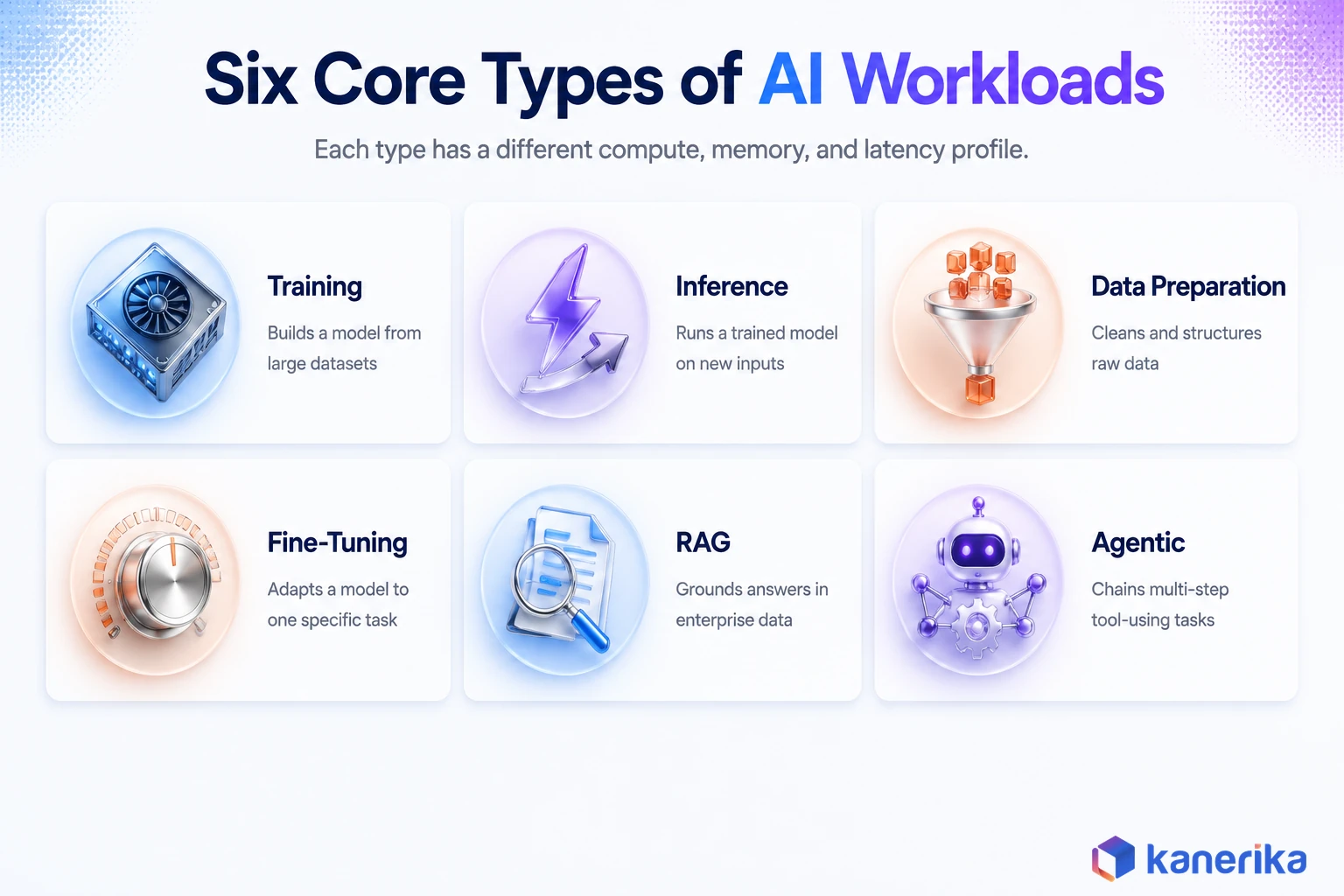
Table 1: The core types of AI workloads compared.
| Workload type | Primary resource driver | What it optimizes for |
|---|
| Training | Multi-GPU compute, interconnect bandwidth | Model accuracy per training run |
| Inference | Latency, concurrency | Response time and throughput |
| Data preparation | CPU, storage I/O | Data quality and pipeline speed |
| Fine-tuning | GPU memory, moderate compute | Task-specific accuracy at low cost |
| RAG | Vector search, embedding generation | Answer grounding and freshness |
| Agentic | Mixed CPU and GPU, orchestration overhead | Task completion across multiple steps |
AI Workloads vs Traditional Compute Workloads
Enterprises that try to run AI workloads through the same DevOps playbook they use for web applications tend to hit friction fast. In practice, the two categories genuinely need different operating models.
| Dimension | Traditional workload | AI workload |
|---|
| Processing | CPU-focused | GPU or accelerator-heavy |
| Scaling unit | Application instances | Compute clusters |
| Data pattern | Transactional | Large batch and streaming datasets |
| Memory needs | Standard RAM | High-bandwidth GPU memory |
| Operating model | DevOps | MLOps and LLMOps |
Traditional applications have predictable traffic and fixed resource patterns. By contrast, AI workloads bring training spikes, variable inference demand, heavy data movement, and hard dependency on accelerator availability, which is exactly why treating them identically at the infrastructure layer causes the utilization problems enterprises are reporting today.
AI Workload Infrastructure Requirements
Compute: GPUs, TPUs, and CPUs
GPUs remain the default for training and large-model inference. Current-generation accelerators are built specifically for the parallel matrix operations models require. Similarly, TPUs and other custom AI accelerators offer similar performance for specific frameworks. Meanwhile, CPUs still matter for data preprocessing, orchestration logic, and smaller retrieval and agent tooling steps that do not need accelerator power.
Memory Requirements
In most deployments, GPU memory, not just GPU count, is the real constraint. A large language model has to fit in accelerator memory to run at all. As a result, model size and available VRAM directly determine what infrastructure tier a workload needs, independent of raw compute throughput. Specifically, enterprises weighing RAG against fine-tuning often find memory footprint, not accuracy, is the deciding factor.
Storage Requirements
| Storage layer | Typical purpose |
|---|
| Object storage | Training datasets and model artifacts |
| SSD or NVMe | Fast model loading and checkpointing |
| Vector database | RAG retrieval |
| Data warehouse or lakehouse | Enterprise analytics and feature sourcing |
Networking Requirements
Distributed training moves enormous amounts of data between accelerators. That is why AI clusters typically need specialized high-bandwidth networking rather than standard enterprise Ethernet. Consequently, GPU-to-GPU communication speed directly affects how well a training job scales across additional nodes, and a poorly designed network fabric can leave expensive GPUs waiting on data instead of computing.
Kanerika Service
MLOps Consulting
Kanerika designs and runs the MLOps discipline enterprises need to move AI workloads from prototype to governed production, including workload classification, compute-tier design, and lifecycle management.
Explore MLOps Consulting
Where AI Workloads Run: Cloud, On-Premises, and Hybrid
Cloud AI Workloads
Cloud infrastructure gives enterprises elastic scaling and managed AI services, which is why most training and experimentation still happens there. In exchange, the tradeoffs are cost control, data residency, and the risk of vendor lock-in once workloads are deeply integrated with one provider’s tooling.
On-Premises AI Workloads
By comparison, on-premises infrastructure fits best when data sensitivity, regulatory requirements, or large predictable workloads make owning hardware more economical than renting it. Still, the tradeoff is the upfront capital investment and the ongoing burden of capacity planning and maintenance.
Hybrid AI Workloads
Most enterprises land on a hybrid pattern in practice. Typically, training often runs in the cloud where elastic GPU access is easiest to get, sensitive data stays in a private environment, and inference gets distributed between cloud and edge depending on latency requirements.
| Deployment model | Best fit when |
|---|
| Cloud | Workload volume is variable and experimentation speed matters most |
| On-premises | Data is highly regulated or workload volume is large and steady |
| Hybrid | Sensitive data and elastic training or inference needs coexist |
AI Workload Scheduling and Orchestration
Kubernetes for AI Workloads
Kubernetes has become the default orchestration layer for containerized inference services. It is typically extended with GPU-aware scheduling through operators that expose accelerators as schedulable resources. Additionally, tools built on top of it, including platform-native AI tooling, give MLOps orchestration teams a centralized view of GPU allocation across on-premises, cloud, and hybrid clusters, and the choice of scheduler is one of the most consequential decisions in any cloud infrastructure plan.
Slurm for Large-Scale Training Clusters
Slurm remains the standard in high-performance computing environments running large-scale distributed training. In particular, it manages job queues, resource allocation, and multi-node scheduling for the kind of long-running, resource-hungry jobs that Kubernetes was not originally designed for.
Ray for Distributed AI Applications
Meanwhile, Ray has grown into the framework of choice for distributed Python workloads that go beyond a single training job, including model serving and multi-step agent workflows that need to coordinate many concurrent tasks across a cluster. Enterprises comparing platforms for this layer often end up weighing Databricks against Snowflake and Microsoft Fabric. Each, after all, handles distributed compute scheduling differently.
A Compute-Tier Allocation Framework for AI Workloads
The single most effective fix for the utilization problem described earlier is deciding, in advance, which compute tier each workload type actually needs. In other words, buying capacity before this classification exists is precisely what leaves clusters sitting at 5 percent utilization.
| Workload | Recommended compute tier |
|---|
| Data processing | CPU |
| Small or classical ML models | CPU or single GPU |
| LLM inference | GPU, right-sized to model and concurrency |
| Model training | Multi-GPU cluster |
| Agent workloads | Mixed CPU and GPU, scaled to orchestration overhead |
Applying this framework is a four-step exercise. Classify each workload by type, match it to the compute tier above, define the governance level it needs before production, and revisit the mapping every quarter. Workload volume keeps shifting from training-heavy to inference-heavy, which is the direction almost every enterprise is moving.
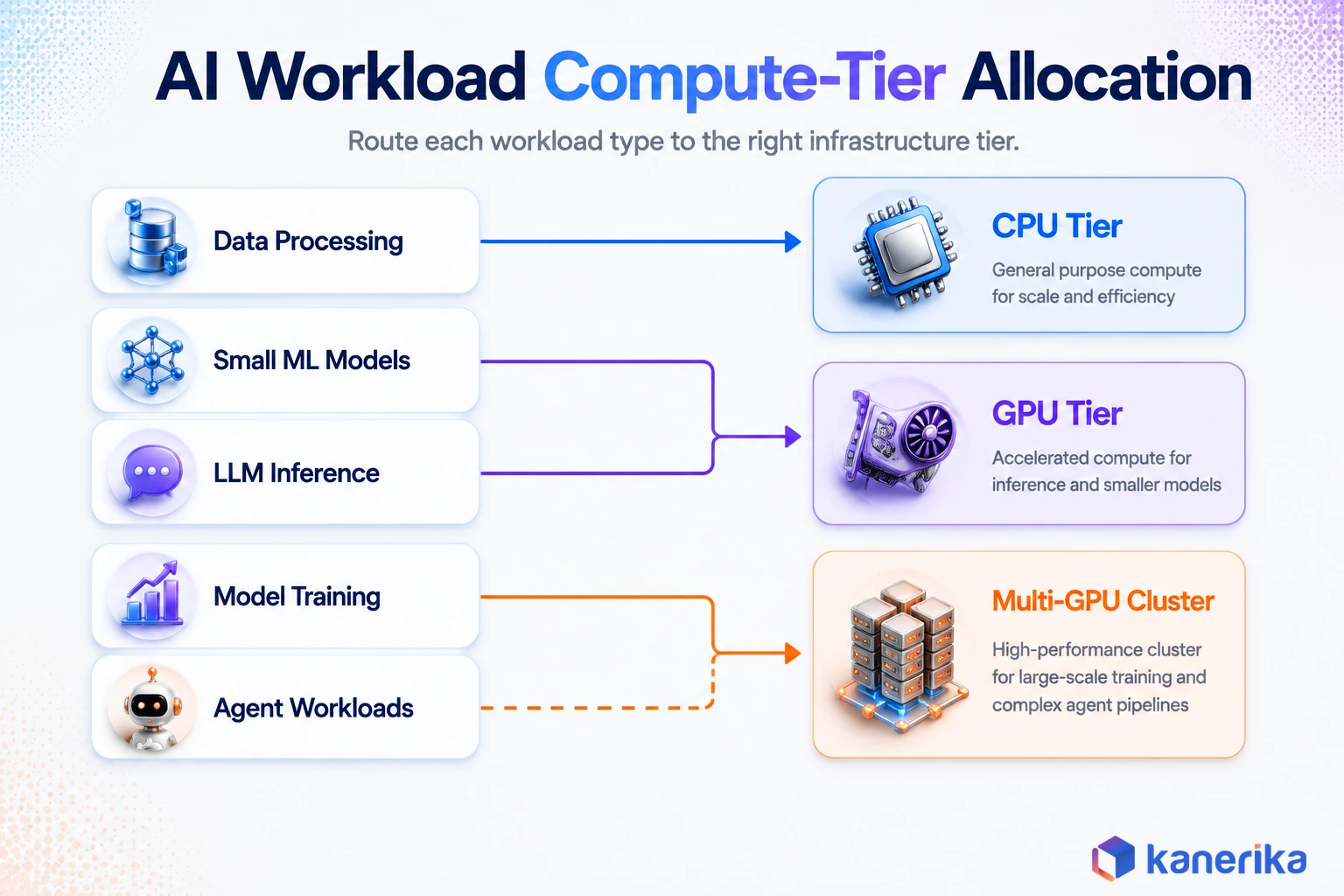
Cost and FinOps for AI Workloads
Why AI Costs Are Hard to Predict
AI cost overruns rarely come from one obvious mistake. Instead, they accumulate from GPU pricing volatility, token-based inference usage that scales with adoption, idle reserved capacity, growing storage footprints, and the compute cost of retraining models on a recurring schedule.
AI FinOps Best Practices
- Track GPU utilization continuously instead of assuming reserved capacity is being used.
- Right-size models to the task instead of defaulting to the largest available option.
- Additionally, use spot or preemptible instances for fault-tolerant training jobs.
- Apply autoscaling to inference endpoints so idle capacity does not sit reserved overnight.
- Finally, use quantization and model compression to cut inference cost without a proportional accuracy loss.
These are the same disciplines enterprises already apply to Azure cost optimization, Snowflake cost optimization, and broader cloud cost management, just pointed at GPU spend instead of general compute.
Cost Metrics Worth Tracking
| Metric | Why it matters |
|---|
| Cost per inference | Ties directly to application-level unit economics |
| GPU utilization rate | Flags idle or overprovisioned capacity early |
| Cost per training run | Informs how often retraining is worth the spend |
| Tokens per dollar | Measures LLM efficiency across model choices |
Scaling AI Workloads From Pilot to Production
The jump from a working prototype to a production AI workload is where most of the surprises happen. Data volume grows past what the original pipeline was designed for, and user concurrency climbs past what a single inference endpoint can serve. Latency requirements tighten once real users are involved, and model version management turns from an afterthought into a genuine operational discipline.
The scaling patterns that actually work in practice are horizontal scaling across inference replicas, autoscaling tied to real request volume, and model response caching for repeat queries. For anything that does not need to be real time, batch processing and load balancing across multiple model endpoints round out the toolkit. Overall, enterprises that have gone through a broader data modernization effort first tend to hit far fewer of these surprises, because the underlying data pipeline is already built to handle production-scale volume.
Listen on Spotify
Why Most Fabric Deployments Fail at Scale
AI Workload Security and Governance
Data Security
Training data protection, encryption in transit and at rest, and tightly scoped access controls matter more for AI workloads than for typical applications. That is because training data often includes sensitive enterprise information that a model can inadvertently memorize and expose later.
Model Governance
In practice, a model registry, version tracking, and a formal approval workflow before deployment are the baseline for treating AI as production infrastructure rather than a science project. AI governance frameworks increasingly extend this to risk assessment at the workload level, not just the model level, especially now that agentic workloads can take real actions rather than just generating text.
Compliance Frameworks Worth Knowing
Three references keep coming up in enterprise AI governance conversations. For example, the NIST AI Risk Management Framework gives organizations a voluntary structure for managing AI risk across the workload lifecycle. ISO/IEC 42001 is the first international management-system standard specifically for AI. The EU AI Act introduces binding obligations tied to how AI systems are classified by risk level. None of these are optional reading for a regulated enterprise scaling AI workloads. In turn, they pair directly with the access-control layer most enterprises are already building for AI access control and identity and access management for AI systems.
Checklist
Enterprise AI Checklist
A practical readiness, governance, and adoption checklist for enterprises scaling AI workloads into production.
Get the Checklist →
Enterprise AI Workload Architecture Patterns
Model Training Pipeline Architecture
The standard pattern moves data from source systems into a data lake, through feature engineering, into a training cluster, and out to a model registry before deployment. In effect, each hop in that chain is a place where a poorly sized workload profile turns into wasted compute time.
Production Inference Architecture
A typical production inference path runs from the application through an API gateway to an inference server hosting the model, with monitoring wrapped around every hop to catch latency or accuracy drift before users notice it.
RAG Architecture
Enterprise data sources feed a chunking step, which feeds an embedding model, which populates a vector database. A retriever pulls relevant chunks at query time and passes them to the LLM alongside the user’s question, grounding the response in current enterprise data instead of only the model’s training data.
Agentic AI Architecture
By contrast, an agentic architecture adds an orchestration layer and a memory layer on top of the LLM, connecting out to tools and external data sources as needed. Specifically, the user request goes to a planner, which decides what the LLM needs to do, which tools or APIs to call, and how to assemble a final response from potentially several intermediate steps.
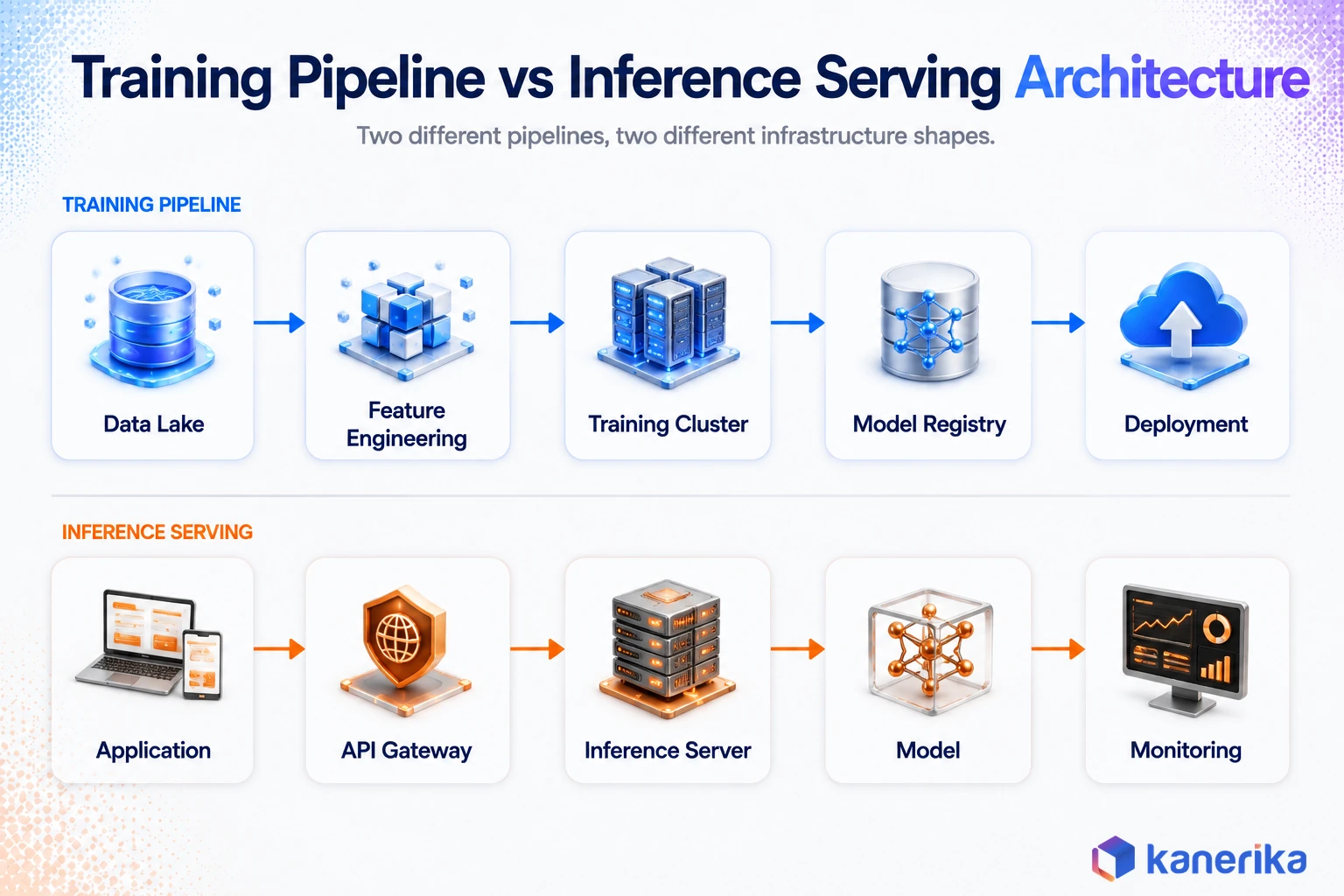
Monitoring and Observability for AI Workloads
Infrastructure monitoring for GPU utilization, memory usage, network bandwidth, and storage performance is the foundation. However, it is not sufficient on its own, which is why most platform teams pair it with dedicated AI observability tooling and LLMOps observability. Model monitoring for accuracy, drift, bias, latency, and cost has to run alongside it.
For LLM-based workloads specifically, teams also need visibility into prompt quality, token consumption, retrieval accuracy, and hallucination rates. A workload can look healthy on infrastructure dashboards while quietly degrading on the metrics that actually determine whether the AI system is doing its job. That is the same blind spot Azure monitoring tools are built to close at the platform level.
Common AI Workload Mistakes Enterprises Make
- Buying GPUs before defining the workload. Instead, infrastructure should follow a documented workload profile, not the other way around.
- Treating AI like a traditional application. AI workloads need MLOps-style lifecycle management, not a standard DevOps pipeline stretched to fit.
- Ignoring data pipeline performance. A slow data pipeline caps AI performance just as hard as underpowered compute does, which is why strong data engineering tooling and reliable data platform migration work come before, not after, AI workload scaling.
- Running production models without cost controls. In practice, production AI spend grows quickly once real usage kicks in, and without guardrails it grows past budget just as fast.
- Building agents without governance. Agentic workloads that take real actions need identity, access control, and monitoring from day one, not retrofitted after an incident, following the same AI governance best practices that apply to every other production AI system.
The Future of AI Workloads: From Training-Heavy to Inference and Agentic
The center of gravity in enterprise AI spend is shifting from training toward inference. Specifically, more applications are moving into real production use, more interactions happen in real time, and more edge deployments need local inference. Agentic AI adds a further layer of infrastructure complexity on top of that shift, because stateful, multi-step execution and long-running workflows do not fit cleanly into either the training or inference bucket.
Most enterprises move through a recognizable AI maturity model as they build out AI workload capability. Early on, AI exists as isolated experiments with no shared infrastructure discipline. From there, the next stage introduces managed AI workloads with real monitoring and cost controls. Eventually, mature organizations run production AI platforms with governed compute allocation across the enterprise.
The leading edge is agentic AI operations, where infrastructure has to support autonomous, multi-step workloads at production reliability. At the same time, infrastructure itself is getting more specialized in parallel, with dedicated inference chips, purpose-built AI data centers, and increasingly automated workload management closing the gap between what enterprises buy and what they actually use.
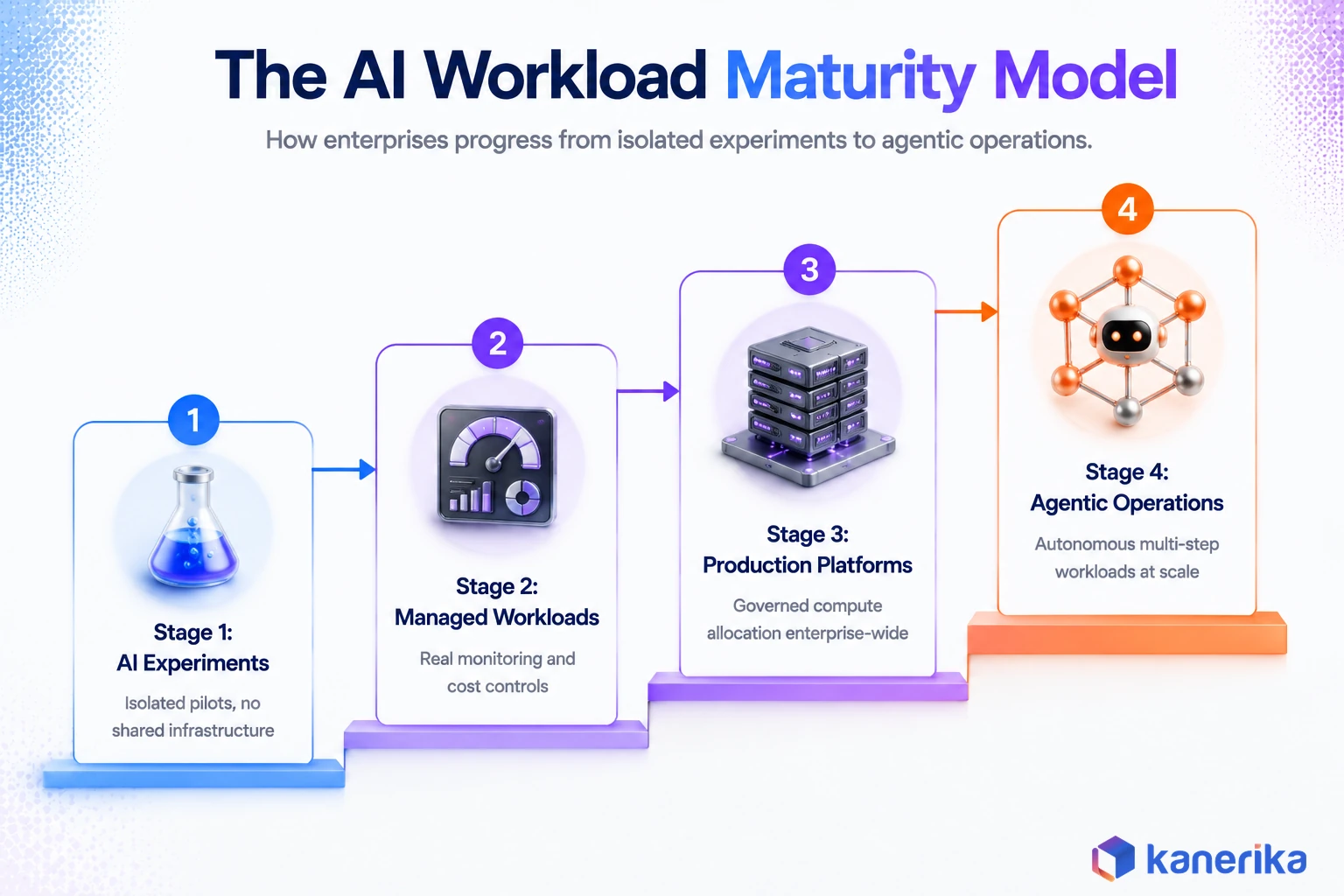
How Kanerika Helps Enterprises Manage AI Workloads
Kanerika is an AI-first data and automation consulting firm, a Snowflake Select Tier Partner, and a Databricks Consulting Partner. The workload classification and compute-tier work described in this guide is not theoretical for us. It is the same assessment we run before any AI or data platform engagement.
How We Deliver AI Workload Engagements
Our approach follows four stages. We start with an assessment of the client’s current workload mix, training, inference, RAG, or agentic, and how much of each is actually running versus planned. From there we design the target architecture, mapping workload types to the compute-tier framework above and to the right combination of cloud, on-premises, or hybrid infrastructure.
The build phase migrates or stands up the platform using our automated migration accelerators. The final stage installs FinOps guardrails and governance controls, so utilization and cost stay visible after go-live instead of drifting the way the industry-wide five percent utilization numbers suggest they usually do.
On the platform side, we deliver this through our MLOps consulting practice, data engineering services for the pipelines that feed every workload type, and agentic AI implementation for enterprises moving into that newer workload category. Our FLIP platform’s Azure to Fabric Migration Accelerator has cut migration timelines by 80 percent and migration costs by 50 percent for clients moving their data and AI infrastructure onto a modern platform. Our Karl AI agent has separately delivered 65 percent time savings on data analysis work for manufacturing and retail clients running real-time analytics workloads in production.
Proof in Production
A recent engagement with a distributed enterprise client illustrates the pattern. The client’s operations spanned multiple regional systems with no centralized view of data or workload performance. As a result, we led a Snowflake migration that centralized their data platform and eliminated the manual reconciliation that previously ate into every reporting cycle, giving distributed teams real-time operational visibility instead of month-end surprises.
We also run governance for AI workloads through kanSuite, our modular governance program covering data governance strategy, regulatory compliance, and access control, delivered on Microsoft Purview. For enterprises specifically working through Databricks-based AI infrastructure, our Databricks partnership brings hands-on delivery experience. That spans workflow orchestration, Unity Catalog governance, and the kind of performance optimization that keeps training and inference workloads efficient as they scale.
AI Assessment
Where Does Your AI Workload Maturity Stand?
Kanerika’s AI Maturity Assessment benchmarks your current workload classification, governance, and infrastructure readiness in minutes.
Start Your AI Assessment →
Frequently Asked Questions
What is an AI workload?
An AI workload is any computational process required to prepare data, train a model, fine-tune it, or run inference in production. It covers everything from a batch training job on a GPU cluster to a single real-time inference request from a customer-facing chatbot, and each type consumes compute, memory, storage, and networking differently.
What are the main types of AI workloads?
The six core types are training, inference, data preparation, fine-tuning, retrieval-augmented generation, and agentic workloads. Training builds or updates a model, inference runs a trained model against new inputs, and the other four cover the supporting pipeline steps that most production AI systems depend on.
How is an AI workload different from a traditional IT workload?
AI workloads depend on specialized accelerators like GPUs and TPUs, need much larger and higher-bandwidth memory, move far more data between storage and compute, and often have highly variable resource demand compared to the relatively predictable traffic patterns of traditional applications. That is why most enterprises manage them through MLOps rather than a standard DevOps pipeline.
Do all AI workloads require GPUs?
No. Data preparation, feature engineering, and many classical machine learning workloads run fine on CPUs. GPUs and other accelerators become necessary for deep learning training, large language model inference, and any workload where parallel matrix computation is the bottleneck.
What infrastructure is needed to run AI workloads?
Enterprises typically need GPU or TPU compute for training and heavy inference, high-bandwidth memory sized to the model, fast storage layers for datasets and model artifacts, a vector database if the workload involves retrieval, and specialized high-bandwidth networking for distributed training. The exact mix depends on which workload types dominate.
Should enterprises run AI workloads on-premises or in the cloud?
Most enterprises land on a hybrid model. Cloud infrastructure gives elastic scaling for training and experimentation, on-premises infrastructure fits sensitive data and large steady workloads, and inference often gets split between cloud and edge based on latency needs. The right split depends on data residency requirements and how predictable the workload volume is.
How do companies reduce AI workload costs?
The highest-impact levers are tracking GPU utilization continuously, right-sizing models to the task instead of defaulting to the largest option, using spot instances for fault-tolerant training jobs, autoscaling inference endpoints so idle capacity is not reserved overnight, and applying quantization to cut inference cost. Given that industry-wide GPU utilization averages just 5 percent according to Cast AI’s 2026 report, utilization tracking alone is usually the biggest opportunity.
How do agentic AI workloads change infrastructure requirements?
Agentic workloads are stateful and multi-step, chaining LLM reasoning calls, tool execution, memory retrieval, and external API calls into a single task instead of one inference request. That means infrastructure has to support orchestration overhead, mixed CPU and GPU allocation, and governance controls around what actions an agent is permitted to take, not just raw inference throughput.














