TL;DR
Microsoft Work IQ is the intelligence layer behind Microsoft 365 Copilot and Copilot Studio agents. It gives those agents shared, permission aware context built from your Microsoft 365 data. It runs on three layers called Data, Memory, and Inference. Work IQ already powers standard Copilot, but adding it to a Copilot Studio agent is still a preview feature. It never grants new access, it only reasons over what a user could already see. Kanerika helps enterprises get their data and governance ready, then pilots the first Work IQ powered agent safely.
Key Takeaways
- Microsoft Work IQ is a workplace intelligence layer that gives Copilot and Copilot Studio agents shared Microsoft 365 context.
- It runs on three layers, Data, Memory, and Inference, exposed through the Work IQ MCP server, A2A, and REST APIs.
- Work IQ inside Copilot Studio is still labeled preview and bills through Copilot Credits, separate from Copilot licensing.
- Work IQ never grants new access. It only enforces the Microsoft 365 permissions your tenant already has.
- Enterprises already on Copilot need data permissions, spending policies, and SharePoint hygiene ready before scaling Work IQ agents.
- Kanerika, a Microsoft Solutions Partner for Data and AI, helps enterprises govern their data and pilot Work IQ ready agents safely.
Watch on YouTube
Microsoft IQ for AI Agents: Work IQ, Fabric IQ, Foundry IQ and Web IQ
A fast walkthrough of Microsoft’s IQ family and where Work IQ specifically fits into the Copilot and agent stack.
The Five Minutes That Decide Whether Work IQ Actually Works
A Copilot Studio admin opens the Tools tab, selects Model Context Protocol, and finds Work IQ waiting in the list. Microsoft’s own setup guide calls the next part a five minute, one time step. Sign in, grant a Global Administrator consent, and the tenant gets its own Work IQ service principal.
That five minutes is deceptively small. Behind it sits a usage based billing plan tied to an Azure subscription, and someone still has to define a spending policy. In addition, a new service principal can now request tokens across every connected Microsoft 365 signal the organization has. None of that shows up in the demo, and none of it is optional once agents start reading real mailboxes.
Enterprises that already run Microsoft 365 Copilot are not deciding whether to adopt Work IQ. Microsoft already ships it underneath Copilot today. The real decision is how deliberately to extend it into custom Copilot Studio agents. That, and what to fix in data governance before it happens.
This guide breaks that decision into three parts. First, what Work IQ technically is. Second, what available now actually means today. Third, what changes for organizations already running Microsoft Copilot and Copilot Studio agents. Kanerika has covered the surrounding ecosystem already. That includes Microsoft 365 Copilot itself, how it compares to ChatGPT, and the security questions enterprises ask before rolling it out. This piece picks up exactly where those leave off.
What Is Microsoft Work IQ, Technically?
Microsoft defines Work IQ as a workplace intelligence layer that lets agents access and reason over organizational data, context, and tools. It builds a continuous semantic understanding across Microsoft 365 and connected business systems, with permission aware governance built in. That is Microsoft’s own language from its Work IQ overview documentation, not marketing copy.
It is not a chatbot, and it is not a large language model. Work IQ is also not, by itself, an AI agent. Instead, it sits between the model and your organization, and it assembles the context an agent needs before it ever generates a response. Similarly, Microsoft’s own closer look at Work IQ on its Community Hub blog describes it in almost identical terms, calling it the intelligence layer that personalizes Copilot, not a product a user opens directly.
The Three Layers Behind Work IQ: Data, Memory, Inference
Microsoft’s Copilot Studio documentation describes Work IQ as three tightly integrated layers.
- Data unifies signals from files, emails, meetings, chats, and connected business systems across Microsoft 365. This captures how work actually happens inside the organization.
- Memory builds a persistent understanding of how specific people and teams work. Agents managed under Microsoft’s Agent 365 control plane stay aligned to priorities across tasks, apps, and sessions.
- Inference brings models, skills, and tools together so an agent can reason and act through Work IQ MCP tools. The Agent 365 control plane keeps those actions observable and governed.
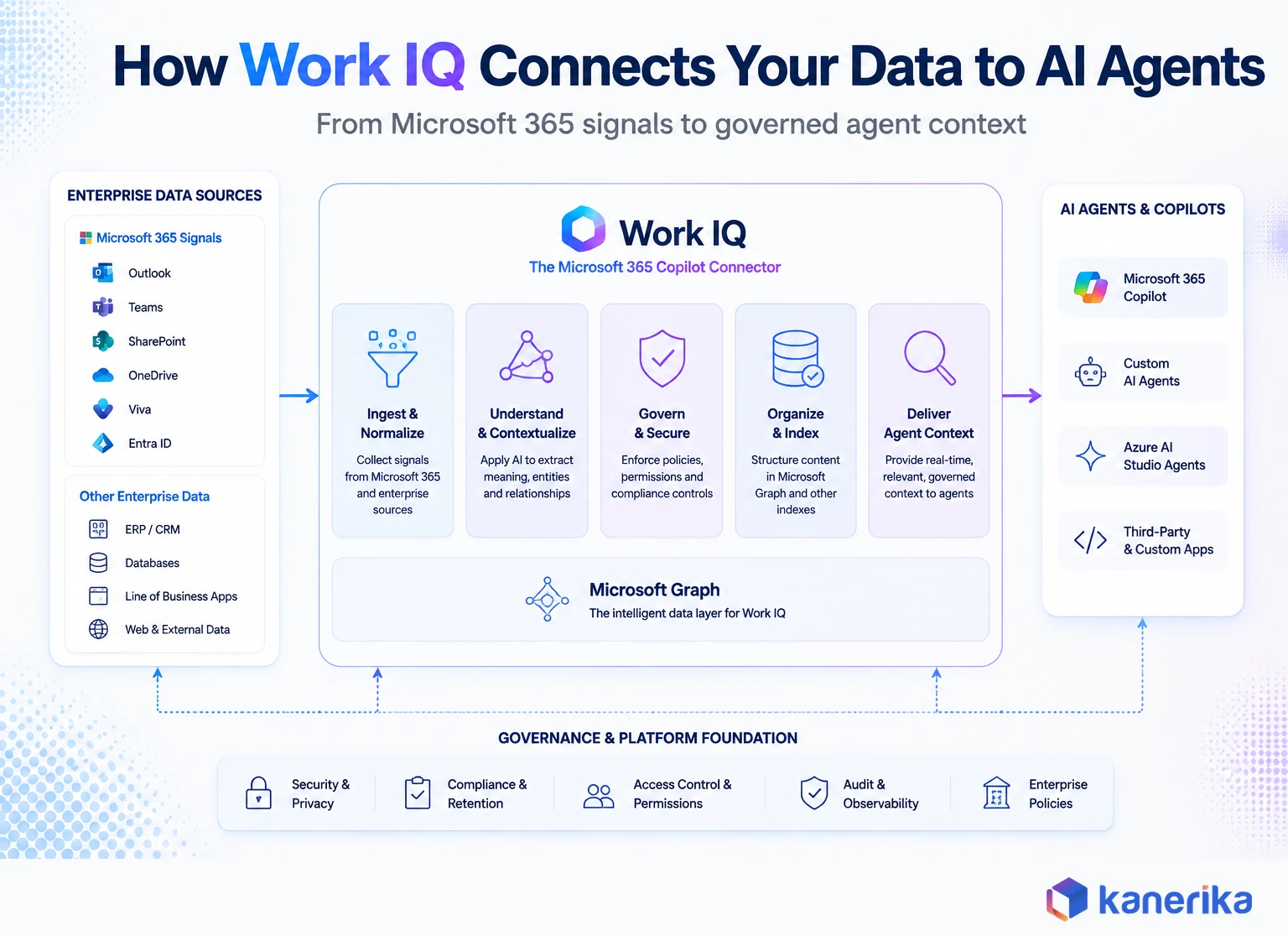
Microsoft packages that same idea into four functional pieces it calls Chat, Context, Tools, and Workspaces. First, Chat handles conversational, agent to agent interaction. Second, Context assembles grounded organizational input, so an agent does not have to stitch together raw signals itself. Third, Tools exposes a compact, agent friendly surface for reading and acting on Microsoft 365 data. Finally, Workspaces gives long running agent tasks a persistent place, backed by SharePoint Embedded, to store intermediate work.
How Work IQ Differs From Plain Microsoft 365 Copilot
Ask Copilot to find a file today and it searches. Now ask a Work IQ grounded agent the same question, and it connects the dots instead. It links the file to the person who last discussed it. It also finds the meeting where pricing was decided and the approval status buried in a Teams thread. So the difference is not the model. Rather, it is what the model gets handed before it answers.
Microsoft’s Copilot Studio team makes the same point technically. The Work IQ in Copilot Studio documentation describes it as the layer that grounds Copilot and custom agents in real time, shared context. That enables personalized search, deeper reasoning, and semantic understanding by connecting signals across Microsoft 365 and business systems.
Work IQ is also explicitly not the same thing as Microsoft Graph. Graph gives an agent raw access to mail, calendar, and file objects. Work IQ interprets that access instead. It discovers how data is structured at runtime, turning each source into what Microsoft calls a self describing interface, rather than making a developer hand code every integration.
Table 1: Traditional Copilot Retrieval vs. Work IQ Grounded Reasoning
| Capability | Search-only Copilot | Work IQ Grounded Agent |
|---|
| Finding information | Keyword and semantic file search | Understands relationships between files, people, and processes |
| Answering a request | Single prompt, single response | Supports multi-step, high-volume agent workflows |
| Connecting new systems | Requires custom connectors and integrations | Discovers data structure at runtime through Work IQ MCP |
| Access boundaries | Inherits Microsoft 365 permissions | Same permissions, plus a dedicated policy engine per request |
How Work IQ Surfaces Inside Copilot Studio Agents
For a team that already builds agents in Copilot Studio, Work IQ shows up as a tool you add, not a platform you migrate to.
The Work IQ MCP Server: Ten Tools Instead of Hundreds
Microsoft 365 exposes hundreds of discrete API operations across mail, calendar, files, people, chat, and sites. The Work IQ MCP collapses that surface into roughly ten generic tools. They are built as simple verbs, such as fetch, create, and update, with resource paths defining what the agent is actually working on.
That separation keeps the tool surface small on purpose. As a result, new data sources and scenarios can be added later without forcing any agent developer to learn a new integration pattern first.
Security works the same way. Instead of hundreds of static OAuth scopes, Work IQ MCP uses a small set of broad permissions to set access boundaries. It then enforces detailed rules on every single request through a Rego based policy engine, the same open policy language used in cloud native access control. Every action is scoped to the specific signed in user. Every tool invocation is logged for auditability and rate limiting.
On-Demand Webinar
Model Context Protocol for Enterprise AI Agents
Kanerika’s on-demand session on MCP, the same open protocol standard that the Work IQ MCP server itself is built on.
Watch the Webinar →
Adding Work IQ to a Copilot Studio Agent
According to Microsoft’s documented steps, connecting an existing agent to Work IQ inside Copilot Studio follows a short, consistent path.
- Open the agent, select the Tools tab, and choose Add Tool.
- On the Add Tool page, select Model Context Protocol to see Work IQ listed alongside other MCP tools.
- Select Work IQ, create a new connection, and sign in with the appropriate credentials.
- Test the agent with a prompt that needs real context, such as drafting an email that references an actual thread. Approve the consent prompt when asked.
Two details matter more than the setup steps themselves. Microsoft 365 Work IQ is read only by default. An administrator has to explicitly turn on write operations in the Microsoft 365 admin center before an agent can create or update anything. Admins also need a separate spending policy for Work IQ usage. It is distinct from whatever policy already covers Copilot Studio itself. Microsoft’s tenant enablement guide puts the one time Global Administrator setup at roughly five minutes. That matches the scenario at the top of this article.
Is Microsoft Work IQ Available Now?
The honest answer depends on which layer you mean. Most explainer content glosses over that distinction.
Live Inside Standard Copilot, Billed on Usage
Work IQ underneath standard Microsoft 365 Copilot experiences is live. Microsoft’s licensing documentation states that Work IQ API access is independent of Copilot licensing and runs on usage based billing. So, Copilot licensed users get Work IQ across Copilot experiences and agents, while usage based billing applies specifically to custom and third party agents. Even users without a Copilot license can still be billed on usage. That usage based billing exists because Work IQ itself runs as an AI workload against your tenant’s compute, not a feature that ships free with a Copilot seat.
Still Preview Inside Copilot Studio
Adding Work IQ to a custom agent inside Copilot Studio is a different story. Microsoft’s own documentation labels it plainly as Work IQ (preview), subject to Microsoft’s supplemental terms for preview features. It states plainly that the feature is not intended for production use in its current form. That preview runs on the GitHub Copilot harness. It bills through Copilot Credits under consumptive, usage based billing, a separate meter from a standard Copilot seat.
Microsoft announced Work IQ at Ignite 2025 alongside three new agents built on top of it, Workforce Insights, People, and Learning agents. It expanded Work IQ in June 2026 with public APIs for developers building outside Copilot Studio entirely. Microsoft’s own Work IQ product page still frames the whole family as agentic AI solutions rolling out in stages, not a single finished product. The pace of change here is fast. Check anything about GA timing against Microsoft’s own Work IQ documentation before it goes into a board deck. Preview status can and does change between Microsoft’s own quarterly update cycles.
Checklist
AI Governance Checklist
A practical checklist for the governance controls Work IQ and any Copilot Studio agent expects before it goes live.
Get the Checklist →
Table 2: Where Work IQ Actually Stands Today
| Layer | Status | Billing |
|---|
| Inside standard Copilot experiences | Live for Copilot licensed users | Included, with usage based billing for extended use |
| Work IQ (preview) in Copilot Studio | Preview, not for production per Microsoft’s own terms | Copilot Credits, consumptive billing |
| Work IQ API for custom developers | Public, independent of Copilot licensing | Usage based, managed in the Microsoft 365 admin center |
What Changes for Enterprises Already Running Copilot and Copilot Studio
This is where most Work IQ explainers stop. However, it is where the real work for an IT and data team actually starts. Kanerika builds Copilot and Copilot Studio implementations for enterprise clients, so the pattern below reflects what a governance and data team should expect once Work IQ moves from a Copilot feature to something custom agents call directly.
Governance and Permissions
Work IQ does not create new access rights, and it is worth repeating because it gets misunderstood constantly. Every request runs in the context of the specific signed in user, and the Rego based policy engine evaluates resource paths, request methods, identity, and data content before allowing anything through. Therefore, if a user cannot see a file today, an agent acting on that user’s behalf cannot see it through Work IQ either. That per request identity check is a live example of AI in identity and access management, enforcing exactly who can see what before a single token gets issued.
What Work IQ does change is the blast radius of a permissions mistake. A single overshared SharePoint site used to mean one careless click. Now agents route routine questions through that same site automatically. A permissions gap becomes something an agent surfaces to someone who never would have found it manually.
That risk carries different weight by industry. A misrouted answer in banking, healthcare, or insurance is a regulatory conversation, not just an awkward one. Kanerika’s own Microsoft Purview implementations exist for exactly this reason. It is why data governance stops being a compliance checkbox the moment agents start reading real production data.
New Admin and Spending Controls
Two new administrative surfaces show up the moment Work IQ enters the picture. First, a Global Administrator has to complete a one time Work IQ enablement, registering a service principal through Graph or the Azure CLI. Second, someone else, usually IT finance working with the Copilot Studio owner, has to define a spending policy for Work IQ’s consumptive billing. That budget is separate from whatever already covers Copilot Studio agents.
Neither control exists by default. Skipping either one does not block Work IQ from working. However, it does mean nobody is watching the meter or the blast radius until a bill or an incident forces the conversation.
Data Readiness Your Teams Need Before Work IQ
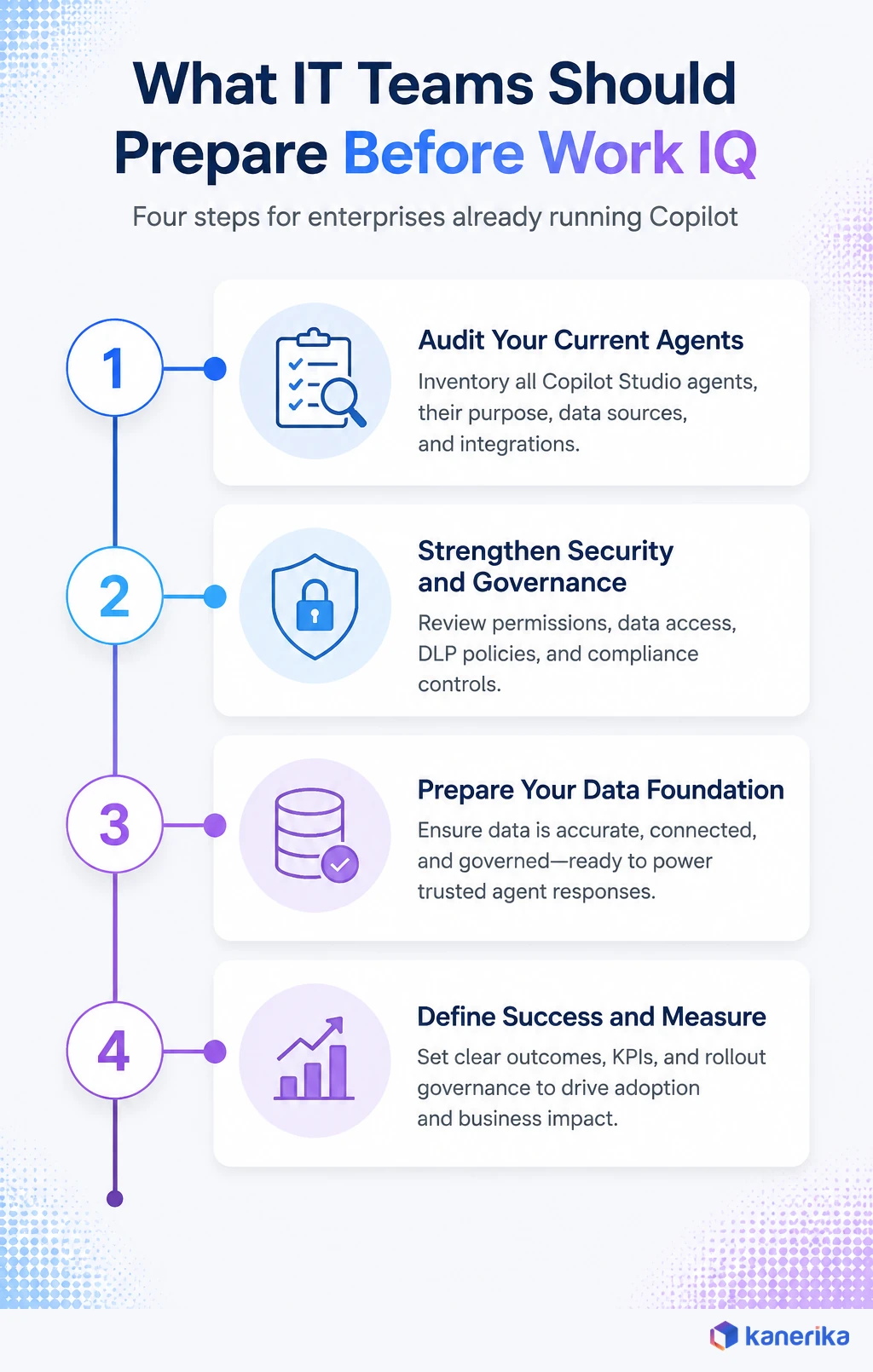
Work IQ’s Memory layer learns from how people and teams actually work. As a result, messy inputs become durable, repeated context rather than a one time bad answer. Stale SharePoint sites, unlabeled sensitive files, and inconsistent naming do not just create a bad search result anymore. Instead, they become the pattern an agent learns to trust.
Enterprises that treat this as a data quality project first, not an agent deployment project first, see fewer surprises. In other words, data foundation comes before agent scale, and that is also the exact ordering Kanerika’s own Microsoft Fabric, data integration, and data architecture engagements are built around.
How Work IQ Relates to Fabric IQ and the Rest of Microsoft’s IQ Family
Work IQ did not launch alone. Microsoft has been rolling out a small family of IQ layers.
- Work IQ covers people and collaboration context.
- Fabric IQ covers business data and semantic models.
- Foundry IQ covers model and agent orchestration.
- Web IQ grounds agents in public web content.
Why Work IQ and Fabric IQ Need Each Other
The distinction that matters for a data team is simple. Work IQ understands how people work, emails, meetings, approvals, and collaboration history, while Microsoft Fabric and Fabric IQ understand how the business operates, revenue data, forecast models, and governed semantic layers. So an agent that only has one of the two gives an incomplete answer. For example, a finance agent that knows a deal discussion happened, but not the actual forecast numbers, is only half useful. Likewise, the reverse is just as true.
Enterprises that already run both Copilot in Microsoft Fabric and Copilot Studio agents are best positioned here. The two IQ layers are meant to compose, not compete. Kanerika’s work on agents and Copilots inside Fabric, and our broader data modernization engagements, make sure both layers connect to governed, trustworthy data. That happens before an agent is ever asked to reason across them.
Case Study
Revolutionizing Data Governance for a Leading Bank With Microsoft Purview
How Kanerika built the classification and access-policy foundation a regulated enterprise needed before scaling Microsoft 365 automation.
Read the Case Study →
Kanerika’s Approach to Preparing Enterprises for Work IQ
Kanerika is a Microsoft Solutions Partner for Data and AI with an Advanced Specialization in Azure Data and Analytics, and Work IQ readiness work sits squarely inside the Copilot and AI governance engagements our teams already run for enterprise clients. We do not treat Work IQ as a switch to flip. Instead, we treat it as the last mile of a data governance program, one that either already exists or needs to exist before agents start acting on it.
Our Four-Stage Approach
- Assess. A permissions and data classification audit across the Microsoft 365 tenant, usually built on Microsoft Purview, finds overshared sites and unclassified sensitive content before an agent ever touches them.
- Govern. We stand up the policy layer, spending controls, and approval workflows Work IQ expects, delivered through Kanerika’s own kanGovern and kanGuard governance services under our broader AI governance practice.
- Connect. We handle the actual agentic AI integration work, wiring Work IQ MCP into the specific Copilot Studio agents a client wants to build, alongside named agents like our own Karl where a use case calls for it.
- Enable. Our AI strategy team pilots one governed, read only agent against a real business question, before write actions or a second use case ever get turned on.
Proof This Sequence Works
Our work enabling a sales team’s decision making through Microsoft Copilot followed this exact pattern. Governance and data structure came first, agent capability second. We ran the same sequence on the data governance side directly for a leading bank’s Microsoft Purview implementation, and in a separate engagement on advanced Purview governance strategies. Getting classification and access policy right before expanding automation made the difference between a governed rollout and a slow motion incident.
The pitfall we watch for most often is not technical. Instead, it is a business unit that wants a Work IQ powered agent live in a week, before anyone has audited what that agent will actually be able to see. Slowing down at the permissions review pays off, because it saves the much more expensive conversation that follows once an agent surfaces something it should never have had access to.
Talk to Kanerika
Ready to Assess Your Work IQ Readiness?
Kanerika audits Microsoft 365 permissions, governance, and data quality, then pilots one governed Copilot Studio agent before you scale.
Schedule a Demo →
Common Mistakes to Avoid When Preparing for Work IQ
- Treating Work IQ as a search upgrade. Enterprise agents need context and relationships, not just faster retrieval. A Work IQ rollout that only optimizes for search speed misses the actual value.
- Skipping the permissions audit. Work IQ inherits existing access exactly as it stands. An overshared site stays overshared, just with an agent now reading it automatically.
- Leaving the spending policy unset. Copilot Credits and Work IQ’s consumptive billing are separate meters from a standard Copilot license. Nobody notices until the invoice does.
- Connecting every data source at once. More connected systems does not automatically mean better agent answers. Instead, it usually means a wider blast radius for whatever governance gaps already exist.
- Building the agent before mapping the workflow. Start with the specific business process an agent needs to support, then decide which Work IQ tools it actually needs, not the other way around.
Most of this list is really one mistake wearing five costumes. It treats Work IQ readiness as an IT ticket instead of a data strategy decision. Enterprises in manufacturing and logistics that already run data modernization programs tend to clear this bar faster. The governance foundation already exists before an agent shows up asking for it.
Frequently Asked Questions
What is Microsoft Work IQ?
Microsoft Work IQ is a workplace intelligence layer that lets Microsoft 365 Copilot and Copilot Studio agents access and reason over organizational data, context, and tools. It builds a continuous semantic understanding across Microsoft 365 and connected business systems. Permission aware governance is built in, so it is not an app or chatbot a user opens directly.
Is Microsoft Work IQ available now?
Yes and no, depending on the layer. Work IQ already powers standard Microsoft 365 Copilot experiences for licensed users today. Adding Work IQ to a custom Copilot Studio agent is still labeled Work IQ (preview) by Microsoft. It is subject to preview terms and not intended for production use in its current form.
Does Microsoft Work IQ cost extra?
It can. Microsoft states that Work IQ API access is independent of Copilot licensing and runs on usage based billing. Copilot licensed users get Work IQ across standard experiences, but usage based billing applies to custom and third party agents. The Copilot Studio preview bills separately through Copilot Credits.
How is Work IQ different from Microsoft Copilot?
Copilot is the assistant a user talks to. Work IQ is the intelligence layer underneath it that supplies context, relationships, and permission aware data. That lets Copilot and custom agents reason instead of only retrieving files. Work IQ is not a separate product a user opens on its own.
Can Work IQ access data a user could not already see?
No. Every Work IQ request runs in the context of the specific signed in user. A policy engine evaluates resource paths, request methods, identity, and data content on every call. If a person cannot see a file today, an agent acting on their behalf cannot see it through Work IQ either.
How do I enable Work IQ for my organization?
A Global Administrator completes a one time setup, registering a Work IQ service principal through Microsoft Graph or the Azure CLI. Microsoft’s own documentation estimates that step at about five minutes. Adding Work IQ to a specific Copilot Studio agent afterward takes a few more steps inside the Tools tab.
Is Work IQ the same as Microsoft Graph?
No. Microsoft Graph gives an agent raw access to mail, calendar, and file objects. Work IQ interprets that access instead. It discovers how data is structured at runtime and exposes it through roughly ten generic tools, instead of requiring a developer to hand code every integration.
Does Work IQ work with Microsoft Fabric?
Yes, and the two are meant to complement each other. Work IQ understands how people work, emails, meetings, and collaboration history. Microsoft Fabric and Fabric IQ understand how the business operates through governed data and semantic models. An agent grounded in both gives a more complete answer than either alone.














