TL;DR
Edge AI beats cloud AI when decisions must land in milliseconds, links are unreliable or data must stay on site. It means running trained models on the camera, sensor, gateway or local server that produces the data. Cloud AI stays the better choice for training, for very large models and for analysis across many sites. Production systems usually split the work, running inference at the edge and retraining in the cloud. Most of the cost sits in fleet operations, such as updates, security and monitoring, rather than in hardware. Start with one critical workload at one site, prove it against today’s baseline, then scale.
Key Takeaways
- Edge AI runs trained models on or near the device that creates the data, so decisions happen without a cloud round-trip.
- Run inference at the edge when latency, connectivity or data rules demand it, and keep training and cross-site analysis in the cloud.
- Five gates decide placement: latency budget, connectivity, data sensitivity, model size against device compute, and the cost to operate the fleet.
- Most of the cost and risk sits in running the fleet, so plan updates, monitoring and security before the pilot ends.
- Small language models such as Gemma 3n and the Phi family bring generative AI onto phones, laptops and tablets for bounded tasks.
- Kanerika delivers edge programs in gated stages, from a measured baseline and a one-site pilot to a hardened, monitored fleet.
When a Camera Cannot Wait for the Cloud
Picture a camera above a packaging line, checking every carton seal as it passes. A bad seal has to be pushed off the belt before the next carton arrives. So there is no time to send the image to a data center, wait in a queue and get an answer back.
Instead, the model runs right there, on a small computer bolted next to the camera. It sees the seal, scores it and fires the reject arm while the carton is still within reach. The cloud still matters, but its job changes to training the next version of the model and comparing results across plants.
That split is what edge AI means in practice. This guide explains how it works, where it pays off and also where it does not. It also covers deployment, fleet operations and governance, with a worked example and a reusable decision framework.
What Is Edge AI?
Edge AI is artificial intelligence that runs on or near the device that produces the data. That device might be a sensor, a camera, a phone, a factory gateway or a server in a store’s back room. The model makes its prediction locally, so the raw data does not have to travel to a distant cloud first.
The word “edge” describes a location rather than a type of model. A defect classifier, a speech recognizer or a small language model can all run there. What changes is where the computing happens, and that also changes response time, network cost and who controls the data.
Think of a hospital bedside monitor that flags an irregular heartbeat. If the alert depends on an internet round-trip, then a network outage silences it. When the model runs on the monitor itself, however, the alert fires whether or not the network is up. Only a summary then goes to the central record.
Edge AI vs Cloud AI vs Edge Computing
These three terms get mixed up because they overlap. Edge computing is the broader idea of processing any data close to where it is created, with or without AI. Cloud AI runs models in large remote data centers, while edge AI is the part of edge computing that runs trained models locally.
The table below compares them on the questions an architect usually asks first.
| Aspect | Edge AI | Cloud AI | Edge computing without AI |
|---|---|---|---|
| Where processing runs | On the device, a gateway or a local server | A remote data center | On or near the device |
| Response time | Milliseconds, with no network round-trip | Depends on the network and the queue | Milliseconds for rules and filters |
| Works without a connection | Yes, for inference | No | Yes |
| Data that leaves the site | Results, summaries and hard cases | Usually the raw data | Filtered or aggregated data |
| Typical workloads | Vision inspection, anomaly alerts, on-device assistants | Model training, large models, cross-site analytics | Data filtering, protocol conversion, local control |
| Main limit | Device memory, power and fleet upkeep | Latency, bandwidth cost, data residency | No learning or prediction on its own |
The practical takeaway is simple. Edge computing gives you a place to run code close to the data, and the AI layer puts a trained model in that place.
Kanerika Service
AI and Machine Learning Services
Kanerika designs, builds and operates AI systems for enterprises, from model development and optimization to deployment, monitoring and governance across cloud and on-site environments.
Explore AI ServicesInference at the Edge, Training in the Cloud
A model’s life has two very different jobs. Training teaches the model from large volumes of labeled data, so it needs heavy compute for hours or days. Inference applies the finished model to one new input at a time, which needs far less compute but needs it immediately.
That difference also explains the standard split. Teams train centrally, where the GPUs and the full history live, then ship a compact version of the model to the devices. The devices then run inference on live data and send back only results, summaries and the hard cases the model was unsure about.
Those hard cases, in fact, matter most. Picture a weld-inspection camera that flags every image where its confidence was low. Engineers then label those images, retrain the model in the cloud and push the improved version back out.
Federated learning goes a step further, training across devices without pooling the raw data in one place. Our guide to federated learning explains when that extra complexity is worth it.
For a plant or a hospital, the results sent back rarely stop at the retraining loop. They also flow into the dashboards that managers already use, which is where business intelligence for manufacturing picks up the story.
Why Edge AI Matters for Enterprises in 2026
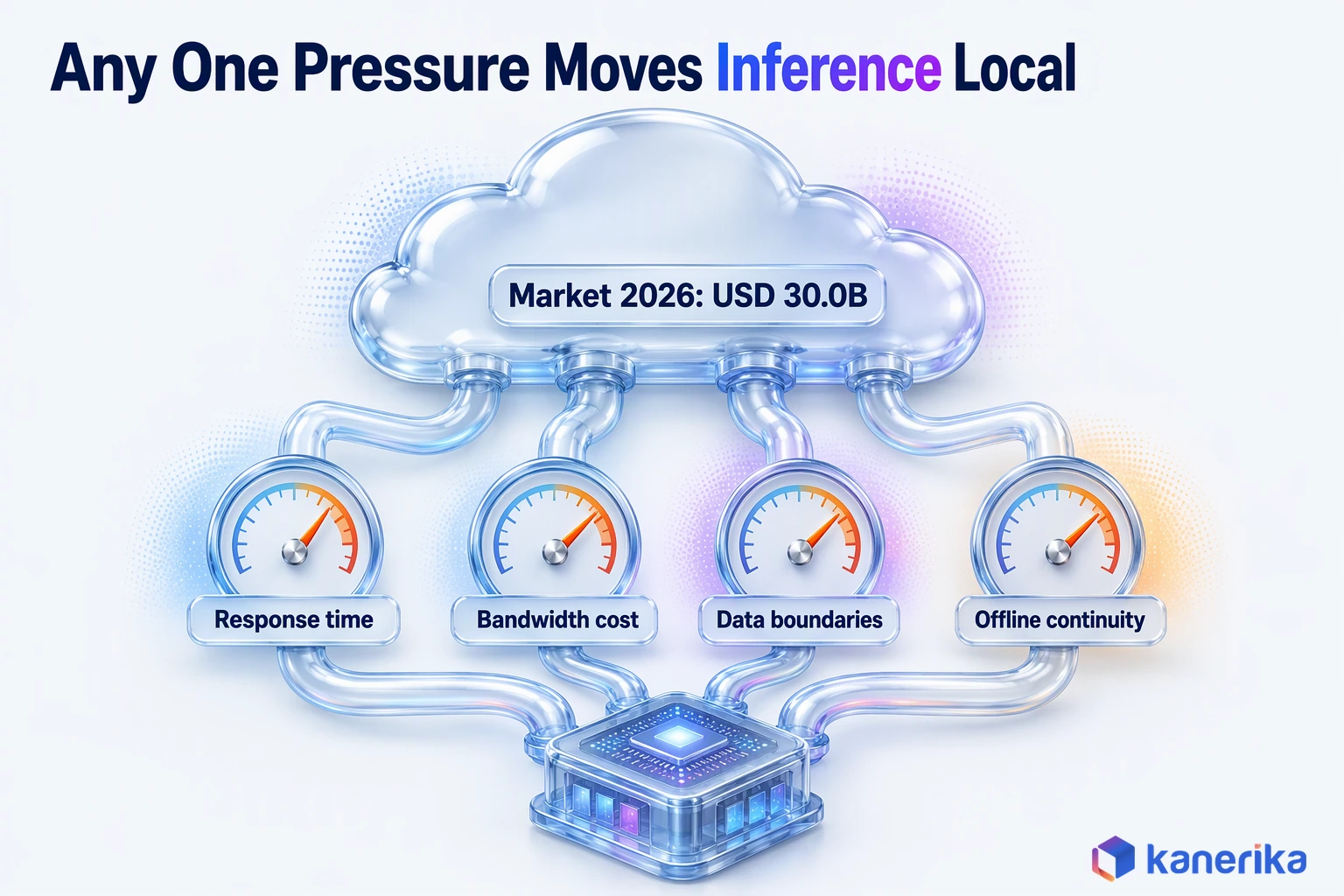
Some decisions cannot wait for a network round-trip, and some data should not make the trip at all. For years the cloud was the default home for every model. By 2026, however, four pressures are pulling the inference part of that work back toward the devices.
- Response time. A robot arm, a reject gate or a safety alarm has a time budget measured in milliseconds, so a network round-trip can easily blow it.
- Bandwidth cost. Streaming raw video from hundreds of cameras to the cloud is expensive, while sending one result per frame is cheap.
- Data boundaries. Patient images, shop-floor video and customer faces often fall under privacy or residency rules, so keeping raw data on site is simpler.
- Offline continuity. Mines, ships, farms, trucks and remote substations lose connectivity, and the operation cannot stop when they do.
What Changed: NPUs, Small Models and Market Growth
What changed is that the hardware and the models finally met in the middle. Mainstream laptops sold as Copilot+ PCs ship with neural processing units (NPUs). Microsoft’s guidance on Copilot+ PCs and NPU devices sets an NPU able to run 40+ TOPS as the bar for many Windows AI experiences. At the other end, small models are also built to fit on phones and laptops, as the section on generative AI explains below.
The money is following the hardware. Grand View Research’s market analysis sizes the market at USD 24.9 billion in 2025, and it also estimates USD 30.0 billion for 2026. It projects USD 118.7 billion by 2033, a compound annual growth rate of 21.7% from 2026. North America also held the largest regional share in 2025, at 36.0%.
How Edge AI Works in a Production System
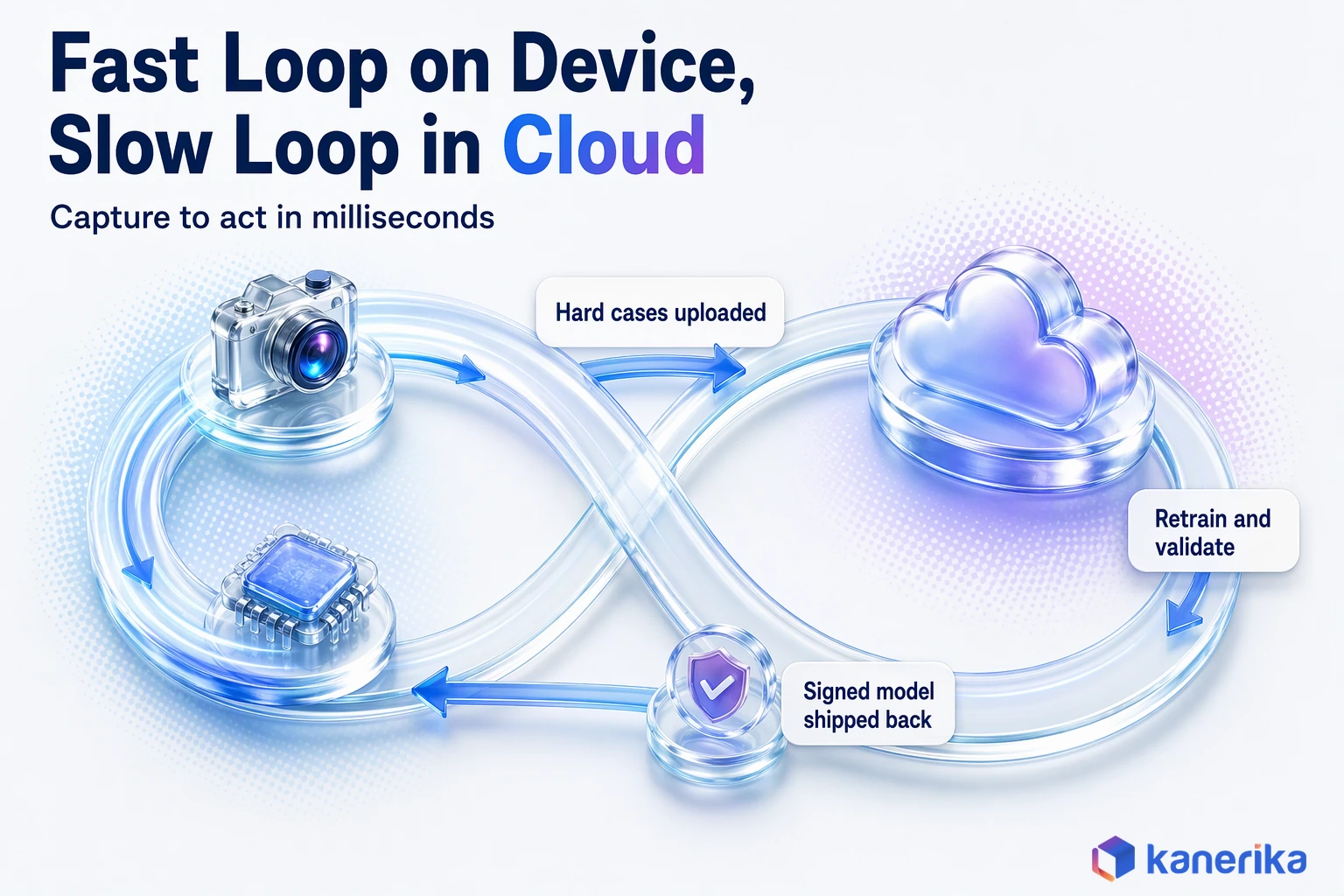
A production system at the edge runs two loops at different speeds. On the device, a fast loop turns each new input into an action in milliseconds. In the cloud, a slow loop turns weeks of results into a better model.
The Runtime Loop
This fast loop repeats for every frame, reading or sound clip. A vibration sensor on a pump makes a good example.
- Capture. The sensor records raw data, such as a one-second vibration window from the pump.
- Prepare. Local code cleans and reshapes it, for example by converting the signal into the frequency values the model expects.
- Infer. The optimized model then scores the input and returns a prediction with a confidence value.
- Decide. Business rules turn the score into a choice, such as raise an alert, slow the pump or do nothing.
- Act. The device triggers the action locally and logs the result, plus the raw input when confidence was low.
Only the last step needs the network, and even then it can wait. If the link drops, the device simply keeps deciding and then uploads its log when the connection returns.
The Model Lifecycle
The slow loop decides whether the fast loop stays accurate over time. It follows six stages, and skipping any of them is how pilots fail quietly.
- Train the model centrally on labeled historical data.
- Optimize it for the target chip, shrinking its size and memory use.
- Validate the optimized version against a held-out test set and the business accuracy threshold.
- Deploy it to devices as a signed, versioned package.
- Monitor accuracy, confidence and input drift from every device.
- Update it by retraining on new hard cases and repeating the cycle.
Validate and Monitor are where that quiet failure usually starts. A weld model can score well on clean test images and still miss defects under the glare and grime of a real line.
Drift stays invisible unless every device reports its own confidence and input signals. Without them, a slowly degrading pump sensor looks healthy until a failure slips through.
Right-Sizing Models for Edge Hardware
Models are usually trained bigger than an edge device can hold, so they have to be slimmed down before deployment. Three techniques do most of that work. First, quantization stores the model’s numbers at lower precision, such as 8-bit integers instead of 32-bit floats, which cuts memory and speeds up inference.
Second, pruning removes connections that add little to the output. Finally, distillation trains a small “student” model to copy the behavior of a large “teacher” model. Teams often combine all three, then check how much accuracy they gave up along the way.
That check is where many projects go wrong. Accuracy nearly always drops a little, so a drop alone tells you nothing. The real test is whether the smaller model still clears the business threshold, such as the defect-catch rate the quality team accepts. Run that test on real site data as well as the clean training set, because lighting, noise and wear differ in the field.
Deployment Options: Device, Gateway, Server or Hybrid
Where exactly the model runs is a design choice with five common answers. Each one also draws the line between local and central computing in a different place. The right answer depends on how fast decisions must happen, how many devices you run and how much data may leave the site.
On-Demand Webinar
Custom vs Off-the-Shelf AI: Choosing the Right Solution
Kanerika’s AI team explains when to build a custom model and when to buy one, and how to pick the right option for a specific enterprise use case.
Watch the Webinar →A retail chain, for example, shows the range well. Shelf cameras might run a tiny model on the camera itself, while a store server handles heavier checkout analytics. Head office then compares every store in the cloud each night.
| Option | Where inference runs | Response time | Data leaving the site | Management effort | Best fit |
|---|---|---|---|---|---|
| On-device | Inside the sensor, camera, phone or PC | Fastest | Results only | High, because there are many units | Simple models, battery devices, privacy-sensitive apps |
| Gateway | A small computer serving several sensors or cameras | Very fast | Results and hard cases | Moderate, with fewer boxes | Production lines, buildings, vehicles |
| On-premises edge server | A rack server or GPU box at the site | Fast | Results and summaries | Lower, run like a small data center | Heavier vision, many camera feeds, local language models |
| Hybrid edge-cloud | Local for time-critical steps, cloud for the rest | Fast where it matters | Selected data | Highest design effort | Enterprise programs at scale |
| Cloud only | A remote data center | Slowest, network dependent | All raw data | Lowest on site | Batch analysis, predictions that are not urgent |
The hybrid row is where enterprise programs tend to end up, because few workloads are purely local. Kanerika’s connected-vehicle platform shows the cloud half of that pattern, with high-volume vehicle data landing on Azure for analysis.
Case Study
40% Lower Operational Costs on a Connected-Vehicle Platform
A smart connectivity and mobility services company worked with Kanerika to engineer a connected-vehicle platform on Azure for high-volume vehicle data, cutting operational costs by 40% and reaching market 35% faster.
Read the Case Study →The Edge AI Technology Stack
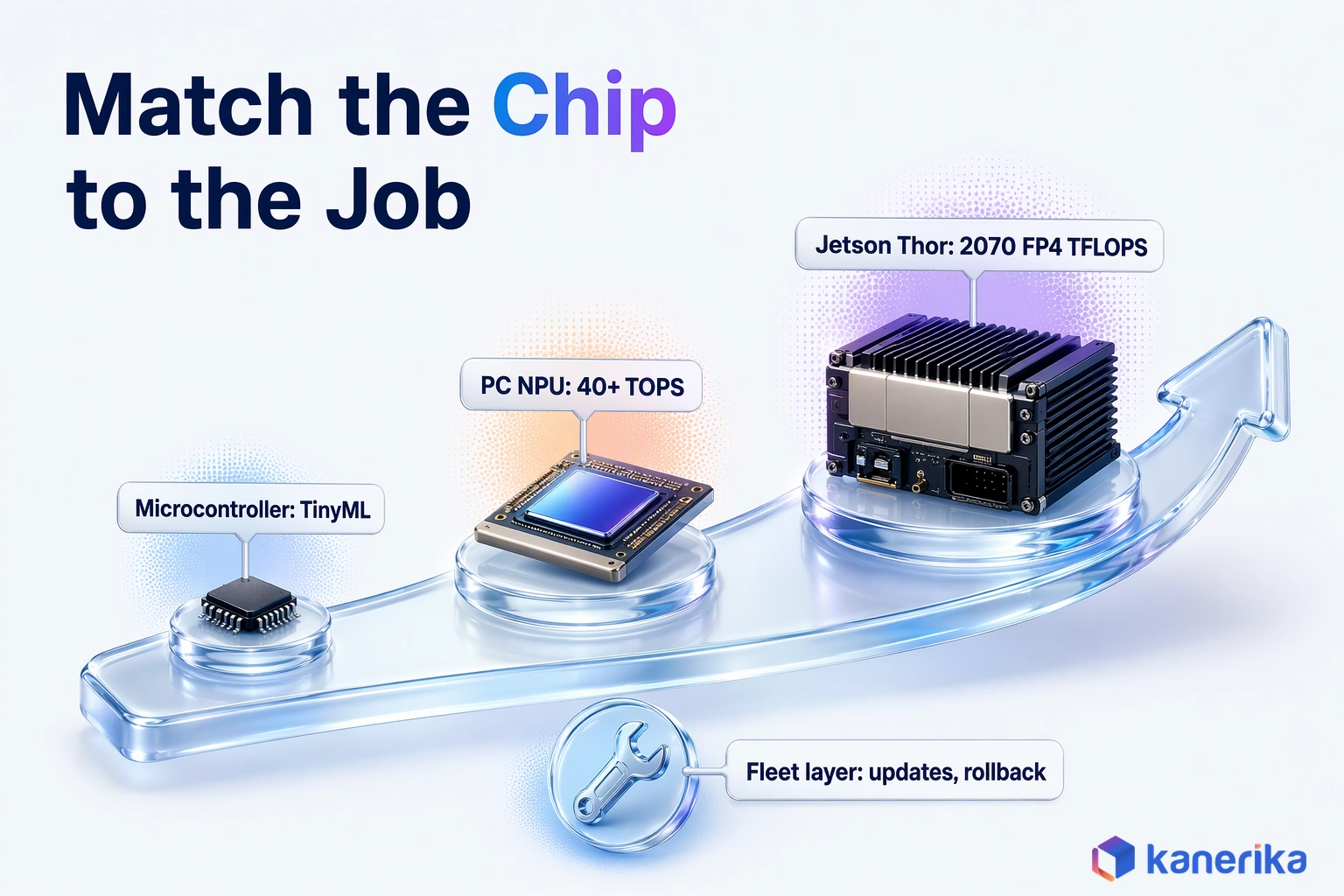
An edge stack has four layers, and each one constrains the next. First, the device’s chip sets how big a model can be. Then the runtime must target that chip, while the fleet layer decides whether you can manage a few sites or several hundred.
Hardware: From Microcontrollers to Robotics Modules
Hardware spans a wide range. At the small end, microcontrollers run TinyML models in kilobytes of memory, which suits simple jobs such as spotting an abnormal vibration. In the middle, Copilot+ PC laptops carry NPUs that clear the 40+ TOPS bar Microsoft sets. That class of chip suits on-device assistants and jobs such as redacting documents before they leave the laptop. At the top end, robotics-class modules such as NVIDIA Jetson Thor deliver up to 2070 FP4 TFLOPS with 128 GB of memory.
NVIDIA rates Thor at 7.5 times the performance and 3.5 times the energy efficiency of its Jetson AGX Orin. It also runs within a 40 to 130 watt power range. These numbers matter for robots and multi-camera systems. They are far more than a single sensor needs, which is why matching the chip to the job comes first.
Runtimes and Fleet Platforms
Software sits between the model and the chip. Google’s LiteRT on-device runtime, built on TensorFlow Lite, converts PyTorch, TensorFlow and JAX models for local use. ONNX Runtime execution providers let one model format run on different chips, for example through TensorRT, OpenVINO, QNN and CoreML. Intel’s OpenVINO toolkit optimizes models for Intel GPUs and NPUs as well as CPUs.
| Layer | What it does | Verified examples |
|---|---|---|
| Device hardware | Runs the model within power, heat and memory limits | Microcontrollers for TinyML, PCs with 40+ TOPS NPUs, NVIDIA Jetson Thor modules |
| Runtime and optimization | Converts and accelerates the model for a specific chip | LiteRT, ONNX Runtime with TensorRT, OpenVINO, QNN or CoreML providers, Intel OpenVINO |
| Edge platform | Runs containers and local logic near devices, even offline | Azure IoT Edge, AWS IoT Greengrass |
| Fleet and MLOps | Ships models, tracks versions, watches drift and rolls back | Cloud model registries and device management on Azure or AWS |
On the platform layer, Azure IoT Edge runs containerized Linux workloads close to devices so they can make decisions offline. Similarly, AWS IoT Greengrass lets devices act locally on their data, run machine learning predictions and filter or aggregate data before sending it on. For specific product picks, see our roundup of edge AI tools for real-time analytics.
Edge Generative AI and Small Language Models
Generative AI on local hardware used to sound unrealistic, because large language models need far more memory than a phone or laptop has. Small language models, however, changed that. They trade breadth of knowledge for a footprint small enough to run on the device.
Two model families show where things stand. Google describes Gemma 3n as a generative model optimized for phones, laptops and tablets. Microsoft, similarly, builds its Phi family of small language models to deploy in the cloud, at the edge and on device. Our overview of small language models compares more options, and SLMs vs LLMs explains how to choose between the two sizes.
The good tasks for on-device generative models are narrow and repetitive. A field technician’s tablet can summarize equipment logs and answer questions from the manual with no signal. An office laptop can also classify and redact documents without sending them to an outside service. A plant can run a multimodal model that reads analog gauges, a job that vision language models are starting to take on.
The limits, however, are just as real. Memory caps the context window and the model size, so answers are shallower than a large cloud model gives. Updating a model on thousands of laptops is also slower than swapping a cloud endpoint, and every update needs fresh testing. Treat edge generative AI as a fast local assistant for bounded tasks, and route open-ended questions to the cloud.
Talk to Kanerika
Scoping an Edge AI Pilot?
Bring one workload and one site. Kanerika will help you set the accuracy threshold, choose the device class and plan a shadow-mode test against your current baseline.
Schedule a Demo →Edge AI Use Cases by Industry
Local inference earns its place wherever a local decision is worth more than a central one. The pattern repeats across industries: a sensor or camera sees something, a local model judges it and an action follows in time to matter. The table below maps the common cases to what runs locally and why.
| Industry and use case | Why it runs at the edge | What runs locally | Learn more |
|---|---|---|---|
| Manufacturing: visual inspection | Reject decisions must land inside the line’s cycle time | A vision model on a gateway beside the camera | AI in manufacturing |
| Manufacturing and energy: predictive maintenance | Plants and substations need alerts even when links fail | Anomaly models on vibration and temperature streams | AI in predictive maintenance |
| Transportation and fleets | Vehicles pass through dead zones and need on-board decisions | Driver alerts, route events and load monitoring | AI in transportation |
| Healthcare devices | Patient data is sensitive and alarms cannot depend on a network | Monitoring and imaging models on the device | IoT in healthcare |
| Retail | Store video is heavy, and privacy rules limit what leaves the store | Shelf, queue and checkout vision on store servers | Computer vision in retail |
| Logistics and warehousing | Docks and yards need instant scans and counts | Package recognition, dock and yard tracking | IoT in logistics and supply chain |
Predictive Maintenance, Digital Twins and Vehicles
Predictive maintenance is the most common starting point for industrial firms. The device spots the anomaly in real time. Meanwhile, the cloud compares the same asset type across sites to learn which patterns come before failures. That central view is the territory of predictive AI, and it gets sharper as more sites report in.
Digital twins push the idea further by pairing the live sensor feed with a model of the physical asset. Our piece on AI-powered digital twins shows how that works for preventive maintenance.
Vehicles deserve a note of their own. Fleets use on-board models for driver alerts and load monitoring, while self-driving systems add strict safety tiers that form a separate discipline. For that depth, see our guide to edge computing in autonomous vehicles.
A Decision Framework: What Should Run at the Edge?
The real question is rarely edge or cloud for a whole program. It is where each workload should run, and five gates answer that in order. If the first two gates rule out the cloud, the workload belongs at the edge almost regardless of the rest.
- Latency budget. How long can the decision take? If the answer is shorter than a reliable network round-trip, then inference must be local.
- Connectivity. What happens when the link drops? If the operation must keep deciding offline, then inference must be local.
- Data sensitivity. May the raw data leave the site? If privacy, residency or contract terms say no, keep raw data local and send only results.
- Model size against device compute. Does the model fit the chip after optimization, at the accuracy the business needs? If not, use a bigger box at the site or keep it in the cloud.
- Fleet size and cost to operate. Can you update, monitor and secure every device for years? A design that works on a handful of devices can fail across thousands when nobody budgets for operations.
Common Scenarios and Their Patterns
Running the gates for typical scenarios produces a short list of patterns. Use the table as a starting point, then test each answer against your own latency and data rules.
Datasheet
Manufacturing AI Readiness: Critical Gaps and a Path Forward
Before you pick a pattern for a plant, check the gaps that most often hold manufacturing AI back across data, platforms, processes and workforce readiness.
View the Datasheet →| Scenario | Recommended pattern |
|---|---|
| Real-time control or a safety alarm | On-device or gateway inference, cloud training |
| Many cameras at one site | On-premises edge server, cloud retraining |
| Sensitive images or audio | Local inference, with only results leaving the site |
| Battery-powered sensors in the field | TinyML on the device, periodic uploads |
| Office documents on laptops | On-device small language model, cloud for open-ended questions |
| Daily forecasts and reports | Cloud only |
When several workloads compete for the first pilot, pick the one with the tightest latency budget and the clearest baseline. That workload will prove the pattern fastest.
Worked Example: Choosing an Architecture for Visual Inspection
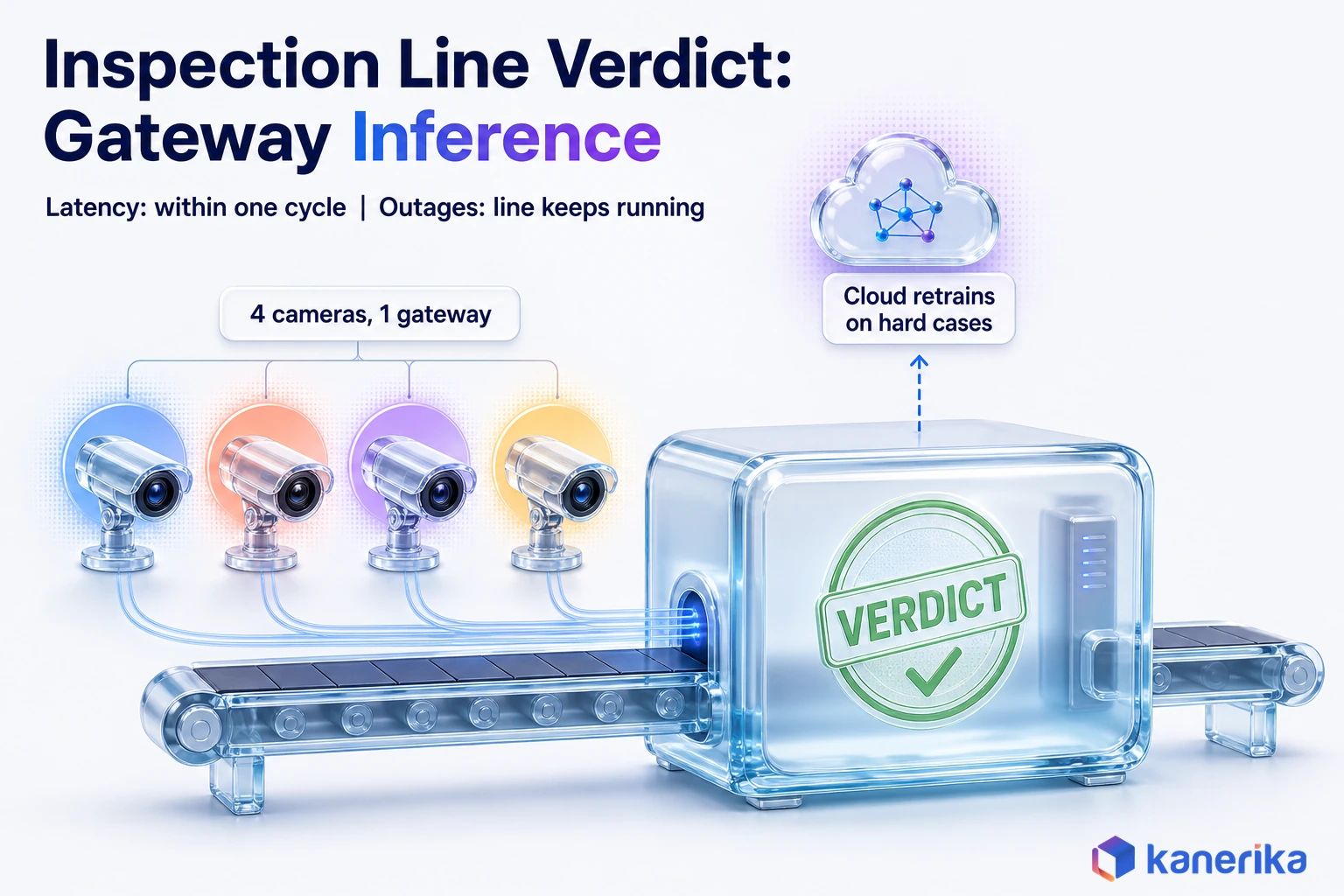
Take a plant that wants to catch label and seal defects on one packaging line with four cameras. Walk the gates in order, and the design falls out.
The latency gate comes first. A rejected pack must leave the belt before the next one reaches the reject arm, so the decision has to land within one line cycle. A cloud round-trip cannot promise that, so inference has to happen on site.
Connectivity points the same way, since the plant network has outages during maintenance windows and the line must keep running. Data sensitivity is moderate, because the images show product and not people. Still, streaming four cameras to the cloud would cost far more than sending results.
The device gate decides between on-camera and gateway inference. Four cameras can share one gateway with a modest accelerator, which is simpler than buying four smart cameras. The fleet gate settles it, since the plant has twelve similar lines and wants one update path for all of them.
The result, then, is gateway inference beside the line, with results and hard cases sent to the cloud for retraining. Before go-live, the team runs the new model in shadow mode next to the human inspector, comparing catches and false rejects. For the vision side of this design, our guide to machine vision AI goes deeper.
What Edge AI Costs and How to Prove the Business Case
The cost of an edge program is spread across many line items, and hardware is often the smallest one. A pilot on one site can look cheap because it hides the cost of running hundreds of devices for years. A sound business case therefore prices the whole life of the fleet, from the first box to the last update.
| Cost component | What drives it | How to keep it in check |
|---|---|---|
| Hardware per site | Chip class, number of devices, ruggedized enclosures | Pick the smallest device that clears the accuracy threshold |
| Integration | Links to cameras, PLCs, the MES and business systems | Reuse one integration pattern across sites |
| Model optimization | Quantization and testing on each target chip | Standardize on a few hardware types |
| Connectivity | Uploads of results, logs and hard cases | Send results, not raw streams |
| Fleet management | Updates, monitoring and device identity | Budget it per device per year from day one |
| Security | Secure boot, signed models and patching | Build it into the device image before rollout |
| Support | Field visits, spares and on-call staff | Remote diagnostics and spare devices on site |
The benefit side, however, starts with a baseline. Before the pilot, measure the current process the way finance will measure the new one. That could be scrap rate, downtime hours, inspection labor or response time. Without that number, a pilot can work perfectly and still fail to win funding.
Then compare like with like over a fixed period. A predictive maintenance pilot, for example, should count the stoppages and parts it actually saved. The same discipline applies further down the chain, where predictive analytics in supply chain turns local signals into planning decisions. Manufacturing analytics then ties those decisions back to plant results.
Running Models at Scale: Edge MLOps
One model on one device is a project. Running many models across thousands of devices, by contrast, is an operation that needs the same discipline as any production system. This is also the stage where edge programs either mature or stall.
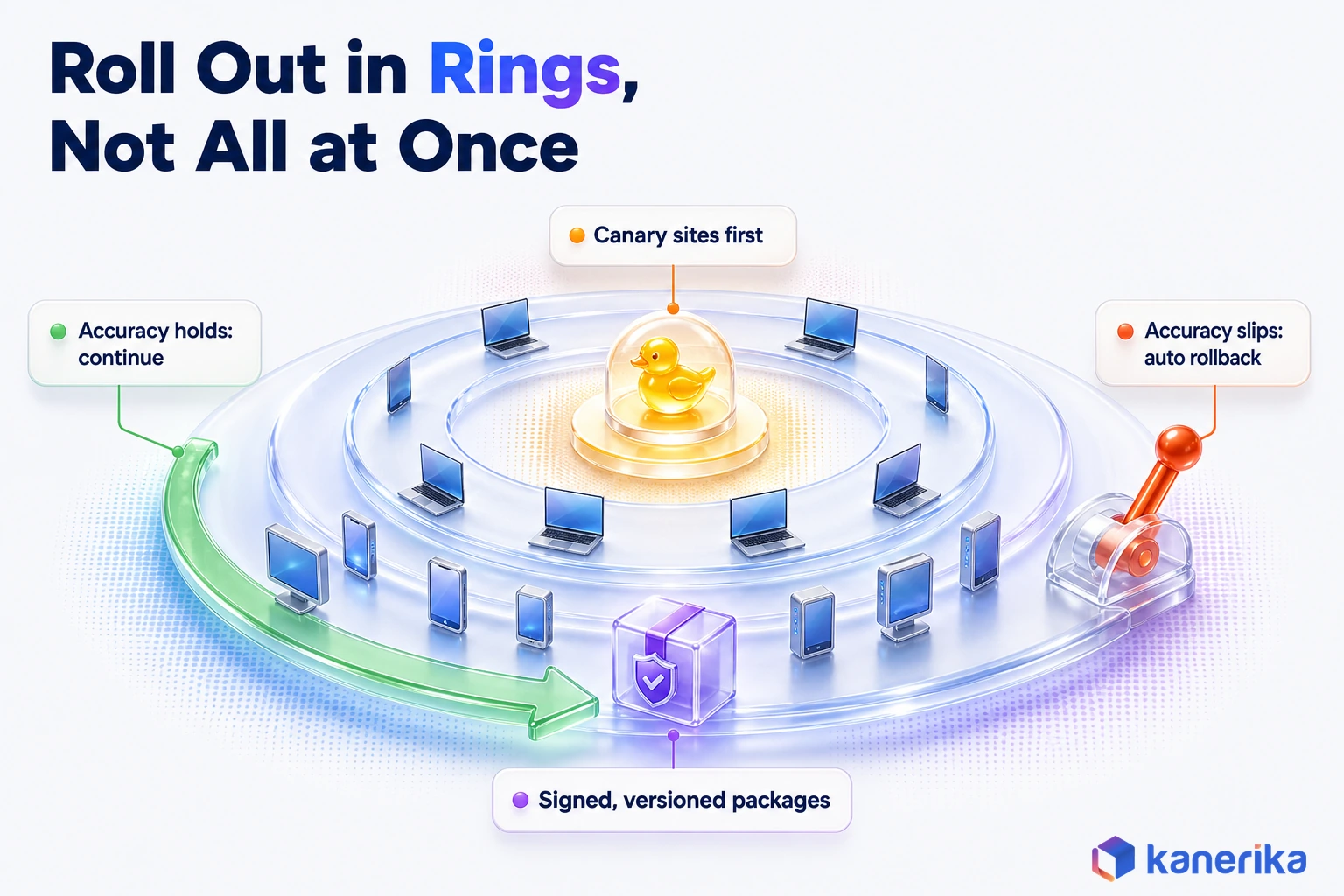
Updates come first. Models ship over the air as signed, versioned packages, and they roll out in rings rather than to every device at once. The first ring is a canary group of a few sites, and the rollout continues only if accuracy and error rates hold. If they slip, devices roll back to the previous version automatically.
Monitoring, Identity and Platform Lifecycle
Monitoring is harder at the edge than in the cloud, because the evidence is spread across devices. Each device should report accuracy signals such as confidence scores, input statistics and operator override rates. When a camera lens gets dirty or a new product variant appears, those signals drift before anyone files a complaint.
Finally, device identity and platform lifecycle complete the picture. Every device needs its own credentials, so a stolen gateway can be cut off without touching the rest. Platforms age too, and Microsoft’s Azure IoT Edge documentation states that support for IoT Edge 1.5 LTS ended on November 10, 2026. Version 1.6 is the current release, so fleets still on 1.5 need an upgrade plan.
The central pipeline still follows general MLOps practice, which our guides to Databricks MLOps and AI model risk management cover in depth. At the edge, the extra work lands in four areas this guide has already covered. Hardware fit and model optimization come from the right-sizing section, with headroom left for the next model version. Security starts in the device image, as the next section shows, and observability is the per-device monitoring described above.
The difference between a successful edge AI deployment and one that stalls at pilot usually comes down to these four areas. Many edge ai companies emphasize these same implementation principles to improve deployment success across enterprise environments.
Edge AI Security, Governance and Regulation
Edge devices sit in places that data centers never do, such as utility poles, vehicles, shop floors and patients’ homes. That physical exposure therefore changes the threat model, because someone can steal a device, copy the model off it or tamper with its inputs.
So the defenses start at the hardware. Secure boot makes sure the device runs only approved software, and signed model packages make sure only approved models load. Encrypting the model at rest also makes theft less useful, and per-device credentials limit the damage from one compromised box.
On-Demand Webinar
The Real Cost of LLM Security Risks and How to Reduce Them
A Kanerika session on what model security breaches cost and the practical strategies teams use to deploy language models securely.
Watch the Webinar →Raw data that stays on the device needs a retention rule too, or it piles up in places nobody audits. Decide what is kept, for how long and who can read it before the first device ships.
Governance Frameworks and the EU AI Act
Governance uses the same frameworks as any AI system, so the threats above feed straight into them. The NIST AI Risk Management Framework, released on January 26, 2023, gives a common way to map, measure and manage AI risk. Our NIST AI RMF playbook shows how to apply it without drowning in paperwork, and responsible AI covers the principles behind it.
Regulation follows the use rather than the location. Under the EU AI Act regulatory framework, transparency rules apply from August 2026. Obligations for high-risk uses such as hiring apply from December 2, 2027, and for AI built into regulated products from August 2, 2028. A model that screens job candidates is treated the same way on a laptop as in the cloud. Our guide to EU AI Act compliance covers the roles, deadlines and evidence.
A short checklist keeps edge projects honest before they scale.
- Every device boots only signed software and loads only signed models.
- Each device has its own identity and can be revoked remotely.
- The team knows which raw data stays on the device, for how long and why.
- Each model has a documented risk category, an owner and a review date.
- The AI security framework covers the edge fleet, not only cloud systems.
Checklist
AI Governance Checklist
Check ownership, risk categories, model review and security controls before your edge AI fleet grows beyond the first site.
Get the Checklist →Common Mistakes That Stall Edge Pilots
Picture a pilot line where the model hit its accuracy target, then a second plant where the same model kept missing defects. Nothing about the model had changed, but the lighting, the cameras and the update process had. Six mistakes like that come up again and again, and each one is cheaper to avoid than to fix.
- Piloting on one perfect site. The newest line, the best lighting and the most engaged team produce results the other sites cannot repeat.
- No update path. The model is copied onto devices by hand, so the first retrain turns into a round of site visits.
- Ignoring power and heat. An accelerator that runs fine on a desk throttles inside a hot enclosure next to a furnace.
- Skipping the baseline. Without a before number, nobody can prove the after number is better.
- Treating it as a one-off project. Local inference is an operating capability, so a project team that disbands leaves an orphaned fleet behind.
- No owner for fleet operations. IT assumes operations owns the devices, operations assumes IT does, and so nobody patches them.
Each of these is cheap to fix at the pilot stage but expensive to fix after rollout. Writing the update path, the baseline and the owner into the pilot plan takes days, while retrofitting them across a live fleet takes months.
How Kanerika Delivers Edge Programs in Stages
Kanerika runs edge programs as a sequence of gated stages, so each one proves something before the next begins. The aim is a fleet that keeps working long after the project team moves on.
- Assess and baseline. Pick one decision-critical workload, walk it through the five gates and then measure today’s process.
- Pilot one site. Deploy on representative hardware, then run in shadow mode against the baseline.
- Harden. Add secure boot, signed models, monitoring and a tested over-the-air update path.
- Scale the fleet. Roll out in rings, with automatic rollback and acceptance checks at each site.
- Operate and improve. Retrain on hard cases, track drift and report results against the original baseline.
Proof From Kanerika Projects
One example comes from computer vision at the point of decision. A global luxury goods retailer needed to spot counterfeit products during returns and verification. Kanerika trained its FLIP platform for computer-vision product authentication, added blockchain records for provenance and deployed its Karl agent for real-time checks.
The AI vision case study reports 95% accuracy in counterfeit detection, 68% faster product verification and 100% product traceability. The case study does not describe edge hardware, but the gates still read it clearly. Verification at a returns counter needs an answer while the item is in hand, which is the latency gate. That gate decides what must run where the product is checked and what can run centrally.
Case Study
95% Accuracy in Counterfeit Detection with AI Vision
A global luxury goods retailer used Kanerika’s FLIP-trained computer vision, blockchain provenance and the Karl agent to reach 95% counterfeit detection accuracy, 68% faster verification and 100% product traceability.
Read the Case Study →Kanerika is a Microsoft Solutions Partner for Data and AI. It also holds ISO 27001, ISO 27701, SOC 2 Type II and CMMI Level 3 credentials. Explore our AI services to see how these stages apply to your own workloads.
Conclusion: Where Edge AI Pays Off and How to Start
Edge AI pays off when latency, data boundaries or unreliable connectivity make the cloud round-trip the bottleneck. In those cases, running inference next to the camera, sensor or vehicle is the design that works. Training and fleet analysis, by contrast, stay in the cloud.
Where none of those pressures apply, however, cloud AI is simpler and cheaper to run. So start with one decision-critical workload at one site, measure it against today’s baseline and build the update path before you scale. Deployed that way, edge AI turns a fast local decision into a reliable result across the whole fleet.
Frequently Asked Questions
What exactly is edge AI?
Edge AI means running a trained AI model on or near the device that produces the data. That device might be a camera, sensor, phone, gateway or on-site server. The model predicts locally instead of sending raw data to a distant data center. That gives faster responses, lower bandwidth use and continued operation when the network drops.
What is the difference between edge AI and cloud AI?
Cloud AI runs models in remote data centers, so data travels over the network and answers come back after a round-trip. Edge AI runs the model next to the data source and answers in milliseconds, even offline. Most enterprises use both, with inference at the edge and training, large models and cross-site analysis in the cloud.
Can generative AI and small language models run at the edge?
Yes, for bounded tasks. Small language models such as Google’s Gemma 3n are optimized for phones, laptops and tablets. Microsoft’s Phi models deploy in the cloud, at the edge and on device. Good jobs include summarizing logs, classifying documents and offline assistants, while open-ended questions still work better on large cloud models.
Does the EU AI Act apply to edge AI systems?
Yes, because the EU AI Act regulates what an AI system does, not where it runs. A high-risk use such as screening job candidates carries the same obligations on a laptop as in the cloud. Transparency rules apply from August 2026. High-risk uses like hiring apply from December 2, 2027, and AI in regulated products from August 2, 2028.
What is TinyML and how does it relate to edge AI?
TinyML is the smallest form of edge AI. It runs compact machine learning models on microcontrollers with only kilobytes of memory and very low power draw. Typical jobs are simple ones, such as spotting an abnormal vibration or a wake word. All TinyML is edge AI, but edge AI also covers gateways, PCs and on-site servers.
What are the most common enterprise use cases for edge AI?
The most common uses are visual quality inspection on production lines, predictive maintenance on pumps and motors, and driver and load monitoring in vehicle fleets. Hospitals use it in patient monitors, and retailers run shelf and checkout vision on store servers. Each case needs a fast local decision, a weak network link or data that should stay on site.
What hardware do enterprises use to run edge AI?
Hardware ranges from microcontrollers running TinyML to PCs whose NPUs reach 40+ TOPS, up to robotics modules such as NVIDIA Jetson Thor. Many plants and stores use gateways or on-site servers with a GPU or accelerator. The right choice is the smallest device that still clears the accuracy threshold the business has set for the model.
What are the main challenges in deploying edge AI at scale?
The hardest part is operating the fleet rather than building the model. Teams must ship updates safely to thousands of devices, monitor accuracy and drift remotely, and secure hardware that sits in exposed places. Power and heat limits, mixed hardware types and unclear ownership between IT and operations also stall many programs after a successful pilot.
What is the difference between IoT and edge AI?
IoT is the network of connected devices and sensors that collect and send data. Edge AI adds a trained model that analyzes that data on or near the device and makes a decision there. An IoT sensor may only report a temperature reading, while an edge AI system can judge that reading and trigger an action locally.
Is edge AI better than cloud AI?
Neither is better in every case. Edge AI wins when a decision must land in milliseconds, the connection is unreliable or raw data cannot leave the site. Cloud AI wins for training, very large models and analysis across many locations. Most production systems combine them, running inference locally and retraining and monitoring the models centrally.
How much does an edge AI deployment cost?
Cost depends on device count, chip class and how many sites you run, so there is no standard price. Hardware is often the smallest line item. Integration, model optimization, connectivity, security and years of fleet management usually cost more. A sound business case prices the whole fleet lifecycle and compares it against a measured baseline of the current process.
How do you update AI models on thousands of edge devices?
Teams ship models over the air as signed, versioned packages through a fleet platform such as Azure IoT Edge or AWS IoT Greengrass. The new version goes to a small canary group first. Rollout continues only if accuracy and error rates hold, and devices roll back to the previous version automatically when monitoring shows a problem.