TL;DR
Azure disaster recovery is the combination of Azure Site Recovery, Azure Backup, and geo-redundant storage that Microsoft provides to restore applications and data after an outage. Real resilience comes from matching the right service to a defined recovery time and recovery point target for each workload, not from turning on every feature at once.
Key Takeaways
- Azure disaster recovery is not one product. It is a combination of Azure Site Recovery, Azure Backup, and storage redundancy, and each one protects a different kind of failure.
- Recovery Time Objective and Recovery Point Objective should shape your Azure DR architecture. Picking tools before defining these numbers is the most common planning mistake.
- Azure Site Recovery replicates virtual machines continuously to a secondary region and automates failover and failback for application-level recovery.
- Azure Backup restores files, databases, and disks on request. It protects data, but it will not fail over a running application by itself.
- Azure region pairs and Availability Zones solve different problems. Zones protect against a datacenter failure, while paired or chosen secondary regions protect against a full regional outage.
- Kanerika holds the Microsoft Advanced Specialization for Data Warehouse Migration to Azure and has delivered Azure Data Factory to Microsoft Fabric migrations with zero data loss and measurable performance gains.
When the Primary Region Goes Dark, the Plan Is All You Have
A retail analytics team pushes a routine deployment at 2 a.m. on a Tuesday. Twenty minutes later, their primary Azure region reports a networking outage, and the dashboards every regional manager checks before opening stores go blank.
The team that recovers in twenty minutes and the team that recovers in six hours are usually running the same Azure services. The difference is whether someone tested the failover plan before the outage happened, not during it.
That is the real substance of Azure disaster recovery. Microsoft gives enterprises the replication, backup, and multi-region infrastructure to survive an outage. What separates a fifteen-minute recovery from a six-hour one is whether the organization defined its recovery targets, mapped its dependencies, and rehearsed the failover before it needed to work under pressure.
This guide covers how Azure disaster recovery actually works, which Azure services do which job, how to set RTO and RPO targets that mean something, and the mistakes that turn a well-built architecture into a failed recovery. For the broader picture of Azure services, migration, and cost planning, our Microsoft Azure guide for enterprises covers the platform end to end.
What Azure Disaster Recovery Actually Means
Azure disaster recovery is the process of restoring applications, data, and infrastructure to a working state after a disruption, using Azure’s own replication, backup, and multi-region services. It is a subset of business continuity planning, not a synonym for it.
Three related terms get used interchangeably, and that confusion is where most DR plans go wrong.
Disaster Recovery vs Backup vs High Availability
A backup is a point-in-time copy of data that you restore on request. High availability keeps an application running through a local failure, usually with Availability Zones or redundant instances inside one region. Disaster recovery is what brings an entire application back online in a different location after the primary one fails.
| Capability | Backup | High Availability | Disaster Recovery |
|---|
| Protects against | Data loss, accidental deletion | Component or zone failure | Full region or site failure |
| Recovery unit | Files, databases, disks | Application instance | Entire application stack |
| Typical Azure tool | Azure Backup | Availability Zones, load balancers | Azure Site Recovery |
| Recovery speed | Hours, on request | Seconds to minutes, automatic | Minutes to hours, orchestrated |
| Data currency | As of last backup | Real-time | As of last replication cycle |
An enterprise that only has backups can restore data, but nobody has told the application where to run. An enterprise that only has high availability survives a bad server, but not a regional outage. Azure disaster recovery closes that gap.
What Azure Disaster Recovery Protects Against
A useful Azure DR plan accounts for more than the dramatic scenarios.
- Virtual machine or disk failure inside a single datacenter.
- Availability Zone outage affecting one part of a region.
- Full regional outage from power, networking, or infrastructure failure.
- Ransomware or malicious deletion, where the threat is inside the environment, not outside it.
- Application-level failure, where the infrastructure is healthy but the software is not.
- Human error, such as a misconfigured deployment or an accidentally dropped resource group.
Ransomware belongs on this list because Veeam’s 2023 Ransomware Trends Report found that attackers target backup storage in more than 93 percent of cyberattacks, specifically to remove the victim’s ability to recover without paying. A disaster recovery plan that assumes only external, physical failures misses the scenario most enterprises are actually likely to face, and this is exactly the gap a zero trust data security posture is meant to close.
Core Azure Disaster Recovery Services
Azure splits disaster recovery across a small set of purpose-built services rather than one all-in-one product. Knowing what each one actually does prevents the most common architecture mistake, which is assuming one tool covers a job it was never built for.
Kanerika Service
Azure Cloud Solutions, Built for Resilience
Kanerika designs, migrates, and operates Azure environments with disaster recovery built in from day one, not bolted on afterward.
Explore Azure Cloud Solutions
Azure Site Recovery
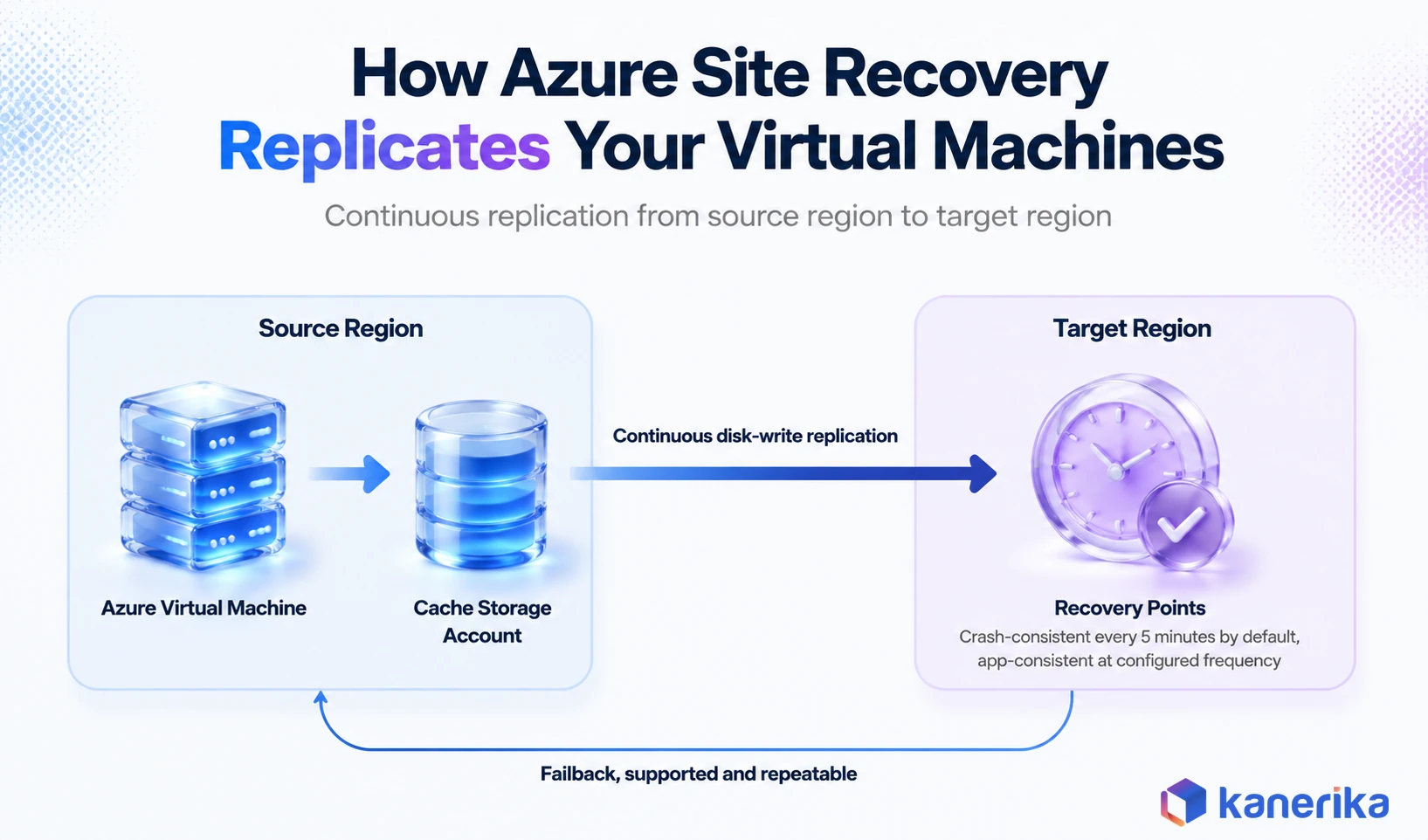
Azure Site Recovery, usually shortened to ASR, is Microsoft’s disaster recovery as a service offering. It continuously replicates Azure virtual machines to a different target region, and if an outage occurs, it fails the VMs over to that secondary region so the application keeps running.
According to Microsoft’s own architecture documentation, ASR replicates disk writes to a cache storage account in the source region, processes them, and sends them to the target region. It generates crash-consistent recovery points every five minutes by default, and app-consistent recovery points at whatever frequency you configure. Failback to the original region is a supported, repeatable operation, not a manual rebuild.
ASR is built for application-level recovery. It handles Azure to Azure replication, on-premises to Azure, and hybrid scenarios where some infrastructure stays on-site.
Azure Backup
Azure Backup is Microsoft’s data protection service. It backs up Azure VMs, managed disks, Azure Files, SQL Server and SAP HANA databases running on Azure VMs, and several other workload types, storing recovery points in a Recovery Services vault.
Per Microsoft’s Azure Backup overview, Azure Backup has three storage replication options for the backup data itself. Locally redundant storage keeps three copies in one datacenter. Geo-redundant storage, the default, replicates to a secondary region hundreds of miles away. Zone-redundant storage spreads copies across Availability Zones in the same region for workloads with data residency requirements.
Azure Backup restores what you ask for, when you ask for it. It does not automatically fail an application over to a new location. That distinction is where most of the confusion between Azure Backup and Azure Site Recovery comes from.
Azure Storage Redundancy and Recovery Point Durability
Every Azure disaster recovery plan sits on top of storage redundancy decisions, and the durability differences between options are larger than most teams expect. Microsoft’s own storage redundancy documentation publishes exact figures.
| Redundancy Option | What It Replicates | Durability Per Year | Survives Regional Outage |
|---|
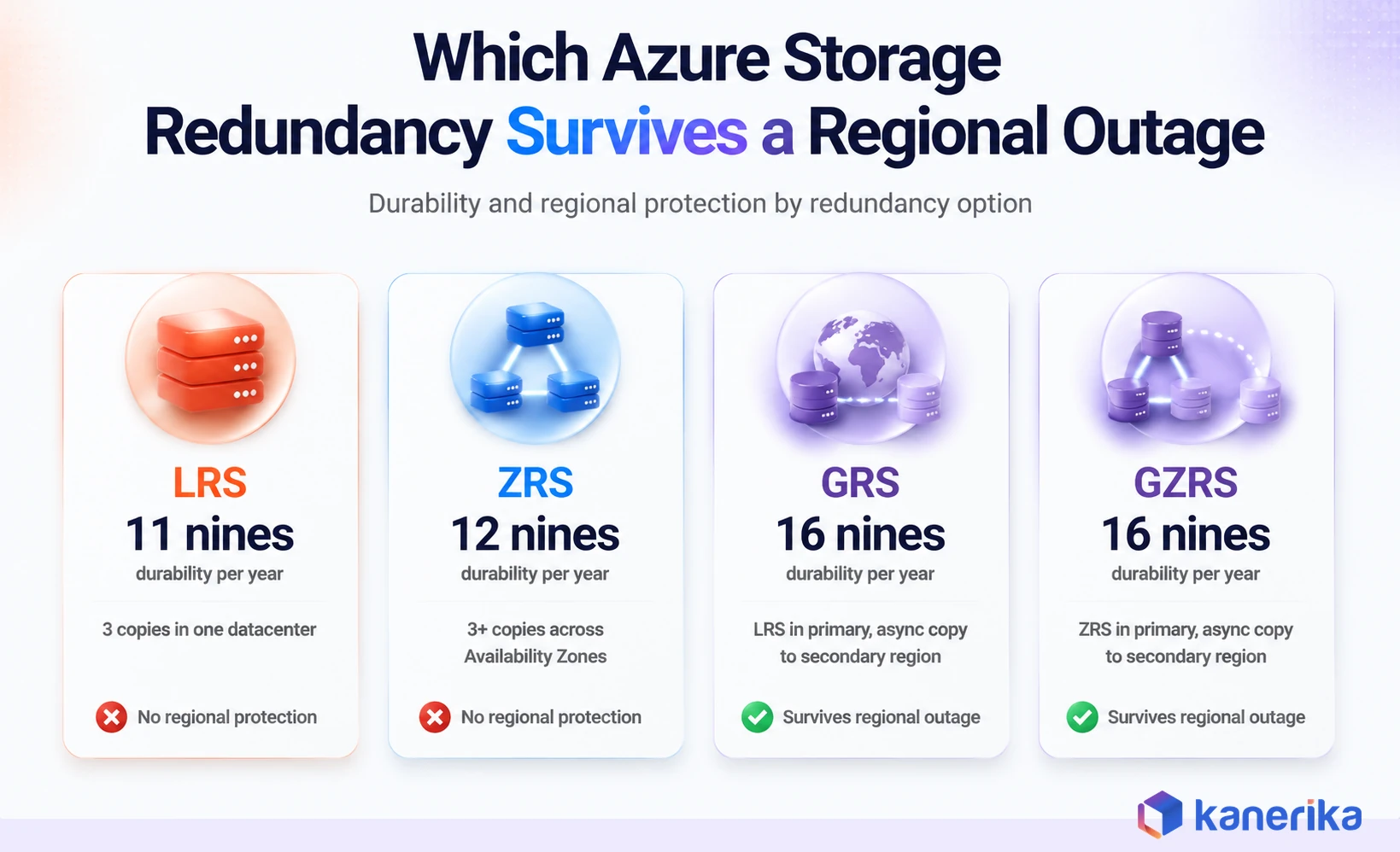
| Locally redundant storage (LRS) | 3 copies in one datacenter | At least 99.999999999% (11 nines) | No |
| Zone-redundant storage (ZRS) | 3+ copies across Availability Zones | At least 99.9999999999% (12 nines) | No |
| Geo-redundant storage (GRS) | LRS in primary, async copy to secondary region | At least 99.99999999999999% (16 nines) | Yes, with failover |
| Geo-zone-redundant storage (GZRS) | ZRS in primary, async copy to secondary region | At least 99.99999999999999% (16 nines) | Yes, with failover |
The practical takeaway is that LRS and ZRS protect against hardware and datacenter failure, but not a regional outage. Only GRS, RA-GRS, GZRS, and RA-GZRS put a copy of your data far enough away to survive one. If your cost optimization work or a broader cloud cost management push already trimmed storage tiers, it is worth confirming DR-critical accounts were not downgraded along with everything else. A quick check against your Azure SQL Database pricing tier is worth the same scrutiny, since backup retention there follows similar tradeoffs.
Azure Site Recovery vs Azure Backup
These two services get bundled together in conversation constantly, and choosing wrong in either direction creates a real gap.
| Factor | Azure Site Recovery | Azure Backup |
|---|
| Primary purpose | Application and workload recovery | Data protection and restore |
| Recovery method | Continuous replication and orchestrated failover | Point-in-time backup restore |
| Best fit | Business-critical apps needing fast recovery | Data recovery, retention, and compliance |
| Failover and failback | Yes, automated and testable | No, restore-based only |
| Typical recovery speed | Minutes to a few hours | Hours, depending on data volume |
Most enterprise Azure environments need both, layered by workload tier rather than applied uniformly. A customer-facing application with a low tolerance for downtime needs ASR. An internal reporting database that can tolerate a few hours of restore time is often well served by Azure Backup alone.
Case Study
80% Faster Reporting on Microsoft Fabric and Power BI
See how Kanerika modernized Southern States Material Handling’s data platform without disrupting operations, the same discipline a DR architecture depends on.
Read the Case Study →
Designing Azure Disaster Recovery Around RTO and RPO
Recovery Time Objective is how long the business can tolerate an application being down. Recovery Point Objective is how much data loss, measured in time, the business can accept. Neither number should come from IT guessing. Both should come from the business unit that owns the application, because they carry the real cost of getting it wrong.
Skipping this step is the single most common Azure disaster recovery mistake. Teams pick Azure Site Recovery or Azure Backup, configure a reasonable-sounding schedule, and only discover the mismatch between what they built and what the business actually needed during a real outage.
A workable process looks like this.
- List every application and rank it by business impact, not by technical complexity.
- Interview the business owner for acceptable downtime and acceptable data loss in plain terms, not technical ones.
- Translate those answers into RTO and RPO numbers for each application.
- Group applications into recovery tiers based on those numbers.
- Match each tier to the Azure DR architecture that can actually hit its targets, and price it out before committing.
Mapping Workloads to Recovery Tiers
| Recovery Tier | Example Workloads | Target RTO | Target RPO | Recommended Azure Approach |
|---|
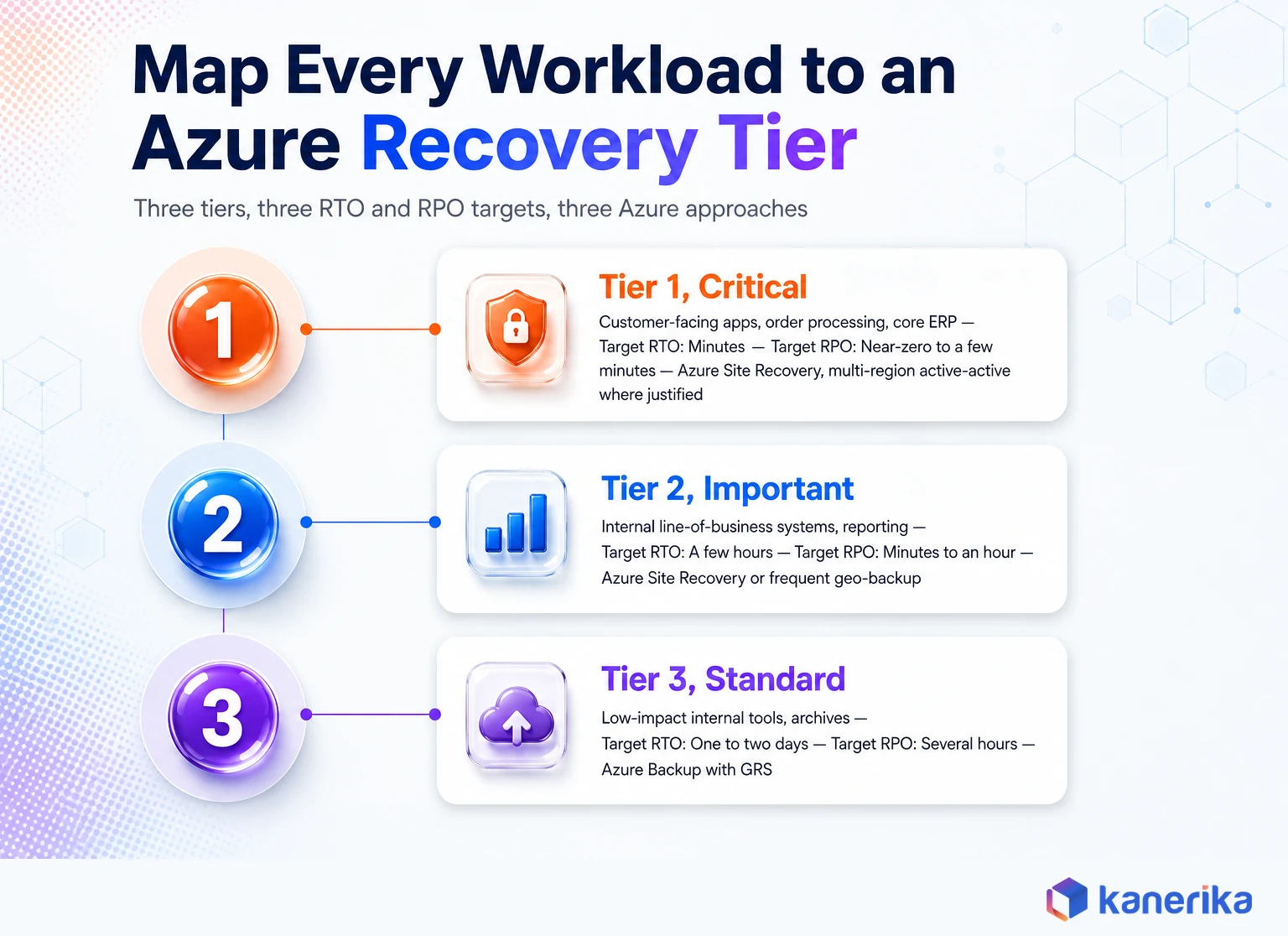
| Tier 1, Critical | Customer-facing apps, order processing, core ERP | Minutes | Near-zero to a few minutes | Azure Site Recovery, multi-region active-active where justified |
| Tier 2, Important | Internal line-of-business systems, reporting | A few hours | Minutes to an hour | Azure Site Recovery or frequent geo-backup |
| Tier 3, Standard | Low-impact internal tools, archives | One to two days | Several hours | Azure Backup with GRS |
Once tiers exist, the cloud migration roadmap and the DR plan should be built together, not in sequence, following the same cloud migration best practices that govern the rest of the move. A workload’s target region, storage redundancy, and network design all get decided at the same time it is migrated, and retrofitting DR onto a live production system is always more expensive than designing it in from the start.
Migration ROI Calculator
Design Your Migration and Your DR Plan Together
When target region, storage redundancy, and network design get decided once instead of twice, the savings compound. See what a coordinated build saves.
Calculate Migration ROI →
Multi-Region Azure Disaster Recovery Architecture
A single Azure region is not a disaster recovery plan by itself, no matter how many Availability Zones it has. Zones protect against a datacenter-level failure. A regional outage, rare as it is, requires a second region to fail over to.
Azure Region Pairs, and Why Not Every Region Has One
Microsoft associates many Azure regions with a paired region, usually in the same geography, for staggered updates and prioritized recovery sequencing. According to Microsoft’s own region pairs documentation, West US pairs with East US, UK South pairs with UK West, and Central India pairs with South India, among others.
Not every region has a pair. Newer regions, including several launched with built-in Availability Zone support, do not have an associated pair and rely on zones as their primary resilience model instead. A small number of pairs are asymmetrical. Brazil South pairs with South Central US, for example, but South Central US does not pair back to Brazil South.
Microsoft is explicit that deploying to a paired region does not automatically create disaster recovery capability. The pairing supports certain services’ geo-replication and improves the odds of coordinated recovery, but the organization still has to design, configure, and test its own failover. Relying on Microsoft-managed failover between paired regions as a primary DR strategy is not a supported approach for anything mission-critical.
Active-Passive and Active-Active Architectures
An active-passive design runs production in one region and keeps a standby environment ready in a second region, activated only during a failover. This is the more common and more affordable pattern, and it is what Azure Site Recovery is built around.
An active-active design runs the application in two regions simultaneously, splitting or duplicating traffic between them. It removes the failover step almost entirely, at the cost of running duplicate infrastructure permanently. Active-active makes sense for Tier 1 workloads where even a few minutes of failover time carries real business cost. It is difficult to justify for anything below that.
Network and Database Recovery Considerations
Application failover is only half the job. A recovered VM that cannot reach its database, its DNS records, or its firewall rules is not actually recovered.
- Virtual network peering and private endpoints need a mapped equivalent in the target region, configured before an outage, not during one.
- DNS and Azure Traffic Manager or Front Door routing need to redirect users to the recovered region automatically, not through a manual DNS change under pressure.
- Databases replicate differently depending on the engine. SQL Server on Azure VMs, Azure SQL Database, and Cosmos DB each have their own replication and failover mechanics, and a one-size-fits-all assumption here is a common planning gap.
- Network security group rules and firewall policies need to exist in the target region already, or the recovered application will come up unreachable.
How to Build an Azure Disaster Recovery Plan
A disaster recovery plan is a document and a rehearsed procedure, not a checkbox on an architecture diagram. The steps below reflect what actually holds up during a real failover, not just what passes an audit.
- Identify critical applications and their dependencies. Map what each application needs to run, including databases, APIs, and third-party integrations, before deciding how to protect it.
- Define recovery objectives per application. Set RTO and RPO with the business owner, and document the reasoning, not just the number.
- Select the Azure DR architecture and services. Match Azure Site Recovery, Azure Backup, or a combination to each recovery tier from the previous section.
- Configure replication and recovery vaults. Set up the Recovery Services vault, replication policies, and target resources before you need them, and confirm the target region has capacity for your VM sizes.
- Build recovery plans and failover sequencing. Applications with multiple tiers, such as a web layer and a database layer, need to fail over in the correct order, not all at once.
- Test failover without touching production. Azure Site Recovery supports test failover into an isolated network specifically so this step does not risk the live environment.
- Monitor, review, and update the plan on a schedule. Applications change, dependencies change, and a DR plan that was accurate a year ago is not automatically accurate today.
Checklist
Microsoft Azure Checklist
A structured checklist for planning and hardening your Azure environment, useful alongside the recovery-plan steps above.
Get the Checklist →
Azure Disaster Recovery Cost Considerations
Cost is the reason most enterprises under-invest in disaster recovery, and it is also where the biggest surprises show up after the fact.
Azure Site Recovery charges per protected instance, plus the storage and networking costs of maintaining a replica in the target region. Azure Backup charges based on storage consumed and retention period, which scales with how many recovery points a compliance policy requires you to keep. Multi-region deployments layer on duplicate compute, storage, and often licensing for anything running active-active.
The costs enterprises miss most often are the ones outside the monthly bill. Test failovers consume compute resources while they run, and capacity reservations in the secondary region carry a cost even when idle.
Cross-region data transfer during replication and failover adds up on high-change workloads too. A DR budget built only from list pricing on the primary services tends to run 20 to 30 percent under the real number once these are included.
The right question is not how to make Azure disaster recovery cheap. It is how to spend proportionally to what each application’s downtime actually costs the business, which is exactly what the recovery tiering exercise above is meant to answer.
Datasheet
Microsoft Funding Support Through Kanerika
Enterprises pairing a DR build with an Azure migration may qualify for Microsoft funding that offsets the cost. See how Kanerika helps you access it.
View the Datasheet →
Common Azure Disaster Recovery Mistakes
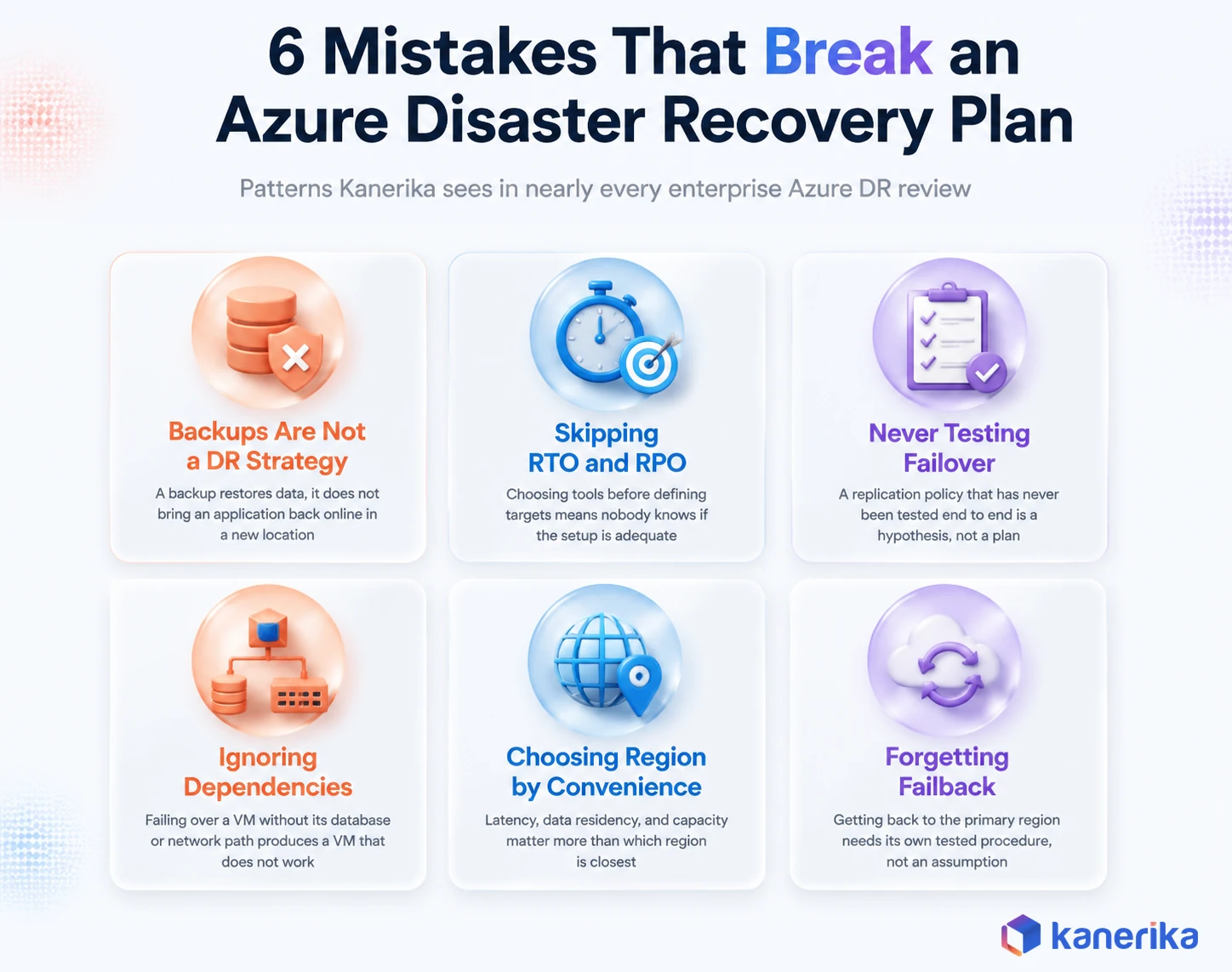
Some of these show up in nearly every DR review Kanerika runs for enterprise Azure environments.
- Treating backups as a complete DR strategy. A backup restores data. It does not bring an application back online in a new location by itself.
- Skipping RTO and RPO before choosing tools. Configuring Azure Site Recovery or Azure Backup without defined targets means nobody knows if the setup is actually adequate until it is tested by a real outage.
- Never running a test failover. A replication policy that has never been tested end to end is a hypothesis, not a plan.
- Ignoring application dependencies. Failing over a VM without its database, its network path, or its downstream integrations produces a VM that boots but does not work.
- Choosing a secondary region on convenience alone. Latency, data residency rules, and available capacity for your VM sizes all matter more than which region is geographically closest.
- Forgetting failback planning. Getting back to the primary region after an incident needs its own tested procedure, not an assumption that reversing the failover is automatic.
Azure Disaster Recovery Compliance and Security
For regulated industries, disaster recovery is not optional infrastructure. It is frequently an audit requirement with specific documentation expectations attached.
Data residency rules affect which secondary region is even a legal option, particularly for banking and healthcare organizations operating under regional data protection law. GDPR and CCPA compliance requirements can rule out certain region pairs entirely, which is why the region selection step in the DR plan needs legal and compliance input, not just an infrastructure team’s preference.
Backup and replica security matters as much as the primary environment’s security. Given how consistently ransomware targets backup repositories specifically, immutable backups, zero trust access controls, and strict identity governance around who can modify or delete a Recovery Services vault are no longer optional hardening steps, and they follow the same data security best practices that should already govern production data. A data governance program built on Microsoft Purview extends naturally into DR, since the same access controls and data classification work protecting production data should extend to its recovery copies.
Audit requirements typically expect documented test failover evidence, not just a policy stating that DR exists. Building that documentation into the regular test failover cadence from the plan above means it already exists when an auditor asks for it, instead of becoming a scramble.
Azure Disaster Recovery vs AWS and Google Cloud
Enterprises running multicloud, or evaluating AWS versus Azure versus Google Cloud for a new workload, often ask how Azure’s DR capability compares to the alternatives.
AWS’s equivalent to Azure Site Recovery is AWS Elastic Disaster Recovery, which takes a similar continuous-replication approach. Google Cloud has its own backup and DR service, generally considered less mature than either Azure’s or AWS’s option as of this writing. All three clouds support geo-redundant storage and multi-region architectures, and all three require the customer to design and test the actual failover plan.
The practical decision usually comes down to where the workload already runs rather than a feature-by-feature comparison. An enterprise already committed to Azure for its data platform gains more from mastering Azure Site Recovery and Azure Backup deeply than from adding a second cloud purely for DR diversity, which introduces its own complexity and cost. Third-party DRaaS platforms are worth evaluating only when Azure-native tools genuinely cannot meet a specific compliance or architecture requirement, not as a default upgrade.
How Kanerika Approaches Azure Disaster Recovery and Business Continuity
Kanerika holds Microsoft’s Advanced Specialization for Data Warehouse Migration to Azure, earned in December 2025, and was named a Major Contender in Everest Group’s Microsoft Azure Services PEAK Matrix Assessment 2026. Both credentials sit on top of the same discipline that Azure disaster recovery work requires, which is moving and protecting enterprise data on Azure without losing it or the business’s trust in the process.
Our approach to an Azure resilience engagement runs in four stages.
Assess. We inventory the client’s Azure estate, map application dependencies, and interview business owners for real RTO and RPO targets rather than assuming defaults. This step alone surfaces most of the gaps a client did not know they had.
Design. We architect the recovery tier structure, choosing Azure Site Recovery, Azure Backup, or a layered combination per workload, and select target regions against both technical and compliance constraints.
Build and migrate. We configure replication, recovery vaults, and network failover paths, and validate them against a defined data migration testing process before anything is called done.
Operate and govern. We hand off with a tested runbook, an Azure monitoring setup, and a review cadence, and where governance is part of the engagement, we tie access to recovery infrastructure into the client’s broader data governance framework rather than leaving it as a standalone system.
Case study. Kanerika delivered 80 percent faster insights and 30 percent lower cost on an Azure to Microsoft Fabric migration. A global packaging manufacturer came to Kanerika with data operations fragmented across Azure Data Factory and Synapse, an intermediate Parquet conversion step causing latency and failures, and no unified governance model across the environment. Kanerika migrated the client’s Azure assets to Microsoft Fabric using our proprietary migration utility, preserving code integrity while keeping downtime to a minimum throughout the transition.
The result was a 30 percent reduction in cloud and data costs, a 50 percent improvement in data pipeline reliability, and 80 percent faster business insights and reporting. The same discipline that protected data integrity and uptime through that migration, careful dependency mapping, tested cutover sequencing, and governance built in from day one, is exactly what a sound Azure disaster recovery architecture requires.
Kanerika is also a Snowflake Select Tier Partner, and the recovery discipline is consistent across platforms. Whether the workload runs on Azure, Snowflake, or a hybrid of both, the same questions apply. What is the acceptable downtime, what is the acceptable data loss, and has the recovery plan actually been tested.
Enterprises planning an Azure migration or building out Azure cloud solutions from scratch get the strongest results when disaster recovery is designed alongside the platform, not bolted on afterward once something has already gone wrong.
Talk to Kanerika
Talk to Kanerika About Your Azure Resilience Plan
Bring your current architecture and recovery targets. We will help you find the gaps before an outage does.
Schedule a Demo →
Wrapping Up
Azure disaster recovery works when the architecture matches real recovery targets, not when every available feature gets switched on. Azure Site Recovery and Azure Backup solve different problems, storage redundancy choices determine whether a plan survives a regional outage at all, and none of it means anything until a test failover proves it works under real conditions. The enterprises that recover in minutes are the ones that treated the plan as a living process, tested on a schedule, rather than a document written once and filed away.
Ready to Pressure-Test Your Azure Disaster Recovery Plan?
Kanerika works with enterprise Azure teams to design, build, and validate disaster recovery architecture around real business recovery targets. If it has been a while since your failover plan was actually tested, that is worth fixing before an outage forces the question. Talk to Kanerika about an Azure resilience assessment.
Frequently Asked Questions
What is Azure disaster recovery and how does it work?
Azure disaster recovery is Microsoft’s combination of replication, backup, and multi-region infrastructure for restoring applications and data after an outage. Azure Site Recovery continuously replicates virtual machines to a secondary region, and if the primary region fails, it orchestrates an automated failover so the application keeps running from the secondary location.
What is the difference between Azure Backup and Azure Site Recovery?
Azure Backup protects data through point-in-time backups you restore on request, and it does not fail an application over on its own. Azure Site Recovery protects entire applications through continuous replication and automated failover, with recovery in minutes to hours. Most enterprise environments need both, applied by workload criticality rather than uniformly across everything.
How do I set up disaster recovery in Azure?
Start by defining RTO and RPO for each application with the business owner, not IT alone. Then create a Recovery Services vault, enable Azure Site Recovery or Azure Backup depending on the workload’s tier, configure target region resources, and run a test failover before calling the setup complete.
What RTO and RPO does Azure Site Recovery support?
Azure Site Recovery generates crash-consistent recovery points every five minutes by default, and app-consistent points at whatever frequency is configured, subject to retention settings. Achievable RTO depends on application complexity and failover testing, but well-architected Tier 1 workloads typically recover in minutes rather than hours.
Can Azure Site Recovery replicate virtual machines between regions?
Yes. Azure Site Recovery supports Azure to Azure replication between regions, including paired and non-paired region combinations, as well as on-premises to Azure and hybrid replication scenarios. You choose the target region and resources yourself, so replication is not limited to a VM’s assigned paired region, and cross-geography replication is supported where data residency rules allow it.
Does Azure have built-in disaster recovery?
Azure provides the services needed to build disaster recovery, including Azure Site Recovery, Azure Backup, and geo-redundant storage, but it does not provide disaster recovery automatically. Deploying to a paired region does not create DR capability on its own. The organization has to design, configure, and test its own recovery plan.
How much does Azure disaster recovery cost?
Costs come from protected-instance charges for Azure Site Recovery, storage and retention charges for Azure Backup, and duplicate infrastructure costs for multi-region designs. Hidden costs, including test failovers, capacity reservations, and cross-region data transfer, commonly push real spend 20 to 30 percent above initial estimates. Pricing scales with how many workloads you protect and how aggressive your recovery targets are, so tiering workloads by business impact first keeps the bill proportional.
What is the best disaster recovery strategy for Azure?
There is no single best strategy. The right approach tiers workloads by business impact, matches each tier to the Azure DR architecture that can hit its RTO and RPO, and validates the whole plan with regular test failovers rather than assuming it works. Critical applications typically pair Azure Site Recovery with a multi-region design, while lower-impact systems are often well served by Azure Backup alone.














