TL;DR
Workflow orchestration tools coordinate tasks that depend on each other across different systems, so one failure doesn’t quietly cascade into ten. They track the state of every task, and apply retry and alerting rules automatically when something breaks. Tools like Apache Airflow, Dagster, and Prefect are built for data pipelines. Camunda is built for business processes, and Temporal is built for long-running distributed applications.
The right tool depends on what kind of problem you actually have, not on which one has the most integrations. Fivetran’s 2026 benchmark found large enterprises average 4.7 pipeline failures a month, each taking nearly 13 hours to resolve, at an estimated $3 million a month in business exposure. What separates a production-grade orchestrator from a glorified cron job is reliability behavior like idempotent retries, checkpointing, and dead-letter handling, not a longer feature checklist.
Key Takeaways
- Workflow orchestration tools fall into four working categories: data-pipeline orchestrators (Airflow, Dagster, Prefect), business-process orchestrators (Camunda), durable-execution platforms (Temporal), and cloud-native or platform-native services (AWS Step Functions, Argo Workflows, Databricks Lakeflow Jobs, Snowflake Tasks).
- Fivetran’s 2026 Enterprise Data Infrastructure Benchmark found large enterprises average 4.7 pipeline failures a month, each taking nearly 13 hours to resolve, at an estimated $3 million a month in business exposure.
- A DAG-based scheduler is the default for batch data pipelines, but it is the wrong model for a workflow that waits on a human approval for three weeks or a service call that must survive a process crash.
- Reliability semantics, not feature checklists, separate production-grade orchestration from a cron replacement: idempotent retries, checkpointing, backfills, and dead-letter handling matter more than a longer integrations list.
- Databricks, Snowflake, and Microsoft Fabric all ship native orchestration; the real decision is whether every workload stays inside one platform or a separate control plane needs to span several.
- Kanerika’s Databricks Workflows migrations have cut document-processing time by 80% for enterprise clients by replacing brittle, JavaScript-based pipelines with governed, Python-based orchestration and clear retry and data-quality gates.
The Scheduler Is the Only Thing Watching at 2 AM
Enterprise data teams report an average of 4.7 pipeline failures every month, and each one takes close to 13 hours to fully resolve, according to Fivetran’s 2026 Enterprise Data Infrastructure Benchmark Report, based on a survey of 500 senior data and technology leaders at enterprises with 5,000 or more employees. Across a year, the report put the resulting business exposure at roughly $3 million a month for large organizations.
Almost none of that cost comes from the pipeline logic itself. It comes from what happens after something breaks: nobody notices for hours, the retry logic either doesn’t exist or retries the wrong thing, and the person who finally gets paged has no idea which of forty dependent tasks actually failed first.
That is the job a workflow orchestration tool exists to do. Not to move data or run a business process by itself, but to sit above the work, track what depends on what, and know exactly what to do when something fails at 2 AM. This guide covers what these tools actually are, the four categories engineers keep collapsing into one, the execution models and reliability semantics that separate a production-grade orchestrator from a cron replacement, how the leading tools compare, and how to choose one without buying a tool built for a problem you don’t have.
It goes deep specifically on orchestration mechanics; for the wider engineering stack around it, Kanerika’s software development toolkit guide covers source control, CI/CD, and testing tooling more broadly.
What Are Workflow Orchestration Tools?
A workflow orchestration tool is software that coordinates dependent tasks across time, systems, services, or people while tracking state and responding to failure. It is the layer that decides what runs next, not the layer that does the work itself.
Watch on YouTube
Databricks Genie ZeroOps: AI That Fixes Broken Pipelines
A look at how AI-assisted operations catch and resolve broken pipeline dependencies automatically, the retry-and-alert problem this guide covers in depth.
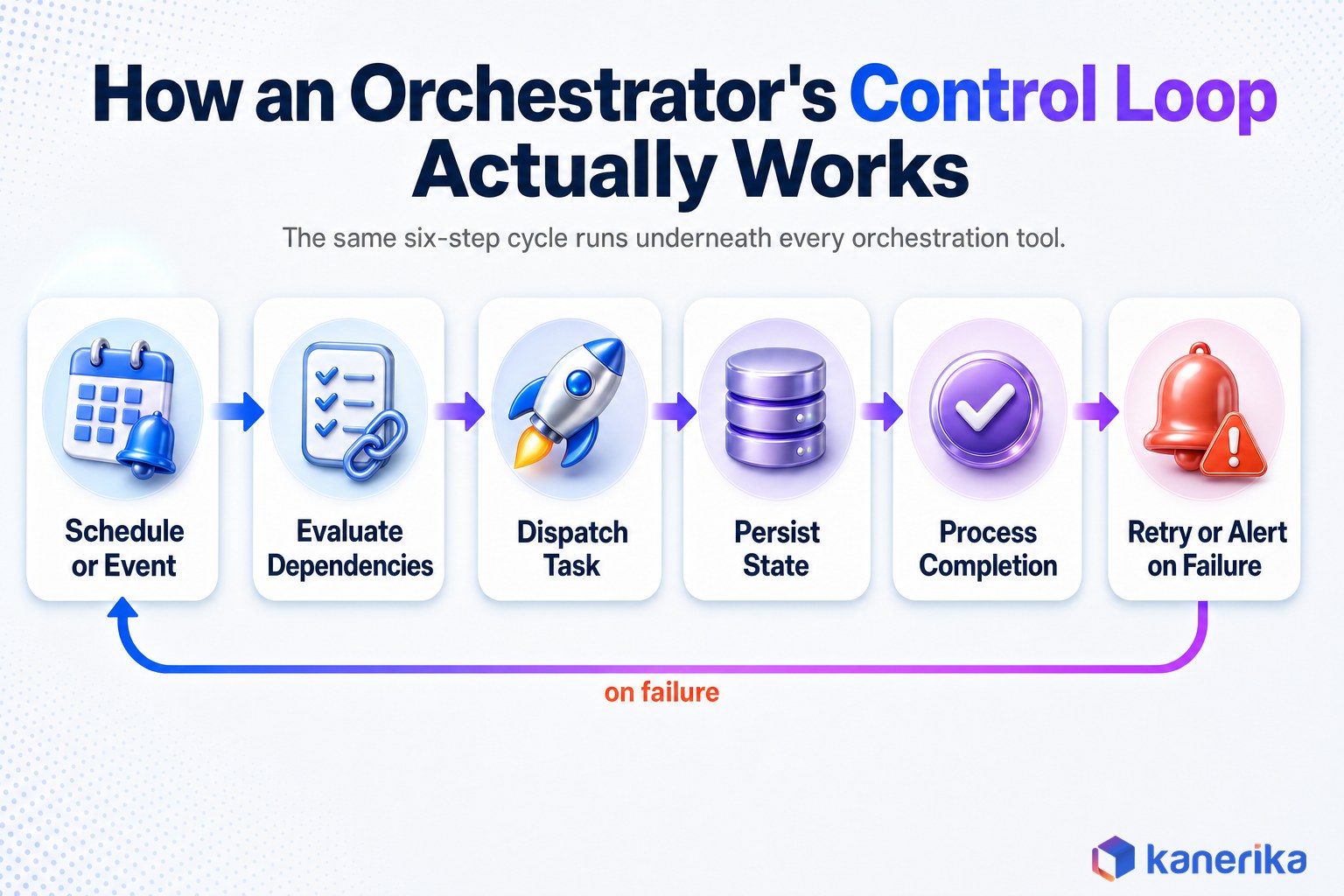
Every orchestrator runs some version of the same control loop. It receives a schedule or an event, evaluates whether upstream dependencies are satisfied, dispatches the next unit of work, persists the resulting state, and processes the completion signal. When something fails, it applies retry rules and triggers alerts or downstream recovery tasks.
Most orchestrators, though not all, represent that dependency structure as a directed acyclic graph, or DAG. Tasks are nodes, dependencies are edges, and the graph makes it explicit which branches can run in parallel and which downstream tasks are blocked when an upstream one fails. Apache Airflow’s own documentation popularized this model for data pipelines, and it is the reason “DAG” and “orchestration” get used almost interchangeably in data engineering conversations, even though DAGs are only one of several execution models covered later in this guide.
Three mechanics do most of the real work inside that control loop, and they are the ones worth understanding before comparing any tools.
- Dependency management. The orchestrator prevents a task from starting until the upstream datasets, APIs, approvals, or infrastructure conditions it needs are actually ready, rather than just assuming a fixed time delay was enough.
- Retry and recovery. When a task fails, the tool applies retry limits, delay policies, and sometimes checkpoints or replay logic, so a transient failure does not require a human to manually restart the whole pipeline.
- Alerting and operational response. Failures generate context-rich notifications, open incidents, or route work to a dead-letter queue instead of silently disappearing into a log file nobody reads until a downstream report is late.
Orchestration also gets confused with three adjacent categories worth separating explicitly. Automation performs a single action, like sending an email or moving a file. Orchestration coordinates many automated actions as one stateful process with dependencies between them. ETL and ELT tools transform or move data; an orchestrator decides when those transformations run and what they wait on.
Container orchestration, meaning Kubernetes, controls where containers run and how they are scheduled on infrastructure. Workflow orchestration controls the business logic and sequencing that connects the jobs running inside those containers. A pipeline can use both at once: Kubernetes decides where a task’s container runs, while the workflow orchestrator decides when that task should run and what happens if it fails.
The Four Categories of Workflow Orchestration Tools
Most comparison articles list Airflow, Camunda, Temporal, and AWS Step Functions on the same page as if they compete for the same job. They cover very different problems. Each one was built around a different unit of work and a different failure model, and picking based on feature count instead of category is a common orchestration mistake enterprises make.
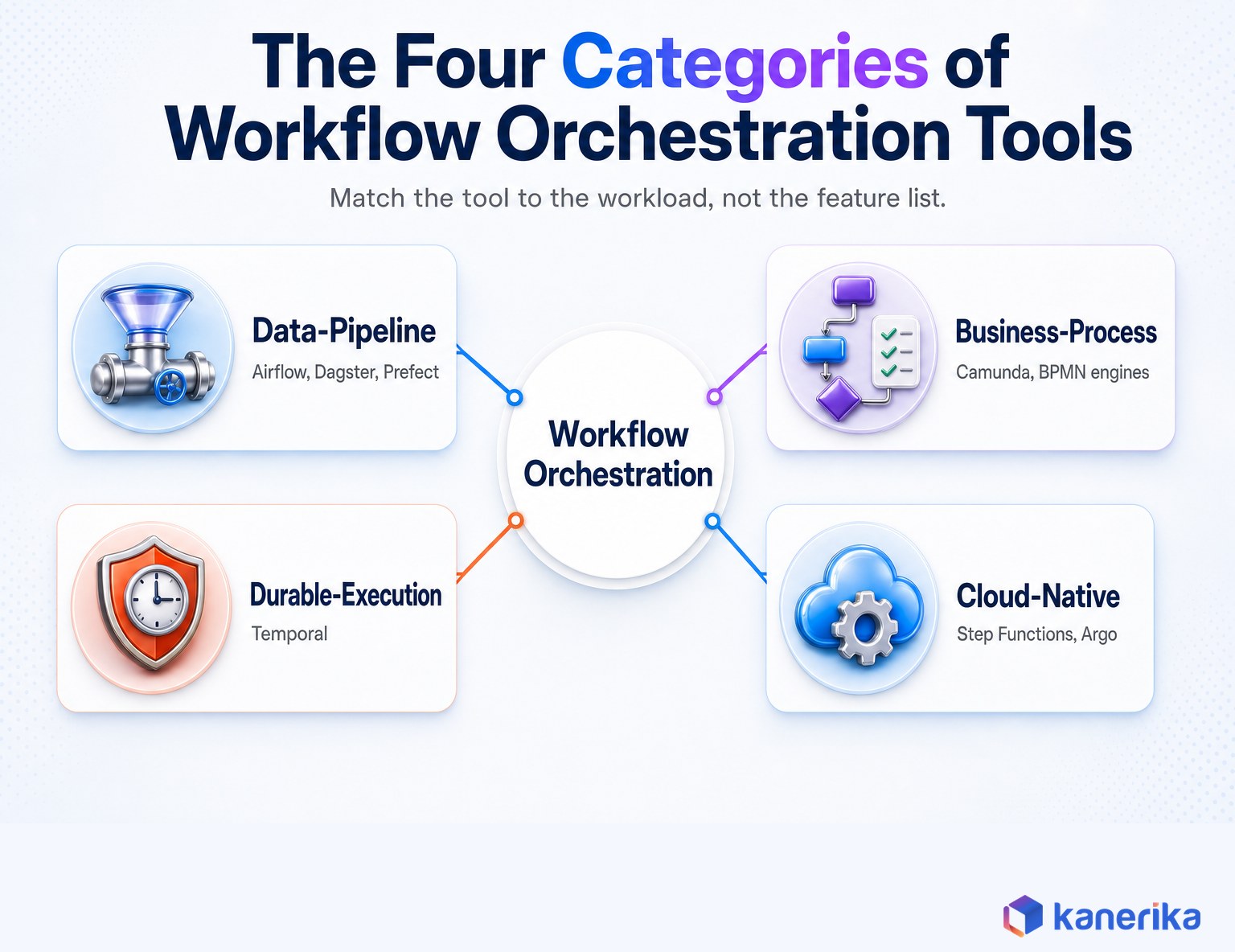
- Data-pipeline orchestrators: Apache Airflow, Dagster, Prefect, and similar tools coordinate ingestion, transformation, quality checks, and analytics dependencies. The unit of work is usually a batch job measured in minutes to hours, and the dominant concern is backfills, freshness, and dependency graphs across datasets.
- Business-process orchestrators: Camunda and other BPMN 2.0 engines coordinate service tasks, business rules, and human approvals inside long-running operational cases like claims processing or vendor onboarding. Workflows here can stay open for weeks and routinely involve a person, not just a service, in the loop.
- Durable-execution platforms: Temporal and comparable systems persist application workflow state so a distributed service can survive a crash, retry safely, and wait for hours or months without holding a worker process open the whole time. The unit of work is application code, not a scheduled job.
- Cloud-native and platform-native orchestration: AWS Step Functions, Argo Workflows, and platform-native services like Databricks Lakeflow Jobs or Snowflake Tasks coordinate work through a managed, provider-owned control plane, trading some portability for less infrastructure to operate.
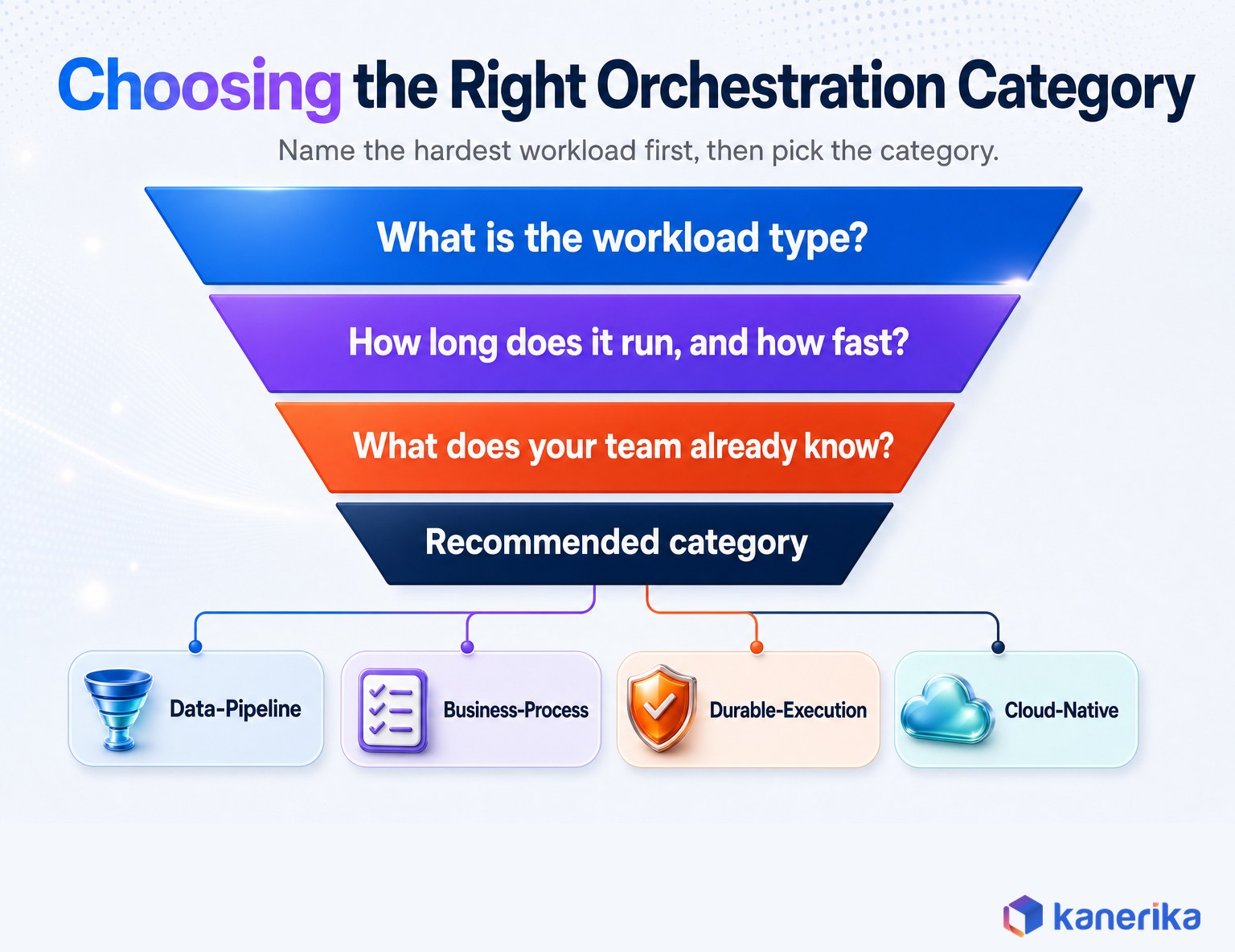
The categories overlap in practice. A data pipeline can call a microservice, wait on a human sign-off, and trigger a cloud function in the same run. But every orchestrator still has one primary execution model it was designed around, and the selection rule that actually works is simple: choose the tool whose native state and failure model matches the hardest part of your workload, not the tool with the longest integrations list.
A useful gut check is to name the single hardest failure your current process has to survive. If it is “a nightly job needs to reprocess three days of missing partitions,” the answer lives in category one. If it is “a claim sits open for two weeks waiting on a supervisor,” the answer lives in category two.
If it is “a provisioning workflow has to keep going even if the service restarts halfway through,” that is category three. If the honest answer is “everything already lives in Databricks and rarely leaves it,” category four may mean you don’t need a separate orchestrator at all yet.
Kanerika’s own posts on data orchestration tools and MLOps orchestration comparing Kubeflow, Airflow, and Prefect go deep on the first category specifically, including tool-by-tool breakdowns this hub post does not repeat. If the workload in question is AI agents coordinating tool calls rather than scheduled tasks, Kanerika’s guide to AI agent orchestration covers that adjacent, related problem directly, and the AI workflow automation guide covers adding AI steps to a fixed business process.
This guide treats data-pipeline tooling as one of four categories, and spends the next several sections on the mechanics that decide which category, and which tool inside it, actually fits.
How Workflow Orchestration Engines Actually Execute Work
Feature comparisons rarely explain what happens inside the engine when a task runs, and that is exactly the gap that makes tool selection feel like guesswork. Underneath the marketing, there are really only a handful of execution models, and almost every orchestration tool on the market is a variation on one of them.
Static DAG construction parses the entire graph before execution starts, which makes dependency validation and scheduling predictable but limits how much can change at runtime. Dynamic workflow construction generates tasks or branches from data discovered while the workflow is already running, which is more flexible but harder to observe and reproduce after the fact. Airflow supports both: a DAG file is parsed up front, but dynamic task mapping can still spin up parallel task instances based on what a previous task returns.
Task-centric engines, the traditional scheduler model, treat operations as nodes and dependencies as edges. Asset-centric engines, which is how Dagster models its world, instead treat datasets or other outputs as the thing being managed, and derive the required computation from what those assets need. The practical difference shows up during a backfill: a task-centric tool reruns a chain of jobs, while an asset-centric tool reasons about which specific assets are stale and only recomputes those.
State-machine engines, like AWS Step Functions, define explicit states, transitions, and catch conditions in a declarative format. Durable-execution engines, like Temporal, let application code look sequential while the platform silently records every decision so execution can resume exactly where it left off after a crash, a pattern Temporal’s documentation calls event-history replay. BPMN engines, like Camunda, represent service tasks, human tasks, gateways, and timers as a process diagram business and engineering teams can both read and, in principle, agree on.
Triggers follow a similar split. Scheduler-based triggers use cron expressions or fixed intervals and handle missed runs, catch-up windows, and time-zone rules. Event-driven triggers instead start a run from a message, a webhook, or a table update. Polling sensors repeatedly check whether a condition is true; event systems push a readiness signal to the orchestrator the moment it happens, which is usually cheaper and faster at scale, since a sensor checking every thirty seconds for six hours burns real compute waiting for something that might arrive in the first five minutes.
None of these models is objectively better. A DAG scheduler that is excellent at running four hundred nightly warehouse jobs is the wrong engine for a workflow that has to survive a service restart three weeks into a customer onboarding process, and a durable-execution platform built for that kind of long-running application state is overkill for a straightforward hourly extract.
Retry Logic, Alerting, and the Reliability Semantics That Actually Matter
This is the part most “best tools” listicles skip entirely, and it is usually the part that determines whether a production incident takes fifteen minutes or half a day.
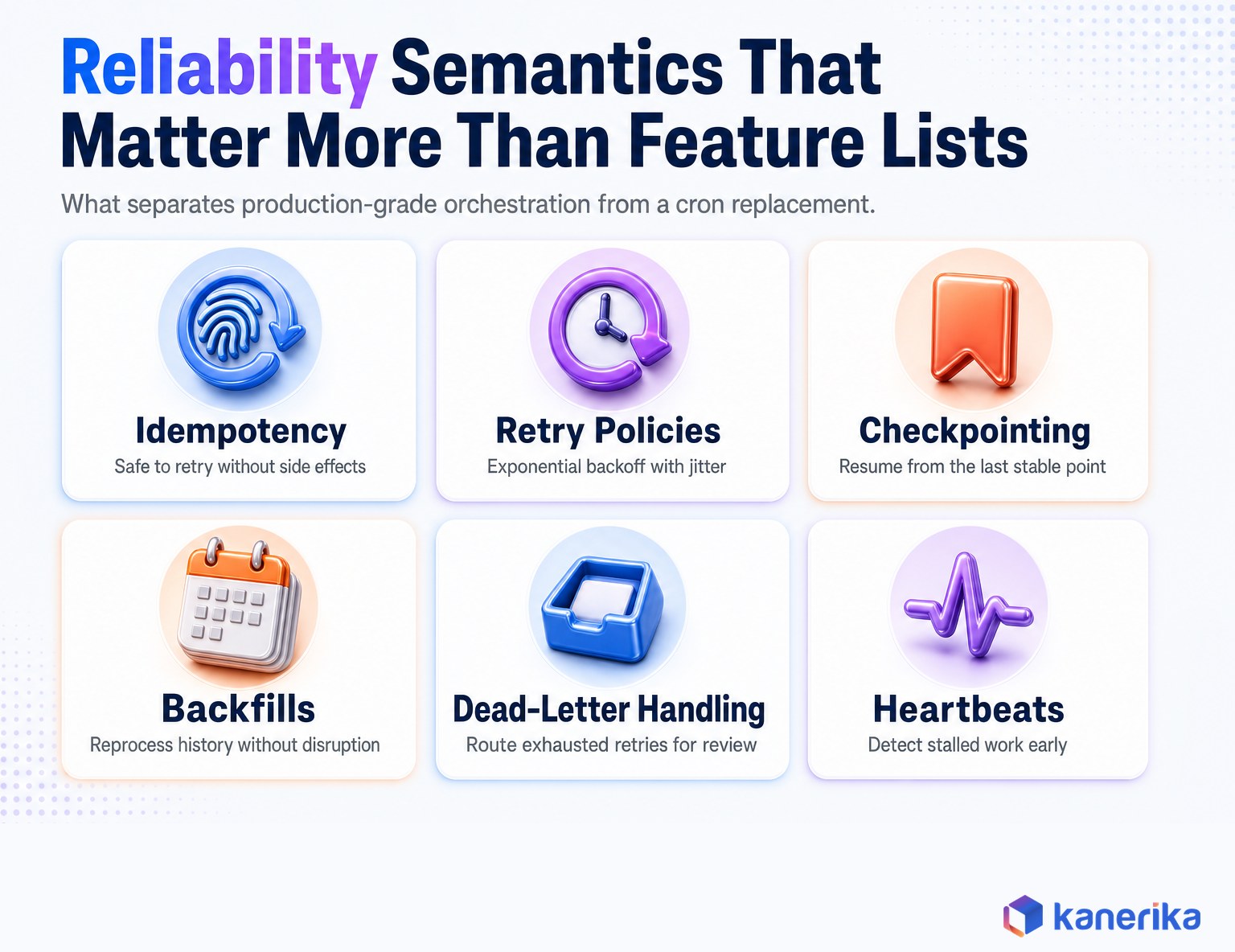
Most orchestrators guarantee at-least-once execution, meaning a task can run more than once after a failure. That makes idempotency the engineer’s responsibility, not the tool’s: a task has to produce the same result, or detect that its effect already happened, no matter how many times it retries. A payment task that isn’t idempotent and gets retried twice is a very different kind of incident than a stalled report.
Retry policies themselves vary more than most comparisons admit. Fixed delay retries hit the same failing dependency at the same interval every time. Exponential backoff with jitter spreads retries out so a struggling downstream system isn’t hit by a synchronized wave of requests the moment it starts to recover. Per-error retry conditions let a tool distinguish a timeout worth retrying from a validation error that will never succeed no matter how many times it runs.
A few other mechanics separate a tool that survives production from one that just looks good in a demo.
- Checkpointing lets a long task save progress partway through, so recovery restarts from the last stable point instead of repeating the entire operation.
- Event history and replay, the mechanism durable-execution platforms like Temporal rely on, rebuilds workflow state from a recorded event log rather than trusting a worker’s memory, which is what lets a workflow survive a process crash mid-run.
- Backfills reprocess historical intervals or missing partitions without disrupting the schedules already running in production, and doing this safely is one of the most common places data teams get burned.
- Dead-letter handling routes a task that has exhausted its retries into a review queue instead of either retrying forever or silently disappearing.
- Heartbeats let a worker periodically confirm it is still making progress, so the control plane can detect a stalled task without waiting for a long timeout to expire.
- Compensation reverses or offsets already-completed actions when a later step in a business workflow fails and a simple database rollback isn’t possible, which is why Camunda and Temporal both treat sagas as a first-class pattern.
Practitioners who have run these systems in production tend to name the same failure patterns. Retry storms hammer an already-struggling downstream service the moment everything retries at once. Sensors get left polling long after the condition they were checking stopped mattering. A scheduler’s own metadata database becomes the bottleneck once a few thousand tasks are running on the same schedule, and nobody notices until query latency creeps up across the whole platform. None of these show up on a feature comparison table, and all of them show up in an incident review.
Workflow Patterns Every Orchestration Tool Has to Support in Production
Whatever tool ends up on the shortlist, it needs to handle the same handful of patterns that show up in almost every real workflow. Comparing tools against this list is a faster filter than reading feature pages, because a tool that fakes its way through one of these usually shows it under load.
- Sequential dependency: start one task only after the prior task succeeds or reaches another accepted state.
- Fan-out and fan-in: run independent tasks in parallel and continue only once the required branches complete.
- Conditional branch: select a path using runtime data, validation results, business rules, or a prior task’s failure status.
- Dynamic mapping: create task instances from files, partitions, accounts, tables, or API responses discovered at runtime, rather than hand-defining every parallel task in advance.
- Event wait: pause until a message, file, webhook, approval, or table update arrives, without holding a worker slot open the entire time.
- Scheduled batch: run on a calendar or interval while correctly handling missed runs, catch-up windows, and time-zone edge cases.
- Long-running transaction: retain workflow state across service restarts, deployments, and extended external waits, which is where durable-execution platforms earn their keep.
- Human approval: assign a decision, apply a deadline, record who acted, and continue down an approved or rejected path.
- Backfill and reprocessing: rerun historical periods while isolating current production schedules and avoiding duplicate downstream effects.
Not every tool needs to support every pattern well. A data-pipeline orchestrator that handles fan-out, dynamic mapping, and backfills flawlessly can be genuinely weak at human approvals, and that is fine if the workload never needs one. The mismatch that causes real damage is buying a tool that is weak at the one pattern your hardest workflow actually depends on.
Kanerika Service
Kanerika Data Engineering Services
Kanerika designs and operates the dependency graphs, retry logic, and governance behind enterprise orchestration, not just the pipelines themselves.
Explore Data Engineering Services
Comparing the Leading Workflow Orchestration Tools
With the categories and execution models in mind, here is how the tools enterprises evaluate most often actually stack up. Pricing changes frequently enough that it is worth confirming directly with each vendor before a purchase decision.
| Tool |
Category |
Execution model |
Best fit |
Authoring |
| Apache Airflow | Data-pipeline | Static/dynamic DAG, task-centric | Mature batch pipelines, broad provider ecosystem | Python |
| Dagster | Data-pipeline | Asset-centric DAG | Data products needing lineage, partitions, checks | Python |
| Prefect | Data-pipeline | Dynamic Python flows | Python-heavy teams wanting flexible runtime workflows | Python |
| Temporal | Durable-execution | Event-history replay | Long-running application and microservice state | Go, Java, Python, TypeScript |
| Camunda | Business-process | BPMN process engine | Regulated processes with human tasks and approvals | BPMN diagrams |
| AWS Step Functions | Cloud-native | State machine | AWS-centric serverless and service coordination | Amazon States Language (JSON) |
| Argo Workflows | Kubernetes-native | Container-template DAG | Containerized ML and batch jobs on Kubernetes | YAML custom resources |
Apache Airflow remains the default reference point, and for good reason. Astronomer’s State of Apache Airflow 2026 Report, based on responses from more than 5,800 data practitioners across 122 countries, found the project had grown to over 43,800 GitHub stars and more than 3,600 unique contributors, more than either Apache Spark or Apache Kafka.
That ecosystem is Airflow’s real advantage: a large library of pre-built provider integrations and a dataset-aware scheduling model that can trigger downstream DAGs when upstream data actually changes. The tradeoff is operational weight. Its scheduler can come under real pressure once an estate reaches thousands of mapped tasks, and it was never designed to be a low-latency application coordinator.
Dagster’s asset-centric model earns its keep on data platforms that need lineage and partition-aware backfills built in rather than bolted on. Because Dagster reasons about the datasets a pipeline produces rather than just the tasks that produce them, a team can ask “which assets are stale” and get a direct answer instead of reconstructing it from task run history. Prefect suits teams that want workflows to feel like ordinary Python rather than a rigid DAG definition, trading some of that structure for flexibility that Python-heavy teams tend to prefer.
Temporal solves a genuinely different problem. It is the right choice when application code, not a scheduled job, needs to survive a crash and pick up exactly where it left off, which is why it shows up in payment and provisioning systems more than in data pipelines. Camunda earns its place whenever a human approval or a business rule engine needs to sit inside the workflow alongside the automated steps, and its BPMN diagrams give business stakeholders a process definition they can actually read without a Python background.
AWS Step Functions and Argo Workflows both trade some portability for a managed or Kubernetes-native control plane that removes scheduler infrastructure from the team’s plate entirely. Step Functions’ Standard and Express Workflow modes serve different needs: Standard workflows keep a full execution history for up to a year, while Express workflows optimize for high-volume, short-duration executions where that history would be overkill.
Platform-Native Orchestration: When Databricks, Snowflake, or Fabric Is Enough
Databricks, Snowflake, and Microsoft Fabric all ship their own orchestration now, and for a lot of workloads it is genuinely enough. The decision that actually matters is not whether the native tool is good, it is whether the workload stays inside one platform or has to cross several.
Databricks Lakeflow Jobs coordinates notebooks, SQL, dbt runs, and pipeline tasks natively, with direct access to cluster control, Unity Catalog permissions, and repair runs that rerun only the failed part of a job rather than the whole thing. Snowflake Tasks schedules SQL and stored procedures close to the warehouse data itself, and Dynamic Tables can express target freshness without a separate scheduler for that specific pattern. Microsoft Fabric’s Data Factory coordinates pipelines, notebooks, and dataflows across OneLake and Power BI with native Microsoft security controls.
Each one is strong inside its own platform and limited the moment a workflow needs to cross into another one. A common and pragmatic pattern is hybrid: use Airflow, Dagster, or Prefect as the control plane that submits work to Databricks, Snowflake, or Fabric without moving the underlying compute, standardizing deployment, testing, and monitoring across all three from one place rather than three separate operational models.
Kanerika’s Databricks Workflows guide covers the platform-specific mechanics of jobs, triggers, and orchestration in more depth than this hub post attempts to, and the data pipeline automation guide covers what to know before building automated pipelines on top of whichever platform is already in place.
Checklist
Data Engineering Checklist for Enterprise Teams
A practical checklist for evaluating pipeline design, orchestration readiness, and governance before a migration or a new build.
Get the Checklist →
How to Choose the Right Workflow Orchestration Tool for Your Organization
Most buying guides ask which tool has the most integrations. The better first question is what kind of workload actually breaks your current process, because that answer usually rules out most of the field before pricing even comes up.
- Identify the workload type. Batch data pipelines, streaming coordination, long-running distributed services, business processes with human steps, and Kubernetes jobs each point toward a different category from the four above.
- Measure duration and latency needs. A sub-second request coordinator, an hourly warehouse pipeline, and a workflow that stays open for months are not the same engineering problem, even if all three get called “orchestration.”
- Check the authoring model against your team’s skills. Python-first teams gravitate toward Airflow, Dagster, or Prefect; teams that need business users to read the process definition need BPMN; teams building services natively in Go or Java often prefer Temporal’s SDKs.
- Assess governance requirements. RBAC, audit trails, secrets management, and environment promotion matter far more once a tool moves from one team’s pipeline to an enterprise system of record.
- Decide who owns the infrastructure. Self-hosting a scheduler means owning its metadata database, queues, and worker fleet; a managed or platform-native option trades that ownership for less control.
- Total the real cost. License fees are the easy part. Worker compute, metadata storage, on-call coverage, and the engineering time spent keeping a self-hosted scheduler healthy usually dwarf the license line item.
- Test exit risk before committing. Export the workflow definitions, estimate how hard it would be to recreate the integrations elsewhere, and treat a tool that makes migration nearly impossible as a real cost, not a hypothetical one.
The tools that win a proof of concept are rarely the ones with the most features. They are the ones whose native state and failure model already matches the hardest workload in the estate, which is exactly why category selection has to come before tool selection, not after it.
Talk to Kanerika
Not Sure Which Orchestration Category Fits?
Kanerika scopes the workload, the failure model, and the governance requirements before recommending a tool, so the choice fits the problem, not a vendor pitch.
Schedule a Demo →
Migrating to a Modern Orchestrator Without Breaking Production
Most enterprises are not starting from nothing. They are replacing cron jobs, a legacy ETL scheduler, Azure Data Factory pipelines, or years of custom scripts, and the migration itself is where most of the real risk sits.
The pattern that actually holds up in production is a parallel run, not a cutover. Old and new orchestration systems execute the same workloads side by side, outputs get compared, and only once the new system has proven itself does traffic switch over, with rollback still available if something surfaces late.
- Inventory existing dependencies before touching anything, including the undocumented ones that only someone on the team remembers.
- Group tasks by failure domain so retry behavior can be redesigned deliberately rather than copied blindly from the old system.
- Run both systems in parallel on real production data long enough to catch edge cases the first pipeline design missed.
- Compare outputs, not just completion status, since a job can finish successfully and still produce the wrong numbers.
- Cut over incrementally, workflow by workflow, keeping the ability to roll back a single flow without touching the rest.
The failure mode Kanerika sees most often is skipping the parallel-run step entirely to save time, which trades a controlled migration for an uncontrolled incident a few weeks later once the edge cases the old system quietly handled start surfacing in the new one. This is also where Kanerika’s ETL process optimization guide is worth reading alongside this one, since a migration is often the moment a team also rethinks how the pipelines themselves are built, not just how they are scheduled.
Case Study
80% Faster Document Processing via Databricks Workflows
A sales intelligence team replaced JavaScript-based, disconnected pipelines with governed Databricks Workflows orchestration, cutting document processing time by 80%.
Read the Case Study →
Real-World Example: Orchestrating Databricks Workflows for Faster Document Processing
A sales intelligence team’s document ingestion pipeline had outgrown its original design. Critical document-handling logic was written in JavaScript, pipelines were scattered across disconnected systems, and unstructured PDF and metadata processing depended on manual effort that slowed every downstream report.
Kanerika re-architected the pipeline around Databricks Workflows. The team refactored the document-handling logic from JavaScript into Python running natively in Databricks, consolidated the previously disconnected data sources into one governed pipeline, and standardized the PDF, metadata, and classification steps so they ran as clearly defined, dependency-aware tasks instead of ad hoc scripts.
The result was document processing that ran 80% faster, with the added benefit of Unity Catalog-backed visibility into every stage of the pipeline and a Snowflake integration that strengthened downstream data governance. Full details are in the complete case study. The bigger structural change was that the workflow logic became something the team could actually monitor, retry selectively, and extend, rather than a black box someone had to babysit manually. That is the difference platform-native orchestration makes once the dependency graph and retry design are treated as real engineering, not an afterthought.
How Kanerika Builds and Modernizes Enterprise Orchestration
Kanerika approaches orchestration work in four stages, and the order matters as much as the individual steps. Jumping straight to tool selection before the first two stages are done is a common reason orchestration projects stall.
Assess. Before recommending any tool, Kanerika’s engineers map the existing dependency graph, including the undocumented dependencies buried in cron jobs and legacy schedulers that nobody has looked at in years. This is also where the workload actually gets classified against the four categories in this guide, since choosing the tool before understanding the workload is how most orchestration projects end up over-engineered or under-powered.
Design. Kanerika designs the retry, alerting, and failure-handling model explicitly, rather than accepting whatever a tool’s defaults happen to be. This includes deciding which tasks need idempotent design, where checkpointing matters, and what a dead-letter path actually looks like in production, not just on a whiteboard.
Build and migrate. Using accelerators built specifically for platform migrations, including FLIP, Kanerika’s AI-driven migration engine, the team moves workloads from legacy schedulers into modern orchestration with a parallel-run methodology, comparing outputs before cutting over rather than trusting a single test run. This work sits inside Kanerika’s broader data engineering services, which cover pipeline design and governance beyond orchestration alone.
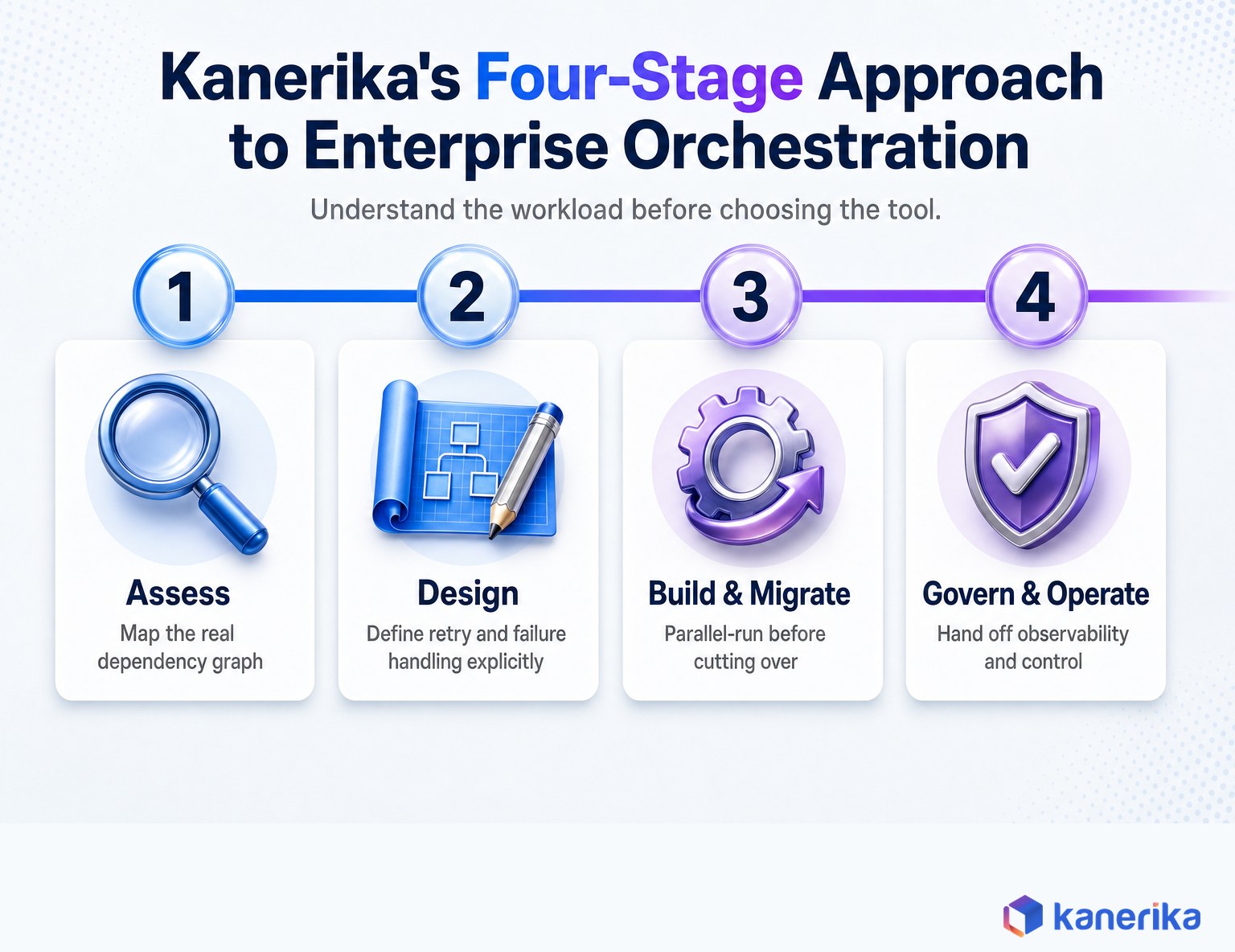
Govern and operate. Post-migration, Kanerika sets up the observability, RBAC, and lineage tracking that turns an orchestration platform into something the client’s own team can operate independently, rather than something that only works while a consultant is still in the room.
The pitfall Kanerika’s teams watch for most closely is treating orchestration as a scheduling problem rather than a reliability problem. A tool that runs tasks on time but has no real retry design, no idempotency guarantees, and no meaningful alerting is a scheduler with extra steps, not production-grade orchestration. That gap is exactly what separates the tools compared earlier in this guide from the reliability semantics covered in the sections above.
Common Mistakes to Avoid When Adopting Workflow Orchestration Tools
Most orchestration failures trace back to a handful of repeatable mistakes rather than an exotic edge case. The list below is drawn from the migration and adoption patterns Kanerika sees most often, and every one of them is avoidable once a team knows to look for it.
- Choosing a category, not a tool, based on feature count. A long integrations list doesn’t fix a workload that needs durable execution instead of a DAG scheduler.
- Treating retries as automatic safety. A retry on a non-idempotent task can cause a worse incident than the original failure.
- Skipping the parallel-run step during migration. Cutting over before comparing outputs is how edge cases turn into production incidents.
- Letting sensors poll indefinitely. A forgotten sensor can quietly consume scheduler capacity long after the condition it checks stopped mattering.
- Ignoring scheduler metadata growth. Thousands of mapped tasks or frequent schedules can degrade a scheduler’s own database well before anyone notices.
- Building one orchestrator to do everything. Forcing a business-process workflow through a DAG scheduler, or a data pipeline through a BPMN engine, usually costs more than running two purpose-fit tools.
None of these mistakes are unique to a specific tool or vendor — they show up in Airflow migrations just as often as Camunda or Temporal rollouts. Catching them at the design stage, before the first production workload depends on the orchestrator, is far cheaper than fixing them after an incident.
Wrapping Up
Workflow orchestration tools are not interchangeable. Data-pipeline orchestrators, business-process engines, durable-execution platforms, and cloud-native services each solve a different failure model, and the fastest way to a bad decision is picking based on feature count instead of category. Start by naming the single hardest workload your team runs today, match it to one of the four categories, then evaluate specific tools against the reliability semantics that actually matter in production: idempotency, retry design, and backfills. Kanerika’s teams apply this same assess-first approach on every orchestration engagement, and it consistently outperforms starting with a tool demo.
Frequently Asked Questions
What is the difference between workflow orchestration and workflow automation?
Automation performs a single action, like sending an email or running a script. Workflow orchestration coordinates many automated actions as one stateful process, tracking dependencies, state, and what happens when one of those actions fails. An orchestration tool typically sits above several automated steps and decides when each one runs.
Is Apache Airflow still the best workflow orchestration tool in 2026?
Airflow remains the most widely adopted data-pipeline orchestrator, with a large provider ecosystem and dataset-aware scheduling. It is not universally “best” though: Dagster suits teams that want asset-level lineage built in, Prefect suits teams that want workflows to feel like plain Python, and neither Airflow nor those tools are the right fit for durable-execution or business-process workloads, where Temporal or Camunda fit better.
What is the difference between Airflow and Dagster?
Airflow is task-centric: it schedules and monitors a graph of tasks. Dagster is asset-centric: it models the datasets or outputs a pipeline produces and derives the required computation from what those assets need. In practice, Dagster’s model makes it easier to ask “which datasets are stale” and to manage partition-aware backfills, while Airflow’s larger ecosystem gives it broader pre-built integrations.
Can Databricks or Snowflake replace a dedicated orchestration tool?
For workloads that stay entirely inside one platform, yes: Databricks Lakeflow Jobs and Snowflake Tasks both handle dependency-aware scheduling, retries, and monitoring natively. Once workflows need to coordinate across platforms, such as triggering a Snowflake task from a Databricks job or a business approval, a separate orchestrator like Airflow, Dagster, or Prefect typically becomes the control plane instead.
What is a DAG in workflow orchestration?
A DAG, or directed acyclic graph, represents tasks as nodes and their dependencies as edges, with no cycles allowed. It makes explicit which tasks can run in parallel and which downstream tasks are blocked if an upstream task fails. Most data-pipeline orchestrators, including Airflow, Dagster, and Prefect, use some form of DAG to model a pipeline’s execution order.
Is Temporal a workflow orchestration tool?
Yes, but in a different category from Airflow or Dagster. Temporal is a durable-execution platform: it persists application workflow state so a distributed service can survive a crash or restart and resume exactly where it left off. It is built for long-running application code, such as payment or provisioning workflows, rather than scheduled batch data pipelines.
How much does workflow orchestration software cost?
Open-source tools like Airflow, Dagster, and Prefect have no license fee, but self-hosting still costs worker compute, a metadata database, and the engineering time to keep the scheduler healthy. Managed versions and cloud-native services like AWS Step Functions bill by usage. Across any option, the biggest cost driver is usually operational: on-call coverage and the time spent debugging retries and backfills, not the license line item.
What is the easiest workflow orchestration tool to learn?
For teams already writing Python, Prefect and Dagster both have a gentler learning curve than Airflow’s DAG-file conventions, since workflows are defined closer to ordinary functions. For teams that need business stakeholders to read the workflow definition rather than engineers only, Camunda’s BPMN diagrams are often easier to onboard non-technical reviewers onto than any code-first tool.














