TL;DR
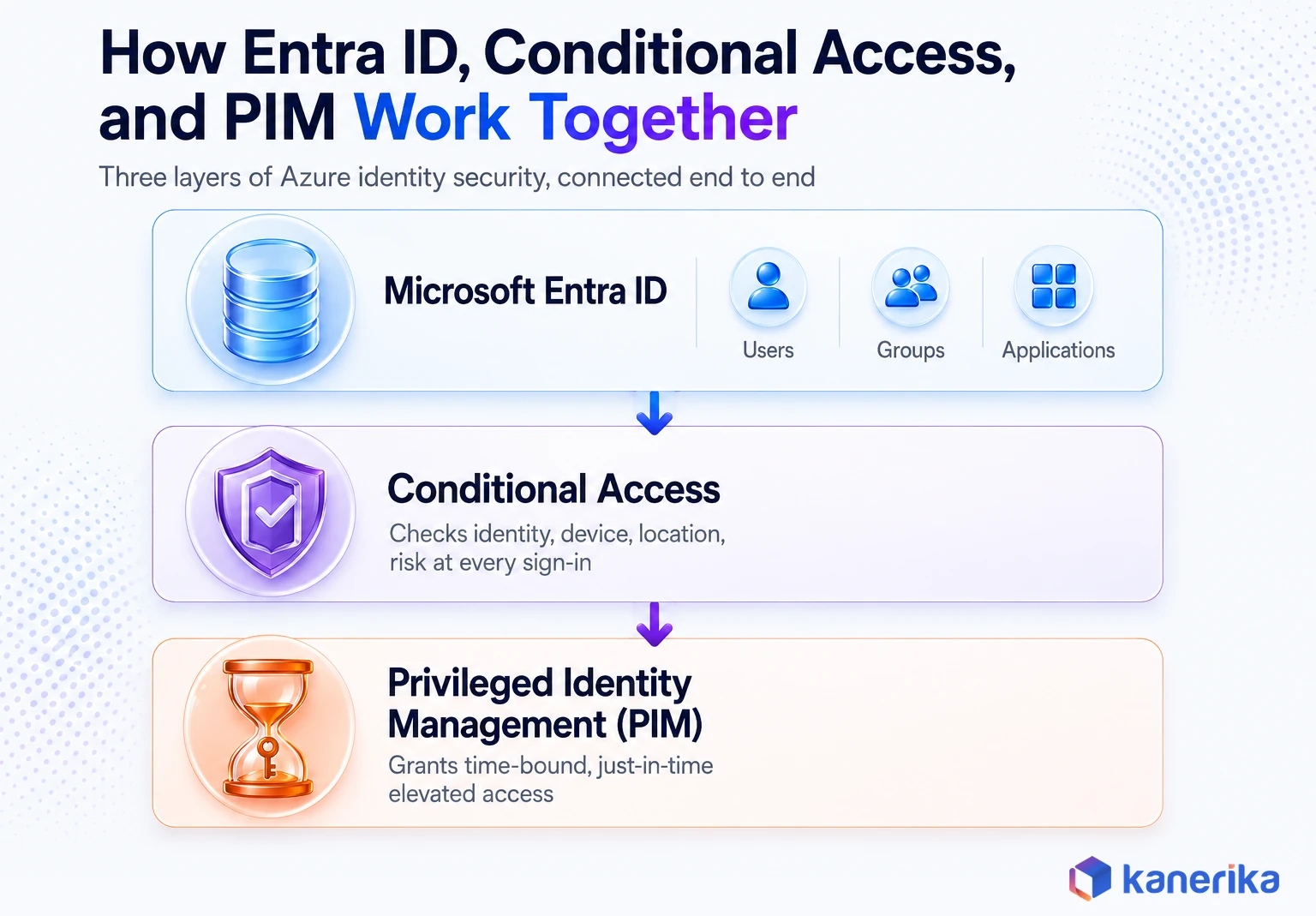
Azure identity management is a set of connected controls. It combines Microsoft Entra ID capabilities, Conditional Access policies, Privileged Identity Management, managed identities, and RBAC role assignments to control who and what can access Azure resources. Microsoft Entra ID (the renamed Azure AD) is the directory and authentication layer every other control sits on top of.
Conditional Access enforces sign-in conditions. PIM removes standing admin access in favor of just-in-time elevation. Managed identities eliminate stored credentials for workloads, and RBAC scopes what an identity can actually do once it is in. Hybrid organizations extend this to on-premises Active Directory through Microsoft Entra Connect. Get the sequencing and governance layer wrong and every other Azure security control inherits the gap. This guide walks through how each piece works and how to configure them together as one governed system.
Key Takeaways
- Azure identity management is the combined system of Microsoft Entra ID, Conditional Access, Privileged Identity Management, managed identities, and Azure RBAC that controls who and what can access Azure resources.
- Enforcing multi-factor authentication blocks more than 99.2% of account compromise attacks, per Microsoft’s own identity security research, which is why Azure now mandates it across CLI, PowerShell, and API access.
- Privileged Identity Management replaces standing admin access with just-in-time eligible roles that require activation, MFA, and often approval, and it requires Microsoft Entra ID P2 licensing.
- Managed identities eliminate stored credentials for Azure-to-Azure authentication, and Microsoft now recommends migrating user-based service accounts to them under mandatory MFA enforcement.
- Azure RBAC should assign roles to groups at the resource group, subscription, or management group level, not to individual users on individual resources, to keep the model auditable as the tenant grows.
- Kanerika, one of the earliest Microsoft Purview implementors globally, builds Azure identity governance programs on the same Entra ID foundation that underpins a zero-breach, 100%-compliance outcome in its own banking client work.
Why 99.2% Is the Number Every Azure Admin Should Know
Microsoft’s own research puts a hard number on the single biggest lever in cloud security: enforcing multi-factor authentication blocks more than 99.2% of account compromise attacks.
That statistic comes directly from Microsoft’s identity management and access control best practices documentation, and it explains why Microsoft made MFA mandatory rather than optional. Starting October 1, 2025, Azure began enforcing Phase 2 of mandatory MFA. Specifically, that phase covers the CLI, PowerShell, the Azure mobile app, infrastructure-as-code tools, and REST API endpoints for create, update, or delete operations.
That single control sits inside a much larger system. Azure identity management is not one setting you toggle once. It is a stack of interlocking services: Microsoft Entra ID, Conditional Access, Privileged Identity Management, managed identities, and Azure role-based access control. Together, they decide who can touch what, when, and under which conditions. That platform-specific mechanics is distinct from the broader discipline of AI in identity and access management. That companion guide looks at how machine learning augments IAM programs across any platform, not just Azure.
Get the sequencing wrong, and every other control you layer on top of Azure inherits the gap. This guide breaks down how each piece actually works, how enterprises configure them together, and where most identity programs quietly fall short.
What Is Azure Identity Management?
Azure identity management is the collection of native Azure and Microsoft Entra services that authenticate users and workloads, authorize what they can do, and govern that access over time. Specifically, it covers four distinct jobs that are easy to conflate but function very differently.
The Four Jobs Inside Azure Identity Management
In short, authentication confirms who or what is signing in. Authorization, delivered through Azure RBAC, decides what that identity can do once it is inside. Privileged access management, through PIM, controls when elevated permissions are active rather than leaving them switched on permanently. Finally, governance ties it together with access reviews, audit logs, and a measurable security posture score.
Unlike a general identity and access management program, Azure identity management is specific to how Microsoft built the platform. This is not a vendor-neutral IAM framework applied to a cloud. Instead, it combines Microsoft Entra ID’s directory model, Azure’s resource hierarchy, and Azure-native controls like Conditional Access and PIM, working as one system. It also underpins broader data access governance programs. Every policy that decides who can read or write a dataset, after all, ultimately traces back to an Entra ID identity and its RBAC role.
| Layer | Question it answers | Azure service |
|---|
| Authentication | Who or what is signing in? | Microsoft Entra ID |
| Conditional enforcement | Under what conditions is access allowed? | Conditional Access |
| Authorization | What can this identity actually do? | Azure RBAC |
| Privileged access | When is elevated access active? | Privileged Identity Management |
| Workload identity | How do apps and services authenticate without secrets? | Managed identities |
| Hybrid sync | How does on-prem identity extend to the cloud? | Microsoft Entra Connect |
Organizations that treat these as five separate projects end up with gaps between them. The strongest Azure identity programs design all five as one governed system from the start, which is the approach the rest of this guide follows.
Kanerika Service
Azure Cloud Solutions from Kanerika
Kanerika designs and governs Azure environments end to end, from Entra ID tenant architecture to RBAC, Conditional Access, and PIM rollout.
Explore Azure Cloud Solutions
Microsoft Entra ID: The Foundation of Azure Identity
Every other control in this guide sits on top of Microsoft Entra ID. It is Microsoft’s cloud-based directory and identity service. As of the 2023 rebrand, it replaced the Azure Active Directory name, though the underlying tenant, user objects, and APIs are unchanged for existing deployments.
Entra ID combines three things in a single service. Core directory services handle users and groups. Application access management covers thousands of SaaS and custom apps. In addition, identity protection scores risk on every sign-in. Microsoft’s own architecture guidance treats identity as the primary security perimeter, a deliberate shift away from network-based defense as the main control point.
Core Entra ID Objects You Will Configure
- Tenant. The dedicated, isolated instance of Entra ID that represents your organization. Most enterprises run a single production tenant, with separate tenants reserved for sandboxes or acquisitions.
- Users and groups. Human identities and the security or Microsoft 365 groups used to assign access at scale instead of one user at a time.
- App registrations and service principals. The identity objects that let custom applications authenticate against Entra ID and call Azure APIs.
- Guest users. External partner or contractor accounts brought in through Microsoft Entra B2B, kept logically separate from employee accounts.
Entra ID Licensing Tiers
Licensing determines which of the controls in this guide you can actually turn on. Getting this wrong is one of the most common reasons a Conditional Access or PIM rollout stalls halfway through a pilot.
| Tier | What it unlocks |
|---|
| Free | Core directory, SSO for a limited app count, basic reports |
| Microsoft Entra ID P1 | Conditional Access, hybrid identity, self-service password reset, Identity Secure Score |
| Microsoft Entra ID P2 | Everything in P1 plus Privileged Identity Management, Identity Protection risk-based policies, and access reviews |
PIM specifically requires P2 licensing. In fact, teams that plan a PIM rollout without first confirming license coverage across every admin account are the most common source of stalled just-in-time access projects. Licensing complexity is not unique to Entra ID either; Kanerika has broken down the same problem for Microsoft Purview licensing, where governance capabilities are similarly gated by tier.
Checklist
Microsoft Azure Readiness Checklist
A practical checklist for scoping Azure identity, governance, and platform readiness before you configure Conditional Access, PIM, or RBAC at scale.
Get the Checklist →
Conditional Access Policies
Conditional Access is Entra ID’s real-time decision engine. Every sign-in attempt is evaluated against signals: who the user is, what device they are on, where they are connecting from, and which application they want. The policy engine then allows, blocks, or challenges the request before access is granted.
Focusing only on who is allowed to access a resource is no longer sufficient. Conditional Access lets you evaluate how someone is trying to access it before making that decision, which is exactly the shift Microsoft’s identity best-practice guidance recommends.
Four Conditional Access Policies Most Enterprises Start With
- Require MFA for all users. The baseline policy that captures most of that 99.2% compromise-blocking effect.
- Block legacy authentication. Older protocols like POP, IMAP, and legacy SMTP do not support modern authentication challenges. As a result, attackers exploit them for password spray attacks daily.
- Require compliant or hybrid-joined devices. Applied to sensitive applications and privileged accounts, this confirms the device meets your compliance baseline before granting access, not just the user’s credentials.
- Restrict external and guest access. Guest users and partner accounts get narrower Conditional Access treatment than employees, often paired with time-boxed access reviews.
Risk-based Conditional Access policies go a step further. They evaluate Microsoft Entra ID Protection’s sign-in and user risk scores in real time, automatically requiring step-up authentication or blocking a session when risk crosses a threshold. Notably, that capability requires Entra ID P2 licensing. The same risk-scoring discipline underpins broader insider risk management programs, where anomalous sign-in behavior is one input among several used to flag risky activity before it becomes an incident. That real-time, machine-learned risk scoring is a concrete example of AI access control in production, not just a buzzword layered on top of static RBAC rules.
Privileged Identity Management (PIM) for Azure
Permanent administrator access is one of the highest-value targets in any Azure tenant. Indeed, an account with a standing Owner or Global Administrator role is a target every day of the year, whether anyone is actively using those privileges or not.
Microsoft Entra Privileged Identity Management removes that standing exposure. Instead of a role being always active, PIM makes it eligible. A user must explicitly activate it, pass an MFA challenge, and in many configurations wait for an approver, before the permission exists for a limited window.
Why Permanent Admin Access Is a Security Risk
The contrast is easiest to see side by side. Without PIM, an administrator is assigned the Owner role once and holds that access for the full 365 days until someone remembers to revoke it. With PIM, the same administrator holds an eligible assignment instead. They request activation when they need it and clear MFA and approval. In particular, they receive the permission for a defined duration, often one to eight hours, before it expires automatically.
Microsoft’s security planning guidance for hybrid and cloud deployments lists turning on PIM as one of the first steps in any roadmap to secure privileged access. In practice, that single step shrinks the window an attacker or a mistake can exploit.
Azure PIM Assignment Types
| Assignment type | How access works | Best fit |
|---|
| Active | Access is on immediately, no activation step | Emergency access accounts, narrowly scoped operational roles |
| Eligible | User must activate, typically with MFA and a business justification | Nearly every admin role, this is the recommended default |
In addition, PIM also adds notification emails whenever someone is added to a highly privileged role. Consequently, this gives security teams an early warning signal instead of discovering the change during a quarterly audit. Pairing PIM with defined access reviews, covered later in this guide, closes the loop on roles that were activated once and never revisited.
Managed Identities in Azure
Every credential stored in application code, a configuration file, or a CI/CD pipeline is a liability. Managed identities, in short, remove that liability entirely for Azure-to-Azure authentication. A resource gets its own automatically managed identity in Entra ID, with no secret for a developer to store, rotate, or leak.
System-Assigned vs. User-Assigned Identities
In short, there are two flavors, and choosing the wrong one is a common design mistake.
| Type | Lifecycle | Typical use case |
|---|
| System-assigned | Tied 1:1 to the resource, deleted automatically when the resource is deleted | A single VM or App Service that needs to reach one other resource |
| User-assigned | Created as a standalone Azure resource, can be assigned to many resources, persists independently | A fleet of VMs or Automation runbooks that should share one identity for auditing |
In practice, common production patterns include a few recurring examples. A virtual machine authenticates to Key Vault to pull a database connection string. An App Service authenticates to Azure SQL Database without embedded credentials. Automation runbooks authenticate to Azure Storage the same way. Teams that provision these resources through infrastructure as code should assign the managed identity in the same template.
Kanerika’s Azure Bicep guide covers how to define that identity and its role assignment declaratively. Teams standardized on Terraform instead can apply the same declarative pattern using Kanerika’s Azure Terraform guide. Mandatory MFA enforcement made this pattern more urgent, not less. Microsoft’s guidance explicitly recommends migrating user-based service accounts to managed identities. Workload identities are designed for automation and are exempt from the interactive MFA requirement that now applies to human sign-ins.
Datasheet
Elevate Data Governance, Compliance, and Security
See how Kanerika helps enterprises unify identity-driven access governance, compliance, and security controls across their Microsoft data estate.
View the Datasheet →
Azure RBAC: Role-Based Access Control
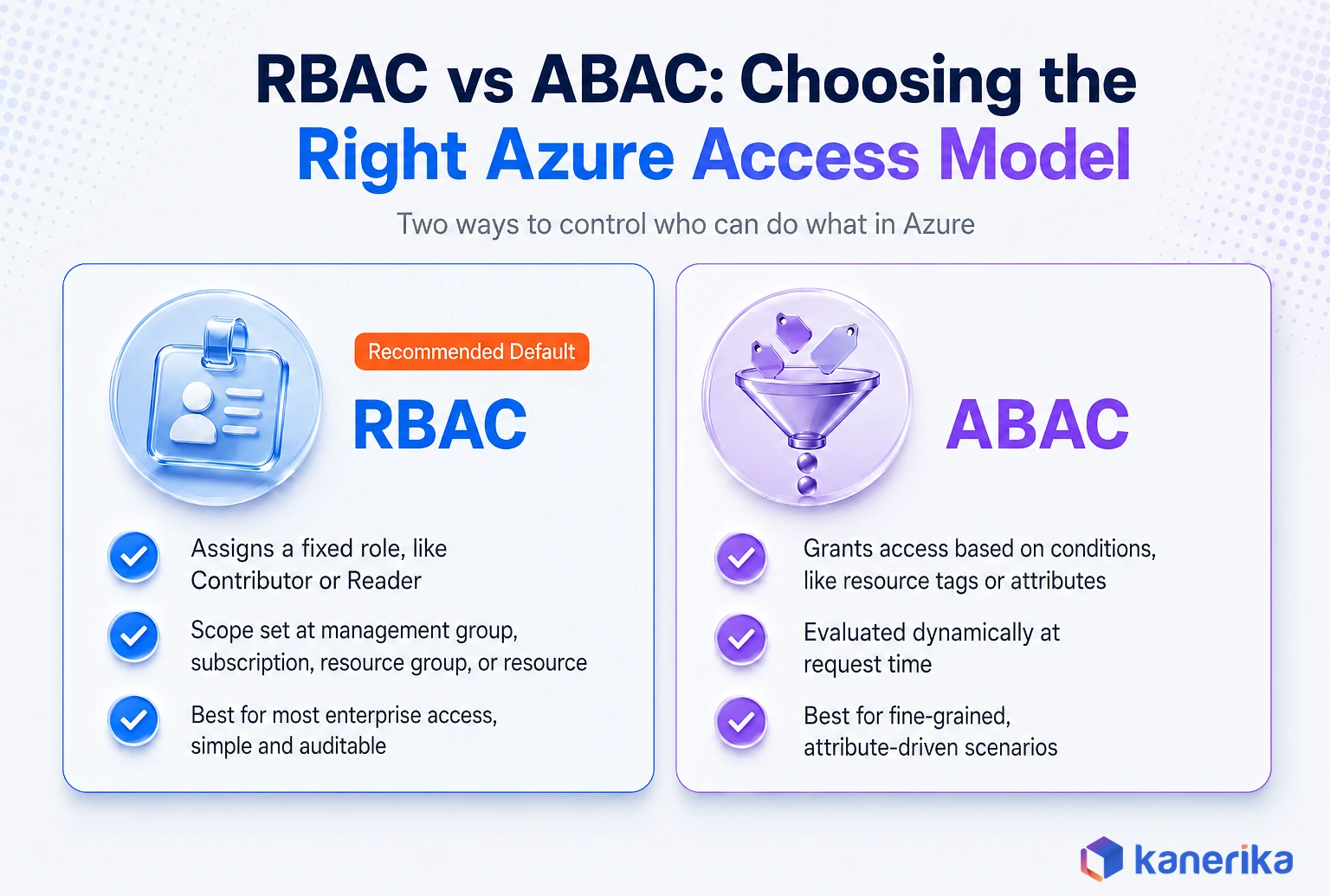
Azure RBAC decides what an authenticated identity can actually do, at what scope. Essentially, it is the authorization layer that sits underneath every management group, subscription, resource group, and individual resource in your tenant.
The core design principle, in other words, is least privilege: grant only the access needed to perform a job, at the narrowest scope that job requires. Microsoft’s Cloud Adoption Framework identity design guidance treats RBAC as one of the concepts shared across platform and application landing zones. As a result, getting scope wrong at the platform level compounds across every application built on top of it. For instance, Kanerika’s Azure landing zone guide walks through that platform-level design in full, including how identity, networking, and policy come together at the management group level.
Built-In Roles vs Custom Roles
By default, Azure ships with built-in roles like Owner, Contributor, Reader, and hundreds of resource-specific roles such as Security Reader and Storage Blob Data Contributor. Built-in roles cover the overwhelming majority of real scenarios and, therefore, should be the default. Custom roles, however, exist for the genuine exceptions: a narrowly defined set of actions that, in other words, no built-in role matches. They proliferate quickly into unmanageable complexity if used as the default instead of the exception.
Role Assignment Scope, From Broadest to Narrowest
- Management group. Applies across multiple subscriptions, used for enterprise-wide roles like a central security team’s read access.
- Subscription. Applies to every resource group and resource inside one subscription.
- Resource group. The most common assignment scope for application teams, matching how most workloads are organized.
- Individual resource. The narrowest scope, reserved for cases that genuinely need one-off access to a single resource.
Avoid resource-specific and user-specific permissions as a habit. Assigning access to groups instead of individual users, and to management groups or resource groups instead of individual resources, keeps the model auditable as the tenant grows. Undocumented resource-level exceptions are exactly what accumulates into the “legacy configuration nobody wants to touch” pattern Microsoft explicitly warns about.
Hybrid Identity: Microsoft Entra Connect
Few enterprises run cloud-only. In fact, most still have an on-premises Active Directory Domain Services environment holding years of accumulated group policy, application dependencies, and organizational structure. Microsoft Entra Connect (the current name for what was Azure AD Connect) is the sync engine that bridges the two. Furthermore, it gives users one identity for both on-prem and cloud resources.
Three Ways to Synchronize Identity
| Method | How it works | Consideration |
|---|
| Password hash synchronization | A hash of the on-prem password hash is synced to Entra ID | Simplest to operate, also feeds Identity Protection’s leaked-credential detection |
| Pass-through authentication | Sign-ins are validated directly against on-prem AD in real time via a lightweight agent | Keeps passwords from ever leaving the on-prem boundary, adds an on-prem availability dependency |
| Federation (AD FS) | A separate federation service issues the authentication token | Highest operational overhead, usually reserved for specific compliance or smart-card requirements |
One configuration detail causes more incidents than any other in hybrid identity: the default Entra Connect sync configuration only excludes the built-in Administrator account from synchronization. It does not automatically exclude Domain Admins, Enterprise Admins, or other highly privileged on-prem groups. Without explicit organizational-unit or attribute-based filtering, a compromised cloud account can become the pivot point back into on-premises infrastructure, turning a cloud incident into a full domain compromise.
The same discipline of scoping exactly which data and accounts synchronize applies to Microsoft Purview data catalog deployments. Moreover, an over-broad scan scope there creates a parallel governance headache. Even so, organizations that use federation should enable password hash sync as a backup path. It keeps Identity Protection’s leaked-credential detection working, and it gives you a fallback if the on-prem federation service goes down.
Case Study
Advanced Microsoft Purview Governance Implementation
Kanerika designed an advanced Microsoft Purview implementation strategy that extended identity-driven access governance across a complex enterprise data estate.
Read the Case Study →
Governance, Monitoring, and Access Reviews
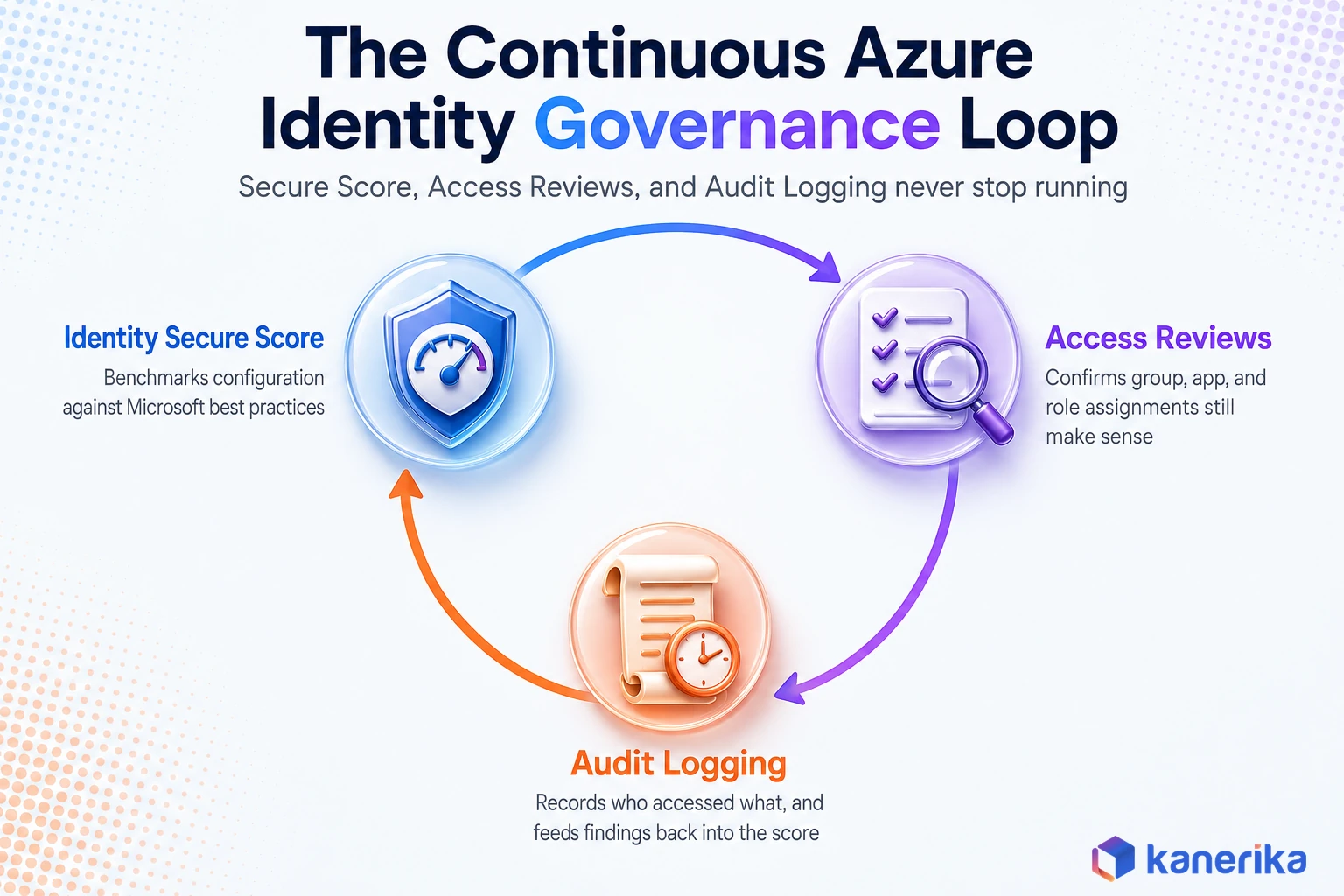
Configuring the controls above once is the easy part. In reality, Azure identity management is a program you operate continuously, not a project you finish.
Identity Secure Score
In essence, Identity Secure Score is Microsoft’s numerical measure of how closely your tenant follows recommended identity security controls, benchmarked against your own trend over time and against comparable organizations. Treat it as a standing agenda item for a monthly or quarterly security review, not a one-time number to check.
Access Reviews and Certification Campaigns
Access reviews, available with Entra ID P2, let you periodically confirm, in other words, that group memberships, application access, and PIM-eligible role assignments still make sense. Run these on a quarterly cadence for privileged roles and a longer cadence for standard application access. That cadence is what actually catches privilege creep and orphaned accounts left behind by role changes or departures, rather than relying on someone remembering to clean up manually.
Sign-In and Audit Logging
Entra ID’s sign-in logs and audit logs are the record of who accessed what, from where, and what changed in the directory itself. Feed these into a SIEM or Microsoft Sentinel rather than leaving them in the default 30-day retention window. In short, that step is what turns them into a real detection capability instead of a compliance checkbox. That same logging discipline feeds directly into a broader AI governance, risk, and compliance program, since identity audit trails are a required input for most AI usage audits.
Common Azure Identity Management Mistakes to Avoid
- Treating Conditional Access as a one-time project. Policies need to evolve as new SaaS apps, device types, and risk signals appear, not stay frozen at whatever was configured during rollout.
- Leaving break-glass accounts unmonitored. Emergency access accounts are necessary. However, without dedicated alerting on their use, they become an unmonitored backdoor rather than a safety net. Indeed, that is the same pattern flagged in Kanerika’s agentic AI vulnerability assessment work on unmonitored high-privilege access paths.
- Skipping OU-based filtering in Entra Connect. Synchronizing high-privilege on-prem accounts to the cloud without exclusion rules is the single most common hybrid identity misconfiguration.
- Defaulting to standing access instead of PIM eligibility. In fact, every admin role assigned as Active instead of Eligible is a target sitting active 365 days a year for no operational reason.
- Assigning permissions to individual resources instead of groups and scopes. As a result, tenants end up with hundreds of one-off role assignments nobody can safely remove.
How Kanerika Helps Enterprises Build Governed Azure Identity Programs
Kanerika is one of the earliest Microsoft Purview implementors globally and, notably, holds Microsoft Advanced Specializations in both Azure Data & Analytics and Data Warehouse Migration to Microsoft Azure. Identity governance sits underneath nearly every engagement we run on Azure. Purview’s access policies, Fabric workspace roles, and Azure resource permissions all inherit from the same Entra ID foundation this guide covers.
Talk to Kanerika
Ready to Harden Your Azure Identity Setup?
Kanerika’s Azure architects can audit your current Entra ID tenant, Conditional Access coverage, and PIM readiness in a short working session.
Schedule a Demo →
Our Four-Stage Delivery Approach
Our approach to Azure identity work follows four stages. We start with an assessment of the current Entra ID tenant, mapping standing admin assignments, Conditional Access coverage gaps, and hybrid sync exposure. From there we design a target model. Specifically, this typically means moving every eligible admin role into PIM and closing legacy authentication paths.
It also means right-sizing RBAC scope, from resource-level exceptions back to group-based assignments at the resource group or subscription level. Implementation follows in controlled waves rather than a single cutover. We close every engagement with a governance layer: access reviews, Identity Secure Score tracking, and documented ownership, so the improvement holds after our team leaves.
That governance discipline is the same one behind our Microsoft Purview implementation for a leading bank. There, the identity and access controls underpinning the data governance program contributed to a zero-breach record and 100% compliance outcome for the client. We have carried the same identity-first discipline into Azure-to-Fabric migrations. For instance, re-mapping RBAC and workspace roles correctly during the cutover is what prevents an access outage on go-live day.
Kanerika’s Azure Cloud Solutions practice, Data Governance services, and AI Governance services teams have delivered this pattern across banking, manufacturing, and technology clients. Our engineers, in particular, watch for the same recurring pitfalls: unmonitored break-glass accounts, unfiltered Entra Connect sync of privileged groups, and RBAC assignments scoped to individual resources instead of groups. Organizations weighing a broader platform migration alongside identity hardening can also use Kanerika’s Migration ROI Calculator to scope the combined effort.
Step-by-Step: How to Set Up Azure Identity Management
Most enterprises inherit an Azure tenant that grew organically rather than one designed as a governed identity system from day one. The sequence below is the order Kanerika’s engineers actually follow when standing up or hardening an Azure identity program, because each step depends on the one before it.
On-Demand Webinar
Data Security Risks in AI: How Microsoft Purview Protects You
An on-demand session on securing enterprise data and AI workloads with Microsoft Purview, built on the same Entra ID identity foundation this guide covers.
Watch the Webinar →
The Seven-Step Rollout Sequence
- Establish a single authoritative Entra ID tenant. Consolidate identity into one directory before configuring anything else. Consequently, multiple tenants for the same organization multiply every policy you have to maintain.
- Connect hybrid identity with filtering in place. If on-premises Active Directory exists, deploy Microsoft Entra Connect with organizational-unit or attribute-based filtering configured before the first sync, not after. Retrofitting filtering onto an already-synced tenant is far riskier than starting clean.
- Turn on Conditional Access with the four baseline policies. Require MFA for all users, block legacy authentication, require compliant devices for sensitive apps, and restrict external access. Pilot on a small group before tenant-wide enforcement.
- Migrate standing admin roles into PIM eligible assignments. Inventory every account with a permanently active privileged role, confirm Entra ID P2 licensing covers them, and convert active assignments to eligible ones with MFA and approval requirements.
- Replace embedded credentials with managed identities. Audit application code, automation scripts, and CI/CD pipelines for hardcoded secrets or connection strings, and migrate each one to a system-assigned or user-assigned managed identity.
- Rebuild RBAC assignments around groups and scope. Replace individual user-to-resource assignments with group-based role assignments at the resource group, subscription, or management group level.
- Schedule recurring access reviews and Secure Score tracking. Set a quarterly cadence for privileged role reviews and add Identity Secure Score as a standing line item in your security operating rhythm.
In practice, organizations that try to do all seven at once, especially PIM migration and RBAC cleanup simultaneously, tend to stall. Sequencing beats attempting everything in parallel, because each step narrows the blast radius the next one has to work inside.
Securing Non-Human and Automation Identities
Human user accounts get most of the attention in identity conversations. Even so, a modern Azure tenant typically has more non-human identities, service principals, managed identities, and automation accounts, than actual employees. Each one is a credential-bearing identity with real permissions, and each one needs the same governance discipline as a human account.
Service principals created for CI/CD pipelines are a common blind spot. Unlike managed identities, a service principal can be assigned a client secret or certificate. A developer sometimes copies that secret into a pipeline configuration file, which reintroduces exactly the credential-storage risk managed identities were built to eliminate. Wherever a workload runs inside Azure, a managed identity should be the default. By contrast, a service principal with a stored secret should be the exception, reserved for scenarios that genuinely require cross-tenant or external authentication.
Automation runbooks, Logic Apps, and Azure Functions all support managed identities directly. In turn, this means the migration described in the setup checklist above usually touches more of the estate than teams initially expect. This is also where identity and IT operations automation intersect. Kanerika’s guide to generative AI for IT operations covers how automated remediation workflows should authenticate using the same managed-identity pattern rather than a stored service account. Treat an inventory of non-human identities as a required input to any Azure identity management program, not an afterthought once the human side is done.
Frequently Asked Questions
What is Azure identity management?
Azure identity management is the set of Microsoft Entra ID, Conditional Access, Privileged Identity Management, managed identity, and Azure RBAC controls that authenticate and authorize access to Azure resources. It covers human users, applications, and automated workloads, and it governs both cloud-only and hybrid environments connected to on-premises Active Directory.
What is the difference between Azure AD and Microsoft Entra ID?
Microsoft Entra ID is the current name for what was previously called Azure Active Directory. Microsoft rebranded the service in 2023 as part of a broader Entra product family, but the underlying tenant structure, user objects, and APIs for existing deployments are unchanged. Documentation and product menus now use Entra ID, though many admins still refer to it as Azure AD out of habit.
What is managed identity in Azure?
A managed identity is an automatically managed identity in Microsoft Entra ID that an Azure resource, such as a virtual machine or App Service, uses to authenticate to other Azure services without storing credentials in code or configuration. System-assigned managed identities are tied to a single resource’s lifecycle, while user-assigned managed identities exist as standalone resources that can be shared across multiple services.
How do you create a user-assigned managed identity in Azure?
Create a user-assigned managed identity as its own Azure resource, either through the Azure portal by searching for Managed Identities and selecting Create, or via CLI with az identity create. Once created, assign it to one or more resources, such as a virtual machine or App Service, and then grant it the appropriate Azure RBAC role on the target resource it needs to access.
What is the difference between Azure PIM and Azure RBAC?
Azure RBAC defines what an identity can do and at what scope, through role assignments like Owner, Contributor, or a custom role. Privileged Identity Management controls when that access is actually active. PIM sits on top of RBAC roles, converting a standing Active assignment into a time-boxed Eligible one that requires activation, making the two systems complementary rather than competing.
Does Privileged Identity Management require a specific license?
Yes. Microsoft Entra Privileged Identity Management requires Microsoft Entra ID P2 licensing for every user who is either a PIM administrator or has an eligible role assignment managed through PIM. Organizations planning a PIM rollout should confirm P2 coverage across all admin accounts before starting the migration, since gaps in licensing are a common reason rollouts stall.
What is Conditional Access in Azure?
Conditional Access is Microsoft Entra ID’s policy engine that evaluates signals such as user identity, device compliance, location, and application sensitivity at every sign-in, then allows, blocks, or challenges the request accordingly. It requires Microsoft Entra ID P1 licensing and is the primary mechanism for enforcing MFA, blocking legacy authentication, and restricting access from unmanaged devices.
What certifications validate Azure identity management skills?
Microsoft’s SC-300 exam, Microsoft Identity and Access Administrator, is the primary certification focused specifically on implementing and managing Microsoft Entra ID, Conditional Access, PIM, and identity governance. It is aimed at identity administrators responsible for configuring and operating these controls day to day, distinct from broader security certifications that touch identity as one topic among several.














