TL;DR
AI in quality assurance is ready in 2026 for test drafting, visual checks, bug triage, data checks and vision inspection on stable lines. Self-healing tests, risk-based regression and synthetic test data still need a small, measured pilot. The term covers three jobs: testing software, checking products and data, and testing AI itself. Nearly 90% of organizations try generative AI in quality engineering, but only 15% use it across the enterprise. A person still approves AI-written tests, every self-heal and each release. Measure where you start, prove one use case, then scale it or stop.
Key Takeaways
- AI in quality assurance means using machine learning, generative AI and computer vision to find, predict and prevent defects.
- Test drafting, visual regression, bug triage, data quality checks and vision inspection on stable lines are ready for production with human review.
- Self-healing automation, risk-based regression and synthetic test data work best as measured pilots first.
- The World Quality Report 2025 found a 19% average productivity gain, but a third of organizations saw minimal gains.
- Baseline defect escape rate, regression cycle time and maintenance hours before any pilot, or the return cannot be proven.
- A named person approves AI-drafted tests, every self-heal and the release decision.
The Regression Suite Passed, Then Production Broke
Picture a release night at a mobility software company. Every regression test passes, so the dashboard turns green and the build ships at 9 p.m.
By morning, the support queue is filling with tickets from one vehicle model. Its telemetry sends sensor values in an order no test ever scripted, because nobody imagined that order. The scenario was simply never in the suite.
That gap is the honest case for AI in quality assurance. Scripted tests check what a team already imagined, while AI helps find the cases, data and signals nobody thought to write.
Why a Passing Test Suite Is Not the Same as Quality
Coverage tells you what a suite checks, but not what users will do. Many teams now ship weekly or even daily, and each release adds paths that manual test design struggles to keep up with.
The useful question for a QA leader is where AI earns its place, and where it still needs a person watching it.
This guide treats AI as a set of tools for QA work rather than a replacement for testers. First, it separates the three meanings of the term. Then it walks through eight use cases, showing for each one what works in production, what still needs a pilot and how to measure the return.
What Is AI in Quality Assurance?
AI in quality assurance is the use of machine learning, generative AI and computer vision to find, predict and prevent defects. It sits on top of an existing QA practice. It also leaves the test plan, the release criteria and their owners in place. For cameras on the factory floor, see machine vision AI.
The phrase covers three different jobs, so mixing them up confuses planning. When a test lead asks about AI, she usually means the first row below. A plant quality manager means the second, while a team shipping a chatbot needs the third.
| Meaning | What AI checks | Typical owner | Example |
|---|---|---|---|
| AI for software QA | Code, UI, APIs and regression suites | QA and engineering teams | Drafting test cases from user stories before a sprint |
| AI for product and data quality control | Physical parts and data pipelines | Plant quality and data engineering | Flagging a scratched part, or a schema change during a load |
| QA of AI systems | Model and agent output | ML, QA and risk teams | Checking a chatbot for hallucinated answers before launch |
This post focuses on the first two rows, that is, using AI to do quality work. Testing AI systems is a separate discipline, so it gets a short section near the end with links to deeper guides.
In regulated settings, AI also slots into a formal quality management system. There it becomes one more controlled process, with owners, records and change control just like any other.
Where AI Fits in the QA Lifecycle
AI can act at every stage of the software development life cycle, but it should not own every decision. The pattern that holds up is simple: AI drafts, ranks and flags, and then a person approves.
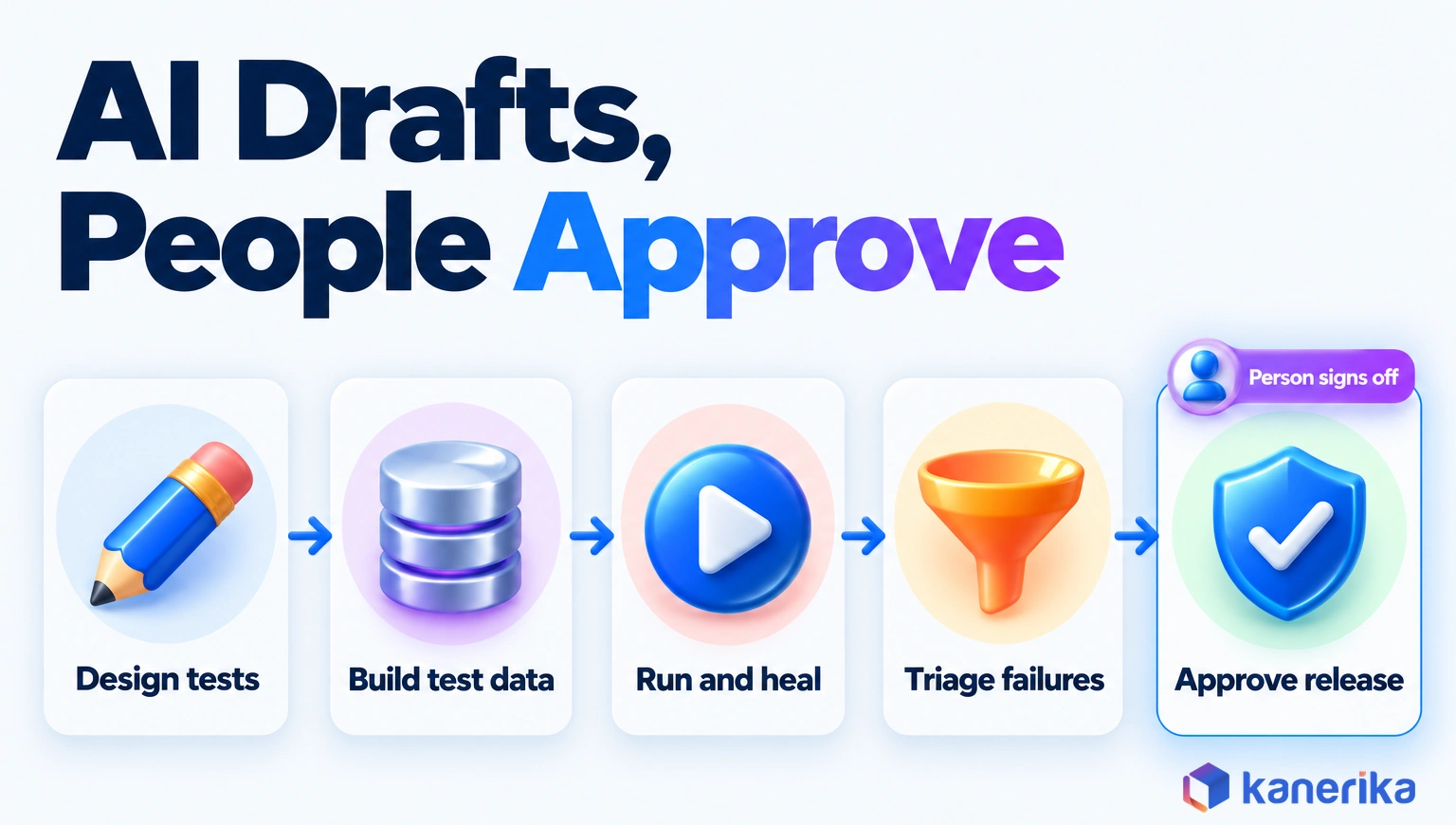
In test design, a language model turns acceptance criteria into draft cases. During data preparation, generators fill gaps that production data does not cover.
Execution and triage come next. Self-healing scripts repair broken locators, and clustering groups duplicate failures into one ticket. Finally, at release, a person reads the evidence and signs off.
That last gate matters most, because an AI tool can tell you a build looks healthy yet cannot carry the accountability for shipping it. For how testing connects to design, build and operations, see our guide to quality engineering across the product lifecycle.
Why AI in Quality Assurance Matters in 2026
Two pressures push QA leaders toward AI: the cost of escaped defects and a widening gap between pilots and real scale.
The Cost of Poor Quality
Poor quality is expensive, even before you count lost customers. The Consortium for Information and Software Quality estimated the US cost of poor software quality at $2.41 trillion or more in 2022. Accumulated technical debt also added roughly $1.52 trillion on top.
That 2022 report is still the latest edition CISQ has published. Much of the cost lands after release, when a defect also brings incident response, rework and support time. Catching defects earlier, while they are still cheap to fix, is the lever AI targets.
The Gap Between Pilots and Scale
Interest in AI is high, but scale is rare. Capgemini’s World Quality Report 2025 found that most organizations now pursue generative AI in quality engineering, yet very few have scaled it across the enterprise.
The rest sat in between. About 43% were experimenting, while 30% used it in limited use cases.
Productivity results were also uneven, ranging from solid gains to almost none. That spread is the real story, because results depend on which use case a team picks and whether it measured the starting point.
Kanerika Service
Product Engineering and QA Services
Kanerika’s QA and test engineering practice covers automated test coverage, performance and load testing and continuous quality validation, with AI added where a measured baseline shows it pays.
Explore Product Engineering| Source | Population | Finding |
|---|---|---|
| Capgemini World Quality Report 2025 (November 2025) | 2,000+ senior executives, 22 countries, 10 sectors | Nearly 90% pursue generative AI in quality engineering, but only 15% at enterprise scale |
| Capgemini World Quality Report 2025 | Same survey | 19% average productivity gain, while a third saw minimal gains |
| CISQ cost of poor software quality report (2022) | US software economy | Poor software quality cost at least $2.41 trillion |
| Applause Testing AI report (April 2026) | 1,000+ developers and QA professionals, 4,000+ consumers | 40% of users hit hallucinations, up from 32% in 2025 |
| Capgemini World Quality Report 2025 | Same survey | Top barriers: data privacy 67%, integration complexity 64%, hallucination and reliability 60% |
The barriers explain the gap. Half of the organizations in the Capgemini study lack AI and machine learning expertise, so a new tool alone does not fix it.
8 AI in Quality Assurance Use Cases That Work
The eight use cases below are the ones with real tools, real evidence and a clear first metric. Each one follows the same order: the problem, how AI helps, an example, the first KPI and the limit to respect.
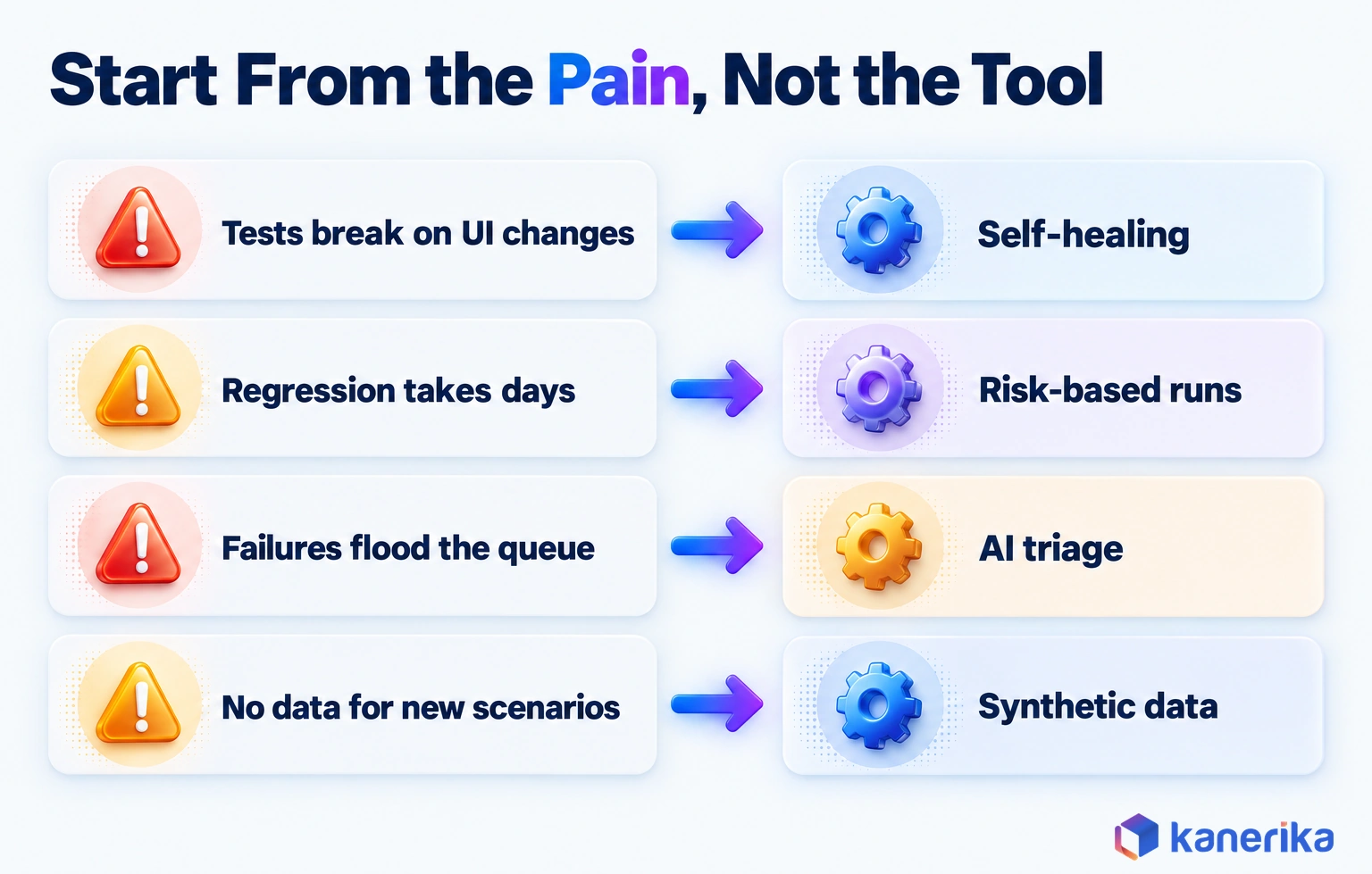
Six of them target software QA, while two target product and data quality. Start from the pain your team feels most, then let that pain pick the tool.
1. Test Case Generation From Requirements
Writing test cases by hand is slow, and coverage often depends on who wrote the story. Edge cases also get dropped when a sprint runs late.
Here a language model reads user stories and acceptance criteria, then drafts positive, negative and boundary cases. The World Quality Report 2025 names test case design and requirements refinement as the leading generative AI uses in quality engineering. GitHub Copilot’s documentation shows the same pattern in code, covering unit and integration tests, mock objects and boundary conditions.
Take a story that says a user can reset a password with an emailed link valid for 30 minutes. A model drafts the happy path, an expired link at minute 31, a reused link and a link sent to a deleted account. A tester then keeps three, fixes one and adds a locked-account case the model missed.
Here is the expired-link case after review, written as a Playwright test. The page path and messages are placeholders, so swap in your own app’s text before you run it.
import { test, expect } from '@playwright/test';

// AI-drafted from the story, approved by a tester
test('expired reset link is rejected', async ({ page }) => {
  await page.goto('/reset-password?token=expired-sample');
  await expect(page.getByText('This link has expired')).toBeVisible();
  await expect(page.getByRole('button', { name: 'Reset password' })).toHaveCount(0);
});
First KPI: review time per accepted test case. Limit: models can invent behavior the requirement never stated, so every draft needs a reviewer who knows the product.
2. Self-Healing Test Automation
UI tests break when a button’s ID changes, even though the feature still works. Engineers then spend hours fixing locators instead of finding bugs.
A self-healing tool notices the failed locator, finds the element by other attributes and updates the script. Playwright added test agents in version 1.56 (October 6, 2025): a planner, a generator and a healer. According to the Playwright release notes, the healer “executes the test suite and automatically repairs failing tests.”
| Situation | Without self-healing | With self-healing |
|---|---|---|
| Submit button ID renamed | Test fails, so an engineer fixes the locator | Script finds the button by label and role, then logs the change |
| Checkout steps reordered | Test fails and waits until someone rewrites it | Healer proposes a new flow, then waits for review |
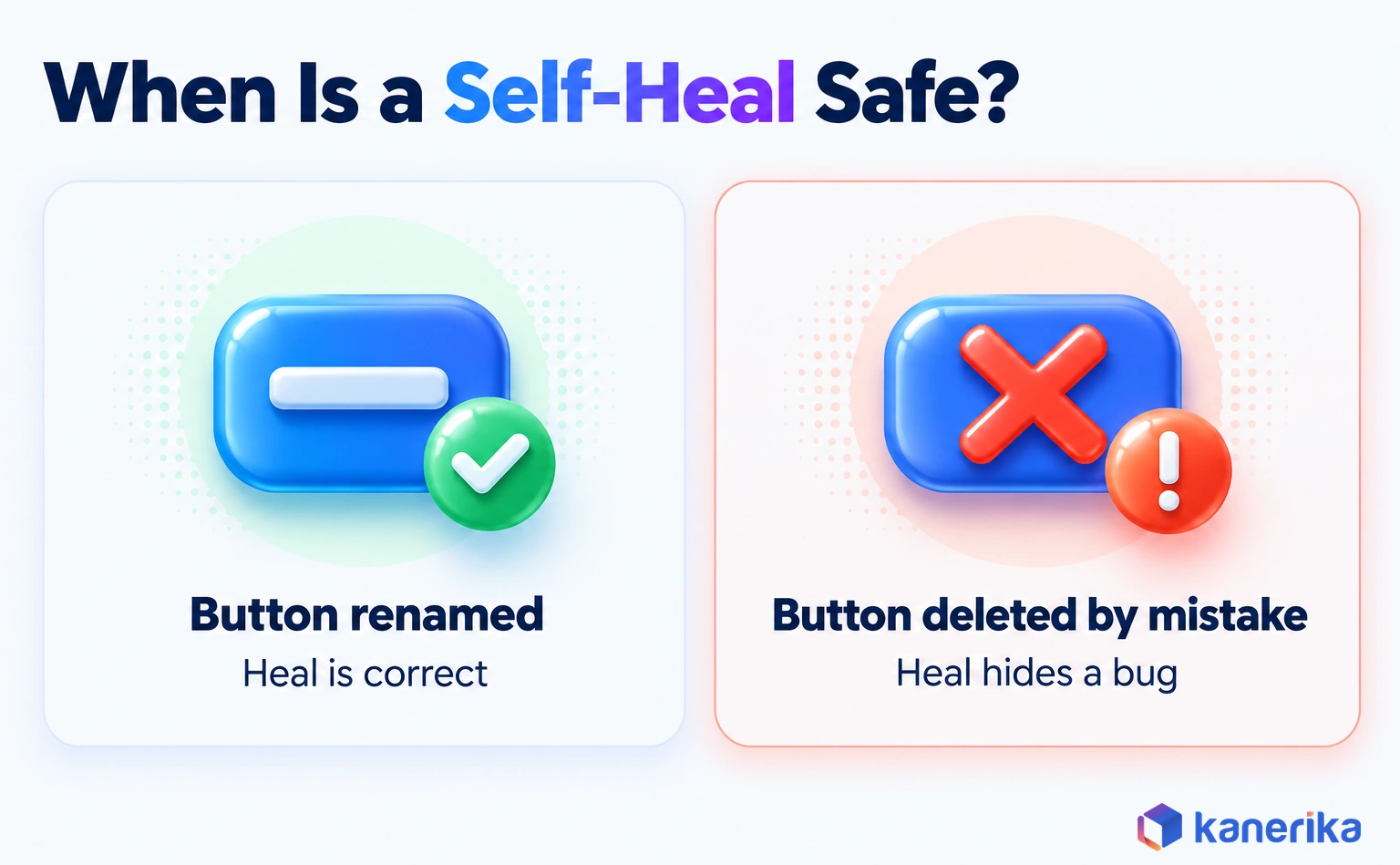
| Button removed by mistake | Test fails, which is correct | Test must still fail, because a heal here would hide a bug |
First KPI: test maintenance hours per sprint. Limit: a heal can mask a real defect, so log every repair and review it before merge.
Case Study
90% Faster Product Releases with Automated Testing
Kanerika rebuilt test automation with Serenity BDD for a digital construction platform, a conventional automation project that cut release time by 90% and shows the baseline AI tools should be measured against.
Read the Case Study →3. Risk-Based Regression Testing and Defect Prediction
Full regression suites grow until they take hours or days to run. Teams then either wait or skip runs, and both choices carry risk.
Machine learning ranks tests by how likely they are to catch a defect in the current change. The signals include code churn, defect history per file and which tests failed on similar changes before. In effect, it is predictive modeling pointed at your own codebase.
- Map each test to the files and components it covers.
- Score every changed file by churn and past defect density.
- Run the highest-risk tests first, on every commit.
- Run the full suite nightly so it catches what the model missed.
- Feed escaped defects back so that the ranking improves.
Step 2 can start as a simple rule before you train anything. The sketch below multiplies each changed file’s recent commits by one plus its past defects. The riskiest files then rise to the top of the run.
import subprocess
from collections import Counter

def churn(since="90 days ago"):
    log = subprocess.run(
        ["git", "log", f"--since={since}", "--name-only", "--pretty=format:"],
        capture_output=True, text=True, check=True).stdout
    return Counter(line for line in log.splitlines() if line)

def rank(changed_files, defects_by_file):
    commits = churn()
    scores = {f: commits[f] * (1 + defects_by_file.get(f, 0)) for f in changed_files}
    return sorted(scores.items(), key=lambda kv: kv[1], reverse=True)
Once a trained model replaces this rule, give it the versioning and drift checks of machine learning operations. A stale ranking quietly skips risky tests.
First KPI: regression cycle time at an unchanged defect escape rate. Limit: the model needs months of clean test and defect history, which many teams still lack.
4. Synthetic Test Data Generation
Some failures only appear with data that production has not created yet. For example, a new vehicle model or a first-of-its-kind insurance claim will not be in last month’s database snapshot.
Synthetic data generators create realistic records that follow the rules of real data without copying personal details. That also helps with privacy, which the World Quality Report 2025 ranks as the top barrier at 67%.
A mobility analytics platform with millions of telemetry combinations to validate shows the effect. Once generated scenario data and automated verification replaced slow manual methods, testing time fell 74%, as the case study near the end describes.
First KPI: defects found in scenarios that have no production data. Limit: synthetic data inherits the assumptions of whoever set the rules, so compare it with real distributions.
5. Visual Regression Testing
Pixel-by-pixel screenshot comparison flags every font-rendering change, so teams learn to ignore the alerts. Real layout bugs, as a result, slip through.
Visual AI compares screens the way a person would, ignoring rendering noise while flagging changes a user would notice. Applitools says its Eyes platform eliminates 99.9% of false positives. Treat that as a vendor figure, and test it on your own screens before you rely on it.
Say a browser update shifts anti-aliasing on every page, and pixel diffing raises 300 alerts. Visual AI ignores those and flags the one page where the Pay button now overlaps the footer.
First KPI: false-positive rate on visual checks. Limit: someone still decides whether a flagged change was intended.
6. Defect Triage and Root-Cause Analysis
A large nightly run can produce hundreds of failures that trace back to a handful of causes. Engineers then lose the morning sorting them by hand.
AI turns that pile into a short, ordered queue. A typical workflow runs in five moves:
- Cluster failures by stack trace, log pattern and error message.
- Link each cluster to an existing ticket, or else open a new one.
- Suggest the likely component and owner, based on past fixes.
- Summarize the logs in plain language inside the ticket.
- Let an engineer confirm or correct the routing.
Operations teams run the same clustering on production alerts, which is the core job of AIOps tools. Sharing one list of failure causes across QA and operations also keeps tickets consistent.
First KPI: time from failure to assigned owner. Limit: a confident but wrong summary can send a team down the wrong path, so always link the raw logs.
On-Demand Webinar
AI-Powered QE: The Key to Faster, Better Product Development
An on-demand Kanerika session on AI-powered quality engineering and how it speeds up product development without lowering the quality bar.
Watch the Webinar →7. Data Quality and Pipeline Validation
Quality assurance covers data too. A pipeline can run without a single error, yet still load half the expected rows or a column full of nulls.
Anomaly detection learns the normal volume, schema and value spread of each table, then flags runs that drift. Rules from a data quality framework catch the failures you predicted, while models catch the ones you did not. Together they form the core of data observability.
| Check | What AI flags |
|---|---|
| Volume | A daily load far below its usual range |
| Schema | A new, renamed or retyped column that appears during a load |
| Distribution | A field whose values shift, such as a currency code that turns null |
| Freshness | A table that stopped updating once its source failed |
| Relationships | Orders with no matching customer record |
For migrations, the same checks also reconcile source and target systems. Our guide to data migration testing covers that test plan in depth.
First KPI: data incidents caught before a dashboard user reports them. Limit: seasonal patterns trigger false alarms until the model has seen a full cycle.
8. Computer Vision Inspection in Manufacturing
On a production line, manual visual inspection tires and varies across shifts. A scratch missed at 3 a.m. can later turn into a warranty claim.
Computer vision models inspect an image of each part and flag surface defects, misalignment or missing components. They work best on stable lines with consistent lighting and well-labeled defect examples. For the wider plant picture, see Kanerika’s work in manufacturing analytics and AI and our roundup of AI applications in manufacturing.
Vision inspection still has clear limits:
- Lighting or camera changes shift the input, so accuracy drops.
- Rare defect classes, for example, have too few examples to train on.
- Labeling images also takes time from experienced inspectors.
- A new product variant may need retraining before it goes live.
First KPI: the rate of defects that escape to final test or to customers. Limit: keep a person on borderline calls until the model proves itself.
Which AI QA Use Cases Are Ready Now?
Readiness depends on how cheap a mistake is to catch. When a person can check the AI output in seconds, the use case is ready now. When a wrong call is hard to spot, run a pilot first.
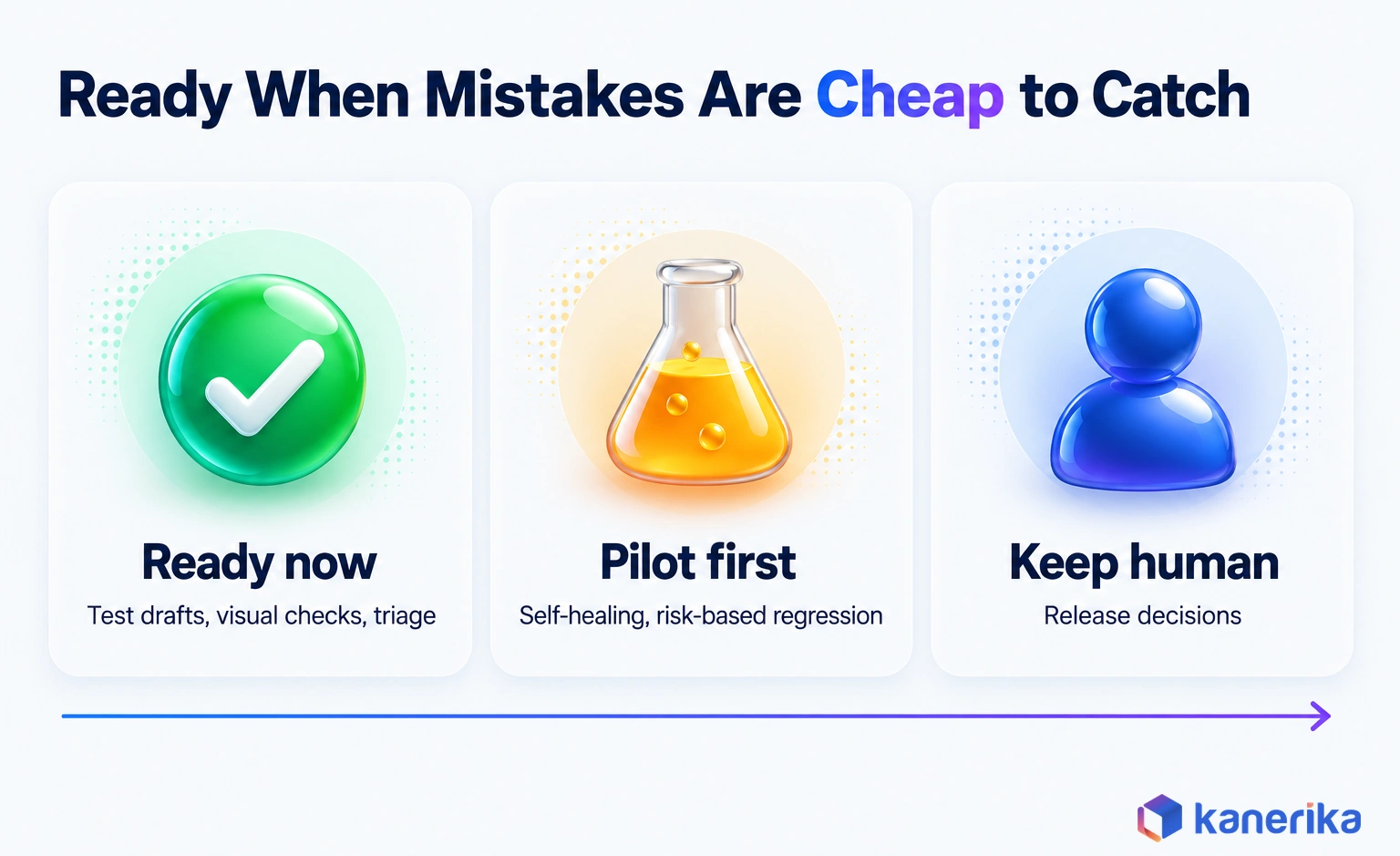
That rule sorts the eight use cases cleanly. Test drafts, visual diffs and triage clusters are quick to review. A self-heal or a skipped regression test is not, because the error only shows up later.
The matrix rates all eight on that basis. Here “Ready” means teams run it in production with human review, not that it runs alone.
| Use case | Maturity | Data needed | Main risk | First KPI |
|---|---|---|---|---|
| 1. Test case generation | Ready | Stories and acceptance criteria | Invented behavior | Review time per accepted case |
| 2. Self-healing automation | Pilot | Stable suite and UI metadata | Heals that hide bugs | Maintenance hours per sprint |
| 3. Risk-based regression | Pilot | Months of test and defect history | A risky change goes untested | Cycle time at the same escape rate |
| 4. Synthetic test data | Pilot | Data rules and real distributions | Unrealistic records | Defects found in new scenarios |
| 5. Visual regression | Ready | Baseline screenshots | Approving an unintended change | Visual false-positive rate |
| 6. Defect triage | Ready | Failure logs and ticket history | Wrong routing | Time to assigned owner |
| 7. Data quality checks | Ready | Pipeline run history | Seasonal false alarms | Incidents caught before users see them |
| 8. Vision inspection | Ready on stable lines | Labeled defect images | Rare defects missed | Downstream escape rate |
Choosing Your First AI in Quality Assurance Use Case
Let your biggest cost pick the starting point. If script upkeep eats each sprint, start with self-healing and keep every heal under review. When the full suite blocks releases, pilot risk-based regression, but only if you hold months of clean defect history.
If bad data reaches dashboards before anyone notices, data quality checks come first. And if writing new cases is the bottleneck, test drafting is the safest first win, because a reviewer can check each draft in minutes.
Notice what the list leaves out: an AI that decides whether to ship. None of these use cases should hold that authority in 2026.
Talk to Kanerika
Not Sure Which Use Case Is Ready for Your Team?
Kanerika reviews your test suite, defect history and pipelines, then recommends the one AI QA use case with the clearest baseline and the lowest risk to pilot first.
Schedule a Demo →AI Quality Assurance Tools by Category
AI QA tools fall into a few categories, and the category matters more than the brand. So pick the category that matches your use case first, then compare vendors inside it. Each one also has to fit the engineering productivity tools your developers already use, from the IDE to the CI server.
| Category | Example | Use cases | Buy or build |
|---|---|---|---|
| AI coding assistants | GitHub Copilot test generation | 1, plus unit-level tests for 3 | Buy, since developers often have it already |
| Framework test agents | Playwright planner, generator and healer | 1 and 2 | Open source, so build your suite on it |
| Visual AI platforms | Applitools Eyes | 5, plus self-healing and root-cause analysis | Buy |
| Data quality monitors | Anomaly detection on pipeline metadata | 7 | Buy a monitor, or build on your platform’s metrics |
| Computer vision models | Models trained on your own part images | 8 | Build, or buy a platform and then train it on your data |
Buy where the problem is generic, such as visual diffing. Build where your own data is the edge, for instance defect prediction from your history or a vision model trained on your parts.
Then check where each tool sends your code and test data. Integration complexity was the second-biggest barrier in the World Quality Report 2025, cited by 64% of respondents.
How to Implement AI in Quality Assurance in 5 Steps
A good rollout is small and measured, and therefore easy to reverse. The five steps below end with a stop decision, so a weak pilot closes cleanly instead of drifting on for a year.
Each step has an entry condition and an exit condition. The durations are a working rule from pilot practice rather than an industry standard.
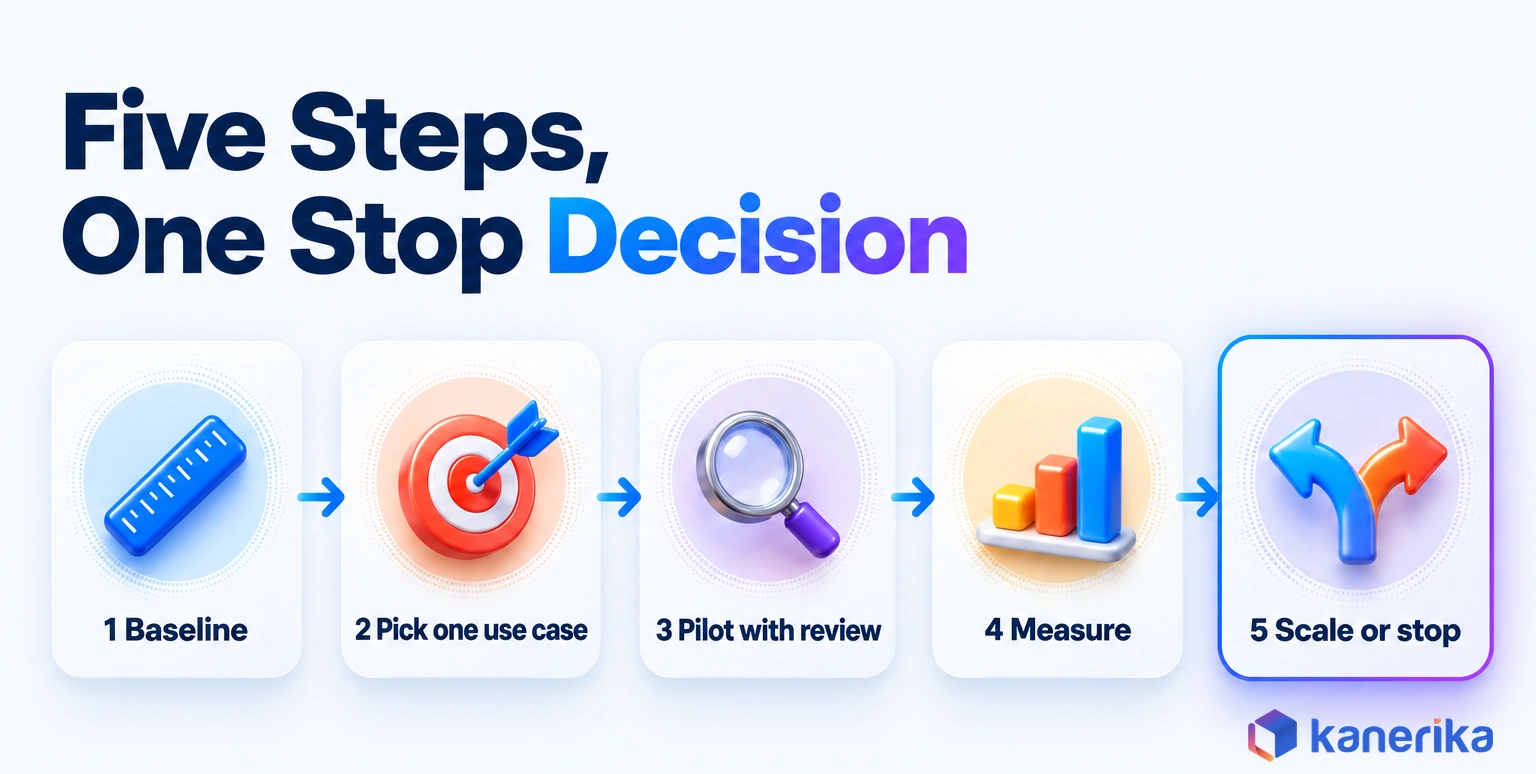
- Baseline the current metrics. Entry: access to test, defect and pipeline data. Exit: four weeks of numbers for escape rate, cycle time, flaky-test rate and maintenance hours.
- Pick one use case. Entry: the baseline shows where testing time goes. Exit: one use case, one owner and one target KPI, agreed in writing.
- Pilot with human review. Entry: a tool chosen and data access approved. Exit: six to eight weeks on one product or team, while every AI output gets reviewed.
- Measure against the baseline. Entry: pilot data collected the same way as the baseline. Exit: a clear change in the target KPI, review effort and false-positive rate.
- Scale or stop. Entry: the measured result. Exit: a written decision to expand, adjust or end the pilot.
The step teams skip most often is the first one. Without a baseline, a pilot produces opinions instead of evidence.
Ownership matters as much as the tool. Name one QA lead who owns the KPI and one engineer who owns the integration, so that the pilot does not stall between teams.
Wiring the Pilot Into CI
The integration usually lands in the CI pipeline, next to the checks teams already run under DevSecOps. Playwright’s CI guide gives the starting workflow for GitHub Actions, shown here with a simpler upload condition.
name: Playwright Tests
on:
  push:
    branches: [ main, master ]
  pull_request:
    branches: [ main, master ]
jobs:
  test:
    runs-on: ubuntu-latest
    steps:
    - uses: actions/checkout@v6
    - uses: actions/setup-node@v6
      with:
        node-version: lts/*
    - name: Install dependencies
      run: npm ci
    - name: Install Playwright Browsers
      run: npx playwright install --with-deps
    - name: Run Playwright tests
      run: npx playwright test
    - uses: actions/upload-artifact@v5
      if: always()
      with:
        name: playwright-report
        path: playwright-report/
        retention-days: 30
It runs the suite on every push and pull request to main, then keeps the HTML report for 30 days. That way reviewers can check each heal or generated test against the report before they merge it.
How to Measure the ROI of AI in Quality Assurance
ROI here is a plain comparison: what the AI costs to run against the hours and defects it saves. The hard part is counting review time honestly, since it rarely shows up on an invoice.
Track a small set of KPIs from the baseline onward. Our guide to software quality KPIs also defines each one in detail.
| KPI | What it shows | Watch for |
|---|---|---|
| Defect escape rate | Share of defects found after release | It must not rise when cycle time falls |
| Regression cycle time | Time to a trusted test result | Gains should still hold across releases |
| Flaky-test rate | Tests that pass and fail on the same code | Self-heals can hide flakiness |
| Test maintenance hours | Effort spent fixing scripts | The main self-healing payoff |
| AI false-positive rate | Share of AI flags that were wrong | High rates erode trust fast |
| Review effort | Hours spent checking AI output | Often the hidden cost, so log it weekly |
Use one formula and keep it visible to the whole team. Net value = (hours saved × loaded hourly rate) + avoided escaped-defect cost − (licenses + compute + review time + upkeep).
A Worked ROI Example
Here is an illustration with assumed numbers, not a benchmark. For instance, suppose a pilot saves 120 maintenance hours a quarter at a $70 loaded rate, which is worth $8,400. Licenses and compute cost $3,200, while 40 review hours add $2,800, so costs total $6,000. Net value is then $2,400 for the quarter, before you count any avoided escaped defects.
If the net stays negative after two quarters, stop. That is still a useful result, because it saved you from scaling a mistake.
AI Assessment
How Ready Is Your Team for AI?
Kanerika’s AI Maturity Assessment scores your data, processes and skills, so you can see which AI use cases, QA included, your organization can support today.
Start Your AI Assessment →Testing the AI Itself: QA for LLM and Agent Systems
Testing an AI system is a different job from using AI to test software. A language model can give two different answers to the same input, so a fixed expected output no longer works as an oracle.
The stakes are rising. The Applause 2026 Testing AI report found that 55% of organizations had released AI-powered apps or features. It also found that 40% of users had run into hallucinations, up from 32% in 2025, while 46% said AI misunderstood their prompts. Our guide to LLM hallucination on enterprise data explains why grounding fails.
Teams that test AI output well work from a short checklist:
- Build an evaluation set of real prompts with graded reference answers.
- Score outputs for accuracy, grounding and refusal behavior rather than exact matches.
- Probe for misuse with AI red teaming before launch.
- Once live, watch production with AI observability tools that trace model and agent behavior in production.
- Re-run the evaluation set whenever a model, prompt or retrieval source changes.
Agents need extra checks on tool calls and multi-step plans, which our guide to AI agent evaluation covers. A step-by-step method for testing those agents before release is in agentic AI testing.
Skills need attention as well. ISTQB’s Certified Tester AI Testing (CT-AI) v2.0 covers testing machine learning and generative AI systems, including LLMs.
Risks, Governance, and Common Mistakes
The biggest risks in AI-assisted QA come from output that nobody checked. Each risk below has a control that fits inside a normal QA process, so none of them needs a new department.
| Risk | What goes wrong | Control |
|---|---|---|
| Hallucinated tests | Tests assert behavior the product never had | A reviewer approves every generated case before merge |
| Over-trust | Teams stop reading AI triage and visual calls | Track the AI false-positive rate every week |
| Data privacy | Production data or code leaves your boundary | Use masked or synthetic data, and check vendor data terms |
| Self-heals masking bugs | A removed feature passes as a “healed” test | Log every heal, then review it before merge |
| Skills gap | Nobody can judge the model’s output | Train testers in AI testing before scaling |
Use case 2 showed the failure mode, and the rule below decides when a heal is safe to merge.
Policies, approvals and audit trails for these controls can live in the same AI governance tools that cover the rest of your AI estate. Data-boundary rules, such as what a test tool may send to a vendor, also belong in your AI security framework.
Standards and Regulations That Apply
Three frameworks and one certification shape how enterprises govern AI that is used in QA or tested by it. They answer different questions, so most teams map to more than one. For a side-by-side view, see our AI governance framework guide.
| Framework | What it is | Why QA teams care |
|---|---|---|
| NIST AI RMF | Voluntary risk framework released January 26, 2023, with a Generative AI Profile added July 26, 2024 | A shared way to map, measure and manage AI risk in test tools |
| ISO/IEC 42001 | AI management system standard | A certifiable process for governing AI use |
| EU AI Act | Law; after the AI Omnibus, high-risk obligations move to December 2, 2027 (standalone) and August 2, 2028 (embedded in products) | Testing and documentation duties for high-risk AI |
| ISTQB CT-AI v2.0 | Tester certification | Skills for testing ML and generative AI systems |
Common Mistakes to Avoid
The same five mistakes show up in stalled pilots again and again:
- Starting with a tool instead of a measured problem.
- Skipping the baseline, so no result can be proven.
- Counting hours saved but not review hours spent.
- Letting self-heals merge before anyone reviews them.
- Scaling three use cases at once before one has worked.
Each one is cheap to avoid at the start but expensive to unwind later, once the tool is embedded in the release pipeline.
How Kanerika Delivers AI-Assisted Quality Assurance
Kanerika runs AI-assisted QA as a four-stage method: assess, pilot, validate and scale. It mirrors the rollout steps above, because the goal is evidence before expansion.
In the assess stage, the team baselines escape rate, cycle time and maintenance hours, then maps where testing time actually goes. Sometimes the baseline shows conventional automation is enough: the construction platform case earlier reached 90% faster releases without AI. During the pilot stage, one use case runs on one product, with human review on every AI output.
Validation then compares the pilot against the baseline, review effort included. Only after that does the work scale to more teams or products, through Kanerika’s QA and test engineering services.
A smart connectivity and mobility services provider shows the method in practice. Its telemetry analysis platform had millions of data combinations to validate, and manual methods were slow and error-prone.
Kanerika built an AI-enabled telemetry synthesizer for scenario testing, along with automated tracking and verification. As a result, testing time dropped 74%, infrastructure-related issues fell 45% and customer satisfaction rose 32%. Those results came from the synthesizer and the automation working together, not from AI alone.
Case Study
74% Less Testing Time with AI Telemetry Synthesizer
Kanerika built an AI-enabled telemetry synthesizer and automated verification for a mobility services provider’s analytics platform, cutting testing time 74% and infrastructure-related issues 45%.
Read the Case Study →Is AI in Quality Assurance Worth It in 2026?
Yes, for named use cases with a baseline and a person on the release decision. Test drafting, visual regression, bug triage, data quality checks and vision inspection on stable lines are ready now. Self-healing, risk-based regression and synthetic data, on the other hand, deserve a measured pilot first.
The World Quality Report 2025 shows why method matters: a 19% average gain, but minimal gains for a third of organizations. The difference is rarely the tool. Instead, it is whether the team measured the starting point and stopped what did not work.
So start with one use case, prove it and then scale. That is how AI in quality assurance pays off in 2026, as an assistant that earns trust one release at a time.
Frequently Asked Questions
How is AI used in quality assurance?
AI is used in quality assurance to draft test cases from requirements, repair broken test scripts, rank regression tests by risk and cluster duplicate defects. It also generates synthetic test data, compares screens visually and watches data pipelines for anomalies. In manufacturing, computer vision inspects parts on the line. A person still reviews the output and approves each release.
Will AI replace QA testers?
AI is unlikely to replace QA testers. It changes the job instead. Models draft cases, heal scripts and sort failures, which frees time for exploratory testing and risk analysis. A tester still judges whether each test reflects real product behavior, and a person owns the release decision. Testers who learn to review AI output take on a larger role.
Which AI tools are used for quality assurance?
Common AI tools for quality assurance fall into categories. GitHub Copilot generates unit, integration and edge-case tests. Playwright includes planner, generator and healer test agents from version 1.56. Applitools Eyes provides visual AI with self-healing and root-cause analysis. Data teams use anomaly detection monitors, and manufacturers use computer vision models trained on their own parts.
How does generative AI create test cases?
Generative AI reads user stories, acceptance criteria or code, then drafts positive, negative and boundary test cases in plain language or in a test framework. A tester reviews each draft, removes invented behavior and adds missing scenarios. The World Quality Report 2025 lists test case design and requirements refinement as the leading generative AI uses in quality engineering.
What is self-healing test automation?
Self-healing test automation detects when a test fails because the application changed, such as a renamed button, and repairs the script by finding the element another way. Playwright added a healer agent in version 1.56 for this purpose. Every heal should be logged and reviewed, since a heal on a removed feature can hide a real defect.
How does AI predict software defects?
AI predicts software defects by learning from code churn, past defect density per file and which tests failed on similar changes. It scores each new change by risk and runs the most relevant tests first. A full nightly run still catches what the model misses. The model needs months of clean test and defect history to rank changes well.
What are the risks of using AI in quality assurance?
The main risks are hallucinated tests that assert behavior the product never had, and over-trust in AI calls. Data privacy is another, along with self-heals that mask real bugs and a skills gap on review. The World Quality Report 2025 lists data privacy, integration complexity and hallucination as top barriers. Human review and logging control most of them.
How do you measure the ROI of AI in QA?
Measure ROI against a baseline taken before the pilot. Track defect escape rate, regression cycle time, flaky-test rate, maintenance hours, AI false-positive rate and review effort. Net value equals hours saved times the loaded rate, plus avoided escaped-defect cost, minus licenses, compute, review time and upkeep. Stop the pilot if net value stays negative after two quarters.
How do you test AI systems and LLM applications?
Test AI systems with an evaluation set of real prompts and graded reference answers, scored for accuracy, grounding and refusal behavior. Add red teaming for misuse, then monitor production with observability tools that trace model and agent behavior. Re-run the evaluation set after every model, prompt or retrieval change. ISTQB CT-AI v2.0 covers the tester skills involved.
What is the future of QA with AI?
The future of QA with AI is human review at scale. The World Quality Report 2025 found nearly 90% of organizations pursuing generative AI in quality engineering, with only 15% at enterprise scale. Expect wider use of test agents, self-healing and risk-based regression. Teams that baseline their metrics and prove one use case at a time will scale first.
How does AI improve quality control?
AI improves quality control by spotting defects earlier and more consistently than manual checks. Computer vision inspects every part on a production line, and anomaly detection flags data or process drift before it spreads. In software, visual AI catches layout bugs that pixel comparison misses. The best results come on stable processes with good labeled examples and clear defect definitions.
What is the role of AI in quality management?
In quality management, AI acts as a controlled assistant inside the existing system. It drafts tests, ranks risks, sorts defects and monitors data, while people keep ownership of standards, approvals and corrective actions. Each AI use should have an owner, a documented purpose and a measured KPI. That keeps it auditable within a formal quality management system.
How can AI improve data quality?
AI improves data quality by learning the normal volume, schema and value patterns of each table, then flagging runs that drift. It catches missing rows, renamed columns, sudden null values and stale tables that fixed rules may miss. Teams pair these models with rule-based checks. Seasonal data needs a full cycle of history before alerts become reliable.
What is AI assurance?
AI assurance is the work of showing that an AI system is accurate, safe and fit for its purpose. It covers evaluation sets, red teaming, bias and robustness checks, production monitoring and documentation. Frameworks such as the NIST AI RMF and ISO/IEC 42001 guide it. It differs from using AI to test software, which is the main subject here.
What is a QA/QC framework, and where does AI fit?
A QA/QC framework pairs quality assurance, which prevents defects through process, with quality control, which finds defects through inspection and testing. AI fits on both sides. On the QA side it drafts tests and predicts risky changes. On the QC side it inspects parts, compares screens and flags data anomalies. People approve the results and own every release.
What are the best AI use cases in QA testing?
The best AI use cases in QA testing for 2026 are test case generation from requirements, visual regression testing, defect triage and data quality checks. These are ready for production with human review. Self-healing automation, risk-based regression and synthetic test data also work well, though they are safer to start as measured pilots on one product or team.
How is AI testing different from traditional test automation?
Traditional test automation runs scripts that people write and maintain, and it breaks when the application changes. AI testing adds models that draft those scripts, repair broken locators, choose which tests to run and group failures by cause. Scripts still execute the checks. AI reduces the writing and upkeep work, and a person reviews what it changes.