TL;DR
AI for business intelligence is worth it in 2026 when your metrics live in a governed semantic model, and premature before that. It adds plain-language questions, machine learning forecasts, anomaly alerts and written summaries on top of the reports you already run. Leading built-in tools include Copilot in Power BI, Tableau Agent, ThoughtSpot Spotter, Looker Conversational Analytics, Qlik Answers, Databricks Genie and Snowflake Cortex Analyst.
Each one answers from the business definitions underneath it, so a vague revenue measure produces a confident wrong answer. Copilot in Power BI also needs paid Fabric F2 or Power BI Premium P1 capacity or higher. Start with the tool that sits on your trusted data, prove accuracy on a test set of real questions, then scale.
Key Takeaways
- AI adds four things to BI: plain-language questions, machine learning forecasts, anomaly alerts and generated summaries or agents.
- Every major vendor grounds its AI in a semantic layer, so metric definitions, synonyms and permissions decide answer quality.
- Pick the AI built into the platform where your trusted metrics already live, because moving definitions costs more than any license.
- Copilot in Power BI requires paid Fabric F2 or Power BI Premium P1 capacity or higher, plus a tenant setting that is on by default.
- Judge a pilot by accuracy against expert answers and by zero permission leaks across every user role.
- Faster answers and a shorter analyst backlog pay off first, while forecasting gains need clean history and model work.
Watch on YouTube
AI in Analytics: From Business Questions to Faster Answers with Karl
A short Kanerika video on how AI shortens the path from a business question to an answer, the same gap this guide is about.
The Dashboard Shows Margin Fell. The Why Takes Three Days.
Picture a finance lead on a Monday morning. The margin dashboard shows gross margin down two points in the Northeast, and the chart is perfectly clear about what happened.
It says nothing about why, so the lead emails two analysts. One pulls discount data from the sales system while the other checks returns, and someone also asks logistics about freight. By Thursday there is an answer, but by then the next week’s numbers are already in.
That three-day gap is the problem AI for business intelligence sets out to close. Instead of waiting in an analyst queue, the finance lead types the question and gets a governed answer with the drivers ranked.
Most companies already use AI somewhere, and the 2026 AI Index from Stanford HAI puts organizational AI adoption at 88%. So for BI teams the question is no longer whether to use AI, but whether its answers can be trusted.
This guide covers what AI adds to BI and how the stack works. It then compares the leading tools, their costs and the accuracy controls, before judging when the investment pays off.
What Is AI for Business Intelligence?
AI in business intelligence means adding machine learning, natural-language query, generative summaries and AI agents to the reporting tools a company already uses. BI itself turns source data into trusted metrics and dashboards. Our guide on how BI differs from data visualization covers that foundation in depth.
The AI layer changes how people reach the numbers. For example, a sales manager no longer needs to know which report holds pipeline by region. She simply asks in plain English. The system then maps the question to the governed model, runs it under her permissions and explains the result.
Still, the definitions underneath stay the same. Revenue, margin and churn need one agreed formula each, because the AI reads those formulas rather than inventing its own.
Checklist
Business Intelligence Checklist
Check your data foundations, metric definitions, governance and dashboard usage before you switch on an AI assistant.
Get the Checklist →
AI-Powered BI vs Traditional BI
Traditional BI answers the questions someone predicted when the dashboard was built. AI-powered BI also answers the follow-up questions nobody planned for, and that is where most analyst time goes. The table compares the two on five practical points.
| Point of comparison | Traditional BI | AI-powered BI |
|---|
| Question style | Filters, slicers and drill-downs on a fixed report | Plain-language questions, then follow-ups |
| Who can ask | Report builders and trained power users | Any user, once access to the governed model is granted |
| Time to answer a new question | Days, while a request waits in a queue | Minutes when the needed measures already exist |
| Output | Charts and tables the reader must interpret | Charts as well as written explanations, alerts and forecasts |
| Governance load | Access rules on reports and models | Access rules, plus synonyms, AI instructions and answer tests |
The last row matters most. AI does not remove governance work, but it does move that work into the model, where every answer can reuse it.
The Four AI Capabilities Inside Modern BI
Vendors package their AI under different names, yet the features fall into four groups. Each group solves a different reporting problem, so it helps to know which one you need before comparing products.
- Conversational query. Users ask questions in natural language and get a chart or a number back. For instance, a regional manager can type “top ten stores by margin last quarter” without building a report.
- Machine learning forecasting. Models project demand, revenue or cash from history and seasonality. Our guide to machine learning for business analytics explains the modeling side, while the split between BI vs predictive analytics shows where reporting ends.
- Anomaly detection and automated insights. The system watches metrics and flags a break from the normal pattern. So a spike in refunds at one warehouse can trigger an alert before the weekly review.
- Generative summaries and agents. Language models write a plain summary of a dashboard or carry out a multi-step analysis. An agent might compare three regions, rank the drivers and then draft a note, much like the AI agent examples already running in finance and operations.
How AI-Powered BI Works
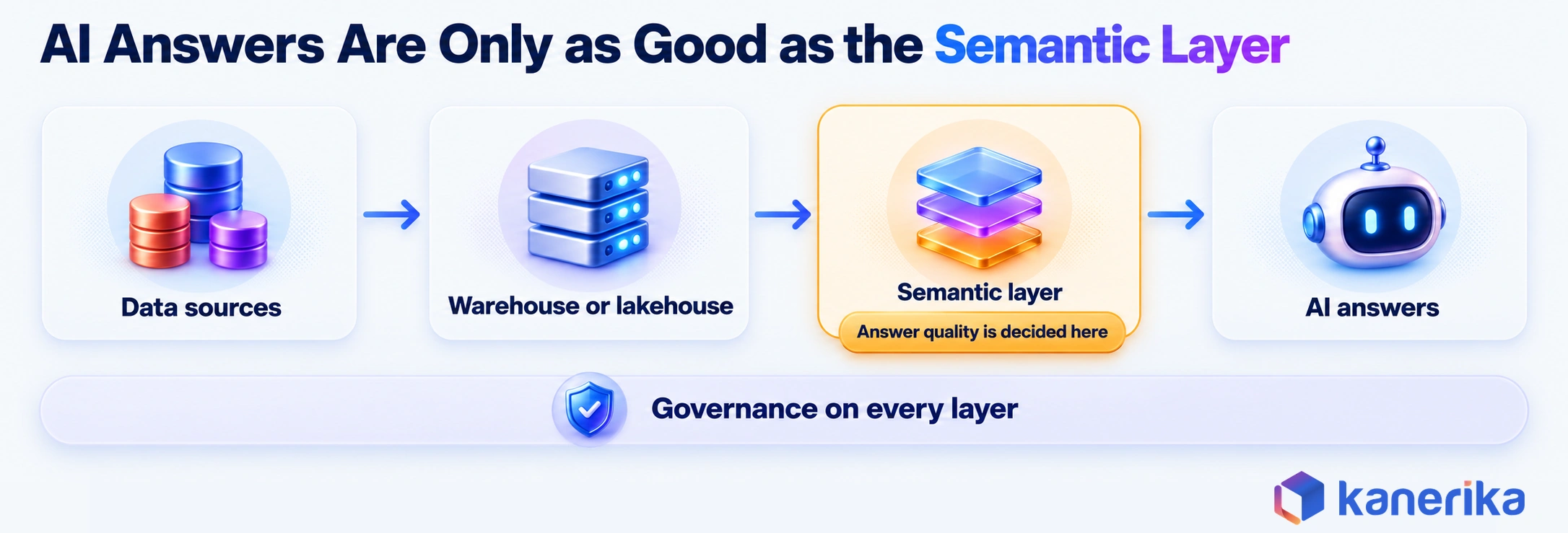
An AI answer in a BI tool is the end of a chain, and every link affects whether the answer is right. Data moves from source systems into a warehouse or lakehouse. It then passes through a semantic layer that defines business terms before it reaches the AI service.
Source systems such as ERP, CRM and point-of-sale hold the raw records. Data pipelines then load them into a data warehouse or lakehouse, where they are cleaned and joined. Next, the semantic layer turns tables into named measures, relationships and access rules, as our guide to business intelligence architecture describes.
At the top, an AI service reads the user’s question, maps it to measures and writes a query. It also returns the result with an explanation. Governance has to run across every layer, because a permission missed at the bottom shows up as a leak at the top.
Why the Semantic Layer Decides Answer Quality
A semantic layer is where “revenue” stops being a column name and becomes an agreed formula. When a user asks about revenue, the AI picks whatever the model calls revenue. So if three tables carry three versions, it picks one of them and answers with full confidence.
Vendors have built their AI around this fact. Microsoft’s Prep data for AI feature is still labeled preview in documentation updated September 16, 2026. It lets model owners set an AI data schema, verified answers and AI instructions. Q&A must be enabled on the model, and the owner then checks Approved for Copilot in the model’s settings.
Snowflake likewise grounds Cortex Analyst in semantic views and respects role-based access. Databricks, for its part, asks data teams to configure trusted data, metrics and business rules for Genie Agents, governed through Unity Catalog.
| Platform | Where business definitions live for the AI |
|---|
| Power BI | In the semantic model, once it is prepared with Prep data for AI |
| Snowflake | In semantic views or a semantic model file that Cortex Analyst reads |
| Databricks | In Genie Agents, where data teams set trusted data, metrics and rules |
| Looker | In LookML Explores, which Conversational Analytics then queries |
Across all four, the pattern holds. An AI answer can only be as good as the definitions it reads, so semantic-model work is the real AI project.
From Question to Answer in Six Steps
Following one question through the system shows where errors creep in. Take the finance lead’s question, “Why did Northeast gross margin fall last month?”
- Question. The user types the question in plain language, either inside the BI tool or in a chat app.
- Intent and metric mapping. The AI maps “gross margin” and “Northeast” to a measure and a region field, using synonyms the model owner defined.
- Governed query. It writes a query against the semantic model instead of raw tables, so the agreed formulas still apply.
- Permission check. Row-level security then limits the result to the regions this user may see.
- Result and explanation. The tool returns a chart and a short summary that ranks discounts, returns and freight as drivers.
- Human check and feedback. Finally, the user confirms or flags the answer, and flagged answers go back to the model owner.
Steps two and four cause most failures. A missing synonym sends the question to the wrong measure, while a weak access rule shows data the user should never see.
AI Assessment
How Ready Is Your Data for AI?
Score your organization on data, governance, skills and use cases in a short self-assessment, and see which gaps to close before an AI-in-BI rollout.
Start Your AI Assessment →
Benefits of AI in Business Intelligence
Each benefit of AI in BI is easiest to defend when it comes with a number you can track before and after. A claim such as “better decisions” cannot be measured, whereas “median time to answer a new question” can. The table pairs each benefit with what changes and how to measure it.
| Benefit | What changes | How to measure it |
|---|
| Faster answers | Business users answer follow-up questions without filing a request | Median time from question to answer, before and after |
| Smaller analyst backlog | Analysts spend less time on one-off pulls, so deeper work moves up | Open report requests per week |
| Better forecasts | Machine learning adds seasonality and external drivers to projections | Forecast error, such as mean absolute percentage error |
| Earlier warnings | Anomaly alerts flag problems between scheduled reviews | Days between an issue starting and someone acting on it |
| Wider use of data | People who never built a report start asking questions, the aim of data democratization tools | Weekly active users of the governed model |
Record the baseline first. Otherwise a team cannot show the gain to whoever funds the next phase. Kanerika’s dairy project, covered later in this guide, shows what tracked numbers look like: data query errors fell 90%, and decision-making got 30% faster.
Which Benefits Pay Off First
Faster answers and backlog relief arrive first, often within the pilot itself. They only need a well-modeled semantic layer and a built-in assistant, and many companies already own both.
Forecasting gains take longer. A demand model needs several seasons of clean history, a feature pipeline and someone to retrain it. So it behaves like a data science project, with machine learning operations to keep it accurate.
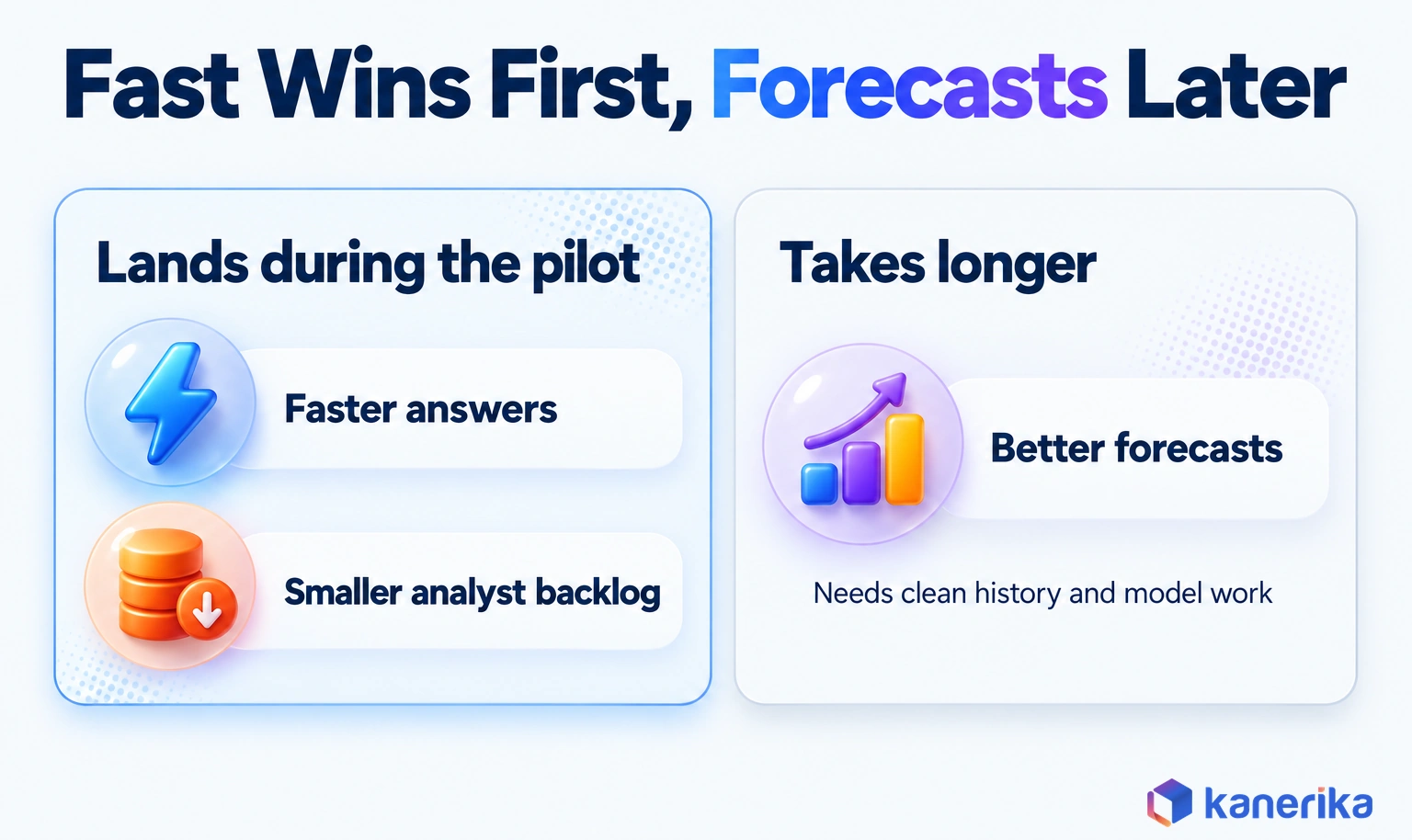
Plan the budget in that order. First fund conversational query on governed data and show the time saved. Then use that result to justify forecasting and agent work.
AI in BI Use Cases by Function
AI earns its place in BI where a team asks the same kind of “why” question every week. Each function below has a recurring question that used to need an analyst, and that can start with a governed AI answer instead.
| Function | Recurring question | AI capability that helps |
|---|
| Finance | Why did margin or cost move against plan? | Conversational query with driver ranking |
| Sales | Which deals in the pipeline are at risk before quarter end? | Machine learning scoring, then a summary |
| Supply chain | Where will stock run out in the next four weeks? | Demand forecasting and alerts |
| Operations | Which site or line broke its normal pattern? | Anomaly detection, especially on sensor and volume data |
| Customer | Which customers are likely to leave, and why? | Churn models surfaced in reports |
| Customer experience | Why are complaints about delivery rising? | Sentiment and text analytics on reviews and tickets |
| Risk and insurance | Which claims or transactions look unusual? See AI-driven BI in insurance. | Anomaly detection with human review |
Finance teams often move first, as our guide to AI in finance shows. Retail, by comparison, shows how several uses combine in one business. A retailer usually starts with three:
- Demand forecasting: models read past sales, promotions and seasonality to project demand by store and product.
- Inventory Management: AI helps maintain optimal stock levels by predicting product demand and identifying potential supply chain issues, thereby reducing the risk of excessive or insufficient inventory. This is especially valuable for eCommerce businesses using a cross listing app to keep inventory synchronized across multiple online marketplaces and minimize overselling.
- Pricing and promotions: models compare promotion lift against margin loss, so planners see which discounts paid for themselves.
Text and Sentiment Analytics in BI
Some answers sit in free text rather than numbers. Reviews, support tickets and survey comments often explain why a metric moved, and AI sentiment analysis turns that text into fields a report can count.
Warehouse platforms expose this as SQL, so the result lands beside the metrics it explains. Snowflake’s AI_SENTIMENT rates the whole text, plus up to ten categories you name such as “delivery”, as positive, negative, neutral or mixed. Databricks offers ai_analyze_sentiment(), which needs Databricks Runtime 15.4 LTS or above and is in Public Preview as of its September 11, 2026 docs.
A service team can then chart negative delivery mentions next to on-time rate on one dashboard.
Worked Example: Gross-Margin Variance in a Power BI Estate
The following example is hypothetical, but it follows the order most successful pilots take. A retailer runs Power BI for 300 users on a Fabric capacity. Its finance team spends two days each month explaining margin variance.
- Define the question. The pilot targets one recurring question, “Why did gross margin move against plan this month, by region?”
- Check the measures. The semantic model already holds Gross Margin %, Discount Amount, Returns Value and Freight Cost, each with one owner in finance.
- Pick the approach. The team chooses Copilot in Power BI, because the model, the capacity and row-level security already exist. A custom text-to-SQL tool is rejected, since it would query raw tables and bypass the agreed measures.
- Prepare the model. Model owners add synonyms such as “GM” and “margin”, write AI instructions and set verified answers for the five most common questions.
- Run a 30-question pilot. Finance analysts write 30 real questions with expert answers, then compare each Copilot answer against them.
- Apply the acceptance test. The pilot passes only if answers match the expert set at the agreed rate and no user sees a region outside their access.
Decision: built-in Copilot on the existing model, because the definitions and permissions were already governed. Condition: rollout waits until the 30-question test passes, and failed questions go back to the model owners.
Kanerika Service
Power BI Consulting and Copilot Readiness
Kanerika designs Power BI semantic models, row-level security and Copilot-ready measures, so AI answers read the same governed definitions as every report.
Explore Power BI Services
Best AI Tools for Business Intelligence in 2026
The right AI tool for BI is usually the one built into the platform that already holds your governed model. Each vendor in the table ships a conversational assistant, according to product documentation checked in October 2026. So the real differences are prerequisites and where definitions live. The table lists verified 2026 feature names, while our roundups of BI tools and self-service BI tools cover the wider products.
| Platform | AI feature (2026 name) | Prerequisite | Trade-off |
|---|
| Microsoft Power BI | Copilot in Power BI, with Prep data for AI | Paid Fabric F2+ or Premium P1+ capacity, with the Copilot tenant setting left on (the default) | Answer quality depends on model preparation |
| Tableau | Tableau Agent, on the Einstein Trust Layer | A Tableau Cloud site with Tableau+ and AI turned on | Tied to the Tableau+ edition |
| ThoughtSpot | Spotter AI analyst, with SpotterModel, SpotterViz and SpotterCode | Data modeled in ThoughtSpot | A separate platform beside existing BI |
| Google Looker | Conversational Analytics, powered by Gemini for Google Cloud | Explores defined in LookML | Answers stay within what the Explores model |
| Qlik | Qlik Answers agentic assistant | Curated analytics and content sources | Mixing documents with metrics needs careful curation |
| Databricks | Genie One, Genie Agents and Genie Code | Data team configures trusted data, metrics and rules | Setup work sits with the data team |
| Snowflake | Cortex Analyst, managed text-to-SQL via REST API | Semantic view or semantic model | You build the user interface, so effort rises |
Teams choosing between the two big visual platforms can read our comparison of Looker vs Tableau. Even so, the assistant matters less than the model behind it. Compare how each platform stores definitions before you compare chat features.
What Copilot in Power BI Requires
Copilot deserves one extra note, since it is the most common starting point. Microsoft’s Copilot in Power BI documentation states that it needs paid Fabric capacity at F2 or higher, or Power BI Premium at P1 or higher. Trial and free SKUs are not supported. The tenant setting “Users can use Copilot and other features powered by Azure OpenAI” must also stay on, which it is by default.
Many Power BI estates still run on Pro licenses alone. The same documentation states that a Pro or Premium Per User license is not enough, because Copilot requires organizational capacity. So the capacity question often comes first, and our guide to Microsoft Fabric adoption covers how teams plan that move.
Built-In AI or Custom AI: Where the Line Sits
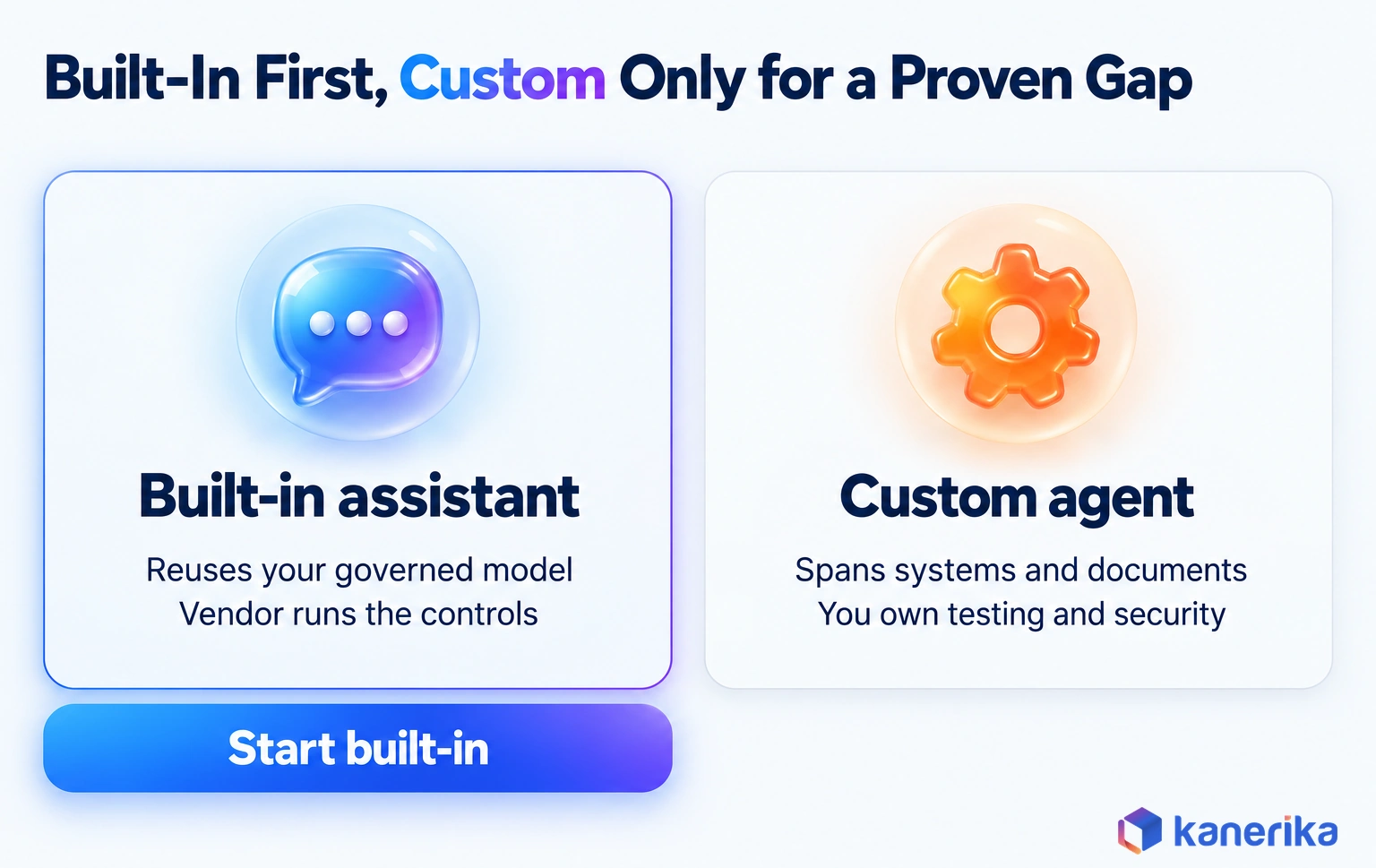
Most AI-in-BI needs are met by the assistant inside the BI platform. Custom builds make sense only when a requirement falls outside it. The test is simple: what does the user need that the built-in tool cannot do on governed data?
| Requirement | Approach |
|---|
| Plain-language questions on one governed model | A built-in assistant, such as Copilot, Tableau Agent or Looker Conversational Analytics |
| Certified answers to recurring questions | BI-native verified answers, set by the model owner |
| Forecasts the BI tool cannot produce | A machine learning model whose output lands in the warehouse, then shows in BI |
| Questions across several systems and documents | A governed custom agent, tested against its own question set |
| Actions such as updating a record or sending a message | An agent that waits for human approval before it acts |
Custom work carries its own testing, security and upkeep, so rule out the built-in route on a real requirement first. When a need does fall outside it, Kanerika’s AI services team can design and test a governed custom agent against the same question set.
How to Choose the Right AI-BI Approach
Choosing an AI-BI approach starts with one question: where do your trusted data and metric definitions already live? That answer narrows the field faster than any feature list, because moving definitions costs more than any license. A team with 200 DAX measures in Power BI, for instance, would rebuild every one in LookML before Looker’s assistant could read them.
| Your current stack | First pick | Why |
|---|
| Power BI on Fabric or Premium capacity | Copilot in Power BI, after Prep data for AI | Because the model, capacity and row-level security already exist |
| Tableau Cloud with Tableau+ | Tableau Agent | It works inside the sites users already visit |
| Looker with mature LookML | Conversational Analytics | It queries the Explores your team already governs |
| Databricks lakehouse on Unity Catalog | Genie | Permissions and lineage carry through from the catalog |
| Snowflake with a custom app | Cortex Analyst | A REST API grounded in semantic views suits embedded use |
| Definitions scattered across spreadsheets | Semantic layer first, then AI | Otherwise any assistant answers from conflicting formulas |
That last row is the most common one. If finance and sales still argue about which revenue number is right, an AI assistant will repeat the argument at machine speed.
Five Questions Before You Pick a Tool
These questions take an hour with the right people in the room, and they prevent most bad purchases.
- Where does the data sit? Name the warehouse, lakehouse or BI model that holds the numbers users trust.
- Who owns each metric? Every measure the AI will use needs a named owner who can approve its definition.
- Which questions go unanswered? List the follow-up questions that wait in the analyst queue for days.
- How wrong can an answer be? A board figure needs near-perfect accuracy, while an exploratory question can tolerate review.
- What does the license cover? Check whether your current capacity or edition already includes the AI feature.
What AI-Powered BI Costs
A license is the visible part of AI-powered BI cost, yet it is usually not the largest. Most spend goes into preparing data and the semantic model, and then into testing and governing the answers. Prices vary by vendor, edition and contract, so get quotes for your own estate.
| Cost category | What it covers |
|---|
| Licenses and capacity | BI editions or capacity tiers that include AI, such as Fabric F2+ or Premium P1+ for Copilot |
| Compute | Query processing and AI token use, which rise as more people ask questions |
| Data and semantic work | Cleaning sources, then defining measures, synonyms and AI instructions |
| Deployment | Configuration and chat-tool integration, as well as user training |
| Operations | Monitoring accuracy, updating the test set and retraining forecast models |
| Governance | Access reviews and audit logs, together with risk sign-off |
Watch compute closely after launch, since a conversational tool invites far more questions than a static report. Each question runs a query, and the AI itself also draws on capacity.
Copilot in Power BI shows how this works. Its usage is billed by token consumption against Fabric capacity units (CUs), and any DAX queries it triggers are billed on top. Capacity admins can track it under the “Copilot in Fabric” operation in the Fabric Capacity Metrics app.
A Simple ROI Model
Analyst hours make the best starting point for ROI, because they are the first benefit to land and the easiest to measure. The figures below are a planning estimate with stated assumptions, not a benchmark.
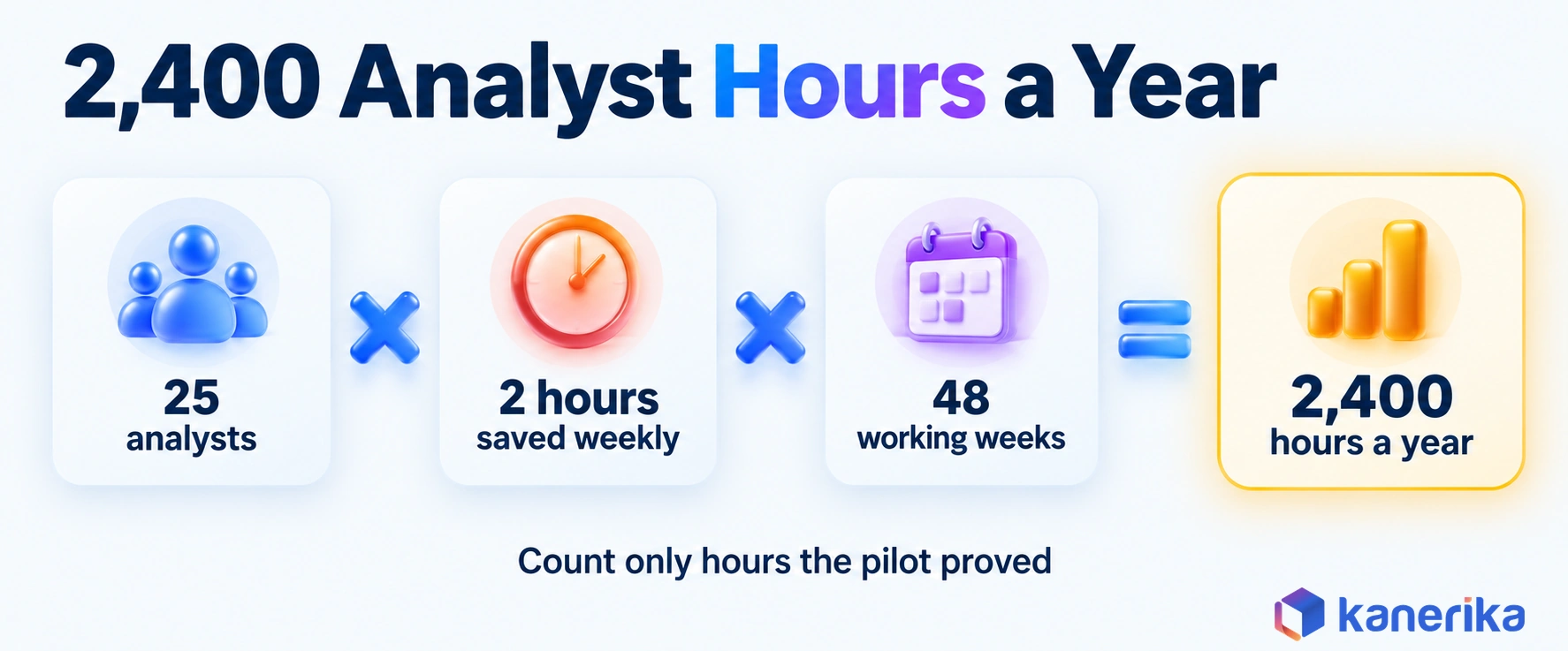
- Assume the time saved. 25 analysts each save 2 hours a week on one-off data pulls.
- Annualize it. 25 analysts × 2 hours × 48 working weeks = 2,400 hours a year.
- Value it. Multiply 2,400 hours by your loaded hourly cost for an analyst to get the annual benefit.
- Apply the formula. ROI = (verified annual benefit − annual cost) ÷ annual cost × 100.
Count only hours that the pilot actually proved. For example, if the test showed one hour saved per analyst instead of two, the benefit halves to 1,200 hours, and the ROI case should say so.
Accuracy, Risk and Governance
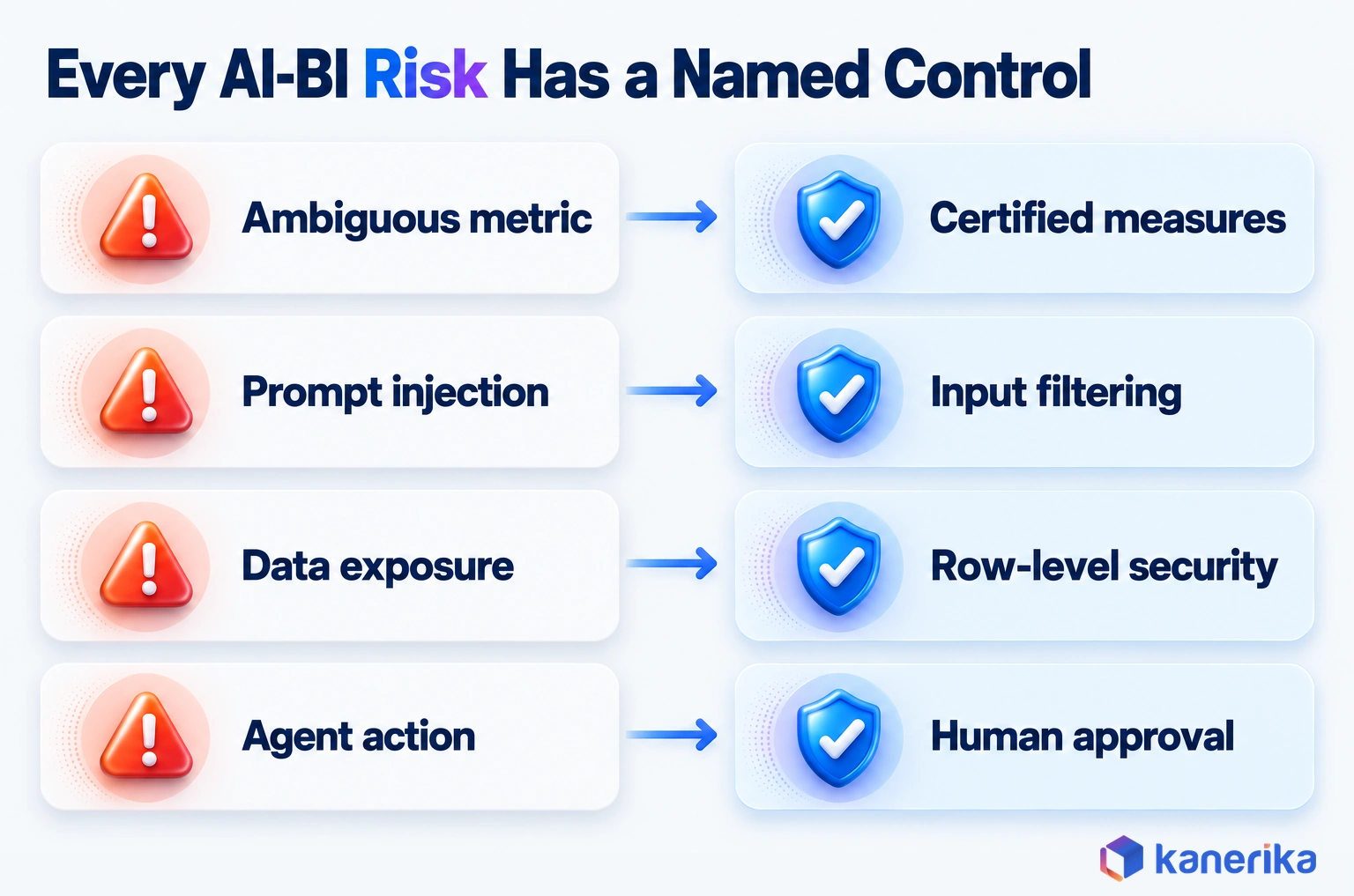
An AI answer in BI carries more weight than a chat reply, because people act on it as if it were a report. Its risks are predictable, though, and each one has a control and an owner who should hold it.
Picture one failure. A regional manager asks the assistant for “margin by region” while preparing a board deck. Her row-level security role was never added to the semantic model, so the answer returns every region instead of hers.
Nobody checks, and figures she should never have seen go straight into the deck. The table lists the five risks behind failures like this one, each with a control and an owner.
| Risk | Control | Owner |
|---|
| Wrong answer from an ambiguous metric | Certified measures and synonyms, tested against a question set | Metric owner in the business |
| Prompt injection | Input filtering, as well as limits on what the AI can read | Security team |
| Data exposure | Row-level security, tested for every role | BI platform owner |
| Stale data | Freshness checks shown next to each answer | Data engineering |
| Unapproved action by an agent | Human approval before any write or message | Process owner |
Tooling helps here as well. Our guides to data governance tools and data observability cover the catalogs, lineage and freshness checks that support these controls.
Frameworks That Anchor AI-BI Governance
Two public frameworks give these controls a shared vocabulary. The NIST AI 600-1 Generative AI Profile, published July 26, 2024, maps generative AI risks to management actions. Meanwhile, the OWASP Top 10 for LLM Applications 2025 ranks LLM01 Prompt Injection and LLM02 Sensitive Information Disclosure as its first two risks.
| Framework | How AI-BI teams use it |
|---|
| NIST AI 600-1 | As a risk checklist for the governance sign-off before rollout |
| OWASP Top 10 for LLM Applications 2025 | As a source of security tests for injection and disclosure during the pilot |
These frameworks guide good practice only. Your legal and risk teams still decide which regulations apply, and an AI security framework can turn their decisions into controls.
Common Mistakes When Adding AI to BI
Five mistakes show up in most stalled AI-BI projects, and each one is cheap to avoid when spotted early.
- Turning AI on over an ungoverned model: the assistant answers from conflicting formulas, so users lose trust in week one.
- Skipping the test question set: without expert answers to compare against, nobody can say whether accuracy is good enough.
- Measuring usage instead of accuracy: a busy chat box can still be giving wrong numbers.
- Skipping row-level security checks: an answer that crosses a permission boundary counts as a data incident, so test every role.
- Buying custom first: a custom agent built before the built-in route is tested adds cost without proving need.
Checklist
AI Governance Checklist
Work through access, risk, testing and oversight controls for AI systems, including the sign-off steps an AI-in-BI rollout needs.
Get the Checklist →
Implementing AI in BI: A Six-Stage Plan
Implementing AI in BI works best as a staged rollout, where each stage has an exit test before the next one starts. This plan fits inside a wider business intelligence strategy, which sets the roadmap, owners and funding for the whole BI program.
- Pick the use case. Choose one recurring question with a clear owner, such as monthly margin variance.
- Check data and semantic readiness. Confirm every measure the question needs exists once, with an owner and synonyms.
- Configure the platform AI. Turn on the assistant, set AI instructions and verified answers, and then confirm capacity.
- Pilot with a test set. Run real questions through the assistant and judge the results against the pilot acceptance criteria below.
- Get governance sign-off. Review security tests, permission checks and the risk register before wider access.
- Scale and monitor. Add users and questions in waves, and re-run the test set after each model change.
Ownership matters as much as sequence. An enterprise data governance council that already approves metric definitions can also approve the AI test set.
Pilot Acceptance Criteria
A pilot needs pass marks agreed before it starts, so the result cannot be argued afterwards. The targets below are suggestions to adapt, not industry standards.
| Metric | Suggested target | How it is tested |
|---|
| Accuracy against expert answers | 90% or higher on the test set | Compare each AI answer with the analyst’s answer |
| Permission leakage | Zero cases | Ask the same questions as users with different roles |
| Response time | Fast enough for a meeting, often under 30 seconds | Time each test question from start to finish |
| Adoption | Most pilot users ask at least one question a week | Weekly active users in the pilot group |
| Cost per question | Within the budget set before the pilot | Capacity or compute cost divided by questions answered |
A pilot that misses on accuracy is not a failure. Instead, it produces a list of measures and synonyms to fix before the next run.
Future Trends in AI for Business Intelligence
Three shifts stand out in vendor documentation checked in October 2026. Each one makes a governed semantic model more important, not less.
First, assistants are becoming agents that act. Databricks documents Genie Agents, and Qlik positions Qlik Answers as an agentic assistant. An agent that updates a record still needs the human approval step from the risk table, as our guide to autonomous agents explains.
Second, text is joining the numbers, through sentiment functions and assistants that read documents beside metrics. Third, answers are moving into chat and custom apps, like the Teams chatbot in Kanerika’s dairy project or Cortex Analyst behind a REST API.
How Kanerika Helps Enterprises Put AI to Work in BI
Kanerika starts AI-in-BI work with the semantic model, not the assistant. A readiness review first checks which measures exist, who owns them and where definitions conflict. Only then does the team enable Copilot and Fabric capacity on the cleaned model, drawing on its Power BI practice.
Every rollout then waits for the business to sign off answer accuracy, with row-level security checked role by role. This order keeps the first answers right, and early accuracy decides whether people keep using the tool.
Where a team needs more than the built-in assistant, Kanerika deploys Karl, its data analytics AI agent, on the client’s own infrastructure. Karl inherits existing access controls and answers inside Teams, Power BI and Fabric, where it runs as a Fabric workload. Setup follows the same order: metadata, lineage and access policies first, then one pilot team asking live questions.
A Kanerika project for a California-based dairy producer, operating since 1901, shows the payoff. Its sales team depended on IT for every data query, because sales metrics sat in technical systems. Kanerika deployed Microsoft Copilot and Power Automate so the team could ask sales questions in natural language. Answers arrived through Microsoft Teams and an intranet chatbot, on Azure SQL for real-time data. The result was a 90% reduction in data query errors, 30% faster decision-making and a 25% increase in sales meeting efficiency.
Case Study
90% Fewer Data Query Errors with Microsoft Copilot
Kanerika gave a California dairy’s sales team natural-language access to sales data through Copilot, Teams and an intranet chatbot, cutting data query errors by 90% and speeding decisions by 30%.
Read the Case Study →
Is AI for Business Intelligence Worth It in 2026?
Yes, where metrics are governed and a test set proves accuracy before rollout. In that case, the built-in assistant cuts time to answer and analyst backlog quickly. Forecasting and agents can then follow on the same foundation.
Where definitions are still scattered, the semantic layer comes first and AI second. The next wave of agentic AI and conversational BI will lean even harder on that layer, since agents that act need definitions they can trust. To make AI for business intelligence pay off, govern the metrics first, then switch on the assistant built into the platform where they live.
Frequently Asked Questions
What is AI for business intelligence?
AI for business intelligence adds machine learning, natural-language questions, generated summaries and AI agents to existing BI tools. Users can ask questions in plain English and get charts with written explanations. Models also forecast demand and flag unusual changes. The AI reads the same governed metric definitions as your reports, so those definitions decide how accurate it is.
How is AI used in business intelligence?
Teams use AI in BI in four main ways. Business users ask questions in plain language instead of building reports. Forecasting models project sales, demand or cash. Anomaly detection flags a sudden change between reviews. Generative summaries explain a dashboard in words. Finance variance, sales pipeline risk and stock planning are common starting points for these uses.
What are the risks of AI in business intelligence?
The main risks are wrong answers from vague metrics, prompt injection, exposure of data a user should not see, stale data and agents acting without approval. Each risk needs a control and an owner. OWASP lists prompt injection and sensitive information disclosure as the top two risks for applications built on large language models.
How do you implement AI for BI in an enterprise?
Start with one recurring question that has a clear owner. Check that every measure it needs is defined once. Configure the assistant with synonyms, instructions and verified answers. Then pilot it against a set of real questions with expert answers. Get governance sign-off, scale in waves and re-run the test set after model changes.
Can AI build dashboards automatically?
Yes, to a point. Copilot in Power BI and similar assistants can draft report pages and visuals from a plain-language request. The draft still reads measures from the semantic model, so its numbers are only as good as those definitions. Treat an AI-built dashboard as a first version for an analyst to review and refine.
How does AI improve forecasting accuracy in BI?
Machine learning models can use seasonality, promotions, prices and outside drivers that simple trend lines ignore. They also update as new data arrives. Gains depend on several seasons of clean history and regular retraining. Measure the change with forecast error, such as mean absolute percentage error, before and after the model goes live.
What is the best AI tool for business intelligence in 2026?
The best tool is usually the assistant built into the platform that already holds your trusted metrics. Power BI estates start with Copilot in Power BI. Tableau Cloud sites use Tableau Agent, and Looker teams use Conversational Analytics. Databricks offers Genie, and Snowflake offers Cortex Analyst. Moving metric definitions to a new platform costs more than any license.
Can AI replace business intelligence analysts?
No. AI takes over routine data pulls and first-pass explanations, which frees analysts for deeper work. Someone still has to define metrics, own the semantic model, write the test questions and check the answers. Analysts also judge whether a result makes business sense. Teams that adopt AI tend to shift analyst time toward modeling and review.
How is AI-powered BI different from traditional BI?
Traditional BI answers the questions a report was built for, through filters and drill-downs. AI-powered BI also answers follow-up questions in plain language, often in minutes. It adds written explanations, alerts and forecasts too. The governance work grows, because metric synonyms, AI instructions and answer testing join the usual access rules on reports and models.
Can ChatGPT be used for business intelligence?
A general chatbot can explain concepts or draft a query, yet it does not know your metric definitions or access rules. Pasting company data into a public tool can also expose it. For governed answers, use an assistant connected to your semantic model, such as Copilot in Power BI. That keeps permissions and definitions in force.
Does Power BI have AI capabilities?
Yes. Power BI includes Copilot, which answers questions in plain language, builds report pages and writes summaries. It also has the Prep data for AI feature for AI instructions and verified answers. Copilot needs paid Fabric capacity at F2 or higher, or Power BI Premium at P1 or higher. A tenant setting, on by default, must also stay enabled.
How accurate are AI business intelligence tools?
Accuracy depends mostly on the semantic model underneath, not on the tool. Clear measures, synonyms and verified answers produce reliable results. Vague or duplicated measures produce confident wrong answers. The only way to know is to test. Run 30 or more real questions with expert answers through the tool and compare the results before rollout.
What data is needed for AI-powered business intelligence?
You need clean, joined data in a warehouse or lakehouse and a semantic model on top of it. Each measure should have one definition and a named owner. Synonyms help the AI map everyday words to the right fields. Row-level security must already work, because the AI answers under the asking user’s permissions.
How much does AI-powered business intelligence cost?
Cost depends on your vendor, edition and contract. Plan for six categories. These are licenses or capacity, compute, data and semantic model work, deployment, operations and governance. Copilot in Power BI, for example, needs Fabric F2 or Premium P1 capacity or higher. Model preparation and answer testing often cost more than the license itself.














