TL;DR
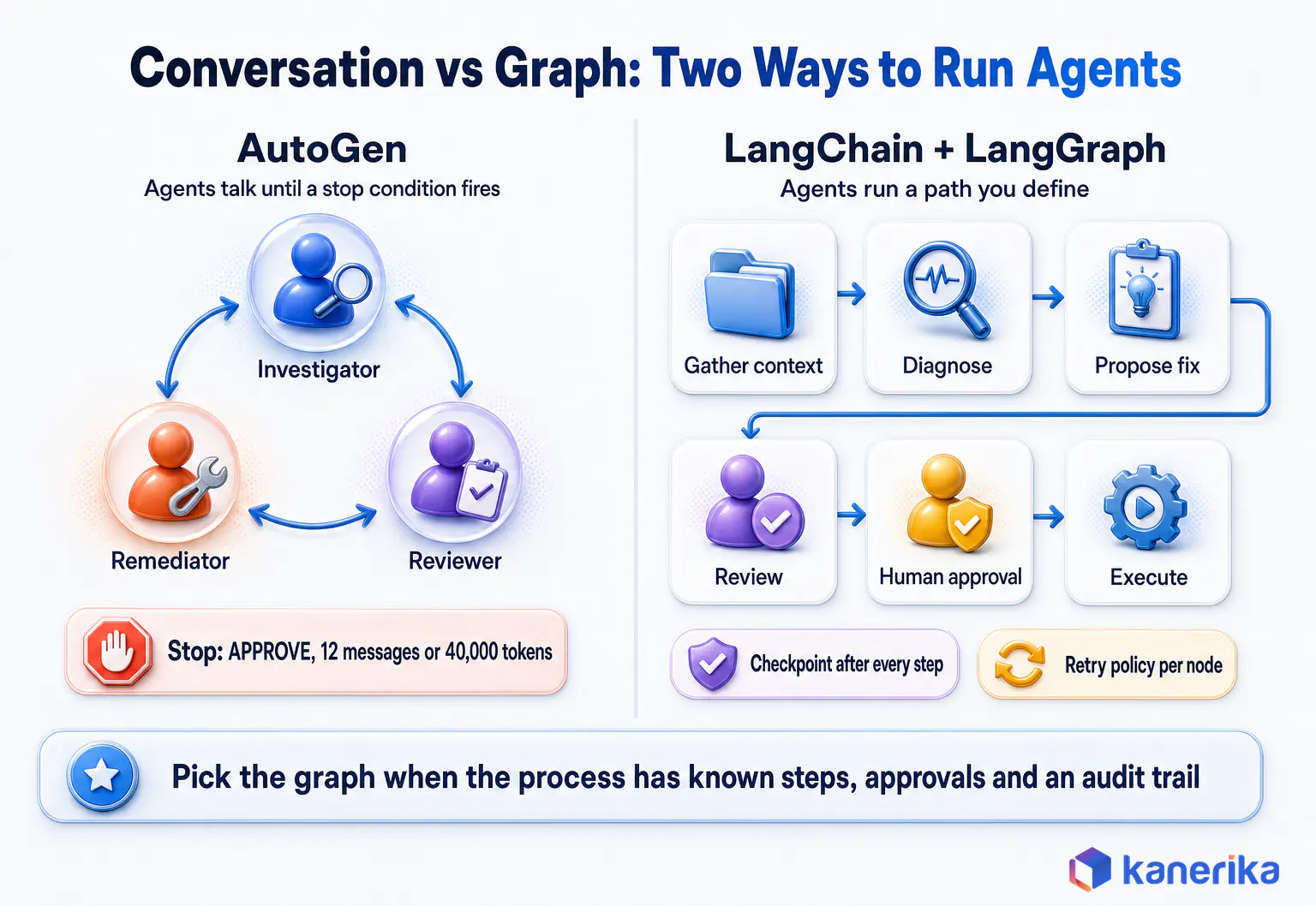
In the AutoGen vs LangChain decision, pick LangChain with LangGraph for new production agents and AutoGen’s side only for Microsoft-first teams or existing systems. The core difference is design, since AutoGen agents talk as a team until a stop condition fires, while LangGraph runs a graph you define.
That graph saves each step and can pause for a person to approve, so runs are easier to check and fix. AutoGen is in maintenance mode, so for a new Microsoft-first or .NET build its successor, Microsoft Agent Framework, carries the AutoGen side. Keep AutoGen itself for systems and experiments already built on it. Whichever you pick, measure cost per task on your own workload before you commit.
Key Takeaways
- The core design difference is conversation versus graph. AutoGen agents talk as a team until a stop condition fires, while LangChain with LangGraph runs a path you define.
- LangChain with LangGraph is the default pick for net-new production agents, because state, retries and human approval are explicit and testable.
- AutoGen is in maintenance mode with no new features planned. Its line continues as Microsoft Agent Framework, the AutoGen-side pick for Microsoft-first teams, so AutoGen itself suits existing systems and research.
- Conversation-driven teams resend a growing history on every turn. Their token use can climb several times faster than a graph that passes each step only the state it needs.
- Governance, tracing, prompt-injection defenses and model portability sit around either framework, and they decide production readiness more than agent syntax does.
- Keep tool contracts, state schemas, traces and evaluation sets framework-neutral so the orchestration layer can change later without a rewrite.
The Prototype That Worked Until Someone Asked for an Audit Trail
Picture a data platform team on a Thursday afternoon. Their AutoGen prototype runs three agents, an investigator, a remediator and a reviewer. It has just traced a broken nightly load to a schema change and proposed a fix in under two minutes, so the demo lands well.
Then the questions start. Risk wants a person to approve any corrective job before it runs, even if that person replies four hours later. Audit wants to replay exactly which tool calls and model outputs led to the fix. Finance also wants to know why one incident consumed 40,000 tokens.
Each of those questions concerns state, control and evidence. Those three properties are where the AutoGen vs LangChain choice now turns. They are also where AutoGen’s conversation-driven teams and LangGraph’s explicit graph differ most.
AutoGen vs LangChain: The Short Answer for 2026
For most enterprise teams starting a new agent system today, LangChain with LangGraph is the better choice. The reason is practical, since LangGraph gives every agent run an explicit graph, a saved state after each step and a retry policy per step. It also has a clean way to pause for human approval, and production systems get judged on exactly those properties.
AutoGen remains a capable framework with a distinctive idea. Its agents work as a team that talks through a problem until a stop condition ends the run. That style still produces good results for research, brainstorming and code-review loops where critique improves the answer.
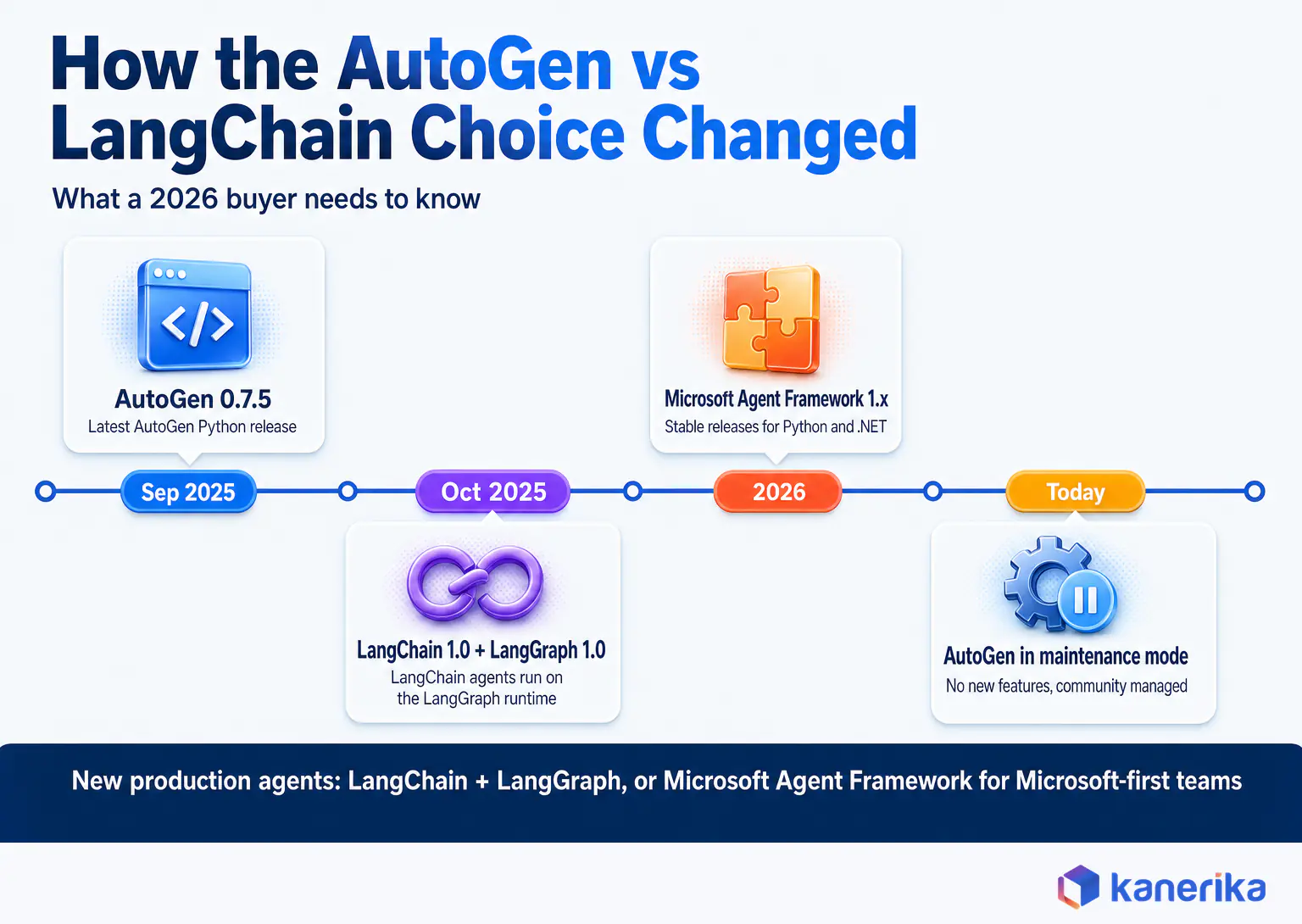
The project itself has changed status, though, and that change weighs more in a buying decision than any feature comparison. The AutoGen library, last released as Python version 0.7.5, is in maintenance mode, and Microsoft names Agent Framework as its successor. So on a Microsoft stack, the AutoGen side of this comparison now means Agent Framework, a continuation of AutoGen rather than a third contender.
For a quick view, the table below gives the pick for the three most common situations. The scenario section further down covers research, RAG, regulated and one-shot workloads. Before that, this guide explains the reasoning, shows the same task built in both frameworks, and works through cost, failure handling and governance.
| Your situation | Pick | Why |
|---|
| New production agent, any industry | LangChain + LangGraph | Explicit state, retries, approvals and active releases |
| Microsoft-first or .NET team, new build | The AutoGen side, now Microsoft Agent Framework (LangChain + LangGraph only if the team is Python-only and multi-cloud) | Agent Framework is AutoGen’s named successor, with Python and .NET support |
| AutoGen system already in production | Keep AutoGen for now, plan a migration | Maintenance mode means fixes slow down and no new features arrive |
What Changed Since Most AutoGen vs LangChain Comparisons Were Written
Most articles on this comparison were written when AutoGen was Microsoft’s flagship multi-agent project and LangChain was known mainly for chains. Both of those pictures are now out of date. Reading an older AutoGen vs LangChain comparison today is like reading a car review for a model that has since been replaced.
AutoGen Is in Maintenance Mode, and Microsoft Agent Framework Is the Successor
The AutoGen repository on GitHub now opens with a maintenance-mode notice. It states that AutoGen will not receive new features or enhancements and will instead be community managed. It also tells new users to start with Microsoft Agent Framework. The most recent Python release listed on the project’s releases page is version 0.7.5, published on 30 September 2025.
Microsoft describes Agent Framework as the direct successor to both AutoGen and Semantic Kernel, built by the same teams. In effect, it combines AutoGen’s agent abstractions with Semantic Kernel’s state management, middleware and telemetry, and adds graph-based workflows for explicit multi-agent orchestration. It also supports interoperability through the A2A protocol and MCP, which Kanerika compares in MCP vs A2A.
The Agent Framework repository ships regular stable releases for Python and .NET, and Microsoft publishes a step-by-step AutoGen to Agent Framework migration guide.
One more name causes confusion. AG2 is a separate open-source project that describes itself as formerly AutoGen, with its own maintainers and roadmap, so treat it as a different framework. For a fuller look at Microsoft’s successor alongside CrewAI, see Kanerika’s comparison of CrewAI, AutoGen and Microsoft Agent Framework.
LangChain 1.0 Runs Its Agents on LangGraph
LangChain moved in the other direction. On 22 October 2025 the team released LangChain 1.0 and LangGraph 1.0 together. At the same time, it committed to no breaking changes before a 2.0 release. Since that release, LangChain’s create_agent function runs on the LangGraph runtime. Middleware hooks then let teams add human approval, history summarization and custom checks inside the agent loop.
That release changes the comparison, because a LangChain agent is now a LangGraph program underneath that inherits durable state, checkpoints and interrupts. Older chain APIs moved to a separate langchain-classic package, which is why “LangChain is just chains” no longer describes the framework. Kanerika’s guide to LangChain vs LangGraph covers how the two layers split the work.
The snapshot below shows where each project stood when this article was updated. Treat it as a due-diligence checklist and recheck each row against the project’s own pages before an architecture decision, because release cadence changes quickly.
| Check (as of 6 October 2026) | AutoGen | LangChain + LangGraph | Microsoft Agent Framework (AutoGen’s successor) |
|---|
| Project status | Maintenance mode, community managed | Active, 1.x stable line | Active, 1.x stable line |
| Latest release seen | python-v0.7.5 (30 Sep 2025) | langchain 1.4.3 (28 Sep 2026); langgraph 1.2.14 (6 Oct 2026) | python-1.20.0 (2 Oct 2026) |
| Code license | MIT (code), CC-BY-4.0 (docs) | MIT for both libraries | Open source under MIT |
| Languages | Mainly Python | Python and JavaScript/TypeScript | .NET and Python |
| GitHub stars | 61,271 | 147,497 (langchain), 42,787 (langgraph) | 13,966 |
| Successor or migration path | Microsoft Agent Framework | langchain-classic for legacy chains | Not applicable |
How AutoGen Works: Agents That Talk Until a Stop Condition Fires
AutoGen models a task as a conversation. You create several agents, each with a model client, a system message and optional tools, and then place them in a team. Then the team passes messages between agents until a termination condition says the work is done.
AgentChat, the high-level API, comes with several team types. RoundRobinGroupChat lets agents speak in a fixed order, while SelectorGroupChat uses a model to pick the next speaker. Swarm passes control through explicit handoffs, whereas MagenticOneGroupChat runs an orchestrator that plans and delegates. For example, a typical multi-agent system pairs a planner, a specialist with tools and a critic who keeps sending work back until it passes review.
Stopping the conversation is a design decision in AutoGen. The framework ships termination conditions such as a message cap, a stop phrase, a token budget, a timeout, a handoff and an external stop signal. You can also combine them, so whichever fires first ends the run.
Teams can save and load their state as a dictionary, which lets a web application persist a conversation and resume it later. That save_state and load_state pair is AutoGen’s built-in resume point. It matters later in this guide. In AutoGen, a human approval or a process restart means ending one run and then starting the next from saved state.
Model Support, Code Execution and GraphFlow
Model support comes through model clients. The AutoGen model documentation lists OpenAI, Azure OpenAI, Azure AI Foundry and OpenAI-compatible endpoints, with Anthropic, Gemini, Ollama and Llama API clients marked experimental. AutoGen also runs model-generated code through code executors, including a Docker executor, and emits traces through OpenTelemetry instrumentation. Tools can also come from MCP servers through AutoGen’s MCP extension, so a tool server built once can later serve Microsoft Agent Framework as well.
On-Demand Webinar
Model Context Protocol (MCP): The Key to Building Context-Aware AI Agents
Tool contracts are the part of an agent stack worth keeping framework-neutral. Kanerika’s on-demand session explains how the Model Context Protocol gives AI agents a standard way to reach enterprise tools and data, whichever framework calls them.
Watch the Webinar →
AutoGen also has a graph option. GraphFlow lets you define a directed workflow of agents, though the documentation labels it an experimental feature. The framework’s center of gravity is still the conversational team. That is why the patterns in Kanerika’s overview of multi-agent workflows map so naturally onto it.
How LangChain Works: An Agent Loop on a Graph You Can Inspect
LangChain starts from the single agent and the systems around it. Its create_agent function wires a model to tools in the standard tool-calling loop. Integration packages connect that agent to model providers, vector stores, document loaders, retrievers and enterprise APIs. Because of that breadth, LangChain became a common base for retrieval-augmented generation applications.
LangGraph, though, is the part that matters most in an AutoGen vs LangChain decision. A LangGraph application is a state graph. You declare a typed state object and then write each step as a node that reads and updates it. Edges then connect the nodes, including conditional edges that route on what a step produced.
Three runtime features follow from that design, and each answers a question from the opening incident. A checkpointer saves the state after every step under a thread ID, so with a durable checkpointer a run survives a restart. The interrupt function pauses a node mid-run and waits for a human.
The LangGraph interrupts documentation shows the run resuming once the person answers, with that answer as the return value. That means the approval Risk asked for can arrive four hours later without losing the run. A per-node retry policy re-runs failed steps with backoff, so a load lookup that times out is retried instead of failing the whole incident.
Observability is also central to LangChain’s production story. LangSmith, the company’s commercial platform, traces every model call, tool call and state change, and it accepts traces through OpenTelemetry as well. So teams that need vendor-neutral telemetry can export the same spans to their own observability stack.
Case Study
43% Faster Document Retrieval for an Investment Bank
Kanerika built chat-based retrieval across an investment bank’s document repositories and databases, with role-based access controls enforced inside the retrieval process. Information retrieval became 43% faster with 100% role-based compliance.
Read the Case Study →
AutoGen vs LangChain Side by Side
The two frameworks solve overlapping problems from opposite ends. AutoGen begins with agents that collaborate and adds structure when needed, while LangChain begins with structure and lets you add agents inside it. The AutoGen vs LangChain differences that matter most sit in production engineering, which the table compares.
| Decision area | AutoGen | LangChain + LangGraph |
|---|
| Core model | Agents exchange messages in a team | Agent loop running on a state graph |
| Control flow | Emerges from the conversation and speaker selection | Defined by nodes, edges and conditional routing |
| State and memory | Conversation history, save_state and load_state | Typed state, checkpoints per step, thread IDs |
| Multi-agent patterns | Round robin, selector, swarm, Magentic-One | Supervisor, subgraph and handoff patterns built in the graph |
| Stopping a run | Termination conditions (messages, tokens, time, text) | Graph reaches END, plus explicit loop counters in state |
| Human in the loop | UserProxyAgent or handoff, then resume on next run | interrupt() pauses a node, resume with Command |
| Retries | Written in your tools or around team.run() | RetryPolicy per node |
| Observability | OpenTelemetry instrumentation | LangSmith tracing, OpenTelemetry support |
| Integrations | Model clients, function tools, MCP, code executors | Large catalog of model, vector store, loader and tool packages |
| Project status | Maintenance mode | Active 1.x releases |
Learning Curve and Developer Experience
AutoGen feels faster on day one. A working three-agent team takes a few dozen lines, and watching agents talk in the console makes the idea easy to grasp. The cost shows up later, when a conversation takes an unexpected path and you have to work out why one agent spoke when it did.
LangGraph asks for more thinking up front. You have to decide what the agent architecture and its state look like and which step owns which decision before anything runs. In return, teams get a system they can unit test node by node, replay from any checkpoint and explain to an auditor. That is usually the trade an enterprise wants.
The Same Incident-Triage Task Built Both Ways
Feature tables only go so far, so here is one workload built in each framework. The task comes from the opening scenario. When a data-quality incident arrives, the system gathers context, proposes a fix and reviews it. It waits for a human to approve before it runs the corrective job.
The Test Task
- Receive an incident, such as a sudden drop in a pipeline’s row count.
- Look up the pipeline’s runbook and metadata through two tools.
- Diagnose the likely root cause.
- Propose one corrective action.
- Review the proposal against the runbook and revise it if needed.
- Pause for human approval, then run the corrective job with retries.
AutoGen Version
In AutoGen the steps become roles in a conversation. An investigator with the two tools diagnoses the issue, a remediator then proposes the fix, and a reviewer approves or pushes back. Three termination conditions cap the run so a disagreement cannot loop forever.
import asyncio
from autogen_agentchat.agents import AssistantAgent
from autogen_agentchat.conditions import (
    MaxMessageTermination, TextMentionTermination, TokenUsageTermination)
from autogen_agentchat.teams import RoundRobinGroupChat
from autogen_ext.models.openai import OpenAIChatCompletionClient

async def fetch_runbook(pipeline: str) -> str:
    """Return the runbook section for a pipeline (wraps your document store)."""
    ...

async def get_pipeline_metadata(pipeline: str) -> str:
    """Return owner, schedule and last run status (wraps your data catalog)."""
    ...

async def main() -> None:
    model = OpenAIChatCompletionClient(model="gpt-4.1")
    investigator = AssistantAgent(
        "investigator", model_client=model,
        tools=[fetch_runbook, get_pipeline_metadata],
        system_message="Find the most likely root cause using the tools.")
    remediator = AssistantAgent(
        "remediator", model_client=model,
        system_message="Propose one corrective action and the exact job to run.")
    reviewer = AssistantAgent(
        "reviewer", model_client=model,
        system_message="Check the proposal against the runbook. Reply APPROVE or explain the gap.")

    stop = (TextMentionTermination("APPROVE")
            | MaxMessageTermination(max_messages=12)
            | TokenUsageTermination(max_total_token=40_000))
    team = RoundRobinGroupChat([investigator, remediator, reviewer],
                               termination_condition=stop)

    result = await team.run(task="Incident: orders_daily row count fell 38% after the 02:00 load.")
    saved = await team.save_state()   # persist with the run for audit and resume
    # Human approval and the corrective job run outside the team, in your application code.
    await model.close()

asyncio.run(main())
The code is short and readable, and the conversation will often reach a good answer. Now notice where the approval and execution steps live. They sit outside the team in ordinary application code, so the pause, the resume and the retry logic are yours to build and test.
LangGraph Version
In LangGraph, the same steps become nodes on a graph. Tool lookups run as plain code with a retry policy, while three nodes call the model. A conditional edge sends weak proposals back for one revision, and an interrupt pauses the run for approval.
from typing import TypedDict
from langgraph.graph import StateGraph, START, END
from langgraph.types import Command, RetryPolicy, interrupt
from langgraph.checkpoint.memory import InMemorySaver   # use a durable checkpointer in production
# llm, parse_pipeline, *_prompt and run_corrective_job are your own helpers; tool functions here are sync wrappers

class TriageState(TypedDict, total=False):
    incident: str
    runbook: str
    metadata: str
    diagnosis: str
    proposal: str
    review: str
    revisions: int
    approved: bool

def gather_context(state: TriageState) -> dict:          # plain code, no model call
    pipeline = parse_pipeline(state["incident"])
    return {"runbook": fetch_runbook(pipeline), "metadata": get_pipeline_metadata(pipeline)}

def diagnose(state: TriageState) -> dict:
    return {"diagnosis": llm.invoke(diagnosis_prompt(state)).content}

def propose_fix(state: TriageState) -> dict:
    return {"proposal": llm.invoke(fix_prompt(state)).content,
            "revisions": state.get("revisions", 0) + 1}

def review_fix(state: TriageState) -> dict:
    return {"review": llm.invoke(review_prompt(state)).content}

def human_approval(state: TriageState) -> dict:
    decision = interrupt({"proposal": state["proposal"], "review": state["review"]})
    return {"approved": decision == "approve"}

def execute_fix(state: TriageState) -> dict:
    run_corrective_job(state["proposal"])   # keep idempotent: nodes re-run on resume or retry
    return {}

def after_review(state: TriageState) -> str:
    if "APPROVE" in state["review"] or state["revisions"] >= 2:
        return "human_approval"
    return "propose_fix"

builder = StateGraph(TriageState)
builder.add_node("gather_context", gather_context, retry_policy=RetryPolicy(max_attempts=3))
builder.add_node("diagnose", diagnose)
builder.add_node("propose_fix", propose_fix)
builder.add_node("review_fix", review_fix)
builder.add_node("human_approval", human_approval)
builder.add_node("execute_fix", execute_fix, retry_policy=RetryPolicy(max_attempts=2))
builder.add_edge(START, "gather_context")
builder.add_edge("gather_context", "diagnose")
builder.add_edge("diagnose", "propose_fix")
builder.add_edge("propose_fix", "review_fix")
builder.add_conditional_edges("review_fix", after_review)
builder.add_conditional_edges("human_approval", lambda s: "execute_fix" if s["approved"] else END)
builder.add_edge("execute_fix", END)
graph = builder.compile(checkpointer=InMemorySaver())

config = {"configurable": {"thread_id": "incident-4417"}}
graph.invoke({"incident": "orders_daily row count fell 38% after the 02:00 load."}, config)
# Hours later, after a reviewer approves in your UI:
graph.invoke(Command(resume="approve"), config)
This version is longer, but the extra lines buy specific guarantees. With a durable checkpointer (for example Postgres) in place of the in-memory one, the approval pause survives a restart. The tool lookups also retry on transient errors, and the revision counter puts a hard ceiling on the review loop. Every path through the graph can be unit tested, which is what an auditor or an on-call engineer needs.
What the AutoGen vs LangChain Versions Reveal
What matters is how each version behaves under load, failure and review. Run both against the same model, tools and incident set, and measure the items below.
- Task success rate on a fixed set of real past incidents.
- Model calls, input tokens and output tokens per completed task.
- End-to-end latency at the median and the 95th percentile.
- Behavior when a tool times out or returns bad data.
- Recovery after the process restarts mid-run.
- How completely the trace explains a failed run.
Be clear about what this guide did and did not test. These six measures are the test it recommends, not one it ran. The code samples follow each framework’s documentation, though they use stub helpers. The token and cost figures below come from stated assumptions, not a timed benchmark. Success rates, latency and recovery also depend on your model, tools and data. The numbers that should settle the decision are the ones your own spike produces.
AutoGen vs LangChain Token Cost for the Same Task
Token cost is where the two patterns diverge fastest. In a round-robin AutoGen team, each agent’s model context accumulates the conversation by default, so every new turn resends the whole history. Input tokens therefore grow roughly with the square of the number of turns.
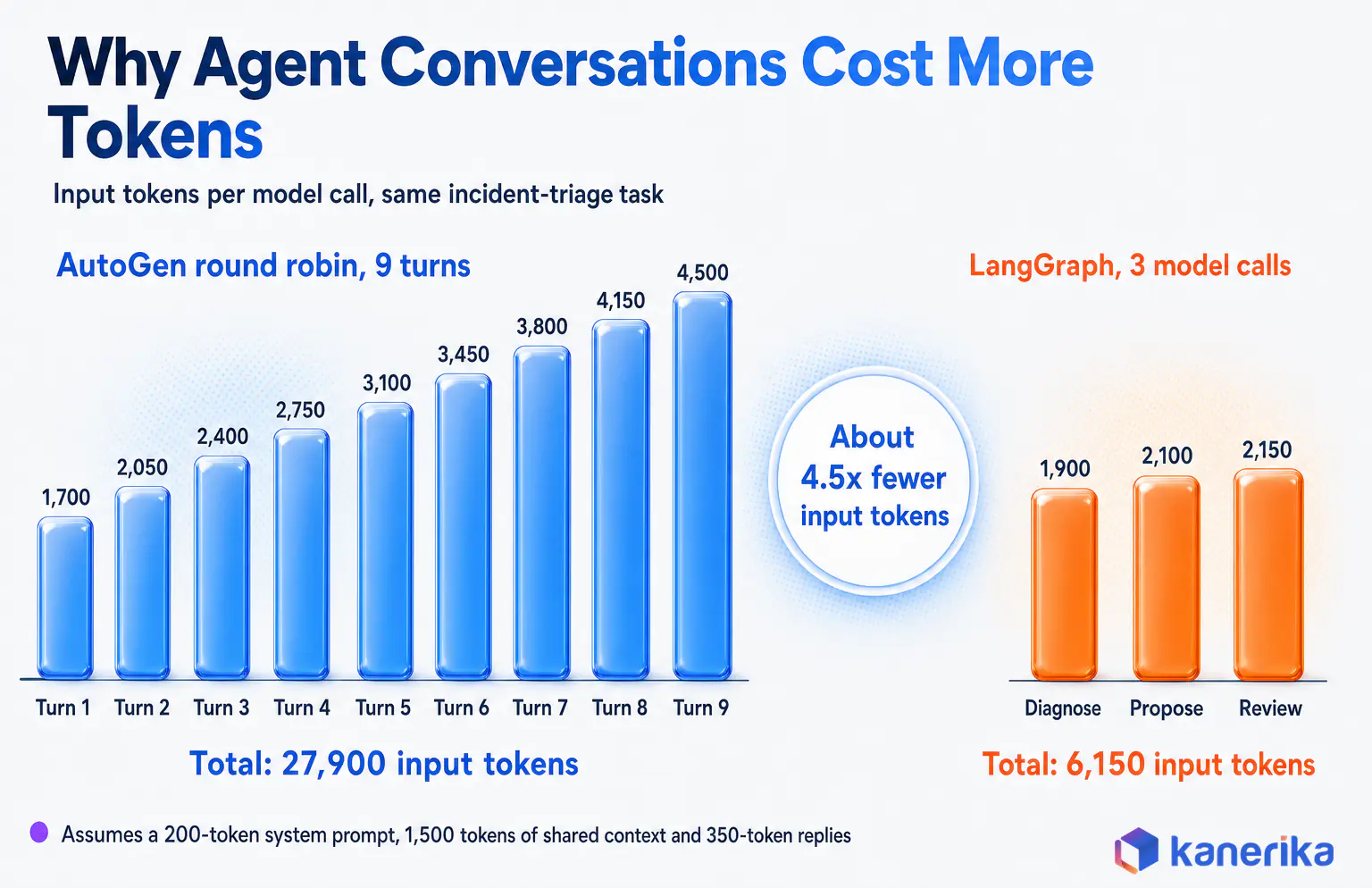
Here is a worked example with stated assumptions. Each call carries a 200-token system message and 1,500 tokens of shared incident context, and each agent reply is about 350 tokens. On turn k the agent reads 1,700 tokens plus all earlier replies. Over nine turns that adds up to 9 × 1,700 + 350 × 36, or 27,900 input tokens.
The LangGraph version makes three model calls on the happy path, and each node passes only what the next step needs. Diagnosis reads 1,700 tokens, the proposal reads 2,050 and the review reads 2,400, for 6,150 input tokens overall. That is about 4.5 times fewer input tokens for the same outcome.
| AutoGen round-robin turns | Input tokens per task | Multiple of the 3-call LangGraph path (6,150) |
|---|
| 6 turns (2 rounds) | 15,450 | 2.5x |
| 9 turns (3 rounds) | 27,900 | 4.5x |
| 12 turns (4 rounds) | 43,500 | 7.1x |
| 15 turns (5 rounds) | 62,250 | 10.1x |
Turning Tokens Into Monthly Cost
To turn tokens into money, use the list price for gpt-4.1, the model in the AutoGen sample. OpenAI’s model page lists $2 per million input tokens and $8 per million output tokens. As before, assume each model reply is about 350 output tokens. The nine-turn AutoGen run then produces 3,150 output tokens and the three-call LangGraph run 1,050. That puts the AutoGen run at about $0.081 per incident and the LangGraph run at about $0.021. At 20,000 incidents a month that is roughly $1,620 against $414, before any retries.
Two caveats keep this honest. First, AutoGen can cap history with a buffered model context, which narrows the gap. Second, a LangGraph design that appends every message to state will grow too. The pattern still holds, because open conversation spends tokens on coordination, and a graph spends them only where a step needs the model.
Error Handling, Retries and Runaway Loops
Production agents fail in ordinary ways. For example, a model call times out, an API rate-limits, a tool returns malformed data or the process restarts halfway through a task. The framework decides how much of that handling you write yourself.
AutoGen leaves most of it to your code. Tools need their own retry wrappers, and a failed team run needs logic around team.run(). Recovery means restoring a saved state before starting the next run. Its termination conditions are the main safety net against runaway conversations, so every team should combine a message cap, a token budget and a timeout.
Kanerika Service
Agentic AI Development Services
Need that approval, retry and audit layer built and tested around your agents? Kanerika engineers production agent workflows, from framework selection and controlled spikes to evaluation and observability.
Explore Agentic AI Services
Where Retries and Recovery Live in LangGraph
LangGraph moves the same concerns into the graph. A retry policy on each node re-runs failed attempts with backoff until it reaches the attempt limit. By default it skips errors that signal a bug, such as ValueError or TypeError. The documentation also warns that a resumed or retried node runs again from its first line. Any side effect inside a node must therefore be idempotent.
| Failure | AutoGen | LangChain + LangGraph |
|---|
| Model timeout or rate limit | Model client settings plus your own retry wrapper | Node RetryPolicy with backoff |
| Tool returns bad data | Agent may notice and retry in conversation | Validate in the node, route to a fix-up edge |
| Agents disagree indefinitely | MaxMessage, TokenUsage and Timeout termination | Loop counter in state, conditional exit |
| Process restarts mid-task | Restore save_state output, start a new run | Resume from the last checkpoint on the same thread |
| Human approval takes hours | End run on handoff, resume later with saved state | interrupt() holds state until resumed |
| Duplicate execution of a side effect | Guard inside the tool | Idempotent node design, guided by the docs |
Kanerika’s guide to AI agent evaluation covers how to turn these failure cases into regression tests that run before every prompt, model or framework change.
Checklist
Enterprise Agentic AI Checklist
Before an agent goes live, pair your failure and recovery tests with a structured readiness review. Kanerika’s downloadable checklist helps enterprise teams judge whether an agent use case is ready for production.
Get the Checklist →
Which Framework for Which Enterprise Scenario
An AutoGen vs LangChain choice should follow the shape of the work. When the job is a business process with known steps, a graph-based agentic workflow fits. When the job is open-ended reasoning where specialists improve each other’s output, a conversation fits, provided the cost and the stopping rules are under control.
| Scenario | Pick | Reason |
|---|
| Single-agent RAG assistant | LangChain | Retrieval and integrations are the work |
| New multi-agent production workflow | LangChain + LangGraph | Explicit routing, state and approvals |
| Long-running process with approvals | LangChain + LangGraph | Checkpoints and interrupts survive restarts |
| Regulated workflow (claims, KYC, compliance review) | LangChain + LangGraph, plus external controls | Every path can be tested and replayed |
| Existing AutoGen system that works | AutoGen short term, migration plan | A rushed rewrite adds risk |
| New research or ideation through agent debate | The AutoGen side: AutoGen if the experiment already runs there, otherwise its successor | Conversation is the method |
| Microsoft-first or .NET team, new build | The AutoGen side, now Microsoft Agent Framework (LangChain + LangGraph only if the team is Python-only and multi-cloud) | AutoGen’s named successor, with Python and .NET |
| One-shot extraction or classification | A model SDK, no agent framework | No loop, so no orchestration needed |
That last row deserves attention. Many workloads described as agents are a single model call with a structured output. Adding any orchestration framework there only adds cost, since it brings no new capability. Kanerika’s comparison of RAG and agentic RAG shows where that line usually falls.
Worked Example: An Insurance Claim Exception
Consider a claims team that wants an agent to handle exceptions. A claim arrives with a document the rules engine cannot classify.
The agent must then retrieve the policy and claim history, interpret the document and decide whether a specialist should look at it. Until an adjuster signs off, it must also hold any payout change.
Most of that flow is deterministic. Eligibility checks are rules, retrieval is a query, and the adjuster’s approval may not arrive until the next morning. Only the document interpretation needs a model. The regulator will still expect a record of the evidence, the model output, the approval and the final action.
The pick here is LangChain with LangGraph. Each step becomes a node, while the model runs only in the interpretation node. The specialist route is a conditional edge, while the adjuster’s sign-off is an interrupt backed by a durable checkpointer.
AutoGen would become the better pattern only if the interpretation itself needed several specialist agents to debate an ambiguous document. Even then, it would run as one bounded step inside the graph.
Three questions settle most real decisions quickly. Does the process have known steps, must it pause for people, and will someone audit it? Three yes answers point to a graph, and Kanerika’s guide to AI agent frameworks covers the wider field when neither option fits.
Production Concerns the Demo Never Shows
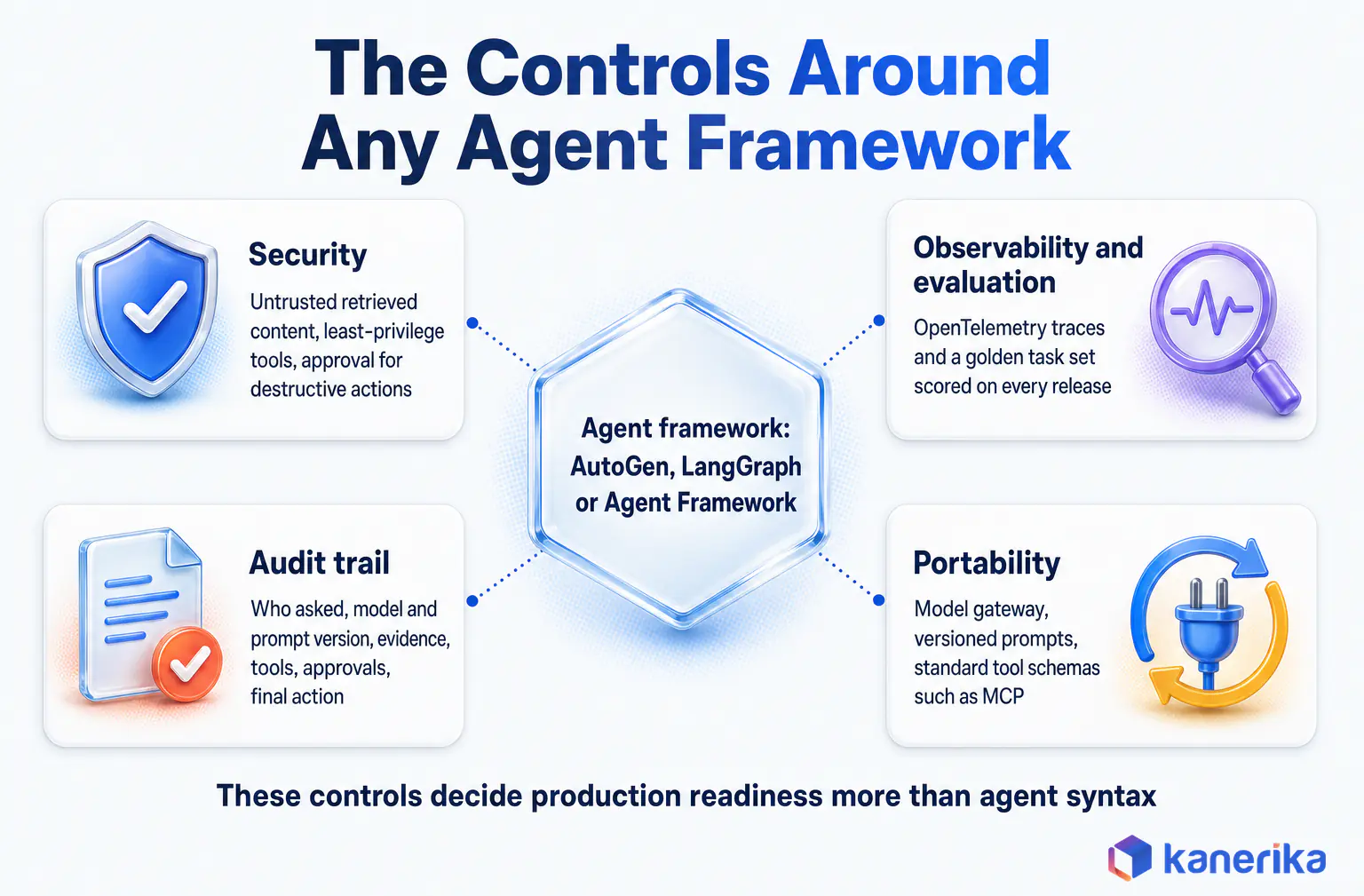
Choosing a framework settles how agents coordinate. It still leaves open the controls that decide whether a system can run in an enterprise. Those controls sit around the framework whichever one you pick.
Governance and Audit Trails
An auditable agent run records who asked, which model and prompt version answered and what evidence was retrieved. It also records which tools ran with which inputs and outputs, who approved the action and what finally happened. LangGraph’s per-step checkpoints give that record a natural spine. In AutoGen, the saved team state and the message history provide the raw material, so you assemble the record yourself.
Retention, access to stored transcripts and policy checks belong to your platform, guided by a written AI governance framework. Kanerika’s article on agentic AI governance sets out the policies most regulated teams need before an agent touches production data.
Observability and Evaluation
When an agent gives a wrong answer, the team needs to see every model call, tool call and decision that led there. AutoGen ships OpenTelemetry instrumentation, and LangSmith supports tracing with OpenTelemetry, so both can feed a vendor-neutral tracing stack.
Traces only help if someone checks them against expectations. A golden set of real tasks, scored on every release, catches regressions from prompt edits, model upgrades and framework changes. The AI agent observability guide explains which signals to track first, and the same habits carry over from LLMOps observability.
Security and Prompt Injection
Agents that call tools turn prompt injection into an action risk. OWASP lists prompt injection as LLM01 in its Top 10 for LLM applications, including indirect injection through retrieved documents and web pages.
Neither framework solves this for you, so treat retrieved content as untrusted and give each tool the narrowest permissions it needs. Validate tool arguments in code before execution, and require human approval for destructive actions. AutoGen’s code executors deserve extra care, so run them in containers with restricted network access.
Watch on YouTube
AI Agent Access Control: From Excessive Agency to Least Privilege
Kanerika walks through how enterprises limit what AI agents can reach, from tool permissions to least-privilege access, the same controls any AutoGen or LangGraph agent needs before it touches production systems.
Model and Vendor Portability
Both frameworks support several model providers, though LangChain’s integration catalog is broader and AutoGen labels several non-OpenAI clients as experimental. Portability depends more on your own design than on either library.
Route model calls through a gateway, keep prompts in versioned configuration, and define tools with standard schemas such as the Model Context Protocol. Kanerika’s explainer on the LLM gateway shows how one control point handles routing, quotas and audit across providers.
Migrating Between Frameworks or Running Both
Many enterprises already run an AutoGen prototype or service, so the practical question is how to move without breaking it. There are two routes, crossing to LangChain with LangGraph or staying on the AutoGen side through Microsoft Agent Framework. For the LangGraph route, the work starts with mapping concepts, since a direct port rarely works between a conversation model and a graph model.
The common mappings are straightforward, and tools usually move with little change. An AutoGen agent role becomes a LangGraph node or a subgraph, and speaker selection becomes conditional routing. Similarly, a termination condition becomes an exit edge or loop counter, saved team state becomes the checkpointer, and a UserProxyAgent becomes an interrupt.
Check Microsoft’s own path before crossing ecosystems. Agent Framework’s migration guide maps AutoGen agents, the round-robin pattern, GraphFlow, human-in-the-loop and checkpointing to its own workflow model. That may well be the lower-change route, especially for a .NET or Azure-centered team. Kanerika’s comparison of Semantic Kernel vs LangChain covers the same choice at the SDK level.
Running both frameworks for a while is also reasonable. A LangGraph workflow can own the process, state and approvals while one node calls a bounded AutoGen team for a step that benefits from debate. That node needs a typed input and output, a token budget, a turn limit and a timeout. Its result then returns to the graph for review and logging.
Whatever you choose, keep the expensive assets framework-neutral. Tool contracts, the model gateway, state schemas and trace fields should outlive any orchestration library you use in 2026. So should evaluation datasets, retry and timeout policies and approval rules.
How Kanerika Takes an Agent From Framework Choice to Governed Production
Kanerika treats the framework as one decision inside a longer delivery path. Through its agentic AI services, each agent moves through five stages, from a fit assessment to measured production. The framework question is settled in the second stage, the controlled spike, with evidence from the client’s own workload.
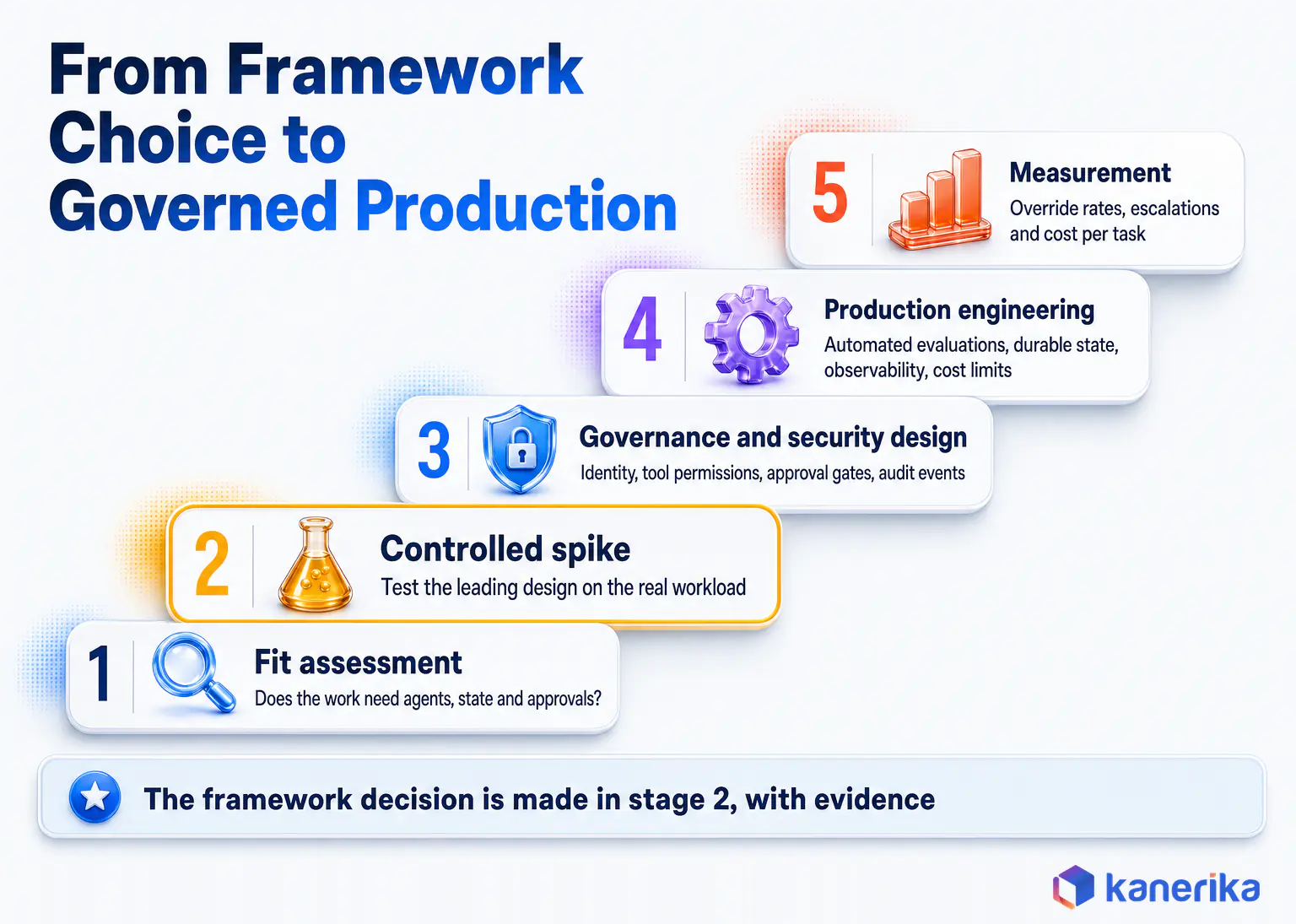
Five Stages From Fit Assessment to Measured Production
Fit assessment comes first, and it starts with a process audit of the tasks that would benefit most from autonomous execution. The audit asks whether the work needs agents at all, how many, and how long state must live. It also maps which systems the agent touches and where people must approve. In practice, many candidate use cases turn out to need one well-instrumented agent, or a single model call with no agent loop.
The controlled spike follows. Kanerika tests agents in controlled environments against the real workload before any production rollout. It builds the leading design, plus a second design whenever the choice is close, with the same model and tools. Task success, cost per completed task, p95 latency, failure recovery and trace quality are measured before anyone commits to a platform. For a task like the incident triage above, this is where the six recommended measures become the client’s own numbers.
Governance and security come before production traffic. Access controls, audit trails and explainability go into the architecture before the first agent goes live. AI governance policies then become checks that run on every release.
Production engineering then adds CI with automated evaluations, durable state storage, observability, cost limits and model fallback. The handover includes documented agent logic, integration specifications and governance controls built to pass security and compliance review.
Measurement closes the loop. Each deployment is scoped to outcomes such as processing time and cost per task, then tracked against the client’s KPIs. Later, override rates and escalations show whether the agent earns its place.
Case Study: A Compliance Agent for a Global Expert Network
One engagement shows the approach in practice. A global expert network, with access to more than one million subject-matter experts, vetted every expert through manual negative-news screening. That screening covered news sites, social media and LinkedIn. Backlogs grew and client events slipped while approvals waited.
Kanerika built an AI compliance agent that pulls vetting attributes from internal databases and runs targeted web research. It then produces structured reports with citations mapped against the client’s compliance rulebook, so analysts moved from research to review. According to the published case study, expert vetting became 3x faster, backlog cases fell 70% and event delays dropped 40%. Those are measured client outcomes, unlike the illustrative token and cost figures earlier in this guide. The published case study does not name the orchestration framework, so read it as evidence for governed agent design rather than for either library.
The lesson carries over to any framework decision. A compliance agent earns trust through explicit steps, cited evidence and a human checkpoint. Those are the properties a team should test for when it compares AutoGen, or its successor, with LangChain.
Case Study
3x Faster Expert Vetting with an AI Compliance Agent
Read the full engagement: the vetting problem, the agent Kanerika built and how analysts now review its cited reports.
Read the Case Study →
The Bottom Line on AutoGen vs LangChain
This comparison comes down to conversation versus graph. For new production work in 2026, LangChain with LangGraph is the stronger default. Its agents run on an explicit graph with saved state, retries and approval pauses.
AutoGen’s conversational teams still suit existing systems and research, and Microsoft-first teams can stay on the AutoGen side through its successor, Microsoft Agent Framework. Keep tools, state, traces and evaluations framework-neutral, measure cost per task on your own workload, and design governance before the first production run. Settle AutoGen vs LangChain on that evidence, and for most new production builds the answer will be LangChain.
Frequently Asked Questions
Which is better, LangChain or AutoGen?
For a new production system in 2026, LangChain with LangGraph is the safer choice. Its agents run on a graph with checkpoints, retries and approval pauses that teams can test and audit. AutoGen is now in maintenance mode and gets no new features. It still suits existing AutoGen systems and research prototypes built around agent debate.
What is the main difference between AutoGen and LangChain?
AutoGen coordinates work through conversation. Several agents exchange messages as a team until a termination condition ends the run. LangChain builds an agent loop around tools, retrieval and middleware. LangGraph then runs that loop as an explicit graph of nodes and edges. So AutoGen discovers the path during the run, and LangGraph defines it in advance.
Why do teams use AutoGen?
Teams pick AutoGen when a problem benefits from agents talking to each other. Typical examples are research assistants, planner, coder and reviewer loops, and analysis tasks where critique improves the answer. Its team types and termination conditions make those experiments quick to build. Given its maintenance status, many teams now prototype there and plan production elsewhere.
Which framework is better for autonomous task execution?
For long-running autonomous tasks, LangGraph is the stronger fit. It persists state after each step, so a task survives restarts and can pause for approval. It also retries failed nodes under a defined policy. AutoGen can run autonomous teams too, but recovery depends on saving and restoring team state yourself between runs.
Is AutoGen still maintained, and is it production ready?
AutoGen is in maintenance mode. Microsoft’s README for the project says it will receive no new features and is now community managed. Existing AutoGen systems can stay in production with monitoring and a migration plan. For new production builds, LangChain with LangGraph is the stronger default, and Microsoft directs new AutoGen users to its successor, Microsoft Agent Framework.
When should I use AutoGen vs LangGraph?
AutoGen fits a system that already runs on it. It also fits tasks that work as a discussion among specialist agents, such as a planner, coder and critic refining a draft. LangGraph fits business processes with known steps, approvals, retries and an audit requirement. Most enterprise agent workflows belong in that second group, so LangGraph is the usual default.
How does LangGraph change the AutoGen vs LangChain comparison?
LangChain agents now run on LangGraph. The LangChain 1.0 release notes describe create_agent as built on the LangGraph runtime. That gives LangChain agents saved state, checkpoints, approval pauses and retries, which older comparisons credited mainly to AutoGen’s conversation model. Comparing AutoGen with LangChain today means comparing conversation-driven teams with an explicit agent graph.
What is the difference between AutoGen, CrewAI and LangChain?
AutoGen organizes agents as conversational teams. CrewAI organizes them as role-based crews that carry out assigned tasks. LangChain provides the agent loop and integrations, with LangGraph handling stateful orchestration. AutoGen is now in maintenance mode, and its line continues as Microsoft Agent Framework. For new projects, compare CrewAI, LangChain with LangGraph and Agent Framework on state, tooling and support.
Is AutoGen free to use?
Yes. AutoGen’s code is released under the MIT license, so there is no license fee. The real cost is model usage behind each agent turn, plus hosting, monitoring and engineering time. Multi-agent conversations resend a growing message history on every turn, so token spend per task can climb quickly without limits on turns and context size.
What are the alternatives to AutoGen?
Microsoft points AutoGen users to Microsoft Agent Framework, its successor built by the AutoGen and Semantic Kernel teams. Other common choices are LangChain with LangGraph, CrewAI, and AG2, a separate project that describes itself as formerly AutoGen. Compare them on state handling, observability, language support and each maintainer’s commitment to long-term releases.
Does AutoGen support human-in-the-loop workflows?
Yes, in two ways. A UserProxyAgent can pause a running team to collect feedback, which blocks the run until a person responds. A team can also stop on a handoff and resume on the next run, with state saved through save_state and load_state. LangGraph covers the same need with interrupts and persisted checkpoints.
Can I use LangChain and AutoGen together?
Yes, and it can make sense during a migration. A common pattern runs a LangGraph workflow as the outer process and calls a bounded AutoGen team as one node. That node gets a defined input, a token budget, a turn limit and a timeout. Its result then returns to the graph for approval, execution and audit logging.
Is LangChain easier to learn than AutoGen?
For a first agent, both are approachable. AutoGen’s AgentChat gets a multi-agent team running in a few lines of Python, and LangChain’s create_agent is similarly short for a single agent. The learning curve differs later. LangGraph asks you to model state, nodes and edges up front, which takes longer but pays off in testing and debugging.
Which has better tool integration, AutoGen or LangChain?
LangChain has the larger integration ecosystem, covering model providers, vector stores, document loaders, retrievers and tools. AutoGen supports function tools, code execution and Model Context Protocol servers. Its official model clients cover OpenAI and Azure, with experimental clients for Anthropic, Gemini and Ollama. Applications that touch many enterprise systems usually connect faster with LangChain.
Can AutoGen execute code?
Yes. AutoGen includes code executors that run model-generated code, including a Docker executor that runs commands inside a container. Code execution is one of AutoGen’s original strengths for data analysis and software tasks. In production, treat it as a high-risk tool. Isolate it, restrict network access, set timeouts and log every execution for review.
Is AutoGen developed by Microsoft?
Yes. AutoGen was created at Microsoft and lives in the microsoft/autogen repository on GitHub. Microsoft has since moved new development to Microsoft Agent Framework, built by the AutoGen and Semantic Kernel teams. AutoGen itself is in maintenance mode and community managed, so new Microsoft-first agent projects should evaluate Agent Framework first.
Does AutoGen use Semantic Kernel?
AutoGen does not depend on Semantic Kernel. It provides an optional adapter that lets AutoGen agents call models through Semantic Kernel connectors. The closer link is organizational. Microsoft Agent Framework is the direct successor to both projects, built by both teams. It combines AutoGen’s agent abstractions with Semantic Kernel’s state management, middleware and telemetry features.
Which framework is better for real-time applications?
Model inference dominates latency in both frameworks, so the design matters more than the library. A LangGraph workflow makes a known number of model calls, which keeps p95 latency predictable. An AutoGen team may take extra turns on a hard input, adding seconds each time. For user-facing paths, cap turns, set timeouts and stream partial output.
Is AutoGen more expensive than LangChain in token usage?
It can be, because of the pattern. In a round-robin AutoGen team, every turn resends the growing conversation, so input tokens rise roughly with the square of the turn count. A LangGraph node usually receives only the state it needs. The same model on the same task can cost several times more as an open conversation.
Is AutoGen a framework or a platform?
AutoGen is a framework. It ships as Python packages, including AgentChat, Core and Extensions, plus AutoGen Studio for low-code prototyping. Hosting, identity, monitoring and governance stay your responsibility. LangChain is also an open-source framework. Its company separately sells LangSmith for tracing, evaluation and deployment, which some enterprises use to run agents in production.














