Expert RPA & Data Platform Modernization Services

Modernize your data and RPA platforms with our automated migration consulting services. Our custom-built migration connectors handle complex transitions like Tableau to Power BI, SSIS to Microsoft Fabric, and UiPath to Power Automate, cutting costs and downtime.

Reduction in Migration Costs

0 %

Reduction in Migration Time

0 %

Fewer Resources Required

0 %

Get Started with Migration Solutions

Migration

logo_svg

Upgrade Your Analytics Platform Without Business Disruption

Migrating from Tableau to Power BI doesn’t have to be risky or time-consuming. We make it simple, fast, and stress-free—so you can focus on decisions, not downtime.

alarm
100 Hrs

Average manual hours saved

manufacturing
0 %

Overall effort reduced

attach_money
0 %

Lower migration costs

Data Migration Solutions for Accelerated Business Growth

Simplify complex data and RPA platform migrations with our migration accelerators. From assessment to deployment, we manage every step—ensuring fast and secure transitions to modern solutions like Power BI, Microsoft Fabric, and Power Automate.

Migration Across Data Platforms

Seamlessly transition from Informatica to Talend/Alteryx, SSIS/SSAS to Microsoft Fabric, and Azure to Microsoft Fabric using our purpose-built migration accelerators for enhanced performance and scalability.

Highlights:
Business Intelligence & Reporting Migration

Transform your business intelligence landscape by migrating from Tableau to Power BI, SSRS to Power BI, Crystal Reports to Power BI, and Cognos to Power BI with our intelligent migration connectors.

Highlights:
RPA Platform Modernization

Upgrade your automation infrastructure from UiPath to Microsoft Power Automate using our automated migration solutions for streamlined workflow management.

Highlights:
flip.svg

The All-in-One AI SaaS Platform

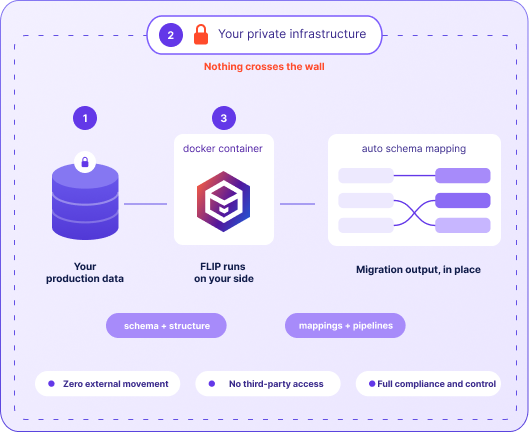
FLIP, our AI SaaS platform, hosts built-in accelerators that enable data and RPA platform migrations through intelligent automation.

Case Studies: Data Migrations Solutions That Deliver Value

Explore real-world case studies where businesses upgraded their data and RPA platforms with minimal risk, faster timelines, and lower costs—while improving operations and long-term value across their tech stack.

Migration

Modernizing Financial Analytics with Informatica to Alteryx Migration 

Impact:
  • 45% Faster Reporting Cycles
  • 38% Reduction in ETL Maintenance Costs
  • 60% Improved Analytics Turnaround

Migration

Transforming Retail Reporting and Analytics with SQL to Microsoft Fabric Migration 

Impact:
  • 74% Faster Reporting Cycles
  • 65% Increase in Reporting Stability
  • 72% Faster Access to Current Metrics

Migration

Modernizing Healthcare Analytics by Enabling Informatica to Databricks Migration 

Impact:
  • 71% Higher Reporting Accuracy
  • 38% Reduction in Data Handling Costs
  • 64% Faster Decision-Making

Our IMPACT Framework for Smart and Efficient Migrations

At Kanerika, we leverage the IMPACT methodology to drive successful migration projects, focusing on delivering tangible outcomes.

OUR PROCESS

Leading the Way in Seamless Data and RPA Migration Services

We start with a thorough assessment of your current systems, followed by a detailed planning phase to ensure a seamless transition. Our team of experts uses cutting-edge tools and techniques to execute the migration, minimizing downtime and disruption, while prioritizing your business continuity.

01
02
03
04
05

Tools & Technologies

We utilize a diverse set of tools and technologies to ensure efficient migration adapting to your unique requirements. 

INNOVATE

Diverse Industry Expertise

Optimizing Business Functions

Efficiency Built Into Every Workflow

Sales

Finance

Supply Chain

Operations

Why Choose kanerika?

With years of experience and a team of skilled professionals, we bring unparalleled expertise to ensure smooth and efficient migrations tailored to your specific needs.

Expertise and Experience

With years of experience and a team of skilled professionals, we bring unparalleled expertise to ensure smooth and efficient migrations tailored to your specific needs.

flexible engagement models
Proven Methodologies

We employ proven methodologies and best practices, minimizing downtime and disruption while maximizing the efficiency and success of your migration.

trusted teams quality assurance
Continuous Support

Our dedicated support team provides continuous assistance before, during, and after the migration, ensuring a smooth transition and ongoing optimization for your business operations.

automation first hypercare
Empowering Alliances

Our Strategic Partnerships

The pivotal partnerships with technology leaders that amplify our capabilities, ensuring you benefit from the most advanced and reliable solutions.


Frequently Asked Questions (FAQs)

The biggest factor is usually cost – Power BI can save you 65% compared to Tableau’s enterprise licensing, with most companies seeing ROI in 8-12 months. If you’re already invested in Microsoft’s ecosystem (Office 365, Azure, SharePoint), the integration is seamless and often unlocks additional licensing discounts. Migration complexity varies widely: simple reports might take just 2-4 weeks, while complex dashboards could need 3-6 months of work. Power BI handles datasets up to 10GB well in import mode and supports real-time analytics through DirectQuery. Working with experienced partners like Kanerika can cut your timeline by 30-40% – they’ve guided over 200 successful BI transformations and know exactly which pitfalls to avoid. Discover how data analytics transforms business decision-making and explore Microsoft Fabric migration strategies for comprehensive modernization.

Your Tableau workbooks become Power BI reports, while dashboards transform into interactive collections with improved navigation. Most standard charts translate beautifully with better mobile responsiveness, though custom visualizations might need alternatives from Power BI’s AppSource marketplace. The real magic happens with data models – Tableau extracts become optimized Power BI datasets with star schema design, calculated fields convert to DAX measures, and parameters turn into user-friendly slicers. Most clients see 40-60% faster loading times after migration, and the right accelerators can cut conversion time in half while ensuring everything works perfectly. Explore the best data visualization tools for modern analytics and discover AI-powered business intelligence solutions.

This is where things get technical fast. Tableau and DAX speak different languages – functions that work perfectly in Tableau might need complete rewrites in DAX, especially window functions that require total restructuring. Context evaluation is the real headache since DAX handles filters differently than Tableau, which can throw off your aggregations if you’re not careful. Some Tableau favorites like RAWSQL and INDEX() simply don’t exist in DAX, so you need creative workarounds. The key is having certified DAX specialists who understand both platforms inside and out – they can recreate your logic accurately while optimizing for Power BI’s strengths. Discover our comprehensive services and learn about data transformation best practices.

Good news here – Power BI’s 300+ connectors cover almost everything Tableau connects to, plus gateways handle secure on-premises access beautifully. The choice between DirectQuery and Import mode depends on your data size and how fresh you need it: DirectQuery for real-time analytics, Import for historical reporting with better performance. Security gets an upgrade too, moving from Tableau’s server authentication to Azure AD with single sign-on that most users actually prefer. Row-level security and credential management through Azure Key Vault keep everything locked down tight while making admin life easier. Learn about data governance, Azure migration best practices, and enterprise RPA solutions for comprehensive transformation. Explore AI and RPA integration possibilities.

Most translate perfectly, often with improvements like better mobile responsiveness and cross-filtering that Tableau users love. Standard charts work great, while complex visualizations might need custom visuals from Power BI’s marketplace. Tableau-specific features like “Show Me” and advanced mapping need different approaches, but Power BI’s alternatives often provide more flexibility once you get used to them. Sometimes simplifying overly complex Tableau visualizations actually improves performance and user experience in Power BI, turning a migration challenge into a design win. Discover comprehensive migration services, explore data modernization, and learn about cognitive automation advances. Review client success stories and understand RPA vs IA strategies.

The security model shift from projects to workspaces feels different initially but offers more flexibility once you adapt. Instead of Tableau’s server-level security, you’ll use DAX-based row-level security that integrates beautifully with Azure AD groups. The workspace approach actually enables better collaboration while maintaining security, and Azure AD’s conditional access and multi-factor authentication often exceed what teams had with Tableau. Compliance certifications like SOC and HIPAA work differently between platforms, so plan for a security review to ensure everything meets your standards. Learn about comprehensive data governance frameworks for enterprise security and explore cloud security best practices.

This requires careful planning since roles don’t transfer one-to-one. Tableau’s project permissions become Power BI workspace roles (Admin, Member, Contributor, Viewer) with different capabilities that might surprise users initially. Dataset security needs rebuilding using Power BI’s row-level security paired with Azure AD groups, while the app-based sharing model provides new ways to distribute content that many find more intuitive. Premium capacity licensing affects what features different users can access, so mapping user needs to appropriate licenses prevents frustration down the road. Discover digital transformation strategies for comprehensive change management.

Plan for 3-6 months depending on complexity and how ready your organization is for change. Discovery takes 2-4 weeks to understand what you really have, development varies wildly from 1-2 weeks for simple dashboards to 4-8 weeks for complex applications, and testing requires 3-6 weeks because you want to get it right. Phased approaches work best, letting you run parallel environments while gradually moving users over. Experienced migration teams can shave 30-40% off these timelines by avoiding common mistakes and using proven accelerators. Learn about project management best practices for successful migrations.

Keep it simple with clear rules about which platform to use for what, and maintain data consistency by syncing refresh schedules where possible. Communication is everything – users get confused quickly when they don’t know which system has the latest data. Training should cover both platforms during transition periods, and your support team needs expertise in both environments with clear escalation paths. The key is making the transition feel seamless to end users while maintaining the data quality they depend on. Explore change management strategies for smooth organizational transitions.

Training needs vary dramatically by role. Business users need 4-8 hours covering navigation, dashboard interaction, and mobile apps – focus on what’s different from Tableau rather than starting from scratch. Report creators require 8-12 hours including Power BI Desktop, data modeling, and basic DAX since these concepts differ significantly from Tableau. Power users and analysts need the full treatment with 12-16 hours covering advanced DAX, performance optimization, and gateway management. Don’t forget administrators who need workspace management and governance training to keep everything running smoothly. Contact our experts for personalized training programs. Learn about our company and proven methodologies.

SSIS requires dedicated servers with all the infrastructure headaches, while Fabric runs as serverless cloud service that scales automatically based on what you need. Fabric plays nicely with OneLake for unified data storage instead of SSIS’s separate configurations, and you’ll develop using modern web-based tools rather than desktop software. The orchestration capabilities are dramatically better with event-driven triggers and parallel processing that would be complex to set up in SSIS. Most organizations see 40-50% cost reduction while gaining scalability they never had before. Learn more about SSIS to Fabric migration benefits. Discover intelligent automation solutions for modern data platforms.

Start with a comprehensive inventory – catalog every data flow task, custom assembly, and third-party component to understand what you’re working with. External dependencies like file system access and custom DLLs need cloud-friendly alternatives, while transformation complexity helps prioritize which packages to migrate first. Security requirements need evaluation since cloud authentication works differently than Windows-based systems. The assessment phase is crucial for accurate effort estimation and avoiding nasty surprises halfway through migration. Explore data engineering services for comprehensive assessment methodologies.

Standard data flows translate beautifully with often better performance through Fabric’s distributed processing. Sources, destinations, and common transformations like lookups map to equivalent Fabric connectors with minimal fuss. The challenge comes with custom script tasks, COM components, and third-party assemblies that need complete rebuilds using Fabric-native activities or Azure Functions. File operations move from local file systems to cloud storage, but the logic usually stays similar. Focus your redesign effort on the custom components while the standard stuff mostly takes care of itself. Learn about cloud modernization strategies for effective component migration.

Say goodbye to SQL Server Agent and hello to sophisticated pipeline orchestration that actually makes sense. Dependencies become event-driven triggers with conditional logic that’s far more flexible than traditional scheduling, and parallel processing means better performance through distributed execution. External system dependencies need evaluation for cloud compatibility, but Fabric’s connector ecosystem usually has you covered. The unified platform approach dramatically reduces scheduling complexity while built-in resilience features and auto-scaling improve reliability beyond what you’d achieve with traditional infrastructure. Discover workflow automation solutions for enhanced orchestration.

Fabric’s error handling makes SSIS look primitive – integrated monitoring, automated retry policies, and comprehensive telemetry across your entire data platform rather than package-by-package logging. Real-time visibility into pipeline execution beats SSIS’s limited logging hands down, while custom error handling becomes built-in exception management with configurable retry policies. Azure Monitor integration provides centralized analytics and alerting, data lineage tracking helps with troubleshooting, and notification systems work through Teams, email, and webhooks for faster incident response. Explore monitoring and observability best practices for comprehensive platform visibility.

Custom scripts need systematic evaluation and usually some rewriting for cloud compatibility. .NET scripts can often be containerized and deployed as Azure Functions maintaining functionality while gaining cloud benefits, and PowerShell scripts typically transition to Azure PowerShell modules with proper authentication. Third-party components usually have Fabric equivalents or need custom connector development, while COM dependencies require modernization or containerized deployment. The goal is preserving functionality while modernizing for better cloud performance and maintainability. Learn about application modernization strategies for legacy component updates.

Validation is critical and needs to be comprehensive – automated reconciliation, statistical sampling, and business rule verification across all migrated pipelines. Row counts, checksums, and key field validation ensure nothing gets lost in translation, while Fabric’s built-in profiling provides better quality monitoring than traditional SSIS approaches. Side-by-side testing between old and new pipelines with automated variance detection catches issues early, and performance benchmarking ensures cloud performance meets or exceeds what you had before. Learn about the best data migration tools that can accelerate validation processes.

Most see 40-60% performance improvements through elastic compute scaling and optimized data movement that SSIS simply can’t match. Auto-scaling eliminates capacity bottlenecks while usage-based pricing often reduces costs, and native cloud storage integration cuts latency significantly. Distributed processing lets complex transformations use multiple resources simultaneously, incremental loading becomes more efficient, and real-time monitoring enables continuous optimization. The performance gains often surprise teams who thought their SSIS packages were already well-tuned. Explore augmented analytics and data intelligence strategies.

Your team needs cloud-first thinking – Azure services familiarity, distributed computing concepts, and modern data architecture understanding replace traditional server-based skills. Web-based pipeline authoring feels different from desktop tools, and data engineering becomes more important with lakehouse architecture and streaming analytics. Azure authentication and security knowledge becomes crucial, while DevOps practices like source control and automated deployment become essential rather than nice-to-have. Investment in training pays off quickly as teams become more productive in the cloud environment. Learn about AI in manufacturing and Azure data migration best practices.

Careful planning prevents data chaos – shared sources need synchronization while supporting both platforms without performance hits, and monitoring must cover both environments for complete visibility. Systematic migration with clear success criteria and rollback procedures for each pipeline keeps risk manageable, while user communication ensures everyone understands what’s happening when. Resource allocation must account for running dual platforms temporarily, but the investment in smooth transition pays off in user confidence and data accuracy. Explore testing automation services and data extraction techniques.

Crystal Reports excels at pixel-perfect formatting for invoices and regulatory documents, while Power BI shines with interactive analytics and responsive design that works everywhere. Crystal delivers static, print-ready documents while Power BI enables dynamic exploration and collaboration that users actually enjoy. The data architecture shift from report-level sources to centralized semantic models enables better governance and reuse, while Power BI’s 50-70% cost reduction compared to Crystal’s server licensing makes the business case compelling. Power BI Paginated Reports bridge the gap when you still need that pixel-perfect formatting. Learn about data visualization best practices for modern reporting.

Formula conversion requires patience and expertise since Crystal’s Basic syntax needs systematic translation to DAX expressions with different function mapping. Variables translate to DAX variables within measures while maintaining calculation efficiency, but context evaluation gets tricky as Crystal’s record-level processing translates to DAX row context with filter considerations that can trip you up. Most Crystal functions have DAX equivalents, though some need creative alternative approaches, and performance optimization through variable usage and calculation engine techniques often improves response times beyond what Crystal achieved. Explore advanced analytics capabilities for enhanced reporting solutions.

Absolutely – Power BI Paginated Reports handle most Crystal formatting requirements beautifully for operational and regulatory needs. Page setup, margins, headers, footers, and precise positioning translate directly with often enhanced functionality, while invoices and compliance documents maintain exact formatting with added cloud deployment benefits. Sub-report functionality, conditional formatting, and complex grouping recreate using advanced features that sometimes work better than the originals, and export formats maintain compatibility with existing business processes while adding modern distribution capabilities. Discover enterprise reporting solutions for comprehensive compliance needs.

Sub-report migration needs strategic thinking to determine the best approach – modular datasets, linked reports, or consolidated structures depending on complexity. Simple sub-reports often become drill-through reports or separate paginated reports with seamless parameter passing, while complex hierarchies benefit from dataset consolidation and master-detail relationships. Shared datasets reduce maintenance overhead compared to individual report connections, parameter management gets enhanced interfaces with better validation, and relationship mapping ensures users can navigate intuitively across related reports. Learn about data integration strategies for seamless report connectivity.

The shift from report-level connections to centralized dataset architecture provides better governance and performance than Crystal’s scattered approach. Database connections need evaluation for cloud compatibility and gateway requirements, but the payoff is optimized data models with proper relationships and performance tuning. Query optimization becomes more important with emphasis on efficient retrieval and caching rather than Crystal’s record-by-record processing, while security upgrades from database-level to Power BI’s row-level security with Azure AD integration that administrators prefer. Explore data warehouse modernization for comprehensive architecture updates.

Highly specialized formatting, custom functions, and report-specific scripting sometimes need creative alternatives in Power BI. Complex page break logic and intricate group management might require redesign for Power BI’s rendering engine, while custom Crystal functions need recreation using DAX or Power Query with potentially different syntax. Database-specific functions may need optimization for Power BI’s processing model, real-time access patterns might require adjustment for refresh-based architecture, and legacy distribution methods transition to Power BI’s sharing capabilities with workflow changes that often improve user experience. Discover business intelligence modernization approaches for legacy system updates.

Parameter migration typically improves user experience with Power BI’s enhanced interface options including dropdown lists, date pickers, and search capabilities that users find more intuitive. Dynamic parameter population based on other parameter values requires DAX implementation or dataset optimization, while cascading parameters maintain functionality with better performance through optimized query engine and caching. Default value assignment and validation benefit from modern interface design and error handling, while parameter passing between related reports enables seamless navigation that often exceeds Crystal’s capabilities. Learn about user experience optimization for enhanced report interfaces.

Power BI maintains comprehensive export capabilities while adding modern distribution and automation that improve on Crystal’s approach. PDF export preserves pixel-perfect formatting through Paginated Reports with enhanced security options, Excel export provides better data interaction with live dataset connectivity, and subscription automation replaces scheduled Crystal delivery with enhanced scheduling and parameter automation. Email delivery, SharePoint integration, and Power Automate workflows provide advanced distribution beyond traditional mechanisms while maintaining compliance requirements. Explore workflow automation solutions for enhanced distribution capabilities.

Side-by-side comparison between Crystal and Power BI outputs across various scenarios ensures nothing changes unexpectedly. Automated testing frameworks enable systematic verification of calculations and formatting consistency, while statistical sampling provides confidence without overwhelming testing overhead. Business rule validation ensures complex calculations implement properly in Power BI environments, performance benchmarking validates response times against Crystal baselines, and user acceptance testing verifies formatting accuracy across different roles and scenarios to ensure everyone’s happy with the results. Discover quality assurance methodologies for comprehensive validation processes.

Report sophistication drives timeline more than anything else – simple tabular reports might take 1-2 days while complex operational reports with extensive calculations need 1-2 weeks each. Portfolio size impacts duration significantly, though parallel development can reduce total timeline when properly managed. Custom formula complexity, sub-report relationships, and specialized formatting requirements drive development effort, while data source modernization, security implementation, and user training contribute to overall project scope. Working with experienced teams helps with accurate estimation and resource optimization. Learn about project estimation best practices for accurate planning.

The Microsoft ecosystem integration is often the deciding factor – seamless connectivity with Office 365, Teams, and Dynamics 365 eliminates integration headaches while leveraging security policies you already have. Power Automate’s per-user licensing can cut costs 40-60% compared to UiPath’s bot-based pricing, especially for organizations with lots of users but variable automation needs. Cloud-native deployment means no more Orchestrator infrastructure to maintain, built-in security features often exceed what you had before, and the low-code approach lets business users build automations without specialized RPA developers. Most organizations hit ROI within 6-9 months through reduced licensing costs and faster development. Discover advanced RPA solutions for seamless automation transitions.

The shift from desktop development to cloud-based authoring enables real-time collaboration that UiPath Studio can’t match. Most UiPath activities translate directly to Power Automate actions with equivalent functionality – file operations, email handling, and application integration work similarly but often perform better. Logic structures like sequences and flowcharts become sequential flows with conditional branching that’s usually easier to understand and debug. Try-catch blocks convert to error handling scopes with retry policies, while attended processes become desktop flows that maintain UI interaction capabilities for legacy systems. Learn about intelligent automation strategies for enhanced workflow design.

Common activities translate seamlessly with often enhanced functionality – file operations, email activities, HTTP requests, and Office automation maintain functionality while gaining cloud scalability and better security. Data manipulation including string operations and variables translate directly with improved debugging capabilities, while loop structures and conditional logic maintain equivalent functionality with enhanced visual design. Application integration benefits from Power Automate’s extensive connector ecosystem, often simplifying what required custom connector development in UiPath. Explore hyperautomation approaches for comprehensive automation coverage.

Custom code needs systematic evaluation but usually finds good alternatives in Power Automate’s ecosystem. .NET assemblies can be containerized and deployed as Azure Functions with proper authentication, VBA scripts often translate to desktop flows with enhanced debugging, and third-party dependencies typically have Power Automate equivalents or custom connector options. Database procedures and complex transformations sometimes benefit from Azure Logic Apps integration, while legacy application code often simplifies through Power Automate’s extensive connector ecosystem. Discover process automation methodologies for effective code migration.

Attended automation migrates to desktop flows with enhanced security and centralized management through Power Platform without requiring local infrastructure. User authentication integrates with Azure AD providing better security and compliance than traditional bot deployment methods, while unattended automation transitions to cloud flows with trigger-based execution and resource optimization that exceeds traditional bot limitations. Parallel execution capabilities improve throughput without infrastructure scaling concerns, and centralized monitoring provides visibility that UiPath Orchestrator struggled to match. Learn about cognitive automation advances for enhanced bot capabilities.

Power Automate’s per-user model provides significant advantages for organizations with variable automation usage patterns compared to UiPath’s bot-based pricing. Premium connectors and AI Builder credits affect total costs but enterprise deployments often benefit from Power Platform’s bundled licensing with existing Microsoft investments. Infrastructure cost elimination through cloud deployment reduces hardware, maintenance, and administrative overhead significantly, while development productivity gains through citizen developer enablement and pre-built connectors provide benefits beyond direct licensing comparisons. Explore RPA vs IA strategies for cost-effective automation approaches.

Cloud-native architecture provides enhanced scalability and reliability without dedicated server infrastructure requirements. Centralized flow management through Power Platform admin center offers comprehensive governance and monitoring capabilities, while trigger-based execution enables event-driven automation with improved responsiveness. Queue management and dependency handling benefit from cloud scalability with automatic load balancing, error handling provides enhanced resilience, and integration with Azure Monitor and Power BI offers analytics and optimization insights that exceed traditional orchestrator capabilities. Discover automation governance strategies for enhanced orchestration.

Power Automate’s enhanced error management with configurable retry policies and exponential backoff often improves on UiPath’s exception handling. Try-catch logic converts to error handling scopes with better debugging visibility, while custom exception types translate to built-in exception management with Azure Monitor integration. Cloud-native resilience features including automatic scaling and intelligent failure detection provide reliability improvements, notification systems work through Teams and email for faster incident response, and comprehensive troubleshooting through Azure Monitor integration aids performance optimization. Learn about robotic process automation best practices for enhanced error handling.

Power Automate provides 600+ connectors covering most UiPath integration requirements while often simplifying complex custom development. Microsoft ecosystem connectors provide seamless integration that exceeds traditional UiPath capabilities, database connectors support major platforms with enhanced security, and third-party application connectors eliminate custom integration development while providing better security and compliance. REST API and HTTP connectors offer flexible integration for custom applications, while file system and cloud storage connectors support comprehensive data processing with enhanced monitoring capabilities. Explore business process automation solutions for comprehensive integration strategies.

Power Platform’s comprehensive administrative controls including environment management and data loss prevention policies often improve on UiPath governance capabilities. Solution-based deployment enables proper application lifecycle management with source control and automated testing that many UiPath environments lack, while connector governance provides granular security management. Credential management through Azure Key Vault and managed identities enhances security compared to traditional bot storage methods, monitoring integration provides comprehensive operational insights, and Microsoft’s compliance framework often exceeds what organizations achieved with UiPath deployments. Discover enterprise automation strategies for enhanced governance.

Think of SSRS as a high-end printer focused on perfect documents, while Power BI is an interactive dashboard that adapts to any screen. SSRS excels at pixel-perfect layouts for invoices and regulatory documents, while Power BI transforms static reports into dynamic, explorable analytics that users actually want to engage with. The data architecture shift from report-specific sources to centralized semantic models enables better governance and reduces maintenance, while Power BI’s 30-50% cost reduction makes the business case easier. Power BI Paginated Reports bridge the gap when you need that regulatory formatting while adding modern distribution capabilities. Discover data engineering expertise and predictive analytics capabilities for enhanced reporting.

It depends on what you’re trying to accomplish – simple paginated reports translate to Power BI Paginated Reports with minimal changes, while interactive reports benefit from redesign to leverage Power BI’s modern capabilities. Invoices and compliance documents maintain pixel-perfect accuracy through Paginated Reports while gaining cloud deployment benefits, while analytical reports transform into interactive experiences with enhanced user engagement. The key is matching migration strategy to business requirements rather than trying to recreate SSRS exactly. Learn about modern analytics platforms for strategic planning.

The transition from server-based connections to Power BI’s cloud-native dataset architecture usually improves governance and performance. Report-specific sources consolidate into reusable datasets enabling better maintenance and security, while connection string migration requires cloud compatibility evaluation and gateway setup for on-premises systems. Query optimization becomes more important with emphasis on efficient retrieval and caching strategies, shared datasets enable consistent business logic across reports, and security transitions from database-level to Power BI’s row-level security with Azure AD integration. Explore data architecture modernization for comprehensive upgrades.

SSRS interactivity features typically improve in Power BI with enhanced drill-down, filtering, and cross-highlighting capabilities that users find more intuitive. Parameter functionality migrates to Power BI’s modern interface with better validation, cascading options, and user experience improvements that reduce support calls. Drill-down reports convert to drill-through and page navigation features with enhanced visual design, while action-based navigation translates to bookmark functionality and report navigation with improved mobile optimization. Discover interactive dashboard design best practices.

For most operational reporting needs, yes – Power BI Paginated Reports provide comprehensive capabilities that match or exceed SSRS functionality while adding cloud benefits. Pixel-perfect formatting, complex layouts, and regulatory compliance requirements translate directly with equivalent accuracy and enhanced export options. Invoice generation and compliance reporting maintain exact formatting while gaining cloud scalability, subscription automation provides equivalent capabilities with better user experience, and data source connectivity supports both on-premises and cloud integration while maintaining security requirements. Learn about operational reporting strategies for comprehensive solutions.

Security migration requires systematic translation from SSRS expression logic to Power BI’s DAX-based row-level security with comprehensive testing across user scenarios. Dynamic security implementation using Azure AD groups and attributes often improves administrative efficiency compared to SSRS approaches, while testing procedures need systematic validation across user roles and data scenarios. Automated testing frameworks enable comprehensive security validation while managing overhead, and performance optimization ensures security filters don’t impact response times while maintaining data protection. Explore data security best practices for comprehensive protection.

Automated conversion utilities and analysis frameworks reduce manual effort while ensuring accuracy and consistency. Report inventory tools analyze SSRS catalog content and complexity to prioritize migration efforts, automated data source mapping identifies optimization opportunities, and testing frameworks enable systematic validation reducing manual overhead. Deployment tools facilitate batch migration and environment promotion for large projects, while documentation generation maintains knowledge transfer. Professional accelerators can reduce project timelines by 40-50% while ensuring quality. Discover migration automation tools for enhanced efficiency.

Strategic evaluation helps balance pixel-perfect requirements with modern user experience improvements. Regulatory and compliance reports typically migrate to Paginated Reports maintaining exact formatting while gaining cloud benefits, while operational reports with extensive formatting often benefit from redesign for better user experience and mobile optimization. Matrix reports and complex grouping translate to Paginated Reports with equivalent functionality, while custom code may require alternative implementation strategies that sometimes simplify maintenance. Learn about report design optimization for enhanced user experience.

Analytical workloads with ad-hoc analysis and interactive exploration see the biggest improvements from Power BI’s modern capabilities. Dashboard consolidation and executive reporting gain improved visual design and collaborative features, while historical trend analysis and comparative reporting leverage enhanced interactivity and performance. Departmental reporting benefits from self-service capabilities and citizen developer enablement, real-time monitoring leverages cloud-native capabilities exceeding SSRS limitations, and collaborative reporting gains enhanced sharing and discussion features. Explore self-service analytics strategies for enhanced capabilities.

Plan for systematic phases including discovery, assessment, design, development, testing, and deployment with parallel environment management. Discovery takes 2-4 weeks for comprehensive analysis, assessment establishes priorities based on complexity, and development varies from 1-2 days for simple reports to 1-2 weeks for complex analytical reports. Testing requires 3-6 weeks for comprehensive validation, while training and deployment ensure user adoption. Experienced teams can reduce timelines by 30-40% through proven methodologies and avoiding common pitfalls. Discover agile migration methodologies for enhanced project management.

The licensing model difference often drives initial interest – Informatica’s per-CPU pricing with higher ownership costs versus Talend’s open-source and subscription options providing cost flexibility for budget-conscious organizations. Development approaches differ significantly with Informatica’s proprietary Designer interface versus Talend’s Eclipse-based Studio with Java code generation enabling greater customization and transparency. Performance characteristics involve Informatica’s optimized engine for complex transformations while Talend’s code generation offers tuning opportunities, and both support hybrid cloud with different native integrations. Learn about ETL tool comparison for comprehensive platform evaluation.

Comprehensive analysis of transformation complexity, performance characteristics, and dependencies ensures successful migration planning. Mapping inventory includes source-target definitions, transformation logic, lookup operations, and custom code affecting effort estimation, while performance baseline analysis establishes expectations through historical monitoring data. Business rule analysis ensures proper recreation of complex logic and error handling, data lineage documentation maintains understanding for accurate migration, and integration touchpoint identification enables coordination for downstream dependencies during migration phases. Explore data mapping strategies for effective assessment.

Systematic mapping from PowerCenter components to Talend job elements with optimization for performance and maintainability usually works well. Source and target definitions translate to input and output components with connection configuration, transformation logic maps to equivalent Talend components with syntax translation, and mapping variables translate to Talend context variables maintaining functionality. Complex transformations including custom code may require redesign using Talend’s framework, while testing procedures ensure accurate transformation and performance validation across various scenarios. Discover transformation design patterns for optimal conversion.

Informatica expressions need systematic translation to Talend’s Java-based language with enhanced debugging and maintenance capabilities. Expression editor syntax differences require careful translation of mathematical operations and conditional logic while maintaining accuracy, custom functions translate to Talend routines with improved reusability, and variable scoping differs requiring adjustment for proper data flow management. Date functions and data type conversions need syntax adjustment for Talend’s framework, while performance optimization through code generation enables fine-tuning and custom techniques. Learn about code migration best practices for systematic conversion.

Informatica workflow dependencies translate to Talend’s job orchestration with enhanced flexibility and cloud-native scheduling capabilities. PowerCenter workflow logic converts to parent jobs with subjob execution and error handling maintaining complex relationships, external scheduling supports enterprise schedulers while providing native capabilities, and parameter passing translates to context variables with enhanced scope management. Error handling benefits from enhanced exception management, while performance monitoring leverages integrated profiling for improved operational efficiency. Explore job orchestration strategies for comprehensive scheduling.

Specialized features including certain PowerExchange connectors and advanced partitioning strategies may require alternative approaches in Talend environments. Real-time integration capabilities differ between platforms requiring evaluation of streaming requirements, advanced lookup caching may need redesign for Talend’s architecture, and repository-based development features require adaptation to project-based models with Git integration. Enterprise-specific connectors may need custom development using Talend’s extensible framework, while professional gap analysis identifies differences early and provides alternative solutions. Discover platform compatibility assessment methodologies.

Talend governance capabilities often exceed traditional Informatica repository limitations with comprehensive lineage tracking, impact analysis, and metadata management. Lineage documentation maintains visibility into transformation flows and system dependencies, metadata management leverages integrated governance tools for enhanced discovery and compliance reporting, and version control benefits from Git integration with enhanced collaboration and deployment automation. Data quality monitoring enables proactive governance throughout the integration lifecycle. Explore data modernization strategies for comprehensive platform upgrades.

Talend performance optimization requires adjustment of parallelization strategies, memory management, and component configuration compared to Informatica’s engine characteristics. Job design patterns need tuning for Talend’s Java-based execution environment, lookup optimization strategies require redesign of caching and join operations, and memory management with JVM tuning becomes critical for large-scale deployments. Parallel execution leverages distributed processing potentially exceeding Informatica limitations, while monitoring tools enable continuous optimization and resource refinement. Learn about ETL performance tuning for optimal configuration.

Talend workflows leverage modern software engineering practices including Git-based version control and automated deployment pipelines compared to Informatica’s repository model. Project-based development enables enhanced modularity and team collaboration through standard practices, continuous integration provides enhanced reliability compared to traditional deployment procedures, and component sharing through marketplace integration enables accelerated development. Testing automation benefits from integration with standard development tools and frameworks. Discover DevOps for data integration best practices.

Comprehensive testing strategies ensure data accuracy, performance consistency, and business rule validation across migration scenarios. Data reconciliation frameworks enable systematic comparison with automated variance detection, unit testing validates individual components while integration testing ensures end-to-end accuracy, and performance benchmarking ensures Talend implementation meets or exceeds Informatica requirements. Business acceptance testing validates analytical accuracy across scenarios, while regression testing enables ongoing validation during development cycles and change management. Explore data quality testing methodologies for comprehensive validation.

The infrastructure shift from dedicated servers to serverless semantic modeling eliminates capacity planning headaches while providing automatic scaling and management. Storage architecture moves from local storage with manual backups to OneLake integration providing unified platform capabilities with automated backup, while development tooling shifts from desktop SQL Server Data Tools to web-based authoring enabling collaborative development. Performance optimization becomes automatic rather than manual tuning, security integrates with Azure AD providing advanced governance, and enterprise organizations typically see 25-40% cost reduction while gaining enhanced collaboration and security. Learn about semantic modeling best practices for modern analytics.

Systematic transformation preserves table structures, relationships, and business logic while optimizing for cloud-native performance and scalability. Table definitions, calculated columns, and measures translate directly with DAX compatibility ensuring accuracy and business rule preservation, while relationship cardinality maintains functionality with potential performance improvements. Partition definitions require evaluation for Fabric’s enhanced capabilities providing improved loading efficiency, perspective definitions translate to enhanced security features, and role-based security converts to Azure AD integration with enhanced governance. Explore data modeling strategies for effective migration.

Most SSAS Tabular features translate directly with equivalent or enhanced functionality including tables, relationships, columns, measures, and hierarchies. DAX expressions maintain compatibility ensuring logic preservation while potentially gaining performance improvements, KPI definitions and formatting translate with enhanced visualization integration, and security roles convert to enhanced security models with Azure AD integration. Data source connections require cloud compatibility evaluation while maintaining equivalent functionality, and processing operations translate to enhanced refresh capabilities with improved scheduling and monitoring. Discover analytical modeling approaches for comprehensive feature mapping.

SSAS partition migration optimizes for cloud-native storage and processing with enhanced performance and management features. Table partitioning strategies translate with potential improvement through intelligent partitioning and incremental refresh reducing processing windows, while historical partition management benefits from automated lifecycle and storage optimization. Hierarchy definitions maintain functionality with enhanced performance and user experience, parent-child hierarchies translate directly with potential performance improvements, and relationship definitions preserve filtering behavior while gaining optimization through improved join processing. Learn about data warehouse optimization techniques.

Migration requires optimization for cloud-native architecture, enhanced collaboration, and unified platform integration. Processing strategies need redesign for serverless compute with automatic scaling replacing traditional capacity planning, storage mode optimization leverages intelligent caching and OneLake integration, and security implementation transitions to Azure AD with enhanced governance capabilities. Development workflows adapt to web-based authoring with collaboration features, while integration patterns optimize for unified platform connectivity with data pipelines and warehouse components. Explore modern data platform design for comprehensive architecture.

Fabric maintains comprehensive DAX compatibility ensuring calculation logic preservation while potentially providing performance improvements through enhanced query processing. Function libraries remain consistent with potential additions for cloud capabilities, context evaluation maintains equivalent behavior ensuring accurate results, and performance characteristics may improve through optimized calculation engine and distributed processing. Error handling benefits from enhanced development environment with improved diagnostics, while version compatibility ensures existing knowledge remains applicable with access to enhanced features. Discover advanced DAX techniques for enhanced modeling.

Large model migration requires strategic optimization for cloud-native architecture with enhanced scalability and performance capabilities. Memory management transitions from server constraints to intelligent resource allocation with automatic scaling based on demands, processing optimization leverages distributed capabilities and incremental refresh reducing update windows, and query performance benefits from optimized engine and intelligent caching providing improved response times. Partitioning strategies require evaluation for enhanced capabilities potentially reducing complexity while maintaining performance. Learn about large-scale analytics optimization strategies.

Migration involves transitioning from on-premises connections to cloud-native endpoints with enhanced security and performance capabilities. Power BI connectivity benefits from native integration providing improved performance and simplified authentication through Azure AD, connection string migration requires updating for Fabric endpoints while maintaining equivalent functionality, and third-party tool connectivity requires compatibility evaluation for tools without native cloud connectivity. Authentication transitions from Windows-based to Azure AD providing enhanced security and simplified credential management. Explore BI tool integration strategies for seamless connectivity.

Fabric deployment benefits from enhanced DevOps integration with Git-based version control, automated pipelines, and environment management exceeding traditional SSAS limitations. Model versioning leverages standard software engineering practices with branching strategies and automated testing, environment promotion benefits from workspace models with enhanced configuration management, and deployment automation supports continuous integration with automated testing and rollback capabilities. Configuration management benefits from enhanced parameter handling compared to traditional deployment procedures. Discover data platform DevOps best practices.

Fabric governance provides enhanced security, compliance, and administrative capabilities through unified Power Platform governance and Azure AD integration compared to SSAS Windows-based models. Row-level security benefits from dynamic implementation using Azure AD attributes providing enhanced efficiency, data sensitivity labeling provides enhanced compliance capabilities, and administrative controls benefit from centralized admin center with enhanced monitoring and policy enforcement. Compliance certifications leverage Microsoft’s comprehensive framework exceeding traditional capabilities. Learn about data governance frameworks for enhanced security.

The evolution from standalone service to unified analytics platform changes everything – ADF operates independently requiring separate configuration for storage and monitoring, while Fabric integrates natively with lakehouse, warehouse, and semantic modeling components. Compute architecture shifts from dedicated integration runtimes with manual scaling to unified serverless compute optimizing resource allocation automatically, storage connectivity moves from various Azure services with separate billing to OneLake for optimized movement and reduced costs. Development gains workspace collaboration and unified deployment, while cost optimization through unified billing provides advantages over separate charges. Learn about unified analytics platform design for comprehensive integration.

Systematic analysis of activity complexity, integration patterns, and resource dependencies ensures successful migration planning. Activity inventory includes data movement, transformation logic, and external integrations affecting complexity estimation, performance baseline analysis establishes expectations through historical monitoring, and dependency mapping identifies external services and authentication requirements needing Fabric compatibility evaluation. Integration runtime assessment determines gateway requirements and connectivity patterns, while security evaluation ensures Fabric implementation meets governance standards. Explore pipeline assessment methodologies for comprehensive evaluation.

Standard activities including copy data, lookup, web, and stored procedures migrate seamlessly with equivalent or enhanced functionality. Data movement benefits from Fabric’s optimized OneLake integration providing improved performance and simplified configuration, while database operations and file operations maintain functionality with enhanced monitoring and error handling. Custom activities and specialized compute integrations may require refactoring for serverless architecture, machine learning integration transitions to enhanced AI capabilities, and complex control flow translates directly with potential performance improvements. Discover data pipeline modernization strategies.

ADF trigger migration maintains equivalent functionality while gaining enhanced reliability and integration capabilities through unified platform architecture. Schedule triggers translate directly with improved flexibility and timezone management, event-based triggers benefit from enhanced integration with OneLake and lakehouse operations, and tumbling window triggers maintain functionality with potential performance improvements. Pipeline dependencies translate to enhanced orchestration with improved error handling, while manual execution benefits from workspace integration providing enhanced collaboration. Learn about event-driven architecture for enhanced triggering.

Pipeline monitoring provides comprehensive observability improvements through unified platform integration, enhanced visualization, and intelligent alerting capabilities. Real-time execution visibility exceeds traditional ADF monitoring with detailed activity tracking and performance optimization recommendations, integration with OneLake provides end-to-end data flow visibility across the analytics platform, and built-in lineage tracking provides enhanced troubleshooting capabilities. Performance analytics enable proactive optimization through intelligent insights, while unified alerting integrates with Teams and email for improved incident response. Explore data observability strategies for comprehensive monitoring.

Native integration provides seamless data flow optimization and simplified architecture compared to ADF’s external storage connectivity requirements. OneLake integration eliminates data movement overhead while providing optimized query performance and reduced latency, unified metadata and governance across components enable enhanced lineage and impact analysis, and serverless compute optimization automatically allocates resources across pipeline execution and warehouse queries. Native SQL endpoint integration enables simplified access patterns, while workspace collaboration enhances development productivity across all platform components. Discover lakehouse architecture patterns for optimal integration.

Unified compute enables optimized resource allocation across ETL/ELT operations with automatic scaling and intelligent workload distribution compared to ADF’s dedicated integration runtime model. Co-location of compute and storage reduces data movement latency while improving processing efficiency and cost optimization, serverless architecture eliminates capacity planning while providing enhanced scalability, and pipeline design benefits from native integration enabling optimized transformation patterns. Unified security provides simplified administrative management, while cost optimization occurs through shared resources providing advantages over dedicated expenses. Learn about modern ETL/ELT patterns for enhanced design.

Migration provides potential cost optimization through unified billing, shared compute resources, and elimination of separate storage and integration charges compared to ADF’s itemized pricing. Compute cost reduction occurs through serverless architecture eliminating dedicated integration runtime expenses and capacity planning overhead, storage optimization benefits from OneLake integration reducing data movement and egress charges, and operational cost reduction includes simplified management overhead. Licensing consolidation provides predictable cost modeling with potential volume discounts, while usage-based pricing aligns with actual consumption providing optimization opportunities. Explore cloud cost optimization strategies for enhanced economics.

Data flow validation requires comprehensive testing including parallel execution, output comparison, and performance benchmarking ensuring migration accuracy and business continuity. Side-by-side pipeline execution enables systematic comparison with automated variance detection and reconciliation reporting, performance testing validates processing times and scalability ensuring Fabric implementation meets or exceeds ADF requirements, and business rule validation ensures proper implementation of transformation logic and error handling. End-to-end integration testing validates connectivity and accuracy across all touchpoints and dependencies. Discover data validation techniques for comprehensive testing.

Migration accelerators including automated assessment tools, pipeline conversion utilities, and deployment frameworks significantly reduce manual effort while ensuring accuracy and consistency. ADF pipeline analysis tools automatically inventory activities and dependencies enabling accurate effort estimation, automated conversion utilities translate common patterns reducing manual development effort, and template libraries provide proven migration patterns accelerating development. Testing automation enables systematic validation of migrated pipelines reducing manual overhead, while deployment automation facilitates environment setup and validation ensuring consistent execution. Learn about migration automation strategies for enhanced efficiency.

Your Free Resource is Just a Click Away!