TL;DR
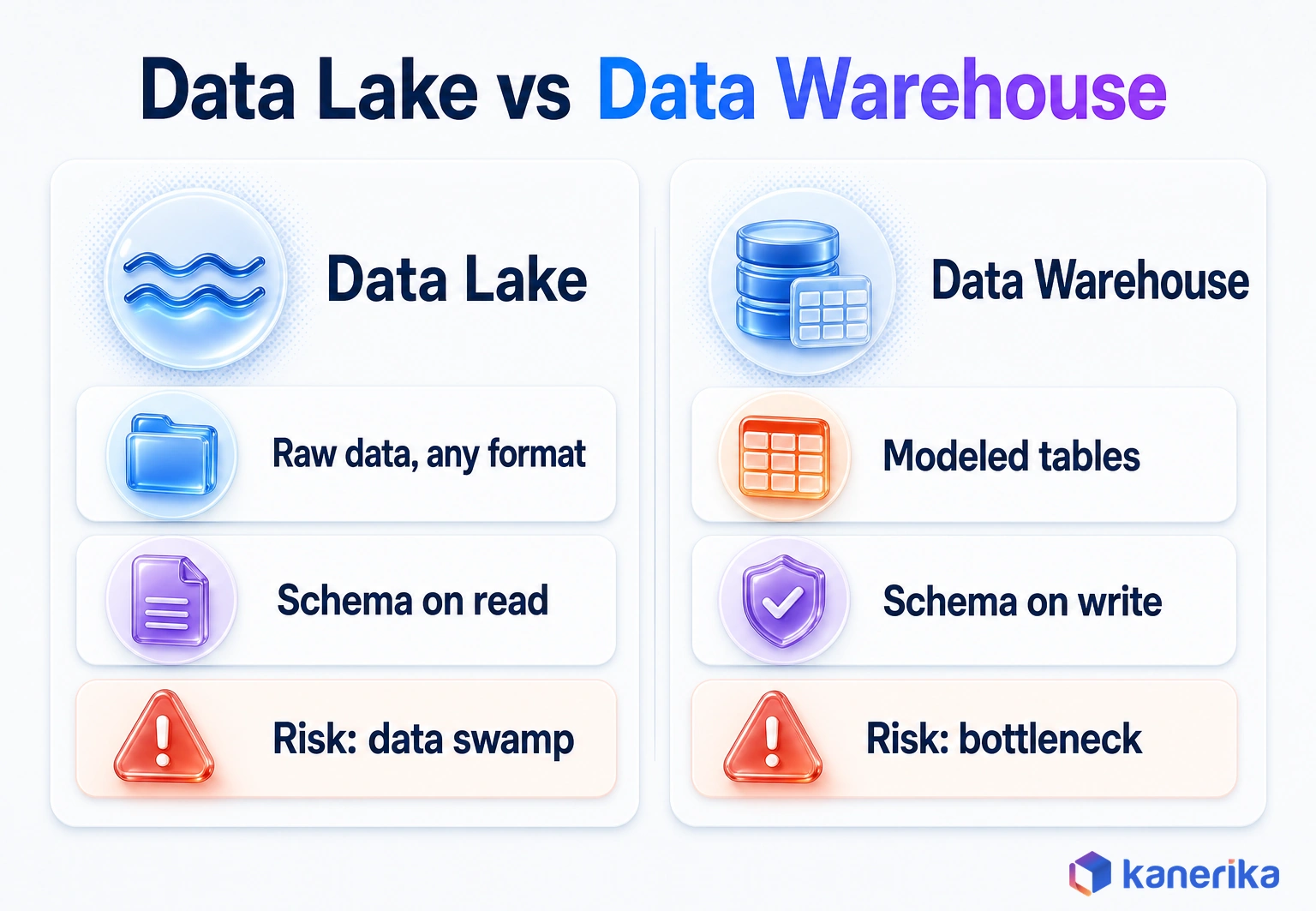
In the data lake vs data warehouse choice, a warehouse wins for governed reporting, and a lake wins for raw logs, files and ML data. A warehouse applies schema on write, so dashboards and the finance close run fast on trusted, modeled tables. A lake applies schema on read and stores any format cheaply in object storage until someone needs it. Storage is rarely the big bill, because compute, duplicate copies and engineering time drive cost on both sides. If you have both kinds of workload, run both: land raw data in the lake and serve certified numbers from the warehouse. Open table formats such as Delta Lake and Apache Iceberg let a lake run as a lakehouse and take on more warehouse work.
Key Takeaways
- A data warehouse stores modeled, structured data with schema-on-write, which makes it the right home for governed reporting and finance.
- A data lake stores raw data in any format with schema-on-read, which suits logs, files, streaming data and ML training sets.
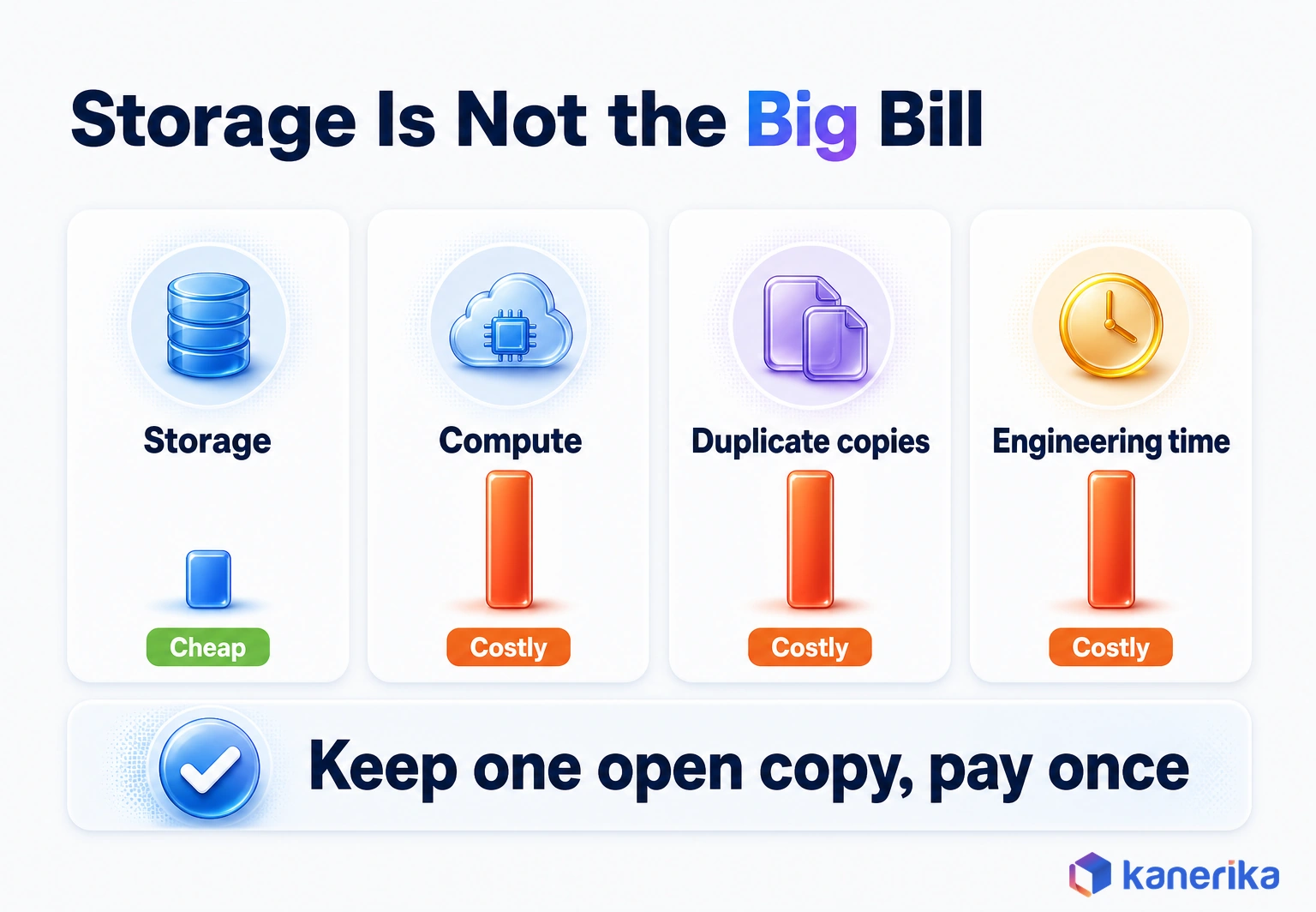
- Storage is the cheap line on both sides; compute, duplicate copies and engineering time decide the real cost.
- Open table formats such as Delta Lake and Apache Iceberg let a lake run as a lakehouse with ACID tables and warehouse-style SQL.
- A lake without a catalog, owners and access rules turns into a data swamp, while a warehouse that routes every change through one team turns into a bottleneck.
- Choose workload by workload, and use a medallion design when one dataset must serve both BI and AI.
Two Teams, One Customer Table, Two Different Answers
Picture a Monday quarterly review. The finance dashboard shows 412,000 active customers. Ten minutes later, the data science lead presents a churn model built on 438,000.
Both numbers are honest. Finance reads a warehouse table that counts customers with a paid invoice in the last 90 days. The data science team, however, reads raw event files in the lake, where anyone who logged in counts as active.
Neither team made a mistake. They read the same business through two systems that follow two different sets of rules, and nobody had decided which system owns the word “active.”
The scene is a composite, but the gap behind it is common. This guide explains how a data lake and a data warehouse differ, what each one costs and where the lakehouse fits. It then ends with a workload-by-workload way to decide which data belongs where.
Data Lake vs Data Warehouse: Main Differences at a Glance
The quickest way to see the difference is to follow one record into each system. A warehouse checks the record against a model before it lands. A lake, by contrast, stores the record as it arrives and leaves the modeling for later.
That single design choice drives almost everything in the table below, from who uses each system to how each one tends to fail.
| Dimension | Data lake | Data warehouse |
|---|
| Types of data | Structured, semi-structured and unstructured: tables, JSON, logs, images, audio | Mostly structured, modeled tables, with some semi-structured support |
| Schema | Schema-on-read: applied when data is queried | Schema-on-write: enforced when data is loaded |
| Processing | Load raw first, transform later (see ETL vs ELT) | ETL or ELT into modeled tables before users query |
| Primary users | Data engineers, data scientists, ML engineers | Business analysts, finance, BI developers, executives |
| Query performance | Varies; fast SQL needs a table format, partitioning and compaction | Tuned for fast, repeated SQL and many concurrent BI users |
| Main cost driver | Processing compute and engineering time; storage is cheap | Query and load compute, plus modeling effort |
| Governance maturity | Catalog, access rules and ownership must be added on purpose | Built around defined tables, roles and row-level security |
| Agility | New sources land in hours with no upfront model | New sources wait for modeling and testing |
| Typical platforms | Amazon S3, Azure Data Lake Storage, Google Cloud Storage, Fabric OneLake | Fabric Warehouse, Snowflake, Databricks SQL, Amazon Redshift, Google BigQuery |
| Typical failure mode | Data swamp: files nobody can find, trust or explain | Bottleneck: a backlog of change requests waiting on one modeling team |
What the Table Means in Practice
Read the table as a list of tradeoffs. The lake buys flexibility and pays for it in governance work, while the warehouse buys trust and speed and pays for it in change cost.
Still, neither side is the modern one. Both are current designs, so the right pick depends on what the data is for. For the layer-by-layer design of the warehouse side, see our guide to data warehouse architecture.
Kanerika Service
Data Architecture Services From Kanerika
Kanerika maps each reporting, analytics and AI workload to the right lake, warehouse or lakehouse design, then builds it on Microsoft Fabric, Databricks or Snowflake.
Explore Data Architecture Services
Pros and Cons of a Data Lake and a Data Warehouse
In short, here are the same tradeoffs as plain pros and cons.
| Option | Pros | Cons |
|---|
| Data lake | Cheap storage for any data type; new sources land fast; raw history for ML | Swamp risk without a catalog and owners; fast SQL needs table upkeep |
| Data warehouse | Fast SQL for many concurrent BI users; certified, governed numbers; row-level security | New sources wait for modeling; change requests queue up; poor fit for images and documents |
What Is a Data Lake?
A data lake is a central store that keeps data in its original form, at any scale, until someone needs it. The files usually sit in cloud object storage, for example as Parquet, JSON, CSV or Avro files.
The term comes from a 2010 blog post by James Dixon of Pentaho. In his analogy, bottled water that is “cleansed and packaged and structured for easy consumption” is the datamart. The lake “is a large body of water in a more natural state,” and users come to examine it, dive in or take samples.
The analogy still holds. Nothing in a lake is forced into a shape on arrival, so structure is applied only when a query or a notebook reads the data. That is why the approach is called schema-on-read.
How a Data Lake Works
- Ingest: pipelines, streams and file drops copy source data into storage without reshaping it.
- Land in zones: raw data goes to a landing zone, and cleaned copies move to later zones.
- Catalog: a metadata catalog records what each dataset is, who owns it and who may read it.
- Read and process: Spark, SQL engines and ML tools read the files and apply structure at query time.
Step three is the one teams skip, yet it decides whether the lake stays usable a year later. Our data lake implementation guide covers the build steps in detail.
Who Uses a Data Lake and for What
Data engineers and data scientists are the main users because they need the full, unaggregated record: every click, every sensor reading, every log line.
Typical lake workloads include application and security logs, IoT telemetry, images, scanned documents and the large training sets behind machine learning models. A manufacturer, for example, might keep years of raw sensor readings in the lake. Its engineers can then test new failure-prediction features against history that nobody summarized away.
Kanerika Service
Data Engineering Services
Kanerika builds the ingestion pipelines, lake zones, catalogs and quality checks that keep a data lake usable as sources and teams grow.
Explore Data Engineering Services
What Is a Data Warehouse?
A data warehouse is a database built for analysis rather than transactions. It holds cleaned, integrated data organized by business subject, such as sales, customers or inventory, so people can query it with SQL.
Unlike a lake, it applies schema-on-write. Data must match a defined table structure before it loads, and loads that break the rules fail. Warehouses also tend to model data dimensionally, with fact tables for events such as orders and dimension tables for the things those events describe.
The engines underneath are tuned for one job: answering the same business questions quickly for many dashboard users at once. That is also why finance, sales operations and executives tend to live in the warehouse.
How a Data Warehouse Works
- Sources: ERP, CRM, billing and other operational systems produce the raw records.
- ETL or ELT: pipelines extract the data, then clean, join and conform it (our ETL vs ELT guide compares the two).
- Staging: data lands in staging tables, where quality checks run.
- Dimensional model: tested data loads into star schemas of facts and dimensions.
- Semantic layer: a model defines measures such as revenue and margin once.
- BI and reporting: dashboards and reports query the semantic layer.
Each step adds control, but each one also adds time before a new source shows up in a report. Our guide on how to build a data warehouse walks through that work, and data warehouse automation covers how teams shorten it.
Data Marts: Department-Sized Slices of the Warehouse
A data mart is a subset of the warehouse built for one team, such as finance or marketing. It carries only the tables and measures that team needs, so queries stay simple and access stays easy to control. In Dixon’s analogy, the mart is the bottled water.
Schema-on-Read vs Schema-on-Write in Practice
The schema difference sounds academic until a source system changes. A single clickstream event, for example, shows what each approach does with it.
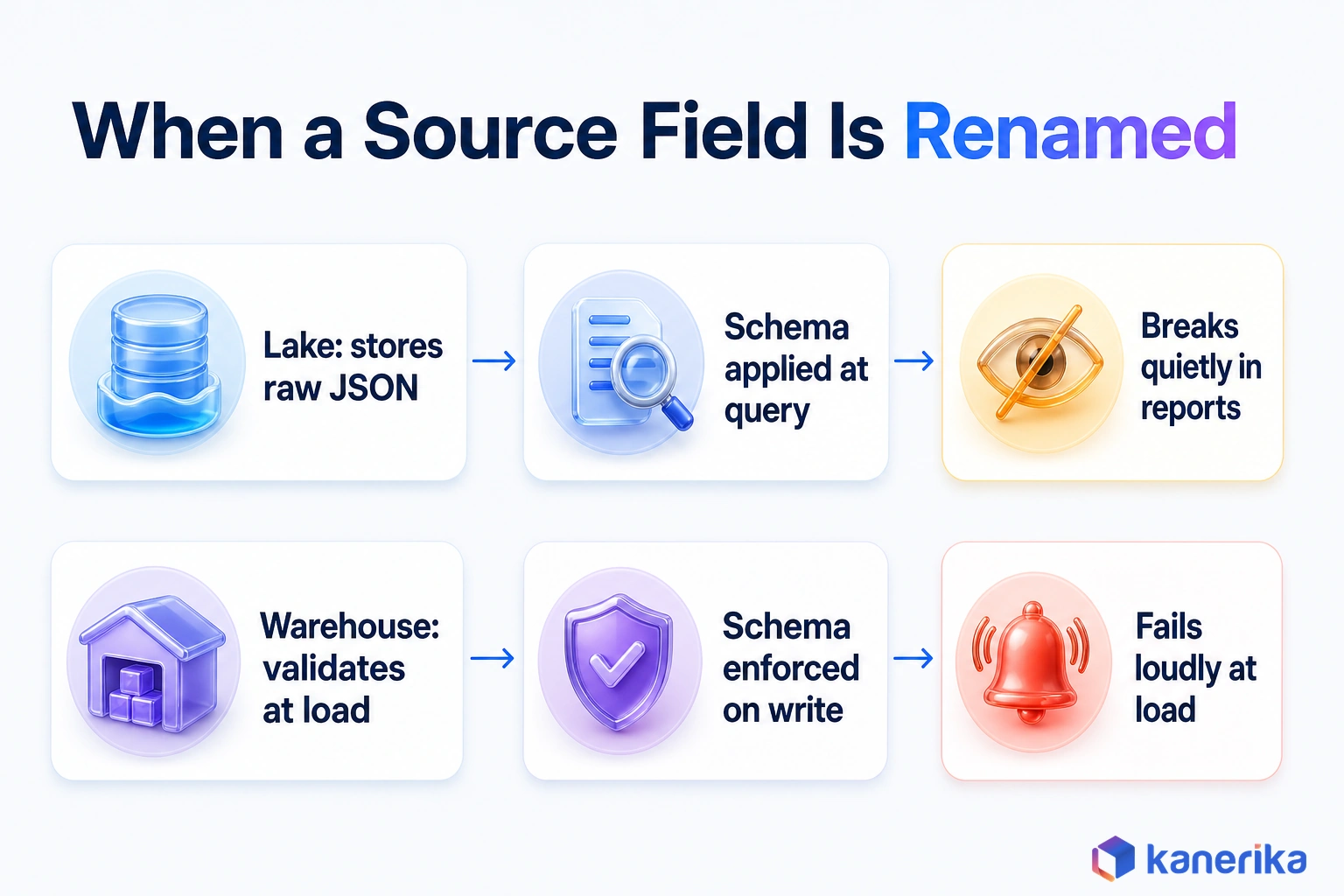
Say a web app emits an event with a user ID, a page URL, a timestamp and a device type. In a lake, the event lands as a JSON line exactly as sent. In a warehouse, however, a pipeline parses it, checks each field and inserts a row into a page-view fact table.
Now the app team renames device_type to device_category in a release. The warehouse load then fails that night, and someone gets an alert. The lake accepts the new field without complaint, so the break shows up later as blank values in a report or a model feature.
| Moment | Schema-on-read (lake) | Schema-on-write (warehouse) |
|---|
| When structure is applied | At query time | At load time |
| A new field appears | Stored automatically, unused until someone reads it | Dropped or rejected until the model changes |
| A field is renamed | Breaks quietly in downstream queries | Fails loudly at load |
| Best for | Exploration, ML and unknown future uses | Stable metrics and audited reports |
Even so, neither failure is free. The loud failure costs a delayed report, while the quiet one costs trust when a wrong number reaches a meeting.
Good lake teams therefore add schema checks at the boundary between zones. That way they get the warehouse’s early warning too, without losing the raw record.
Data Lake vs Data Warehouse Cost: Storage Is Cheap, Compute and People Are Not
Cost comparisons usually start with storage prices, which is the wrong place to start. Object storage is cheap per terabyte, and some warehouses also keep their tables in that same kind of storage. Fabric’s Warehouse, for instance, stores its tables in Delta format in OneLake, the same store its Lakehouse uses.
Compute is the line that grows, because every transformation, query and training run consumes it, on either side.
Duplicate copies come next. Picture a team that loads the lake, copies the data into a warehouse, then exports extracts for BI. It pays to store, move and govern each copy. Engineering time sits on top of all of it, but it rarely shows up on the platform invoice.
Cost Drivers Side by Side
| Cost driver | In a data lake | In a data warehouse | How to control it |
|---|
| Storage | Low per terabyte in object storage | Bundled with the platform or billed per terabyte | Tier cold data and set retention rules |
| Compute | Spark jobs, ad hoc queries, ML training | Loads, transformations, dashboard queries | Auto-suspend, right-size and schedule heavy jobs |
| Data movement | Ingestion and cross-region transfer | Loads from sources or from the lake | Process data where it already lives |
| Duplicate copies | Raw, cleaned and exported versions | Staging, model and extract copies | Keep one copy in an open format |
| Engineering time | Catalog, quality checks, file maintenance | Modeling, testing, change requests | Automate pipelines and quality tests with a data quality framework |
| Governance tooling | Catalog and access tools added on top | Often built into the platform | Use one catalog across both |
The open-format row matters most. OneLake lets Fabric teams create shortcuts to data in Azure Data Lake Storage, Amazon S3 and other stores without copying it.
Snowflake Iceberg tables work from the other direction. They query data in your own cloud storage through an external volume, while your cloud provider bills that storage directly. In both cases one copy serves more than one engine, so you stop paying twice for the same data.
Performance, Concurrency and Freshness
Speed means different things to different users. An executive, for example, wants a dashboard to open in seconds, every time. A data scientist wants a scan of two years of events to finish before lunch, and an operations lead wants yesterday’s numbers by 6 a.m.
Warehouses win the first case because they keep statistics, cache results and organize storage for repeated SQL. They also handle many concurrent BI users well.
Lakes can serve fast SQL too, but only with upkeep. Raw files need an open table format, sensible partitioning and regular compaction of small files before SQL runs fast on them. Skip that maintenance, and a query engine spends its time listing and opening thousands of tiny files.
On a Delta Lake table, for example, that upkeep comes down to two commands. OPTIMIZE coalesces small files into larger ones, and ZORDER BY clusters rows on a column analysts often filter by. VACUUM then deletes unreferenced files older than a retention threshold. That threshold defaults to 7 days, according to the Delta Lake documentation. Auto compaction, when enabled, also aims for 128 MB files by default.
-- Compact one date partition, clustered by event type
OPTIMIZE events WHERE date = '2026-10-29' ZORDER BY (eventType);

-- Delete unreferenced files older than 7 days (168 hours)
VACUUM events RETAIN 168 HOURS;
Freshness, on the other hand, tends to favor the lake. Streaming and event data usually land there first, because nothing has to be modeled before it arrives. The warehouse then picks up those events on a schedule once the model can accept them.
Teams that need both speed and freshness therefore split the work. Hot, certified metrics come from the warehouse, and deep history stays in the lake for the scans that need it.
Governance, Security and the Data Swamp Problem
Governance is where the two systems differ most in daily life. A warehouse, for instance, has a short list of known tables, each with an owner, defined columns and access roles. Row-level security can also limit a sales manager to her own region with one rule.
A lake, unlike a warehouse, starts with none of that. Files arrive from dozens of sources. Without a catalog, nobody can say what a folder holds, whether it is current or whether it contains personal data. That is how a lake turns into a data swamp: the data is still there, but nobody trusts it enough to use it.
The fix is the same on any platform. Register every dataset in a catalog, record data lineage from source to report, tag sensitive fields and grant access by role.
Regulated records need retention rules too, since health and privacy laws often set how long data may be kept and when it must be deleted. Some organizations go further with a data mesh, where each business domain owns and publishes its own lake data under shared rules. Our comparison of data mesh vs data lake covers when that model fits.
Six Mistakes That Turn a Lake Into a Swamp (or a Warehouse Into a Bottleneck)
- Landing data with no named owner, so nobody fixes it when it breaks.
- Skipping the data catalog with a plan to document it later.
- Letting every team copy the same source into its own folder.
- Mixing personal data into shared zones without tags or masking.
- Routing every new warehouse table through one overloaded modeling team.
- Modeling data nobody asked for, which delays the requests people did make.
The first four create swamps, while the last two create bottlenecks. Bottlenecks push frustrated analysts back toward spreadsheets and private extracts.
Talk to Kanerika
Is Your Lake Turning Into a Swamp?
Bring one critical dataset. Kanerika’s architects will review its ownership, catalog coverage and access rules with you and show where it needs work first.
Book an Architecture Review →
Where the Data Lakehouse Fits
For years, the honest answer to data lake vs data warehouse was to run both and copy data between them. Open table formats changed that by giving lake files some of a warehouse’s guarantees.
Delta Lake, for example, adds a transaction log on top of Parquet files in object storage. That log brings ACID transactions with serializable isolation, schema enforcement and time travel to the lake. Delta Lake is an open-source Linux Foundation project, and engines including Spark, Trino, Flink, Snowflake and BigQuery can work with it. Apache Iceberg, the format behind Snowflake’s Iceberg tables, plays a similar role.
Databricks documentation, as of October 2026, defines a lakehouse as “a data management system that combines the benefits of data lakes and data warehouses.” In practice, that means a lake that can take on much of a warehouse’s work while keeping one copy of the data.
| Dimension | Lake | Warehouse | Lakehouse (a lake with warehouse features) |
|---|
| Storage | Open files in object storage | Managed tables in a format the platform controls | Open table format in object storage |
| Transactions | None by default | Full ACID | ACID per table through the table format |
| Schema | Applied on read | Enforced on write | Enforced on write to tables, raw files still read freely |
| Best for | Raw data, ML and archives | Governed BI and finance | BI and ML on one copy of the data |
| Watch out for | Swamps | Bottlenecks and extra copies | Needs a strong catalog and regular table maintenance |
The lakehouse therefore sits on the lake side of the decision. Think of it as the lake option, grown up. It still needs warehouse-style modeling for the numbers finance signs off on. For a wider look at how a lakehouse platform compares with a cloud warehouse ecosystem, this Kanerika podcast episode weighs Microsoft Fabric against Google BigQuery.
How Fabric, Databricks and Snowflake Implement It
Three platforms show the pattern clearly, and each splits lake and warehouse work in its own way. The table sticks to that split.
| Platform | Where the data lives | How SQL users reach it | Notable detail |
|---|
| Microsoft Fabric | OneLake, one per tenant, built on Azure Data Lake Storage, with tables in Delta Parquet or Iceberg | Lakehouse and Warehouse items share one SQL engine over Delta tables in OneLake | Shortcuts reach Azure Data Lake Storage, Blob storage and Amazon S3 without copying |
| Databricks | Delta Lake tables on cloud object storage | SQL over the same Delta tables that Spark jobs write | Unity Catalog provides unified governance |
| Snowflake | Iceberg tables in cloud storage you manage (Amazon S3, Google Cloud Storage or Azure) through an external volume | Snowflake performance and query semantics on those tables | Your cloud provider bills that storage |
For pricing, AI features and a full side-by-side, see Databricks vs Snowflake vs Fabric. For Snowflake’s own architecture, read our Snowflake data warehouse guide.
In Microsoft Fabric: Lakehouse or Warehouse Item?
Microsoft Fabric puts the same choice inside one product. Both items store data as Delta tables in OneLake, so the decision comes down to how your team works. Microsoft’s decision guide, last updated in September 2026, boils it down to three rules.
- Spark-first teams working in Python, Scala, Spark SQL or R should choose a Fabric Lakehouse.
- T-SQL teams should choose a Fabric Warehouse.
- Workloads that need multi-table transactions belong in a Warehouse.
The Lakehouse still gets SQL. Fabric generates a SQL analytics endpoint for it automatically, but that endpoint is read-only. Writes and multi-table transactions belong in the Warehouse, which supports ACID, views, functions and stored procedures in T-SQL.
Kanerika Service
Microsoft Fabric Consulting and Implementation
As a Microsoft Fabric Featured Partner, Kanerika designs OneLake, Lakehouse and Warehouse items around how your teams work, then migrates and runs them.
Explore Fabric Services
Data Lake vs Data Warehouse for AI and Generative AI
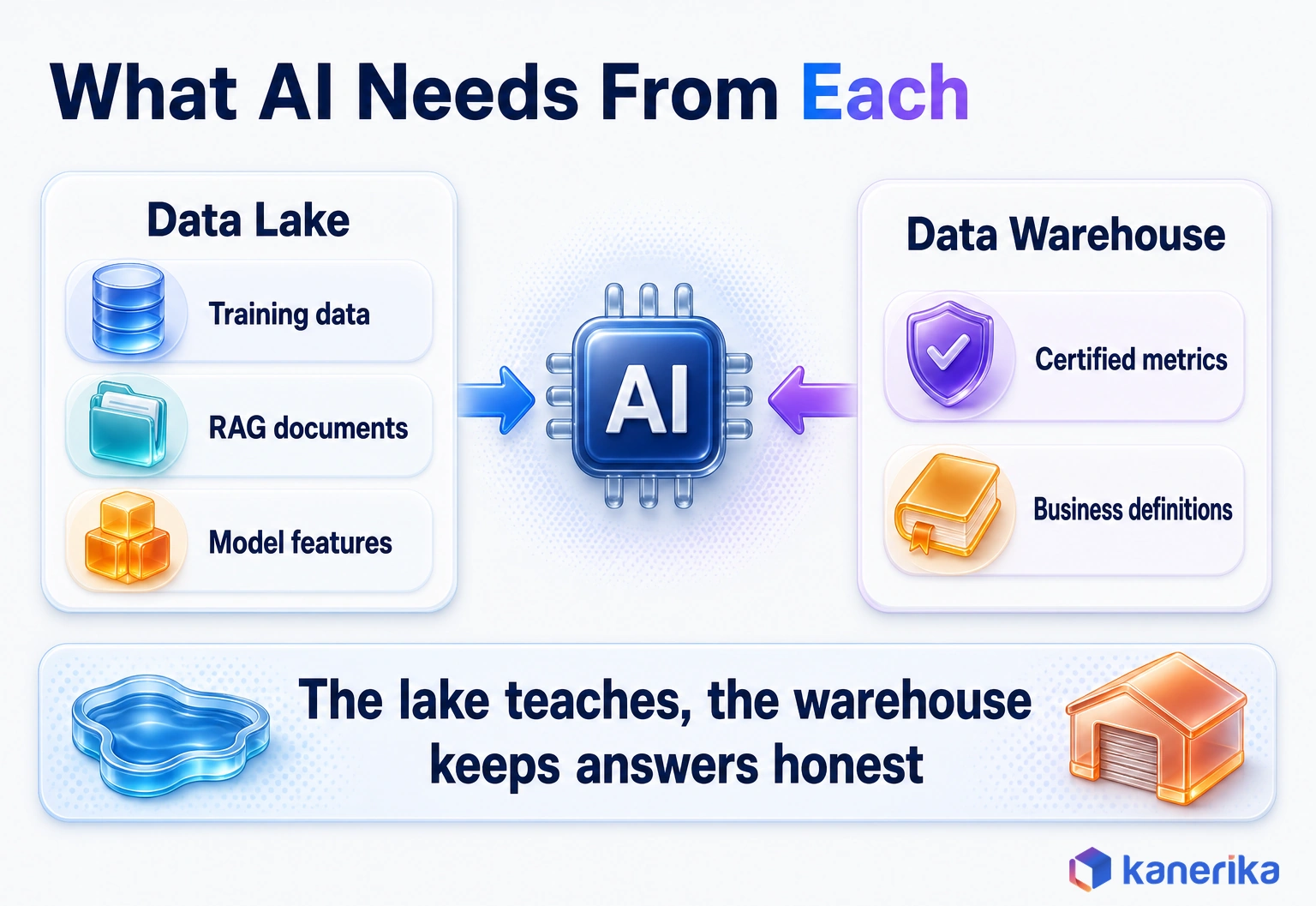
AI changes the weighting of the decision but not its logic. Models need two kinds of data, and each kind has a natural home.
Training data, feature tables and the documents behind retrieval-augmented generation (RAG) belong in the lake or lakehouse. They are large, varied and often unstructured: PDFs, emails, call transcripts and images. A warehouse, by contrast, was never built to hold a contract archive.
Governed numbers belong in the warehouse. Say an AI assistant is asked for third-quarter revenue in the Northeast. It should read the certified figure finance reports instead of recomputing it from raw orders. After all, an AI answer that contradicts the board deck is the fastest way to lose a user’s trust.
- Lake or lakehouse: training sets, feature engineering, RAG source documents and model logs.
- Warehouse or semantic model: certified metrics, business definitions and the numbers AI must quote exactly.
- Both: lineage that shows which source fed which answer.
The strongest AI setups use both sides on purpose. The lake teaches the model, while the warehouse keeps its answers honest.
How to Choose: A Workload-First Decision Framework
Platform labels make this choice feel bigger than it is. Decide workload by workload instead, and the architecture usually draws itself.
Five Questions to Ask First
- What is the workload? Repeated reporting and the finance close point to a warehouse; exploration and ML point to a lake.
- What shape is the data? Mostly tables favor the warehouse, while logs, files, images and documents need the lake.
- How fresh must it be? Streams land in the lake first, and daily metrics fit a warehouse schedule.
- Do you need transactions? Multi-table updates point to a warehouse. A lakehouse table format gives each table ACID writes, but transactions across tables are still a warehouse strength.
- What does your team know? SQL-first teams move faster in a warehouse, and Spark or Python teams move faster in a lake.
Workload Scorecard
Use this scorecard as a starting point, then adjust it to your own estate. Each row names the side that should own the workload, and “both” means the lake feeds a warehouse.
| Workload | Pick | Why |
|---|
| Finance close and statutory reporting | Data warehouse | Needs audited, repeatable numbers and strict schemas |
| Executive and sales dashboards | Data warehouse | Many concurrent users and fast, repeated queries |
| Clickstream and IoT telemetry | Data lake | High volume, changing fields and streaming arrival |
| ML feature preparation | Data lake, run as a lakehouse for ACID tables | Needs full history and Spark or Python access |
| RAG over documents | Data lake | PDFs, emails and transcripts are unstructured |
| Regulatory archive | Data lake | Cheap long-term storage with retention rules |
| Ad hoc exploration of new sources | Data lake | No model needed before the first look |
| Customer 360 for marketing and service | Both | Raw events in the lake, a modeled customer table in the warehouse |
Two industry examples show how the rows combine. A hospital network might keep imaging files and device feeds in the lake while quality metrics for regulators come from the warehouse. A retailer might train demand forecasts on lake data, then publish the forecast numbers to store managers through the warehouse.
Once a row points to the warehouse, the next question is which cloud warehouse to run. The video below compares two common candidates, BigQuery and Snowflake, for enterprise teams.
Watch on YouTube
BigQuery vs Snowflake 2026: Which Cloud Data Warehouse Fits Your Enterprise?
Kanerika compares Google BigQuery and Snowflake as cloud data warehouses and the enterprise needs each one fits, the next decision once a workload belongs in a warehouse.
Using Both: A Reference Hybrid (Medallion) Architecture
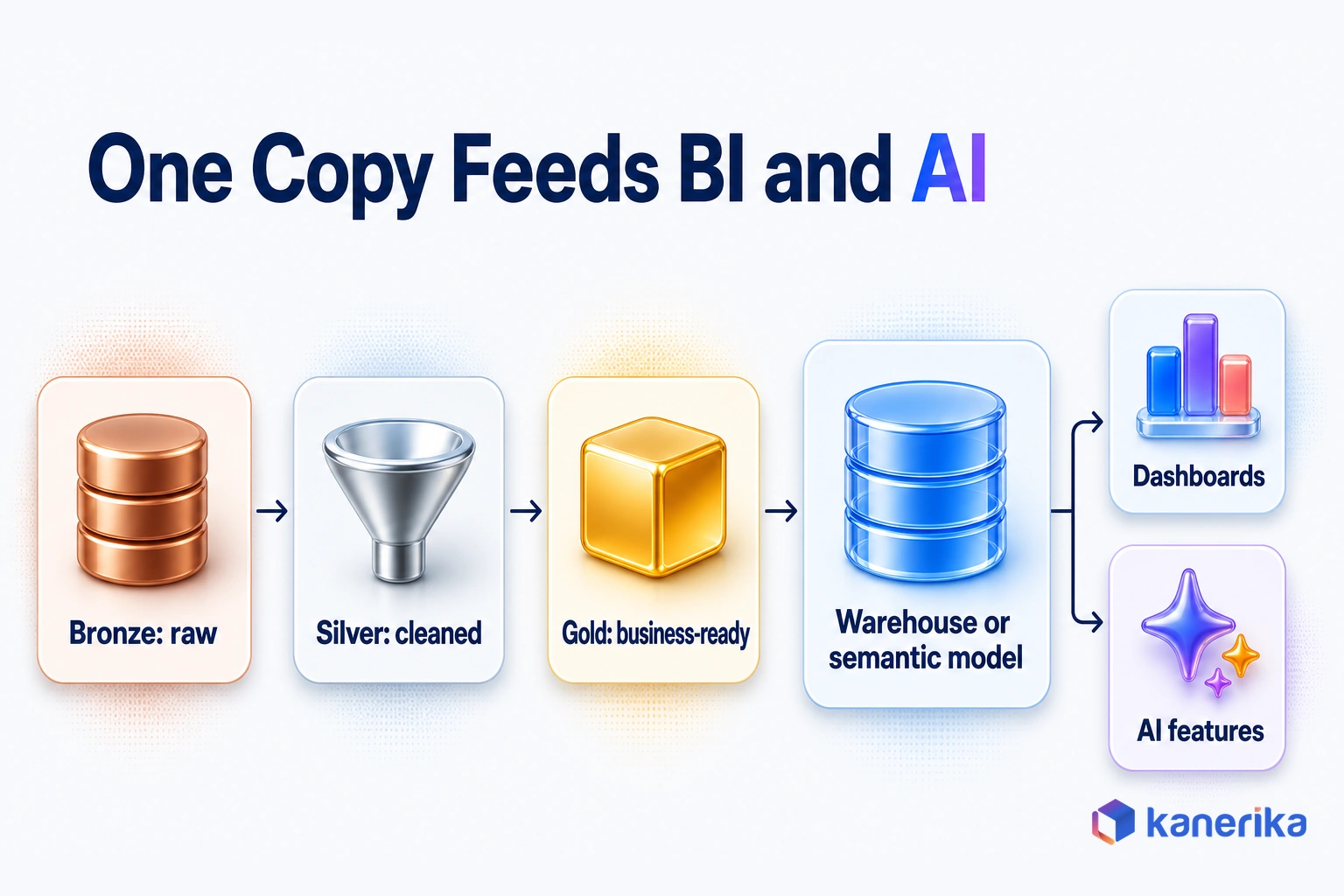
When the scorecard says both, the medallion pattern is the usual answer. It organizes the lake into three layers, and each layer has a clear contract with the next. Data moves forward only after it passes that layer’s checks, so a bad load stops in bronze.
- Bronze: raw data exactly as it arrived, kept for replay and audit.
- Silver: cleaned, deduplicated and conformed tables with schema checks.
- Gold: business-ready tables shaped for reporting and AI features.
Gold tables then feed a warehouse or a semantic model, which is where dashboards and certified metrics live. Data scientists can still read silver tables directly when they need more detail than gold keeps. When operational apps need those numbers back, reverse ETL syncs them from the warehouse into the CRM or support tool.
Moving an existing warehouse into this pattern is a project of its own. Our data warehouse migration guide covers the steps, from inventory to cutover.
How Kanerika Designs Lake, Warehouse and Lakehouse Platforms
Kanerika starts with the workloads, and the platform choice follows from them. The first step is an assessment that lists every reporting, analytics and AI workload. Each one is then placed using the scorecard questions above. The output is a workload map that tags each one lake, warehouse or both, with an owner and a migration order.
From there, the team designs the target architecture on Microsoft Fabric, Databricks or Snowflake. It then builds the pipelines and validates data quality and governance before cutover. After go-live, Kanerika runs and tunes the platform, watching compute spend and query speed as usage grows.
Our data architecture services cover the design method, and our data engineering services cover the pipeline build. Kanerika is a Microsoft Fabric Featured Partner and a Microsoft Solutions Partner for Data and AI, with the Analytics specialization.
A retail reporting project shows the warehouse side of the decision at work. A leading US retail chain ran its reporting on a legacy SQL layer that slowed as stores and transactions grew. Refreshes ran long, dashboards were unstable and analysts spent hours on manual prep. In scorecard terms, it was a classic warehouse workload: governed reporting that many people read every day.
Kanerika migrated the SQL reports to Power BI on Microsoft Fabric with its migration accelerator. The team also moved validation rules into Fabric pipelines and replaced the old reporting layer with a unified Fabric model. The result was 74% faster reporting cycles, a 65% increase in reporting stability and 72% faster access to current metrics.
Case Study
74% Faster Retail Reporting with Microsoft Fabric
A leading US retail chain replaced a slowing SQL reporting layer with a unified Microsoft Fabric model, gaining 74% faster reporting cycles and 65% more stable reporting.
Read the Case Study →
Conclusion: Pick by Workload, Not by Label
The data lake vs data warehouse question has a clear answer once you ask it one workload at a time. Governed reporting, finance and dashboards belong in a warehouse. Raw, varied and fast-arriving data, along with ML and document search, belongs in a lake. When your teams already disagree on a number, start by mapping your top ten workloads against the scorecard above.
A lakehouse table format lets that lake take on more warehouse work, but it does not change who owns the certified numbers. So the answer to lake or warehouse is simple: the lake stores everything, and the warehouse serves the numbers people sign off on.
Frequently Asked Questions
What is the main difference between a data lake and a data warehouse?
A data lake stores raw data in any format and applies structure only when someone reads it, which is called schema-on-read. A data warehouse stores cleaned, modeled tables and enforces structure when data loads, which is schema-on-write. The lake favors flexibility and machine learning, while the warehouse favors trusted, fast reporting.
Can a data lake replace a data warehouse?
Usually not on its own. A plain data lake lacks the modeled tables, transactions and fast concurrent SQL that finance and dashboards need. A lake running an open table format such as Delta Lake can take on much warehouse work, but most teams still keep a warehouse or semantic model for certified business metrics.
Is a data lake ETL or ELT?
A data lake usually follows ELT. Data is extracted and loaded in raw form first, then transformed later inside the lake or by the engine that reads it. Some lake pipelines still run light ETL steps, such as masking sensitive fields before landing, but the defining pattern is loading first and modeling afterward.
What is the difference between ETL and ELT?
ETL transforms data before loading it into the target, so only cleaned, modeled data arrives. ELT loads raw data first and transforms it inside the target platform using its own compute. ETL suits strict warehouse models and sensitive data, while ELT suits cloud platforms and lakes. Our ETL vs ELT guide covers the tradeoffs in detail.
What is ETL in a data warehouse?
ETL in a data warehouse is the pipeline that extracts records from source systems, transforms them by cleaning, joining and conforming fields, then loads them into modeled tables. It enforces the warehouse schema before data lands, so reports read consistent definitions. Many cloud warehouses now run the transform step after loading, which is ELT.
What are examples of data warehouses?
Common cloud data warehouses include Microsoft Fabric Warehouse, Snowflake, Databricks SQL, Google BigQuery and Amazon Redshift. Each one stores modeled tables for SQL analytics and runs as a managed cloud service, so teams avoid running database hardware. They differ in pricing, cloud support, governance tools and how closely they connect to data lake storage.
What are the four components of a data warehouse?
The four core components are source systems that supply data, an ETL or ELT layer that cleans and loads it, the central storage database that holds modeled tables, and the access layer of BI and reporting tools. Many designs add metadata management and a semantic layer that defines business measures such as revenue once.
Is a data lake cheaper than a data warehouse?
Per terabyte stored, a data lake is usually cheaper because it uses object storage. Total cost depends more on compute, duplicate copies, data movement and engineering time than on storage. A poorly governed lake can cost more than a warehouse once teams rebuild the same data repeatedly, so compare full workload costs, not storage alone.
Which is faster for queries, a data lake or a data warehouse?
A data warehouse is usually faster for repeated SQL and dashboards with many concurrent users, because it keeps statistics, caches results and organizes storage for those queries. A data lake can be fast for large scans, but only with an open table format, sensible partitioning and regular compaction of small files.
Which is better for AI and machine learning, a data lake or a data warehouse?
A data lake or lakehouse is better for training data, feature engineering and the documents behind retrieval-augmented generation, because that data is large and often unstructured. A data warehouse is better for the governed metrics an AI assistant must quote. Strong AI setups use both, with lineage showing which source fed each answer.
Is Microsoft Fabric a data lake or a data warehouse?
Microsoft Fabric includes both. OneLake is its single data lake per tenant, built on Azure Data Lake Storage. Inside it, the Lakehouse item suits Spark-first teams and exposes a read-only SQL analytics endpoint. The Warehouse item suits T-SQL teams and supports multi-table transactions. Both store data as Delta tables in OneLake.
How do you stop a data lake from becoming a data swamp?
Give every dataset a named owner, register it in a catalog and record lineage from source to report. Tag sensitive fields, grant access by role and set retention rules for regulated data. Organize the lake into zones such as bronze, silver and gold, and add schema checks between zones so problems surface early.
What is a data lake used for?
A data lake holds large volumes of raw, varied data for later use. Common workloads include application and security logs, IoT telemetry, clickstream events, images, scanned documents and machine learning training sets. Data engineers and data scientists use it to explore new sources, build features and keep full history that a warehouse would summarize away.
What are the disadvantages of a data lake?
A data lake without a catalog, owners and access rules can become a data swamp, where files exist but nobody trusts them. Raw files also need table formats, partitioning and compaction before SQL runs fast. Quality problems surface later, at query time, and sensitive data can spread across zones unless it is tagged.
Is Databricks a data lake, a data warehouse or a lakehouse?
Databricks describes itself as a lakehouse platform. It stores data as Delta Lake tables on cloud object storage, which gives the lake ACID transactions and schema enforcement. Unity Catalog adds unified governance, and SQL users can query the same tables Spark jobs write. That lets one copy of data serve analytics and machine learning work.
Is Snowflake a data lake or a data warehouse?
Snowflake began as a cloud data warehouse and now reaches into lake storage too. Its Iceberg tables keep data in cloud storage you manage, such as Amazon S3, Google Cloud Storage or Azure, through an external volume. Snowflake brings its performance and query semantics to those tables, while your cloud provider bills the storage.
Can you use a data lake and a data warehouse together?
Yes, and this hybrid is a common design. A common pattern lands raw data in the lake, refines it through bronze, silver and gold layers, then feeds gold tables into a warehouse or semantic model for reporting. The lake keeps full history for machine learning, and the warehouse serves the certified numbers that dashboards and finance depend on.
What is the difference between a data lake and a data lakehouse?
A data lake stores open files with no transactions or enforced schema. A lakehouse adds an open table format such as Delta Lake or Apache Iceberg on top of those files. That format brings ACID transactions, schema enforcement and time travel, so the same storage can support warehouse-style SQL as well as data science work.
Can a lakehouse replace a data warehouse?
For many workloads it can, because table formats bring transactions and fast SQL to lake storage. Teams that need multi-table transactions, heavy T-SQL development or strict finance controls often still keep a warehouse. In Microsoft Fabric, both Lakehouse and Warehouse items store Delta tables in OneLake, so teams can mix them without copying data.
Why use a data lake instead of a data warehouse?
Use a data lake when data arrives in many formats, changes shape often or has no defined use yet. Lakes accept new sources in hours without upfront modeling and keep full raw history at low storage cost. They suit machine learning, log analytics, streaming data and document search better than a warehouse built around fixed tables.














