

Migrate from SSRS to Power BI with Kanerika
Don't let legacy SSRS reports slow your business down. Kanerika's migration accelerator seamlessly transforms your static reports into interactive Power BI dashboards, reducing costs while delivering faster, more actionable insights.
Get Started with SSRS to Power BI Migration
The Tech Debt
The Cost of Not Modernizing Your Data Platforms

80%
IT budgets are spent on legacy system maintenance

44%
CIOs see legacy systems as growth barriers

50%
Developer productivity is lost due to outdated tools

70%
Digital transformation efforts fail due to legacy systems
Migrate from

with Our Accelerator
Use Your Azure Committed Spend (MACC)


Experience Our
SSRS to Power BI Migration
The SSRS to Power BI Advantage
Transform Static Reports into Dynamic Analytics

Interactive Self-Service Analytics
- Enable users to explore data without IT dependency
- Enable users to explore data without IT dependency
- Replace scheduled deliveries with real-time insights

Cloud-Native Scalability
- Eliminate on-premises infrastructure maintenance costs
- Handle growing data volumes through auto-scaling
- Accelerate report rendering while reducing server load

Enhanced Data Visualization
- Replace basic reports with rich interactive charts
- Access mobile-responsive dashboards anytime
- Utilize custom visuals and advanced formatting

Streamlined Report Development
- Reduce development time through drag-and-drop interface
- Eliminate report duplication with centralized dataset management
- Replace manual generation with automated refresh cycles
The Migration Process
Transition to Power BI Effortlessly with Our Migration Accelerator
Metadata Extraction & Analysis
Our migration accelerator extracts essential metadata from SSRS report files, including visual elements and dataset definitions, ensuring a smooth transition.


Visual Component Mapping & Conversion
The accelerator maps SSRS visuals to their Power BI counterparts, converting charts, tables, and matrices while preserving visual integrity and formatting.

Automated Report Reconstruction
The platform generates a Power BI report definition (JSON or PBIX file) for direct import, automatically populating visuals with the relevant datasets and connections.

Quality Assurance & Validation
This automated process guarantees accuracy and consistency through comprehensive testing, minimizing manual adjustments and accelerating Power BI adoption.

ROI YOU CAN EXPECT
Drive Measurable Returns Through Intelligent Report Migration
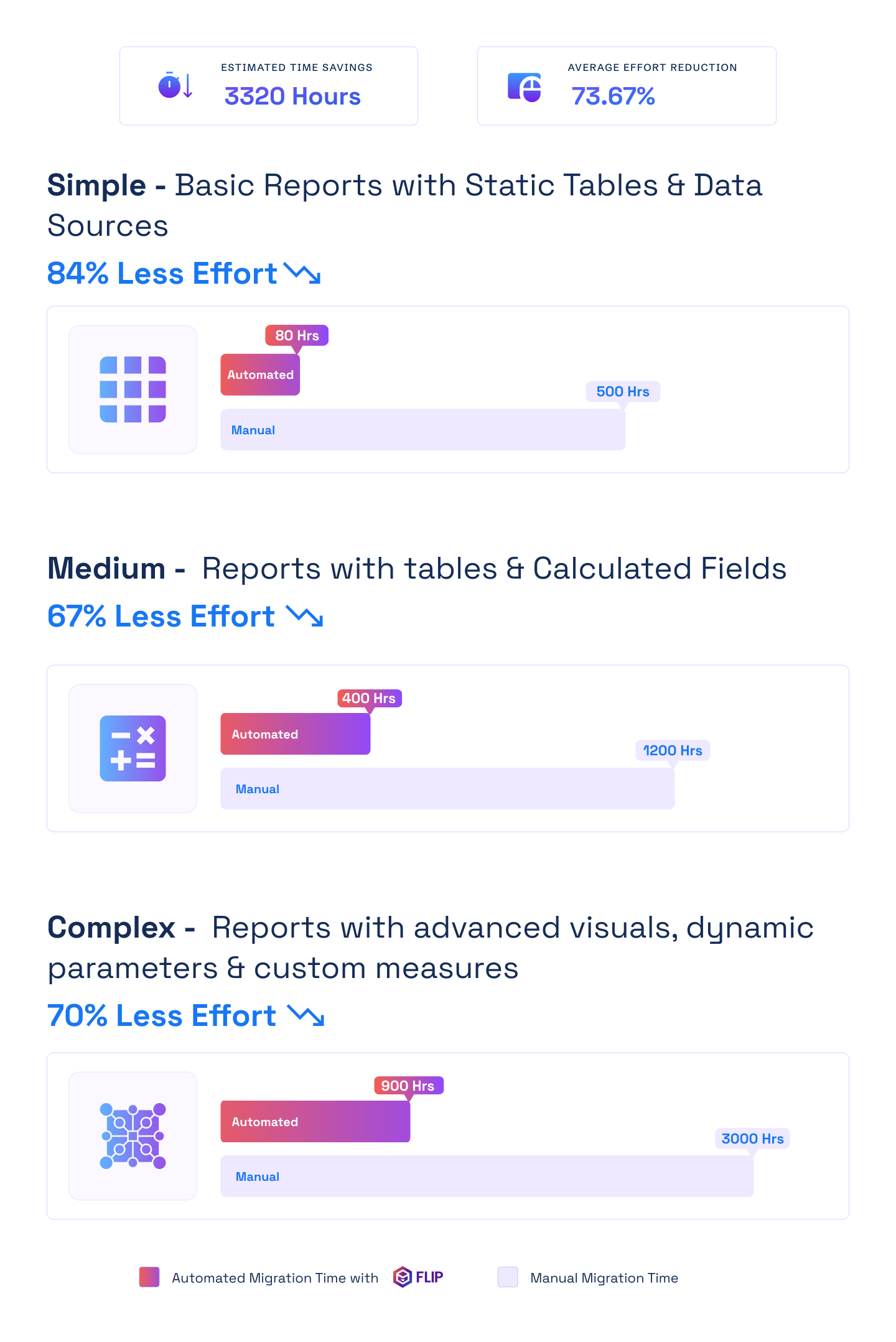

ESTIMATED TIME SAVINGS

Average effort reduction
Simple - Basic Reports with Static Tables & Data Sources
Less Effort

Medium - Reports with tables & Calculated Fields
Less Effort
Complex - Reports with advanced visuals, dynamic parameters & custom measures
Less Effort

Case studies
Delivering Measurable Outcomes with Automated Migrations
Migration
Modernizing Enterprise Reporting with Crystal Reports to Power BI Migration
Impact:
- 60% Faster Migration
- 10x Data Scale
- 99.5% Refresh Success Rate
Migration
Modernizing Financial Analytics with Informatica to Alteryx Migration
Impact:
- 45% Faster Reporting Cycles
- 38% Reduction in Maintenance Costs
- 60% Improved Analytics Turnaround
Migration
Transforming Retail Reporting and Analytics with SQL to Microsoft Fabric Migration
Impact:
- 74% Faster Reporting Cycles
- 65% Increase in Reporting Stability
- 72% Faster Access to Current Metrics
Frequently Asked Questions (FAQs)
The migration time varies based on your setup, but with Kanerika’s automated migration solutions, the process is much faster than manual migration methods, ensuring minimal downtime.
Power BI is intuitive and user-friendly, especially for teams familiar with Microsoft tools. Our approach ensures a smooth transition, with minimal training needed for your team to start using Power BI effectively.
Power BI is more cost-efficient than SSRS, particularly for cloud-based solutions. Migrating to Power BI helps lower infrastructure and maintenance costs, while providing better integration and advanced capabilities.
Talend has built-in governance features, metadata tracking, and role-based access to support your regulatory needs.
No! Our automated migration process ensures that your data is securely transferred without any loss, ensuring full consistency and accuracy across reports.
Once the migration is complete, Power BI unlocks enhanced data visualization, real-time reporting, and better scalability, providing greater value and insights from your data.
SSRS lacks interactive and user-friendly design elements that Power BI offers. Organizations spend 80% of IT budgets on legacy system maintenance and 70% of digital transformation efforts fail due to legacy systems. Organizations can save on SQL server license costs, infrastructure costs, and labor costs on maintenance tasks. Kanerika’s proprietary migration accelerator automates this transition with minimal disruption.
Power BI enables self-service analytics, offers cloud-native scalability, provides enhanced data visualization, and streamlines report development through drag-and-drop interface. Reports that used to take days in SSRS can be done in a couple hours in Power BI. Real-time insights replace scheduled deliveries. Kanerika’s proprietary migration accelerator helps you realize these benefits faster.
Your .rdl reports can be migrated from report servers to Power BI where each migrated .rdl report becomes a Power BI paginated report. Kanerika’s proprietary migration accelerator extracts metadata from SSRS report files and maps visuals to Power BI counterparts. Power BI Report Builder supports paginated reports with automated conversion.
SSRS data driven report subscriptions need to be set up through Power Automate, and subscriptions sent to file share locations also need Power Automate. Parameters convert to Power BI filters. Kanerika’s proprietary migration accelerator automatically populates visuals with relevant datasets and connections. Schedules recreate in Power BI Service seamlessly.
Shared data sources become embedded data sources and shared datasets become embedded datasets during conversion. Kanerika’s proprietary migration accelerator extracts dataset definitions ensuring smooth transition. Power BI connects to the same sources with updated connection strings. Legacy sources may need gateway configuration through our process.
Row-level security works in Power BI paginated reports by using the built-in field UserID in filters or queries. Configure row-level security rules or access controls to segment data as required. Power BI offers workspace and report-level permissions matching SSRS capabilities. Kanerika’s proprietary migration accelerator preserves your security model during transition.
The migration time varies based on your setup, but with Kanerika’s proprietary migration accelerator, the process is much faster than manual migration methods ensuring minimal downtime. Simple reports migrate in days while complex environments take weeks. Organizations report 30% reduction in report generation time after migration.
Kanerika’s proprietary migration accelerator extracts essential metadata from SSRS report files including visual elements and dataset definitions. Historical data transfers with reports. Power BI Service maintains usage analytics and refresh history. Archive old SSRS reports for reference during transition with our guidance.
Yes, running both platforms during transition allows validation. Power BI Report Server offers familiar deployment patterns for IT teams already managing SSRS environments. Hybrid approach lets teams gradually migrate reports. Kanerika’s proprietary migration accelerator supports phased rollouts where both systems run in parallel.
Kanerika’s proprietary migration accelerator guarantees accuracy and consistency through comprehensive testing, minimizing manual adjustments. Compare outputs side-by-side with SSRS reports. Test filters, parameters, and calculations. After migration, continuously monitor report performance and gather user feedback.
Kanerika’s proprietary migration accelerator maps SSRS visuals to Power BI counterparts, converting charts, tables, and matrices while preserving visual integrity and formatting. Visual layouts are faster in Power BI with quick layout changes reducing feedback cycle. Interactive features enhance static SSRS visuals through our automated process.
Power BI utilizes DAX query language, so complex SQL queries and stored procedures from SSRS may need to be rewritten or restructured. Kanerika’s proprietary migration accelerator generates Power BI report definitions automatically populating datasets. Most queries convert with minimal changes through our intelligent conversion engine.
Power BI Report Builder’s interface and functionality resembles SSRS ensuring a smoother transition for report authors. Paginated reports embed in Power BI apps and websites. Each migrated .rdl report becomes a Power BI paginated report. Kanerika’s proprietary migration accelerator handles embedding configuration during migration.
Power BI accelerates report rendering while reducing server load and handles growing data volumes through auto-scaling. Power BI has compression built in where SSRS reports do not. DirectQuery and Premium capacity improve performance. Kanerika’s proprietary migration accelerator includes performance tuning recommendations and optimization.
Power BI is cloud-based whereas SSRS is server-based causing fundamental difference in how data is stored or published. Power BI eliminates on-premises infrastructure maintenance costs. On-premises data gateways connect cloud Power BI to local sources. Kanerika’s proprietary migration accelerator manages hybrid deployments during transition.
Power BI is more cost-efficient than SSRS, particularly for cloud-based solutions, helping lower infrastructure and maintenance costs. Organizations save on SQL server license costs and infrastructure costs for running server machines. Power BI Pro or Premium licenses replace SSRS requirements. Kanerika’s proprietary migration accelerator helps optimize licensing strategy.
Set permissions at workspace and report levels to restrict access as needed. You need at least Viewer role in dataset workspace and Build permission for datasets. Power BI workspace roles replace SSRS folder security. Azure AD integration provides single sign-on. Kanerika’s proprietary migration accelerator maps existing SSRS permissions to Power BI roles.
Kanerika’s proprietary migration accelerator ensures minimal downtime. SSRS reports continue running during migration. Phased approach allows testing before cutover. A successful migration project depends on harnessing business users to test migrated reports. Final switch happens after validation through our structured process.
Power BI fits better into Azure and the cloud, built with cloud apps in mind. Power BI replaces scheduled deliveries with real-time insights and enables mobile-responsive dashboards. Integration with Teams, SharePoint, Excel, and Dynamics 365 exceeds SSRS capabilities. Kanerika’s proprietary migration accelerator configures these integrations during migration.
Power BI is intuitive and user-friendly, especially for teams familiar with Microsoft tools, with minimal training needed through Kanerika’s proprietary migration accelerator approach. Training users on the new platform is key to adoption with sessions introducing Power BI’s capabilities. We include training programs as part of our migration service.
Kanerika’s proprietary migration accelerator process includes metadata extraction and analysis, visual component mapping and conversion, automated report reconstruction, and quality assurance and validation. Use the RDL Migration Tool to help prepare and migrate reports. Our automated approach assesses current reports, rebuilds in Power BI, and migrates data models.
Power BI enables interactive features, cloud capabilities, and better integration with variety of data sources. Power BI supports much larger range of data sources with point-and-click integrations to systems you already use. Modern architecture, AI capabilities, and self-service analytics exceed SSRS. Kanerika’s proprietary migration accelerator helps organizations realize these advantages quickly.
SSRS layouts are fixed while Power BI favors dynamic visuals, complex queries may need modifications, and VB.NET expressions must be rewritten in DAX. Evaluate each report’s complexity as some may require more work due to intricate formulas or custom coding. Plan workspace structure and security. Kanerika’s proprietary migration accelerator handles these considerations through assessment and planning.
Power BI is more flexible with data sources than SSRS, but some legacy data sources may require additional work to integrate smoothly. Power BI supports much larger range of data sources. Most SSRS sources work in Power BI with updated connections. Kanerika’s proprietary migration accelerator validates and configures all data source connections.
Kanerika’s proprietary migration accelerator transforms static reports into interactive dashboards, reducing costs while delivering faster insights. End-to-end migration services include assessment, conversion, testing, and training. Our approach ensures smooth transition with minimal training needed. Full project management from planning through deployment is included.
Take detailed inventory of SSRS reports, determine Power BI deployment options, rebuild reports using drag-and-drop interface, migrate data models and SQL queries. Kanerika’s proprietary migration accelerator extracts metadata, maps visual components, automates report reconstruction, and performs quality assurance. Test thoroughly before deployment through our structured methodology.
Migration time varies based on setup complexity with Kanerika’s proprietary migration accelerator completing much faster than manual methods. Simple reports take days, complex environments take weeks to months. A global financial institution achieved 30% reduction in report generation time after migration. Our automation significantly reduces timelines.
The RDL Migration Tool developed by Microsoft helps customers migrate .rdl reports from SSRS servers to Power BI. Kanerika’s proprietary migration accelerator generates Power BI report definitions for direct import. Power BI Report Builder handles paginated reports. Our accelerator automates complex conversions that manual tools cannot handle.
Row-level security works in Power BI Report Builder using built-in UserID field. Configure workspace and report level permissions and row-level security rules. Power BI offers Azure AD integration, sensitivity labels, and audit logs matching SSRS security. Kanerika’s proprietary migration accelerator maps and implements your security model in Power BI.
Compare results with SSRS reports and check interactivity, filters, and performance. A successful migration depends on harnessing business users to test migrated reports and give feedback. Validate calculations, check formatting, test parameters, and verify data accuracy. Kanerika’s proprietary migration accelerator includes comprehensive testing protocols to ensure report accuracy.
VB.NET expressions in SSRS must be rewritten in DAX or Power Query, for example IIF functions become IF statements in Power BI. Kanerika’s proprietary migration accelerator maps SSRS visuals to Power BI counterparts preserving visual integrity. Complex expressions need manual conversion to DAX which our experts handle during the migration process.
Report subscriptions and parameters migrate through setup in Power BI Service. SSRS parameters become Power BI filters and slicers. Power BI offers more interactive filtering with cross-filtering and drill-down. User experience improves with visual filter panes. Kanerika’s proprietary migration accelerator converts parameters to appropriate Power BI filter types automatically.
Replace subreports using drill-through pages, bookmarks, or matrix expand/collapse features. Power BI drill-through provides similar functionality with better interactivity. Linked reports migrate whether the parent report is selected or not, becoming regular .rdl reports in Power BI Service. Kanerika’s proprietary migration accelerator recreates drill-through functionality with enhanced interactivity.
Download paginated reports from SSRS server, launch Power BI Report Builder and open the .rdl file, change database connections. Power BI Report Builder’s interface resembles SSRS ensuring smoother transition. Publish directly to Power BI Service workspaces. Kanerika’s proprietary migration accelerator automates this process for large volumes of paginated reports.
Catalog all reports and confirm folder structures match planned Power BI environment. Power BI embedding APIs replace SSRS URL access. Each migrated .rdl report becomes a Power BI paginated report. Update application code to use Power BI embed tokens. Kanerika’s proprietary migration accelerator handles embedded report migration with minimal application changes.
Power BI enables self-service analytics and provides enhanced data visualization with rich interactive charts. AI-powered insights, natural language Q&A, and Quick Insights exceed SSRS capabilities. Automated pattern detection and anomaly alerts add intelligence to reports. Kanerika’s proprietary migration accelerator helps configure AI features to maximize value from migrated reports.
SSRS data driven report subscriptions and file share deliveries need to be set up through Power Automate. Power BI subscriptions recreate SSRS schedules. Automated refresh cycles replace manual generation. Email subscriptions work similarly to SSRS. Kanerika’s proprietary migration accelerator configures Power Automate flows to replicate SSRS subscription functionality.
Power BI Report Server maintains local data control while providing enhanced visualization capabilities and modern reporting features. Install Power BI Report Server on same hardware as SSRS instance for transition. Hybrid approach allows gradual cloud adoption. Kanerika’s proprietary migration accelerator supports both hybrid and full cloud migration strategies.
Power BI has compression built in where SSRS reports do not, and as you go to next page you return all results again in SSRS. Power BI accelerates report rendering while reducing server load. DirectQuery, aggregations, and Premium capacity optimize performance differently than SSRS. Kanerika’s proprietary migration accelerator includes performance optimization recommendations specific to your environment.
Prioritize high-value reports to optimize migration timeline. Begin by cataloging existing reports, identifying critical business processes, and evaluating infrastructure requirements. Migrate non-critical reports first, validate thoroughly, then move production workloads. Kanerika’s proprietary migration accelerator makes it easy for you to migrate with zero to nominal business disruption.


