

Migrate from Informatica to Databricks with Kanerika
Transform your legacy Informatica infrastructure into Databricks' modern cloud-native platform. Kanerika's migration accelerator ensures rapid, seamless transition to Databricks with minimal disruption to your operations.
Get Started with Informatica to Databricks Migration
The Tech Debt
The Cost of Not Modernizing Your Data Platforms

80%
IT budgets are spent on legacy system maintenance.

44%
CIOs see legacy systems as growth barriers.

50%
Developer productivity is lost due to outdated tools

70%
Digital transformation efforts fail due to legacy systems
Migrate from

with Our Accelerator
Use Your Azure Committed Spend (MACC)

Experience Our
Informatica to Databricks Migration
The Informatica to Databricks Advantage
Transform Your Data Integration with Databricks' Next-Gen Capabilities

Eliminate Infrastructure Overhead
- Stop PowerCenter and hardware refreshes
- Scale compute resources based on demand
- Transform capital expenses into flexible operational costs

Unified Data Engineering Platform
- Integrate ETL, analytics, and machine learning seamlessly
- Consolidate workflows without switching tools
- Streamline data flow from ingestion to insights

Cloud-Native Performance & Scale
- Process datasets without bottlenecks
- Leverage processing beyond Informatica's limitations
- Handle data with enterprise-grade reliability

Modern Development Experience
- Write code in Python or Scala using familiar languages
- Monitor with observability dashboards
- Collaborate with Git and CI/CD pipelines
The Migration Process
Transform Your ETL Workflows Effortlessly with Our Migration Accelerator
Repository Export via FIRE
FIRE connects securely to your Informatica PowerCenter repository through pmrep protocols. Preview and select the mappings, workflows, and business logic you want to migrate. FIRE packages everything into a structured ZIP format with complete dependencies.


Automated Upload & Configuration
Upload your Informatica export package to FLIP and select your target Databricks workspace. Choose between Python Spark or Scala Spark based on your team's preference. Configure connection settings and transformation options for optimal performance.

Intelligent Conversion & Optimization
FLIP analyzes your Informatica objects and converts them into Databricks notebooks. Business logic, data transformations, and dependencies are preserved while being optimized for Spark's distributed architecture. Complex transformations become efficient, maintainable code.

Deployment Package & Validation
Access migrated scripts immediately through organized deployment packages. Review detailed logs, migration reports, documented source code, and test templates. Validate workflows in Databricks and deploy to production with confidence.

ROI YOU CAN EXPECT
Achieve Significant Time and Effort Savings with Automation
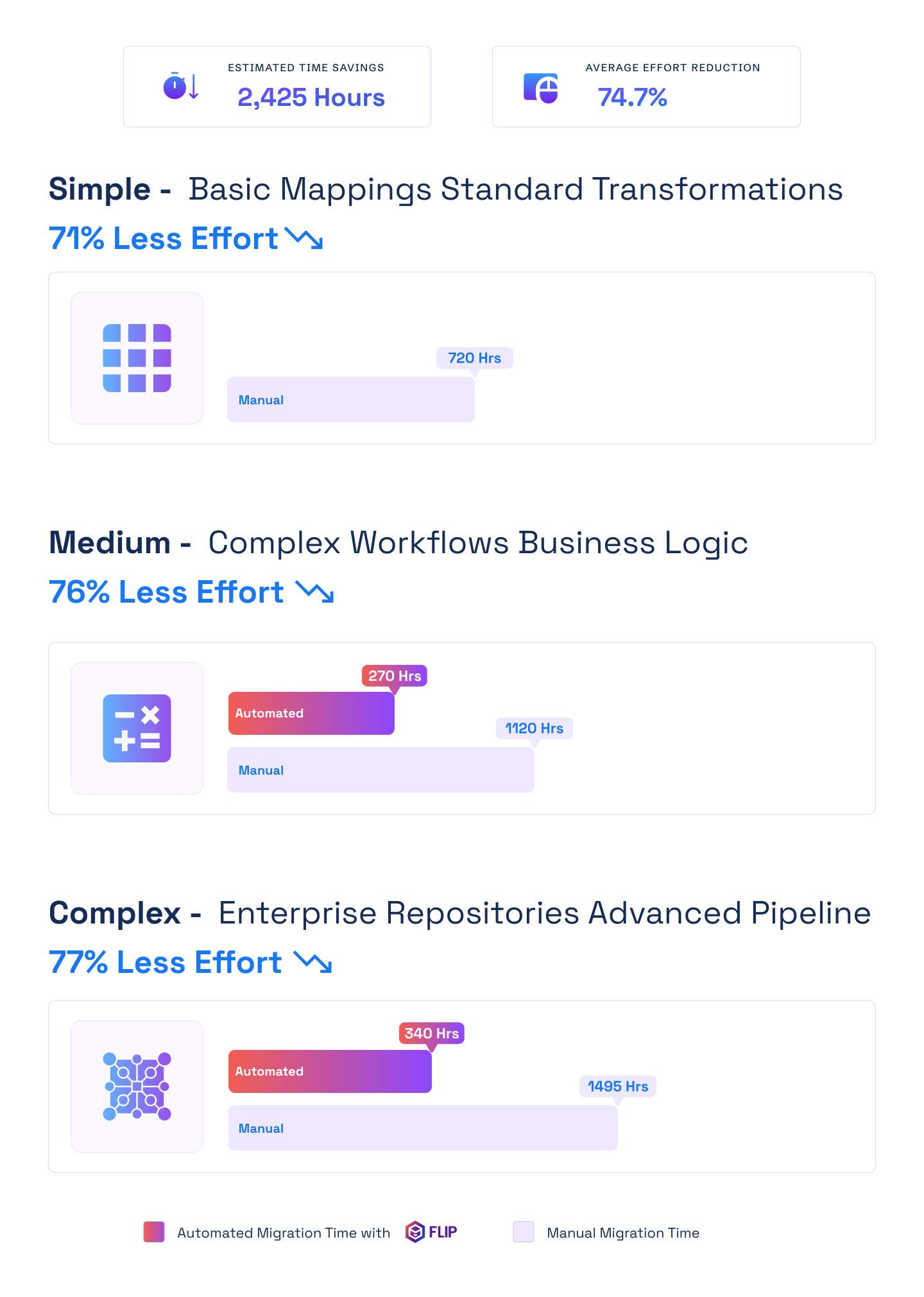

ESTIMATED TIME SAVINGS

Average effort reduction
Simple - Basic Mappings Standard Transformations
Less Effort

Medium - Complex Workflows Business Logic
Less Effort
Complex - Enterprise Repositories Advanced Pipelines
Less Effort

Case studies
Proven Impact with Automated Migration
Migration
Enhanced Data Management, Simplifying Complex Data Workflows
Impact:
- Enhanced Data Efficiency
- Improved Decision-Making
- Scalable Data Infrastructure
Migration
Databricks: Transforming Sales Intelligence for Faster Decision-Making
Impact:
- 80% Faster Document Processing
- 95% Improved Metadata Accuracy
- 45% Accelerated Time-to-Insight
Migration
Transforming Enterprise Data with Rapid, Automated Migration from Informatica to Talend
Impact:
- 70% Reduction in Manual Migration Effort
- 60% Faster Time-to-Delivery
- 45% Lower Total Migration Cost
Frequently Asked Questions (FAQs)
Informatica to Databricks migration involves converting legacy PowerCenter ETL workflows into modern cloud-native data pipelines. This transformation enables organizations to leverage distributed computing, real-time processing, and unified analytics platforms while eliminating expensive on-premises infrastructure and accelerating data engineering workflows significantly.
Organizations migrate to reduce infrastructure costs, eliminate server maintenance, and access modern data engineering capabilities. Databricks offers superior performance through distributed computing, real-time stream processing, machine learning integration, and consumption-based pricing that transforms fixed capital expenses into flexible operational costs.
Migration timelines range from weeks to months depending on workflow complexity and volume. Simple mappings migrate in days, while enterprise implementations require longer periods. Automated migration accelerators reduce deployment time by 60-80%, significantly faster than manual rewriting approaches that consume months.
Key benefits include 50-70% infrastructure cost reduction, elimination of PowerCenter licensing fees, 3-5x faster development cycles, real-time data processing capabilities, machine learning integration, unified analytics workspace, automatic scaling, and modern collaborative development environments with Git integration and CI/CD pipelines.
Yes, phased migration approaches allow organizations to select specific mappings, workflows, or business domains. Critical workloads migrate first for validation, followed by additional components when ready. This incremental strategy minimizes operational disruption and enables teams to adapt gradually to new platforms.
Migration costs depend on workflow complexity, transformation volume, data source diversity, and customization requirements. Automated accelerators reduce expenses by 60-70% compared to manual approaches. Most organizations achieve positive ROI within 12-18 months through combined infrastructure savings and productivity improvements.
Databricks provides equivalent or superior capabilities for most PowerCenter features including complex transformations, workflow orchestration, error handling, and data quality operations. Some proprietary Informatica functions require custom implementation using Spark APIs, notebooks, or user-defined functions during conversion.
FLIP extracts Informatica metadata from PowerCenter repositories, analyzes mapping logic and workflow dependencies, then automatically converts them into optimized Databricks notebooks. The platform preserves business logic while transforming proprietary code into Python or Scala Spark scripts ready for deployment.
Mappings, workflows, worklets, sessions, transformations, parameters, variables, connection objects, and business logic all migrate successfully. Complex expressions, custom transformations, lookup operations, aggregations, joins, filters, and data quality rules convert to equivalent Spark operations with enhanced performance capabilities.
No, properly planned migrations ensure zero downtime through parallel system operation. Existing Informatica workflows continue processing while Databricks pipelines undergo testing and validation. Cutover occurs only after comprehensive validation confirms identical results, maintaining continuous business operations throughout transition.
Mapping logic extracts into structured metadata, analyzing source-to-target transformations, data flow patterns, and business rules. Automated tools convert this logic into Python or Scala Spark code, optimizing for distributed processing. Resulting notebooks maintain functional equivalence while leveraging Databricks’ performance capabilities.
Yes, complex transformations including custom expressions, nested logic, lookup operations, aggregations, and conditional processing convert to equivalent Spark operations. Some transformations optimize during migration to leverage distributed computing. User-defined functions handle specialized logic requiring custom implementation beyond standard operators.
Most PowerExchange sources have equivalent Databricks connectors available. Common database, cloud storage, and application connectors map directly. Legacy or proprietary connectors may require custom implementation using Databricks APIs. Migration assessments identify connector compatibility before conversion begins.
Informatica workflows convert to Databricks jobs with equivalent scheduling, dependencies, error handling, and notification capabilities. Organizations can use native Databricks scheduler or integrate with Apache Airflow, Azure Data Factory, or other orchestration tools for complex enterprise workflow management.
Yes, parameters and variables convert to Databricks widgets, job parameters, and configuration files. Dynamic values, environment-specific settings, and runtime overrides maintain functionality through equivalent Databricks mechanisms. This preserves operational flexibility while improving configuration management across development, testing, and production environments.
Absolutely. Reusable transformations and mapplets convert to Databricks notebooks and libraries callable from multiple pipelines. This preserves modular design patterns while gaining version control benefits. Shared logic centralizes in repositories, enabling collaborative development and consistent transformation logic across workflows.
Session schedules convert to Databricks job triggers supporting time-based, event-driven, and dependency-based execution. Workflow orchestration maintains similar patterns using native schedulers or external tools. Enhanced monitoring dashboards provide superior visibility into pipeline execution, performance metrics, and failure notifications.
Error handling strategies convert to Spark exception handling, logging frameworks, and data quality checks. Error thresholds, rejection record handling, and logging levels translate to equivalent Databricks mechanisms. Enhanced observability through integrated monitoring improves troubleshooting capabilities when issues occur during processing.
Yes, flat file sources, relational databases, cloud storage, and application sources all connect through Databricks native connectors. Connection configurations, authentication methods, and data access patterns convert automatically. Hybrid architectures support both cloud and on-premises sources during transition periods.
Lookup operations convert to Spark broadcast joins, DataFrame operations, or cached reference data patterns. Connected and unconnected lookups both translate effectively. Databricks often improves lookup performance through distributed memory caching and optimized join strategies unavailable in traditional Informatica implementations.
Yes, Databricks typically processes data significantly faster through distributed computing and parallel execution. Large datasets completing in hours with Informatica often finish in minutes with Databricks. Automatic optimization, intelligent caching, and columnar storage formats contribute to superior performance characteristics.
Databricks scales automatically based on workload demands without manual intervention. Unlike Informatica requiring hardware upgrades, Databricks adds compute resources dynamically. This elastic scaling handles data volume growth and concurrent user increases efficiently while maintaining consistent performance under varying loads.
Yes, Databricks handles equivalent or larger data volumes more efficiently. Petabyte-scale processing occurs routinely through distributed storage and compute separation. Intelligent data partitioning, tiering strategies, and optimization capabilities enable Databricks to process massive datasets that challenge traditional Informatica implementations.
Organizations typically see 3-10x faster processing times depending on workload characteristics. Real-time streaming capabilities emerge where batch processing previously limited responsiveness. Query performance improves through optimized execution engines. Development velocity increases with interactive notebooks enabling rapid iteration and testing.
Yes, Databricks provides native real-time stream processing through Structured Streaming. Unlike Informatica’s batch-oriented architecture, Databricks handles continuous data ingestion from Kafka, Event Hubs, and change data capture sources. Low-latency transformations enable immediate analytics and operational decision-making impossible with traditional batch windows.
Databricks employs automatic query optimization, adaptive query execution, dynamic partition pruning, and intelligent caching. The platform analyzes execution patterns, identifies bottlenecks, and adjusts strategies automatically. Built-in advisors suggest optimization opportunities including aggregation strategies, data layout improvements, and resource allocation adjustments.
Yes, distributed query processing, intelligent caching, and workload isolation enable Databricks to support thousands of concurrent users effectively. Resource separation prevents contention between interactive analytics and batch processing. Elastic capacity accommodates user growth without manual infrastructure planning or performance degradation.
Performance tuning translates to equivalent Databricks optimization strategies. Partitioning schemes, buffer memory settings, and commit intervals convert to appropriate Spark configurations. Databricks often requires less manual tuning through automatic optimization, though custom configurations remain available for specialized requirements.
Distributed computing parallelizes data processing across multiple nodes simultaneously. Large transformations partition automatically, processing subsets concurrently. This approach dramatically reduces processing time for massive datasets. Fault tolerance ensures reliability while horizontal scaling accommodates growing data volumes without performance bottlenecks.
While specific benchmarks vary by workload characteristics, industry reports consistently show Databricks processing data 3-10x faster than traditional ETL tools. Real-world migrations demonstrate significant time reductions for complex transformations, large-scale aggregations, and data quality operations through distributed computing advantages.
Organizations typically save 50-70% on infrastructure costs by eliminating PowerCenter servers and maintenance. Informatica licensing fees disappear completely. Consumption-based Databricks pricing aligns costs with actual usage. Combined with productivity improvements, most achieve positive ROI within 12-18 months post-migration.
ROI realization typically occurs within 12-24 months depending on organization size and workload complexity. Infrastructure savings begin immediately post-migration. Productivity gains compound over time as teams leverage modern development practices. Enhanced analytics capabilities enable better business decisions creating additional value beyond cost reduction.
Yes, migrating to Databricks eliminates all PowerCenter licensing fees. Databricks operates on consumption-based pricing where organizations pay only for compute resources used during processing. This fundamental shift from perpetual licensing to flexible operational expenses significantly reduces total cost of ownership for data integration infrastructure.
Databricks consumption-based pricing typically costs less than combined Informatica licensing, infrastructure maintenance, and operational overhead. Organizations avoid hardware refresh cycles, reduce administrative burden, and eliminate capacity planning challenges. Pay-as-you-go models align expenses with business value while providing enterprise-grade capabilities.
Budget for training investments, change management activities, potential application modifications for integration changes, and temporary parallel system operation. However, comprehensive planning and automated conversion minimize these expenses. Long-term savings from eliminated infrastructure maintenance and improved productivity far exceed initial investment requirements.
Yes, comprehensive assessments analyze current Informatica workload characteristics including data volumes, processing frequencies, transformation complexity, and concurrency patterns. This baseline models Databricks cluster requirements and estimates monthly consumption. Monitoring dashboards track actual usage enabling continuous optimization aligned with budgets.
Automated conversion eliminates months of manual rewriting effort, reducing labor costs by 60-80%. Faster deployment minimizes parallel system operation expenses. Fewer errors decrease testing and remediation time. Comprehensive documentation reduces knowledge transfer requirements. Combined benefits significantly lower total migration investment compared to manual approaches.
Organizations eliminate data center costs, server hardware procurement, cooling and power expenses, network infrastructure investments, and disaster recovery redundancy. Cloud-native architecture provides enterprise-grade availability automatically. Consumption-based pricing prevents overprovisioning while ensuring capacity meets demand during peak periods.
Yes, continuous optimization includes right-sizing clusters, implementing autoscaling policies, leveraging spot instances for fault-tolerant workloads, optimizing data storage formats, implementing intelligent caching strategies, and scheduling jobs during off-peak periods. Regular reviews identify additional savings opportunities as workloads evolve.
Developer productivity typically improves 3-5x post-migration through modern development environments, interactive notebooks, and collaborative workflows. This efficiency gain offsets migration costs within first year for most organizations. Reduced maintenance burden frees technical resources for value-adding projects rather than legacy system support.
Databricks provides enterprise-grade security including encryption at rest and in transit, role-based access control, comprehensive audit logging, network isolation, and threat detection. The platform maintains SOC 2, ISO 27001, HIPAA, and other certifications. Security configurations from Informatica translate to equivalent or enhanced controls.
Yes, row-level security, column-level permissions, data masking rules, and role-based access controls convert to equivalent Databricks Unity Catalog configurations. Migration processes analyze existing security implementations and recreate them using modern governance frameworks. Enhanced capabilities often improve security posture beyond legacy implementations.
Absolutely. Databricks maintains comprehensive compliance certifications including HIPAA for healthcare, PCI DSS for financial services, FedRAMP for government, and GDPR for data privacy. The platform provides audit trails, data residency controls, encryption key management, and compliance documentation required across regulated sectors.
Databricks implements multi-layered encryption protecting data at rest using AES 256-bit encryption and data in transit using TLS 1.2+ protocols. Customer-managed encryption keys provide additional control. Private endpoints enable network isolation. These capabilities meet or exceed typical Informatica security implementations.
Yes, data governance policies migrate and enhance through Databricks Unity Catalog integration. Data classification, lineage tracking, quality monitoring, and stewardship workflows translate to modern governance frameworks. Comprehensive metadata management, impact analysis, and regulatory compliance documentation improve throughout the data lifecycle.
Databricks offers comprehensive audit logging capturing user activities, data access patterns, configuration changes, and system events. Integration with SIEM tools enables centralized security monitoring. Compliance reporting generates required documentation for regulatory audits. Enhanced visibility improves security posture and simplifies compliance verification.
Sensitive data protection includes dynamic data masking, column-level encryption, tokenization capabilities, and fine-grained access controls. Data loss prevention policies, classification labels, and usage tracking ensure organizations maintain data sovereignty. Privacy controls support regulatory requirements across jurisdictions and industry sectors.
Yes, Databricks integrates with enterprise identity providers including Azure Active Directory, AWS IAM, and Okta. Centralized authentication supports single sign-on, multi-factor authentication, and conditional access policies. Managed identities enable passwordless authentication for enhanced security beyond legacy credential management approaches.
Absolutely. Databricks provides APIs, custom security policies, network configurations, and integration capabilities enabling organizations to implement specialized security requirements. Private link connections, customer-managed VPCs, and custom encryption strategies accommodate unique compliance needs beyond standard configurations.
Databricks Unity Catalog provides comprehensive data lineage tracking from source to consumption automatically. Unlike Informatica’s limited metadata capabilities, Unity Catalog captures column-level lineage, transformation history, and downstream dependencies. This enhanced visibility improves governance, impact analysis, and regulatory compliance documentation significantly.


