

Migrate from Cognos to Power BI with Kanerika
Break free from legacy Cognos limitations and unlock modern analytics potential. Kanerika's FLIP migration accelerator automatically transforms your complex Cognos reports into interactive Power BI dashboards, delivering faster insights while reducing operational costs.
Get Started with Cognos to Power BI Migration
The Tech Debt
The Cost of Not Modernizing Your Data Platforms

80%
IT budgets are spent on legacy system maintenance.

44%
CIOs see legacy systems as growth barriers.

50%
Developer productivity is lost due to outdated tools

70%
Digital transformation efforts fail due to legacy systems
Migrate from

with Our Accelerator
Use Your Azure Committed Spend (MACC)


Experience Our
Cognos to Power BI Migration
The Cognos to Power BI Advantage
Transform Legacy Reports into Modern Analytics

Accelerate Analytics with Interactive Self-Service Capabilities
- Transform traditional Cognos reports into dynamic dashboards
- Enable users to explore data without IT dependency
- Replace scheduled deliveries with real-time insights

Optimize Costs Through Cloud-Native Scalability Solutions
- Eliminate on-premises server maintenance overhead completely
- Handle growing data volumes through seamless auto-scaling
- Reduce infrastructure expenses with shared cloud resources

Enhance Visualization with Advanced Storytelling Features
- Replace basic charts with rich interactive visualizations
- Access unified governance and security across operations
- Utilize shared resources and streamlined development processes

Modernize Development with Intuitive Design Interface
- Reduce development time through drag-and-drop functionality
- Enable centralized dataset management with automated workflows
- Replace manual processes with intelligent optimization systems
The Migration Process
Transition to Power BI Effortlessly with Our Accelerator
Automated Connection and Report Discovery
FLIP connects directly to your Cognos environment using secure credentials, automatically fetching and cataloging all available reports for seamless selection and processing.


Intelligent Component Analysis and Extraction
Our accelerator analyzes complex multi-page reports with various visualizations including bar charts, pie charts, world maps, and list tables, extracting all data connections and calculations automatically.

Seamless Report Reconstruction and Conversion
FLIP converts the entire Cognos report layout into Power BI format, preserving all visual components, data relationships, and formatting while generating a complete dashboard structure.

Instant Delivery and Implementation Ready
The migration process delivers a convenient ZIP file containing the fully functional Power BI dashboard, ready for immediate import and use without manual adjustments or rework.

ROI YOU CAN EXPECT
Drive Measurable Returns Through Intelligent Report Migration
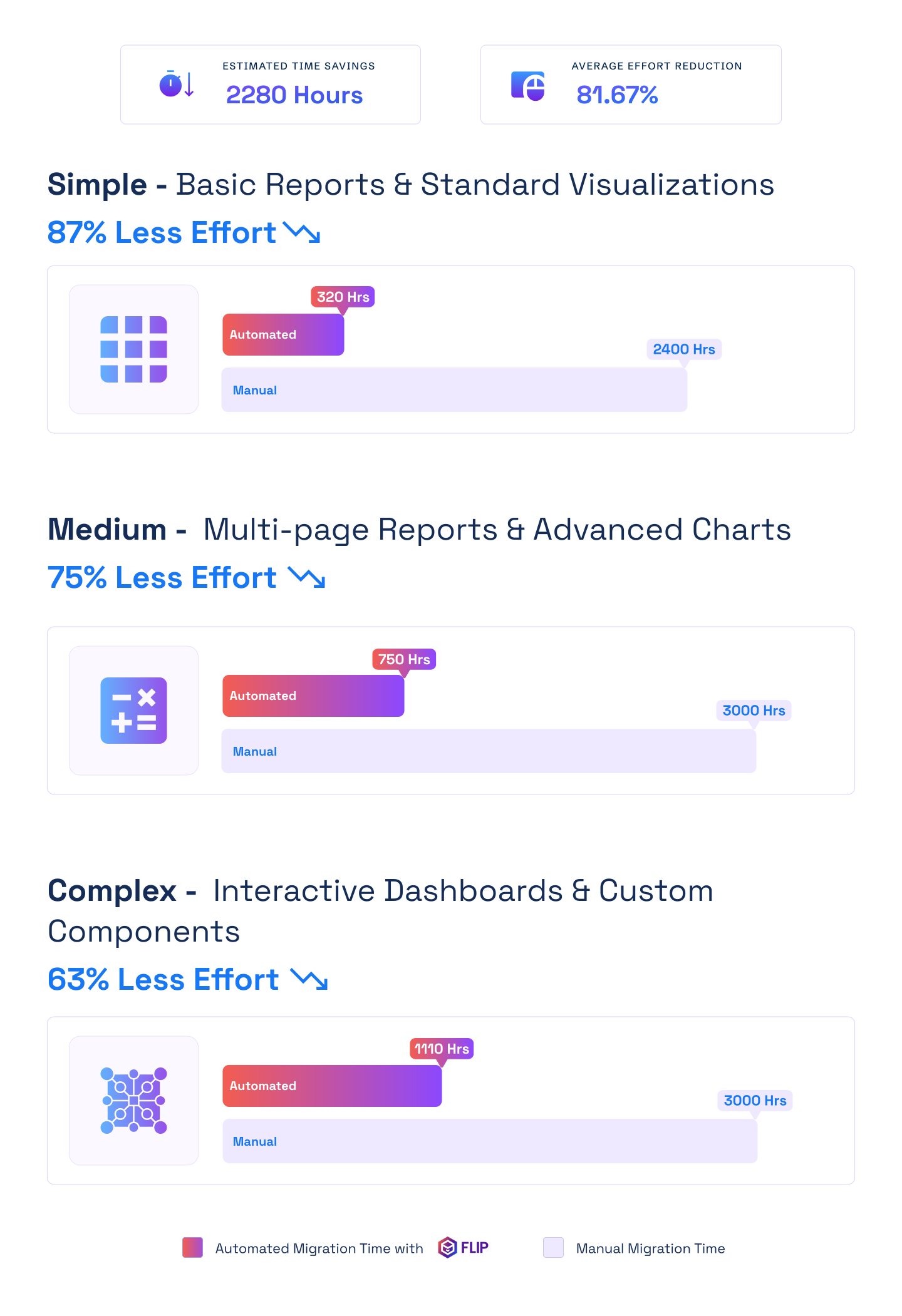

ESTIMATED TIME SAVINGS

Average effort reduction
Simple - Basic Reports & Standard Visualizations
Less Effort

Medium - Multi-page Reports & Advanced Charts
Less Effort
Complex - Interactive Dashboards & Custom Components
Less Effort

Case studies
Delivering Measurable Outcomes with Automated Migrations
Migration
Modernizing Enterprise Reporting with Crystal Reports to Power BI Migration
Impact:
- 60% Faster Migration
- 10x Data Scale
- 99.5% Refresh Success Rate
Migration
Modernizing Financial Analytics with Informatica to Alteryx Migration
Impact:
- 45% Faster Reporting Cycles
- 38% Reduction in Maintenance Costs
- 60% Improved Analytics Turnaround
Migration
Transforming Retail Reporting and Analytics with SQL to Microsoft Fabric Migration
Impact:
- 74% Faster Reporting Cycles
- 65% Increase in Reporting Stability
- 72% Faster Access to Current Metrics
Frequently Asked Questions (FAQs)
Kanerika’s FLIP helps teams move their existing IBM Cognos reports to Microsoft Power BI much faster and with far less manual effort. Instead of rebuilding reports from scratch, FLIP automatically converts the report structure, visuals, and logic. This makes it easier for organizations with a large number of legacy Cognos reports to modernize their analytics while keeping the work they’ve already done.
In most cases, around 70–80% of the work is automated, depending on how complex the reports are. FLIP handles most of the report layout, visuals, calculations, filters, and prompt logic. Some manual work is still needed for validation, setting up data connections, and adjusting highly customized logic, but the overall effort is much lower than a full rebuild.
No. FLIP does not move or copy your data. It works mainly with report definitions and metadata from Cognos. Kanerika’s FLIP converts the report logic and structure into Power BI–ready files, and your team connects the data sources in Power BI afterward. This way, you stay in full control of your data and security.
FLIP produces a Power BI Project (PBIP) file that you can download as a ZIP. You open this file in Power BI, connect it to your data sources, check that everything looks right, and then publish the report to your Power BI workspace.
Cognos prompts are converted into Power BI slicers and filters. Common prompt types like dropdowns and multi-selects are supported where Power BI allows. The look and feel changes because Power BI works differently than Cognos, but the purpose of the prompts stays the same. What used to be pre-run prompts in Cognos become interactive filters in Power BI.
Yes. FLIP supports reports that use custom SQL. The SQL is converted into Power Query (M) inside Power BI so the original logic is kept. For very complex queries, a quick manual review is recommended to make sure everything works as expected.
Yes. Kanerika’s FLIP supports reports built using Framework Manager. It reads the dimensions, measures, and relationships from the model and maps them into Power BI’s data model so the report logic stays consistent.
If Power BI has a direct way to handle the logic, FLIP migrates it automatically. If there’s no direct match, the report is flagged so it can be adjusted manually. In some cases, small DAX changes may be needed after the migration.
Yes. Power BI can achieve the same result using its own features. Row-Level Security controls which data users see, and subscriptions or scheduled delivery can send reports to users with the right data. The setup is different from Cognos, but users still get the reports they need.
Yes. Where possible, FLIP carries over security logic and applies it using Power BI’s Row-Level Security. Depending on how complex the security rules are, some extra setup may be needed in Power BI.
FLIP can be used as a SaaS solution or deployed in your own environment using a VM or Docker. This gives organizations flexibility based on their security and compliance requirements.
FLIP works independently of Microsoft Fabric but fits well with Fabric-based Power BI setups. You can run the migration before, during, or after moving to Fabric, without changing your migration approach.
Yes, and this is usually the best way to start. A pilot migrates a small set of reports using Kanerika’s FLIP so you can see the results, check accuracy, and understand the effort involved before scaling to a full migration.
The engagement usually starts with a discussion to understand your reporting setup and goals. After an NDA is in place, we run a technical demo with your team, define the pilot scope, review security requirements, and then execute and evaluate the pilot before moving forward.
Migration time depends on report complexity, but with Kanerika’s FLIP accelerator, even complex multi-page reports migrate in minutes rather than weeks of manual effort, ensuring minimal business disruption.
Yes, FLIP automatically processes complex reports containing bar charts, pie charts, world maps, list tables, and multi-page layouts while preserving all data connections and calculations.
Power BI’s intuitive interface requires minimal training, especially for teams familiar with Microsoft tools. Our migration approach ensures smooth adoption with comprehensive support throughout the transition.
Power BI offers significant cost savings through cloud-native architecture, eliminating infrastructure maintenance while providing enhanced capabilities and better integration with Microsoft ecosystem.
No. Our FLIP accelerator ensures complete data integrity, automatically preserving all report components, data relationships, and calculations without any loss during the migration process.
Cognos requires expensive infrastructure, complex licensing, and extensive IT involvement for report changes. Power BI cuts costs by 40-60% with simple per-user pricing starting at $14 monthly. You get intuitive self-service analytics that business users can actually use without IT bottlenecks. Kanerika’s proprietary migration accelerator, powered by FLIP, automates the entire transition, converting complex Cognos reports in minutes instead of weeks of manual recreation.
Power BI offers modern drag-and-drop interfaces that reduce training time by 70%. Native Microsoft 365 integration means reports embed directly into Teams, SharePoint, and Excel. Cloud-native architecture eliminates server maintenance and scales automatically. Real-time collaboration features let teams work together on dashboards. Kanerika’s proprietary migration accelerator, powered by FLIP, ensures you start realizing these benefits immediately after migration without lengthy development cycles.
Kanerika’s proprietary migration accelerator, powered by FLIP, automatically converts Cognos reports into Power BI dashboards while preserving all visual components. The tool processes multi-page reports containing bar charts, pie charts, world maps, and list tables in minutes. All data connections, calculations, and formatting transfer automatically. You receive a complete Power BI dashboard ready for immediate import without manual adjustments or rework.
Yes. While Cognos uses Framework Manager for metadata, Power BI uses tabular models with DAX. Kanerika’s proprietary migration accelerator, powered by FLIP, handles this architectural difference by converting data models intelligently. Complex relationships, hierarchies, and business logic translate to Power BI structures. Some advanced Cognos-specific features may need refactoring, but our accelerator identifies these during assessment and provides conversion guidance.
Kanerika’s proprietary migration accelerator, powered by FLIP, preserves all data source connections with proper authentication during conversion. Cognos framework-level security maps to Power BI’s role-level security and workspace access controls. User groups and permissions are restructured for Power BI’s model. We validate security settings post-migration to ensure the same access controls apply. Row-level security rules convert to Power BI DAX expressions automatically.
With Kanerika’s proprietary migration accelerator, powered by FLIP, individual reports convert in minutes. Simple reports with standard visualizations migrate in hours. Medium complexity multi-page reports complete in 1-2 days. Complex interactive dashboards finish in 3-5 days including validation. Manual migration without automation takes 2-4 weeks per report. Our accelerator reduces overall migration effort by 80%, saving over 2,200 manual hours per project.
Yes. Kanerika’s proprietary migration accelerator, powered by FLIP, processes reports that span multiple Cognos packages by consolidating data sources into unified Power BI datasets. The tool analyzes dependencies across packages and creates appropriate relationships in Power BI. Multi-package logic converts to Power BI’s data model with proper table relationships and calculations. Some restructuring may optimize performance, and our accelerator recommends improvements during conversion.
Cognos pricing starts at $15 monthly per user for basic features and reaches $70 monthly for enterprise capabilities. Power BI Pro costs $14 monthly per user, while Premium is $24 monthly with more features than Cognos enterprise plans. You eliminate infrastructure costs since Power BI runs in the cloud. Organizations typically reduce total BI spending by 40-60% after migration. Kanerika’s proprietary migration accelerator, powered by FLIP, cuts migration costs another 45% through automation.
Yes. Kanerika’s proprietary migration accelerator, powered by FLIP, automates the entire migration process. The tool connects directly to your Cognos environment, discovers all reports automatically, and converts them to Power BI format. FLIP preserves visualizations, data connections, calculations, and layouts without manual coding. This automation eliminates human error and ensures consistent quality across all migrated reports while reducing timeline from months to weeks.
Kanerika’s proprietary migration accelerator, powered by FLIP, includes comprehensive validation as part of the conversion process. We compare outputs between Cognos and Power BI environments using identical data sets. All calculations, measures, and KPIs are verified for accuracy row by row. Visual rendering is tested to ensure charts and tables display correctly. Our accelerator generates detailed validation reports documenting every check performed and confirming data integrity.
Yes, but differently. Cognos uses report bursting and scheduled deliveries. Power BI handles this through subscriptions, data-driven alerts, and Power Automate workflows. Email subscriptions deliver reports on schedule to users. Paginated reports in Power BI Premium provide pixel-perfect formatting similar to Cognos. Kanerika’s proprietary migration accelerator, powered by FLIP, helps you redesign distribution strategies to leverage Power BI’s modern capabilities during migration.
Kanerika’s proprietary migration accelerator, powered by FLIP, maintains report layouts and formatting during conversion. The tool adapts Cognos visualizations to Power BI’s modern interface while preserving data representation. Some static Cognos reports benefit from Power BI’s interactive features, so we recommend enhancements. Our accelerator flags visual differences during conversion. Final reports maintain familiar functionality so users recognize their reports after migration.
Yes. Kanerika’s proprietary migration accelerator, powered by FLIP, supports phased migration strategies. You maintain Cognos in production while building Power BI versions. Both systems can connect to the same data sources during transition. This parallel approach eliminates downtime and allows thorough validation. Users gradually shift to Power BI as reports are validated. Cutover happens incrementally rather than all at once, reducing risk.
Kanerika’s proprietary migration accelerator, powered by FLIP, maps Cognos security roles to Power BI workspace roles and row-level security. Cognos user groups convert to Azure Active Directory groups. Permission levels translate to Power BI’s viewer, contributor, and admin roles. We document the security mapping and test with actual user scenarios. Role-based data filtering converts to DAX expressions that restrict data access based on user identity.
Organizations typically see ROI within 6-9 months. You save 40-60% on licensing costs immediately. Infrastructure costs drop by eliminating server maintenance. Development time reduces by 70% with Power BI’s intuitive interface. Faster insights improve decision-making speed. Kanerika’s proprietary migration accelerator, powered by FLIP, reduces migration costs by 80%, accelerating payback period. Most clients report improved user adoption and reduced IT support burden within months of go-live.
Yes. Power BI connects to IBM databases like DB2 and Informix through native connectors. You can query IBM systems directly or use staging databases. APIs enable integration with IBM applications. During migration with Kanerika’s proprietary migration accelerator, powered by FLIP, we maintain all connections to IBM data sources. Power BI’s flexible connectivity often improves data refresh performance compared to Cognos.
Kanerika’s proprietary migration accelerator, powered by FLIP, applies Power BI best practices during conversion. We optimize data models by removing unnecessary columns and implementing proper relationships. Calculated columns convert to measures where appropriate for better performance. Incremental refresh is configured for large tables. Our team monitors query performance post-migration and provides tuning recommendations. Most migrated reports run faster in Power BI than original Cognos versions.
Yes. We provide 30-90 day support periods after go-live to address any issues with reports migrated through Kanerika’s proprietary migration accelerator, powered by FLIP. Training sessions cover Power BI Desktop, service administration, and DAX basics specific to your converted reports. Users learn using their actual migrated dashboards rather than generic examples. Most teams become productive within 2-3 weeks since Power BI’s interface is more intuitive than Cognos.
Main challenges include converting complex business logic from Cognos to DAX, redesigning static reports for interactive Power BI experience, and managing user adoption. Cognos Framework Manager models need rebuilding in Power BI’s tabular structure. ETL processes may require reworking. Kanerika’s proprietary migration accelerator, powered by FLIP, addresses these challenges through automation, handling 90-95% of conversion automatically and flagging the remaining items for review.
Yes. Power BI Premium supports enterprise-scale deployments with dedicated capacity, paginated reports, and advanced governance. Organizations with thousands of users and reports successfully run Power BI at scale. Power BI Premium Per Capacity handles unlimited report distribution. Data refresh scales through incremental updates and dataflows. Kanerika’s proprietary migration accelerator, powered by FLIP, ensures your reports are architected for enterprise scale from day one.
“We start with a comprehensive pre-migration assessment using Kanerika’s proprietary migration accelerator, powered by FLIP. This assessment analyzes your entire Cognos environment to determine exactly how much can be automated and where manual intervention is needed. The tool scans report complexity, identifies custom logic, and maps data dependencies. Based on assessment results, we plan sprints that prioritize high-value reports first. Each sprint includes automated conversion through our accelerator, validation, and user acceptance testing. Reports that FLIP handles completely move through sprints quickly, while those needing manual work get appropriate developer time allocated. This approach delivers working Power BI reports within weeks, not months. Feedback loops ensure continuous improvement, and you see ROI incrementally throughout the migration journey.
“
No direct compatibility exists. Power BI and Cognos use different architectures and data models. You cannot import Cognos reports directly into Power BI. However, Kanerika’s proprietary migration accelerator, powered by FLIP, bridges this gap through intelligent conversion. The tool translates Cognos report structures, calculations, and visualizations into Power BI equivalents automatically. Most report functionality transfers successfully with minimal manual intervention required.
Cognos is a traditional enterprise BI suite requiring IT involvement for report development. Power BI emphasizes self-service analytics with intuitive drag-and-drop interfaces. Cognos relies on Framework Manager for metadata while Power BI uses tabular models. Cognos focuses on static, pixel-perfect reports while Power BI prioritizes interactive dashboards. Licensing differs drastically with Power BI costing 40-60% less. Kanerika’s proprietary migration accelerator, powered by FLIP, handles these architectural differences during conversion.
Power BI provides real-time dashboards that update automatically without manual refresh. Interactive filters let analysts explore data without IT requests. Natural language queries enable asking questions in plain English. AI-powered insights detect anomalies and trends automatically. Mobile apps deliver analytics anywhere. Integration with Excel, Teams, and Office 365 fits naturally into existing workflows. Kanerika’s proprietary migration accelerator, powered by FLIP, ensures your Cognos reports gain these capabilities immediately after migration.
Key considerations include workspace organization, dataset management, gateway configuration, and capacity planning. Implement governance policies for report certification and endorsement. Use deployment pipelines for dev-test-prod workflows. Monitor capacity metrics to prevent performance issues. Configure incremental refresh for large datasets. Establish security policies and row-level security patterns. Kanerika helps architect these best practices during migration through our proprietary accelerator, powered by FLIP.
With Kanerika’s proprietary migration accelerator, powered by FLIP, migrations complete in 4-12 weeks depending on report volume and complexity. Environments with 50-100 reports finish in 4-6 weeks. Large deployments with 500+ reports complete in 8-12 weeks including thorough testing. Manual migration without automation extends timelines to 6-18 months with high error risk. Our accelerator reduces migration effort by 80% through intelligent automation.
Yes. Kanerika’s proprietary migration accelerator, powered by FLIP, handles complex multi-page reports with various chart types, maps, tables, and custom calculations. The tool preserves data relationships and business logic during conversion. Interactive capabilities in Power BI often exceed Cognos functionality. Some static reporting features convert to modern interactive equivalents. Over 90% of typical Cognos reports migrate automatically with remaining items needing minor adjustments.
Power BI includes AI-powered insights that detect anomalies and explain data changes automatically. Quick Insights finds patterns in data without manual analysis. Natural language Q&A lets users ask questions conversationally. Interactive visuals enable drill-down and cross-filtering impossible in static Cognos reports. Integration with Azure Machine Learning adds predictive analytics. Kanerika’s proprietary migration accelerator, powered by FLIP, positions your reports to leverage these advanced capabilities immediately.
Run parallel Cognos and Power BI reports with identical data during validation. Compare outputs row by row to verify calculation accuracy. Test all filters, parameters, and drill-down functionality. Validate security settings with actual user scenarios. Use Kanerika’s proprietary migration accelerator, powered by FLIP, which includes automated validation checks. Document data source mappings and calculation conversions. Conduct user acceptance testing before production deployment.
Start with high-usage reports that impact daily operations. Prioritize executive dashboards and revenue-tracking reports early. Migrate reports with simple structures first to build confidence. Address department-specific reports by business unit. Kanerika’s proprietary migration accelerator, powered by FLIP, analyzes report usage from Cognos logs to recommend prioritization. We create phased migration plans that deliver value incrementally while managing risk effectively.
Cognos charges $15-70 per user monthly depending on features plus infrastructure costs. Power BI Pro is $14 per user monthly with Premium at $24 monthly. Power BI Premium Per Capacity costs $4,995 monthly for unlimited users. You eliminate server hardware, maintenance, and upgrade costs with Power BI’s cloud model. Total cost of ownership drops 40-60% after migration. Kanerika’s proprietary migration accelerator, powered by FLIP, reduces migration costs by 80%.
Automation is possible and recommended. Manual rebuilding takes 2-4 weeks per report with high error risk. Kanerika’s proprietary migration accelerator, powered by FLIP, automates 90-95% of typical migrations. The tool converts reports in minutes instead of weeks. Only highly customized Cognos features with no Power BI equivalent need manual attention. Our accelerator flags these during assessment. Automated migration saves over 2,200 hours per project.
Cognos Framework Manager metadata converts to Power BI tabular models through careful mapping. Query subjects become Power BI tables. Relationships translate to Power BI model relationships. Calculations convert to DAX measures. Kanerika’s proprietary migration accelerator, powered by FLIP, analyzes Framework Manager packages and generates equivalent Power BI data models. We optimize for Power BI’s star schema best practices during conversion.
Cognos expressions map to DAX formulas through syntax translation. Aggregations convert to CALCULATE and SUMX patterns. Time intelligence functions translate to Power BI date table calculations. Kanerika’s proprietary migration accelerator, powered by FLIP, handles most conversions automatically. Complex nested expressions are broken into multiple DAX measures for clarity. We validate all calculations against Cognos outputs to ensure accuracy.
Cognos data modules convert to Power BI datasets through relationship and calculation mapping. Dimensional models translate well to Power BI’s star schema. Kanerika’s proprietary migration accelerator, powered by FLIP, extracts data module definitions and recreates them in Power BI. We optimize for performance by implementing proper data types, compression, and aggregations. Shared data modules become centralized Power BI datasets that multiple reports can use.
Yes. Cognos prompts convert to Power BI parameters and slicers. Dynamic filtering works through visual-level, page-level, and report-level filters. Power BI’s bookmarks enable preset filtered views similar to Cognos prompt templates. Kanerika’s proprietary migration accelerator, powered by FLIP, converts prompt logic to appropriate Power BI filtering mechanisms. Interactive slicers often provide better user experience than traditional Cognos prompts.
Common issues include losing drill-path context, improper hierarchy definitions, and complex master-detail relationships. Cognos drill-through can be tricky to replicate. Kanerika’s proprietary migration accelerator, powered by FLIP, identifies these patterns during conversion. We implement Power BI drill-down hierarchies, drill-through pages, and tooltip pages to match original functionality. Most drill-down capabilities translate well, often with improved interactivity in Power BI.
Cognos bursting converts to Power BI data-driven subscriptions in Premium capacity. Email subscriptions deliver reports on schedule. Power Automate workflows handle complex distribution logic. Kanerika’s proprietary migration accelerator, powered by FLIP, documents existing Cognos distribution patterns and designs equivalent Power BI solutions. Paginated reports in Power BI Premium provide targeted delivery with parameters similar to Cognos bursting.
Power BI connects directly to Cognos data sources like DB2, Oracle, and SQL Server. You can use Cognos as a data source temporarily through OData feeds or custom connectors. During phased migration with Kanerika’s proprietary migration accelerator, powered by FLIP, both systems access the same databases. This parallel approach allows gradual transition without forcing immediate cutover from Cognos data infrastructure.
Power BI uses deployment pipelines for dev-test-prod workflows. Azure DevOps or GitHub integration provides version control for Power BI Desktop files. Kanerika’s proprietary migration accelerator, powered by FLIP, establishes proper governance during migration. We document report versions, track changes, and implement approval workflows. Power BI’s built-in lineage view shows data flow and dependencies. This modern approach often improves upon Cognos change management processes.


