

Migrate from Alteryx to Microsoft Fabric with Kanerika
Alteryx has been a trusted analytics tool, but modern enterprises need unified platforms with real-time insights and cloud-native architecture. Microsoft Fabric delivers both in one seamless ecosystem. Kanerika's FLIP Migration Accelerator automates the transition, converting Alteryx workflows into Fabric-ready pipelines while preserving your business logic and eliminating manual effort.
Get Started with Alteryx to Microsoft Fabric Migration
The Tech Debt
The Cost of Not Modernizing Your Analytics Platform

80%
IT budgets are spent on legacy system maintenance.

44%
CIOs see legacy systems as growth barriers

50%
Developer productivity is lost due to outdated tools.

70%
Digital transformation efforts fail due to legacy systems.
Migrate from

with Our Accelerator
Use Your Azure Committed Spend (MACC)

Experience Our Alteryx to Microsoft Fabric Migration
The Alteryx to Microsoft Fabric Advantage
Seamless Integration. Distributed Processing. Future-Ready Analytics.

Unified Data Platform
- Consolidate analytics, data engineering, and AI into one ecosystem
- Eliminate tool sprawl and reduce complexity across analytics workflows
- Share insights seamlessly with OneLake as your single source of truth

Real-Time Performance
- Process data faster with Azure integration and optimized compute engines
- Enable real-time analytics without complex streaming infrastructure setup
- Reduce latency across entire data transformation and reporting pipelines

Built for AI and Analytics
- Apply machine learning models directly to your data without moving it
- Integrate Power BI natively for instant insights, reports, and dashboards
- Use Copilot for AI-assisted workflow creation and optimization

Cost Optimization
- Pay only for what you use with flexible consumption-based pricing
- Reduce licensing complexity with one platform replacing multiple tools
- Lower infrastructure costs through cloud-native serverless architecture
The Migration Process
Effortlessly Transition from Alteryx to Microsoft Fabric
Export Workflows
Export Alteryx workflows, macros, and analytical apps from Designer. Preview and select the components you want to migrate. FLIP packages everything into a structured format with complete dependencies preserved.


Upload & Configure
Upload the exported packages to FLIP Migration Accelerator. Select Microsoft Fabric as your target destination platform. FLIP analyzes the packages and prepares them for automated conversion.

Automated Conversion
FLIP automatically converts Alteryx workflows into Fabric data pipelines and notebooks. All transformations, business logic, formulas, and data structures are preserved. Complex macros translate to reusable Fabric components.

Deploy & Validate
Production-ready pipelines appear in your Fabric workspace with preserved functionality. Validate converted workflows against original outputs. Deploy to production with confidence and minimal manual adjustments.

ROI YOU CAN EXPECT
Gain Significant Time and Effort Savings with Automated Migration
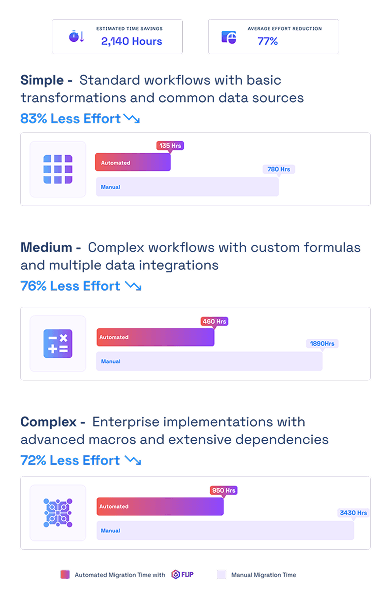

ESTIMATED TIME SAVINGS

Average effort reduction
Simple - Standard workflows with basic transformations and common data sources
Less Effort

Medium - Complex workflows with custom formulas and multiple data integrations
Less Effort
Complex - Enterprise implementations with advanced macros and extensive dependencies
Less Effort

Case studies
Driving Tangible Results with Effortless Migrations
Migration
Modernizing Enterprise Reporting with Crystal Reports to Power BI Migration
Impact:
- 60% Faster Migration
- 10x Data Scale
- 99.5% Refresh Success Rate
Migration
Modernizing Financial Analytics with Informatica to Alteryx Migration
Impact:
- 45% Faster Reporting Cycles
- 38% Reduction in ETL Maintenance Costs
- 60% Improved Analytics Turnaround
Migration
Transforming Retail Reporting and Analytics with SQL to Microsoft Fabric Migration
Impact:
- 74% Faster Reporting Cycles
- 65% Increase in Reporting Stability
- 72% Faster Access to Current Metrics
Frequently Asked Questions (FAQs)
Alteryx to Microsoft Fabric migration is the process of converting analytical workflows, data preparation processes, and transformations from Alteryx Designer to Microsoft Fabric’s unified data platform. This migration modernizes analytics infrastructure while preserving existing business logic, formulas, and data transformation rules.
Organizations migrate from Alteryx to Microsoft Fabric to access unified data integration, real-time analytics, native AI capabilities, and cloud-native architecture. Fabric reduces tool sprawl, eliminates licensing complexity, and provides seamless integration with Power BI, Azure services, and Microsoft 365 ecosystem.
Migration duration depends on workflow complexity and volume. Simple migrations with basic transformations take 80-120 hours with automation versus 600-800 hours manually. Complex enterprise migrations with extensive macros and dependencies take 750-950 hours automated versus 3,000-3,500 hours manually, representing 70-80% time savings.
Main challenges include preserving complex formula logic, handling custom macros and analytical apps, managing data source dependencies, validating converted workflows against original outputs, and minimizing disruption during transition. Manual migration also risks introducing errors and losing institutional knowledge embedded in workflows.
Yes, automated migration tools like FLIP convert Alteryx workflows, macros, and analytical apps into Fabric data pipelines and notebooks. The platform preserves business logic, handles data connections, translates formulas, and generates Fabric-native components ready for validation and deployment with minimal manual intervention.
Microsoft Fabric is a unified analytics platform combining data integration, data engineering, data warehousing, real-time analytics, and AI in one environment. Unlike Alteryx’s desktop-focused approach, Fabric provides end-to-end cloud-native operations with OneLake storage, native Power BI integration, and enterprise-scale collaboration.
Yes, Microsoft Fabric supports real-time data integration through Event Streams, Data Activator, and streaming pipelines. The platform processes streaming data with low latency, enabling real-time analytics and immediate insights without complex infrastructure setup or separate streaming tools.
Fabric integrates natively with Azure Data Lake Storage, Azure Synapse Analytics, Azure SQL Database, Power BI, and other Azure services. Organizations already using Azure benefit from seamless data flow, unified security, shared compute resources, and optimized performance across their cloud environment.
Microsoft Fabric supports hundreds of data sources including SQL Server, Oracle, SAP, Salesforce, Excel, cloud storage systems, REST APIs, and real-time streaming sources. The platform provides pre-built connectors for common enterprise systems and custom connector capabilities for specialized sources.
Yes, Fabric handles complex data transformations through data flows, notebooks, and pipelines. The platform supports data cleansing, aggregations, joins, pivots, conditional logic, custom formulas, and advanced transformations using SQL, Python, Spark, or low-code interfaces similar to Alteryx.