

Migrate from Informatica to Alteryx with Kanerika
Legacy ETL systems often limit the speed, flexibility, and scalability modern analytics require. Kanerika’s FLIP Migration Accelerator automates your Informatica to Alteryx migration, preserving workflow logic, improving maintainability, and enabling self-service data analysis across your organization.
Get Started with Informatica to Alteryx Migration
The Tech Debt
The Cost of Not Modernizing Your Data Platforms

80%
IT budgets are spent on legacy system maintenance.

44%
CIOs see legacy systems as growth barriers.

50%
Developer productivity is lost due to outdated tools

70%
Digital transformation efforts fail due to legacy systems
Migrate from

with Our Accelerator
Use Your Azure Committed Spend (MACC)

Experience Our
Informatica to Alteryx Migration
The Informatica to Alteryx Advantage
Move Faster. Analyze Smarter. Collaborate Better.

Speed Up ETL Development
- Streamline workflows for quicker results
- Shorten cycle times from development to deployment
- Use Alteryx’s intuitive tools for workflows

Empower All Business Users Effectively
- Enable non-technical teams to work with data
- Simplify complex ETL tasks with low-code automation
- Reduce dependency on IT teams

Significantly Cut Operational Costs
- Reduce infrastructure and licensing overhead
- Consolidate data processing within a single platform
- Optimize resource usage through automation

Enable Cloud and AI Readiness
- Seamlessly integrate with modern data systems
- Prepare your ETL for cloud scalability and AI workflows
- Ensure future-ready data operations with Alteryx
The Migration Process
Seamless Transition from Informatica to Alteryx
Workflow Discovery and Analysis
FLIP connects to Informatica PowerCenter, scanning and cataloging workflows, dependencies, and transformations for accurate migration planning.


Automated Conversion
Using the FIRE (FLIP Interface for Informatica™ Repository Export) app, FLIP converts Informatica workflows into Alteryx-ready formats.

Validation and Optimization
Every converted workflow is validated, logged, and packaged with detailed reports for review. Performance settings are fine-tuned to meet Alteryx best practices.

Deployment and Review
Workflows are ready to use in Alteryx Designer, allowing quick validation, fine-tuning, and rollout across teams.

ROI YOU CAN EXPECT
Achieve Significant Time and Effort Savings with Automation
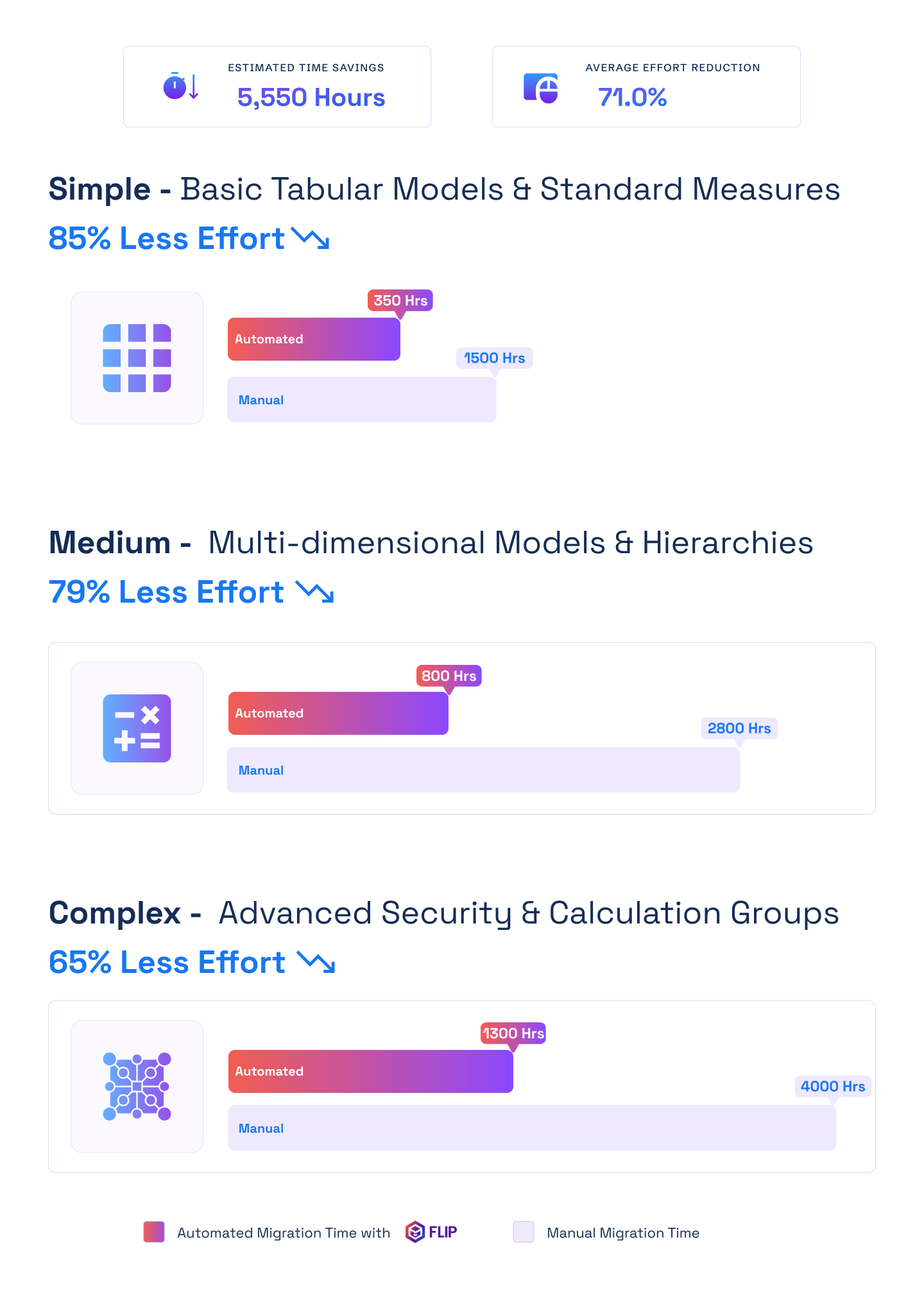

ESTIMATED TIME SAVINGS

Average effort reduction
Simple - Basic Tabular Models & Standard Measures
Less Effort

Medium - Multi-dimensional Models & Hierarchies
Less Effort
Complex - Advanced Security & Calculation Groups
Less Effort

Case studies
Proven Impact with Automated Migration
Migration
Modernizing Enterprise Reporting with Crystal Reports to Power BI Migration
Impact:
- 60% Faster Migration
- 10x Data Scale
- 99.5% Refresh Success Rate
Migration
Modernizing Financial Analytics with Informatica to Alteryx Migration
Impact:
- 45% Faster Reporting Cycles
- 38% Reduction in Maintenance Costs
- 60% Improved Analytics Turnaround
Migration
Transforming Retail Reporting and Analytics with SQL to Microsoft Fabric Migration
Impact:
- 74% Faster Reporting Cycles
- 65% Increase in Reporting Stability
- 72% Faster Access to Current Metrics
Frequently Asked Questions (FAQs)
Kanerika’s FLIP is a low-code intelligent automation platform that simplifies migration between data and analytics systems. It automates complex processes, preserves business logic, and ensures consistency across workflows, helping enterprises move from Informatica to Alteryx faster, with minimal risk and complete transparency.
Migrating to Alteryx offers faster data preparation, built-in automation, and low-code accessibility. It helps businesses shorten development cycles, improve data transparency, and empower users with self-service analytics while maintaining high accuracy and scalability for cloud or hybrid environments.
Yes. FLIP automates up to 80% of the Informatica-to-Alteryx migration process. It identifies, maps, and converts workflows and transformations automatically, significantly reducing manual effort while maintaining logic accuracy, performance settings, and documentation for validation and audit readiness.
No. FLIP preserves workflow logic, data mappings, and transformation expressions during migration. The process includes built-in validation checks, reports, and data lineage tracking to ensure 100% consistency between Informatica workflows and their Alteryx equivalents, eliminating the risk of data loss.
Migration timelines depend on workflow complexity and data volume. However, FLIP’s automation typically reduces migration duration from several months to just a few weeks. Kanerika’s structured methodology ensures accuracy, minimal downtime, and quick adoption across business and technical teams.
Yes. FLIP supports both on-premises and cloud-based environments. Whether your data resides in traditional databases, cloud systems, or hybrid infrastructures, FLIP ensures seamless migration to Alteryx while maintaining connections, dependencies, and business logic across all deployment models.
Informatica is an enterprise-grade ETL platform designed for large-scale data integration with robust governance, while Alteryx focuses on self-service analytics with an intuitive drag-and-drop interface for business users. Informatica excels in handling complex, high-volume workloads across distributed systems, whereas Alteryx empowers analysts to build workflows quickly without heavy IT dependency. Kanerika’s migration accelerator helps organizations transition smoothly while preserving business logic.
Neither is universally better—it depends on your needs. Alteryx is ideal for faster analytics, departmental automation, and empowering business users, while Informatica suits enterprise-scale operations requiring advanced governance and regulatory compliance. Organizations often migrate to Alteryx for lower total cost of ownership and faster time-to-insight. Kanerika’s assessment tools help determine the right fit and migration path for your specific requirements.
The migration process includes: (1) Assessment and inventory of existing workflows, (2) Mapping Informatica transformations to Alteryx equivalents, (3) Converting workflows while preserving business logic, (4) Data validation to ensure parity, (5) Testing and quality assurance, (6) Deployment and cutover, (7) Post-migration optimization. Kanerika’s FLIP accelerator automates much of this process, reducing manual effort and migration timelines by up to 70%.
Migration readiness assessment involves analyzing workflow complexity, cataloging data sources and connections, evaluating custom transformations and business rules, identifying dependencies between jobs, assessing team skill levels, and reviewing compliance requirements. This helps create accurate timelines and resource plans. Kanerika’s automated assessment tools provide detailed complexity reports and migration effort estimates within days.
| Migration timelines vary based on workflow complexity and volume. Simple migrations with 10-20 workflows may take 4-8 weeks, while enterprise migrations with hundreds of workflows can take 3-6 months. Phased approaches allow incremental transitions. Kanerika’s migration accelerator significantly reduces these timelines through automated conversion and validation. |
Data validation involves comparing row counts between source and target, validating column-level data types and formats, performing value-level reconciliation for critical fields, testing with production data samples, and running parallel operations during cutover. Automated validation frameworks detect discrepancies quickly. Kanerika’s accelerator includes built-in validation tools that ensure accuracy and data parity.
Yes, automated migration tools can convert Informatica workflows to Alteryx, handle common transformation patterns, generate conversion reports, and accelerate testing. However, complex custom logic may still require manual review. Kanerika’s proprietary FLIP accelerator combines AI-driven conversion with expert oversight to handle even the most complex migrations efficiently.
Most Informatica transformations have equivalent capabilities in Alteryx, including filters, aggregators, joiners, lookups, expressions, and sorters. However, some advanced PowerCenter features like Unconnected Lookups or XML transformations may require alternative approaches or custom macros in Alteryx. Kanerika maintains a comprehensive transformation mapping library to handle these conversions seamlessly.
Complex mappings are migrated by breaking them into logical components, mapping each transformation to Alteryx equivalents, recreating data flows and connections, converting expressions and business rules, and validating outputs at each stage. Custom transformations may be rebuilt as Alteryx macros. Kanerika’s accelerator handles complex logic translation automatically while flagging items needing manual review.
Downtime reduction strategies include phased migrations moving workflows incrementally, parallel running both systems during transition, prioritizing non-critical workflows first, scheduling cutover during low-activity windows, and maintaining rollback capabilities. Proper planning minimizes business disruption. Kanerika’s proven migration methodology ensures near-zero downtime through careful orchestration and parallel validation.
Alteryx supports 180+ data sources including major databases (SQL Server, Oracle, MySQL, PostgreSQL), cloud platforms (AWS, Azure, Google Cloud), SaaS applications, APIs, and flat files. Most Informatica connections can be replicated, though some legacy or proprietary systems may need custom connector development. Kanerika verifies all connectivity requirements during assessment to ensure seamless transitions.
User and role migration involves mapping Informatica users to Alteryx Server/Gallery accounts, recreating permission structures and access controls, migrating workflow ownership and scheduling rights, and providing training on the new interface. Alteryx offers flexible role-based access control. Kanerika handles complete user migration and provides comprehensive training for smooth adoption.
Business users gain the ability to modify workflows without IT support, create ad-hoc analyses quickly, blend data from multiple sources intuitively, and reduce dependency on data engineering teams. Alteryx’s visual interface lowers the technical barrier, enabling faster insights and greater autonomy. Kanerika ensures your team is trained to leverage these self-service capabilities immediately after migration.
Informatica parameters and workflow variables are converted to Alteryx workflow constants, app interface inputs, or configuration files. Dynamic parameters become Alteryx Interface Tools, session parameters map to workflow constants, and external parameter files can be replaced with Alteryx’s configuration framework. Kanerika’s accelerator automatically converts parameter structures to maintain configuration flexibility.
Best practices include maintaining detailed documentation of business rules, performing side-by-side output validation, using representative test data sets, involving business users in acceptance testing, preserving audit trails, and conducting thorough regression testing. Logic should be validated at each transformation step. Kanerika’s validation framework ensures 100% logic consistency through automated comparison and expert review.
Informatica workflow scheduling is migrated to Alteryx Server or Gallery, which supports time-based triggers, event-based execution, dependencies between workflows, and email notifications. Third-party orchestration tools like Control-M can also schedule Alteryx workflows. Kanerika recreates your entire scheduling framework to maintain operational continuity.
Testing involves comparing row counts and data volumes, validating calculated fields and transformations, checking data types and formats, testing edge cases and null handling, verifying aggregations and summaries, and running production scenarios end-to-end. Automated testing frameworks accelerate this process. Kanerika performs comprehensive regression testing with automated validation to catch any discrepancies before go-live.
Yes, on-premises Informatica workflows can be migrated to Alteryx Designer Cloud or Alteryx Server hosted in AWS, Azure, or Google Cloud. This requires evaluating connectivity to data sources, ensuring network security and access, and potentially modernizing data storage to cloud-native solutions. Kanerika specializes in hybrid and cloud migrations, handling infrastructure setup and connectivity seamlessly.
Metadata and lineage are documented through detailed mapping documents showing source-to-target transformations, data flow diagrams in Alteryx workflows, maintaining business glossaries and data dictionaries, and leveraging Alteryx’s built-in documentation capabilities. Third-party tools can enhance lineage tracking. Kanerika provides complete lineage documentation and integrates with your governance frameworks.
Alteryx offers built-in workflow annotations and comments, automatic documentation export features, reporting on workflow execution history, integration with tools like Tableau and Power BI, and the ability to share workflows via Alteryx Gallery. Custom documentation can be generated from workflow metadata. Kanerika delivers comprehensive migration documentation including technical specs and user guides.
Common challenges include handling custom or proprietary transformations, managing metadata and configuration differences, converting complex expressions and business rules, dealing with platform-specific features, ensuring data validation at scale, and maintaining workflow dependencies. These require a combination of automation and expert review. Kanerika’s accelerator addresses these challenges through intelligent automation combined with experienced data engineers.
Alteryx macros serve a similar purpose to Informatica mapplets, providing reusable workflow components. Both support parameterization and can be shared across teams. Alteryx offers Standard, Batch, and Iterative macros with slightly different capabilities than mapplets. Kanerika converts Informatica mapplets to appropriate Alteryx macro types while preserving reusability.
Incremental migration is recommended for most organizations, starting with less critical workflows to build expertise, moving to high-value use cases, and progressively migrating the entire portfolio. Wholesale migration works for smaller environments or when immediate platform consolidation is required. Kanerika helps design the right phased approach based on your business priorities and risk tolerance.
Informatica uses transformation language with functions like IIF, DECODE, and LOOKUP, while Alteryx uses formula syntax similar to Excel with functions like IF, SWITCH, and FindString. Expressions must be translated carefully to maintain logic. Complex scripts may require rewriting. Kanerika maintains comprehensive function mapping libraries to ensure accurate conversion of all business logic.
Alteryx supports compliance through workflow execution logging, user activity tracking, version control integration, role-based access controls, and data governance features. Alteryx Server provides audit trails for workflow runs and data access. Kanerika ensures your compliance requirements are met through proper configuration and governance framework setup.
Informatica offers session-level error handling with detailed logs and configurable error thresholds, while Alteryx provides workflow-level error capture, conditional routing based on errors, and message tools for custom notifications. Error handling strategies may need redesign. Kanerika recreates robust error handling mechanisms in Alteryx matching your operational requirements.
Informatica expressions are converted by mapping functions to Alteryx equivalents (IIF→IF, DECODE→SWITCH, etc.), adjusting syntax for Alteryx formula tools, handling null logic differences, and testing outputs to verify accuracy. Complex expressions may need restructuring. Kanerika’s accelerator includes automated expression conversion with validation to ensure identical results.
Both approaches work depending on complexity. Standard workflows with common patterns can be migrated in bulk using automation tools, while complex workflows with custom logic benefit from manual review. A hybrid approach using automated conversion with expert validation is often most effective. Kanerika’s accelerator handles bulk conversion while our experts review and optimize complex transformations.
Training should cover Alteryx Designer fundamentals including interface navigation and tool usage, workflow design best practices, formula and expression syntax, data blending techniques, and Alteryx Server/Gallery for scheduling and collaboration. Hands-on labs with migrated workflows accelerate learning. Kanerika provides customized training programs and hands-on workshops to ensure rapid team proficiency.
Versioning is managed through integration with Git or other version control systems, maintaining backup copies of original Informatica workflows, using Alteryx Gallery’s version history, documenting changes and migration dates, and maintaining rollback procedures during the transition period. Kanerika implements comprehensive version control and rollback strategies to mitigate migration risks.
Alteryx Gallery (cloud) or Alteryx Server (on-premises) enables workflow sharing, scheduled execution, centralized workflow management, user permissions and access control, and commenting and annotations. Teams can collaborate more easily than in Informatica’s repository-based model. Kanerika sets up collaborative environments and trains teams on effective workflow sharing practices.
Migration often improves data quality through Alteryx’s advanced cleansing tools, easier-to-maintain business rules, visual data profiling capabilities, and flexible quality validation. Existing quality rules are preserved and often enhanced during migration. Kanerika ensures your data quality standards are maintained or improved through careful transformation mapping and validation.
Workflow dependencies are preserved by documenting upstream and downstream relationships, recreating execution order in Alteryx Server scheduler, using conditional workflows or chained apps, implementing notification mechanisms between workflows, and potentially using external orchestration tools. Kanerika maps all dependencies and recreates workflow orchestration to maintain reliable execution sequences.
Organizations migrate to Alteryx for faster time-to-insight, lower total cost of ownership, empowered business users through self-service analytics, reduced dependency on IT teams, simpler licensing models, and cloud-native capabilities. Alteryx’s intuitive interface accelerates analytics workflows and enables citizen data scientists. Kanerika’s migration accelerator helps organizations realize these benefits quickly with minimal disruption.
Cost savings come from reduced licensing fees, lower infrastructure costs especially in cloud deployments, decreased need for specialized IT resources, faster development reducing labor costs, and improved operational efficiency. Organizations often see 30-50% reduction in total cost of ownership. Kanerika’s efficient migration approach maximizes ROI by reducing migration costs and accelerating time-to-value.
Yes, parallel running is a best practice during migration, allowing gradual transition, side-by-side validation, risk mitigation, and business continuity. Workflows can be migrated incrementally while maintaining production operations in Informatica. Kanerika implements parallel run strategies to ensure zero-disruption transitions.
Kanerika’s FLIP accelerator combines automated workflow conversion, intelligent transformation mapping, built-in validation frameworks, and expert oversight to deliver faster, more accurate migrations. It handles bulk conversions while identifying items requiring manual attention, significantly reducing migration time and effort.
The Informatica repository is typically archived for reference and audit purposes after successful migration and validation. Organizations maintain it during the transition period and for a defined retention period afterward for compliance and rollback if needed. Kanerika helps plan repository retirement strategies aligned with your governance policies.
Integrations with scheduling tools (Control-M, Autosys), BI platforms (Tableau, Power BI), data warehouses, and business applications are recreated in Alteryx using APIs, connectors, or SDK integrations. All touchpoints are identified during assessment. Kanerika ensures all enterprise integrations are maintained or improved during migration.
Teams need familiarity with Alteryx Designer interface and tools, basic understanding of Alteryx formula syntax, knowledge of Alteryx Server/Gallery administration, and workflow design best practices. The learning curve is shorter than Informatica due to the intuitive interface. Kanerika provides comprehensive training to bring your team up to speed quickly.


